
1. పరిచయం
This manual provides instructions for the Yunir AKB69680403 Universal TV Remote Control. This remote is designed as a replacement and is compatible with most LG LCD, LED, and Plasma televisions. It offers stable performance and includes all essential functions of an original remote without requiring any programming or setup.

Image 1.1: The Yunir AKB69680403 remote control in hand, demonstrating its ergonomic design.
The remote control features a compact size and an easy-to-grip design, ensuring comfortable use. Its dedicated menu navigation keys and direct channel access simplify TV operation.
2. సెటప్
2.1 బ్యాటరీ ఇన్స్టాలేషన్
The AKB69680403 remote control requires AAA batteries (not included) for operation. Follow these steps to install the batteries:
- రిమోట్ కంట్రోల్ వెనుక బ్యాటరీ కంపార్ట్మెంట్ కవర్ను గుర్తించండి.
- Press down on the latch and slide the cover off.
- రెండు (2) AAA బ్యాటరీలను చొప్పించండి, పాజిటివ్ (+) మరియు నెగటివ్ (-) టెర్మినల్స్ కంపార్ట్మెంట్ లోపల ఉన్న గుర్తులతో సరిగ్గా సమలేఖనం చేయబడ్డాయని నిర్ధారించుకోండి.
- బ్యాటరీ కంపార్ట్మెంట్ కవర్ సురక్షితంగా క్లిక్ అయ్యే వరకు దాన్ని తిరిగి స్థానంలోకి స్లైడ్ చేయండి.
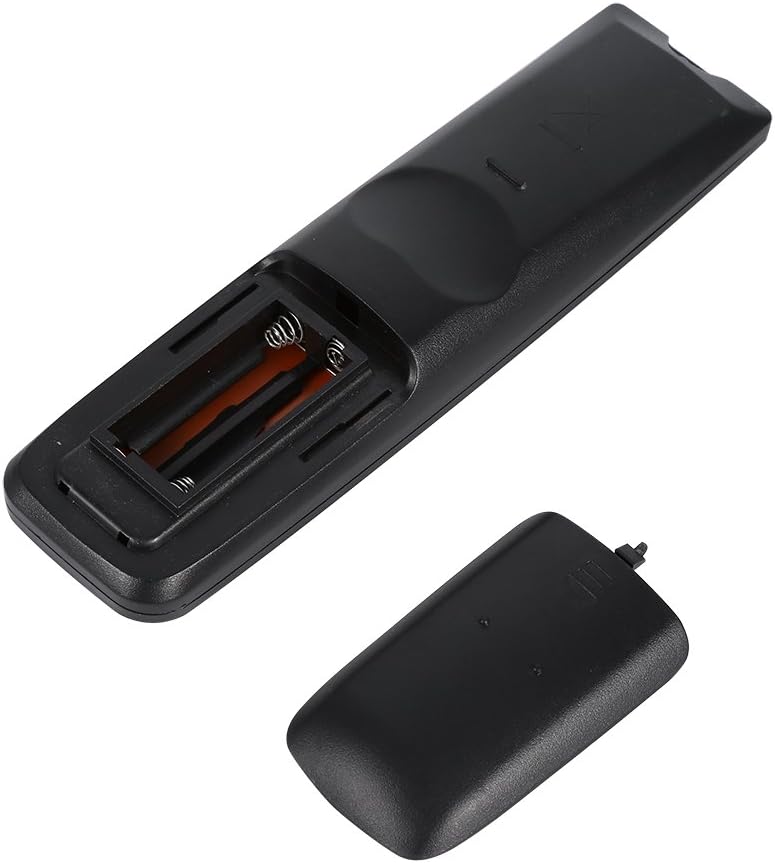
చిత్రం 2.1: View of the remote control's open battery compartment, ready for AAA battery insertion.
గమనిక:
- ఎల్లప్పుడూ ఒకే రకమైన కొత్త బ్యాటరీలను ఉపయోగించండి.
- పాత మరియు కొత్త బ్యాటరీలు లేదా వివిధ రకాల బ్యాటరీలను కలపవద్దు.
- రిమోట్ కంట్రోల్ ఎక్కువ కాలం ఉపయోగించబడకపోతే, లీకేజీని నివారించడానికి బ్యాటరీలను తీసివేయండి.
3. ఆపరేటింగ్ సూచనలు
The Yunir AKB69680403 remote control is designed for immediate use with compatible LG TVs without any prior programming. Simply point the remote at your television and begin operation.

చిత్రం 3.1: ముగిసిందిview of the remote control's buttons and layout.
3.1 బటన్ విధులు
- శక్తి: టీవీని ఆన్ లేదా ఆఫ్ చేస్తుంది.
- ఇన్పుట్: ఇన్పుట్ మూలాన్ని (HDMI, AV, మొదలైనవి) ఎంచుకుంటుంది.
- శక్తి ఆదా: Activates or deactivates energy-saving modes.
- TV/RAD: టీవీ మరియు రేడియో మోడ్ల మధ్య మారుతుంది.
- AV MODE: Selects audio/video modes.
- సంఖ్య బటన్లు (0-9): నేరుగా ఛానెల్లను ఎంచుకుంటుంది.
- జాబితా: ఛానెల్ జాబితాను ప్రదర్శిస్తుంది.
- Q.VIEW: మునుపటి స్థితికి తిరిగి వస్తుంది viewed ఛానెల్.
- VOL +/-: వాల్యూమ్ స్థాయిని సర్దుబాటు చేస్తుంది.
- CH +/-: ఛానెల్లను పైకి లేదా క్రిందికి మారుస్తుంది.
- మ్యూట్: టీవీ సౌండ్ను మ్యూట్ చేస్తుంది లేదా అన్మ్యూట్ చేస్తుంది.
- PAGE ^/v: Navigates through pages in menus or lists.
- Directional Pad (Up, Down, Left, Right) & OK: మెనూలను నావిగేట్ చేస్తుంది మరియు ఎంపికలను నిర్ధారిస్తుంది.
- మెను: ప్రధాన టీవీ మెనూను తెరుస్తుంది.
- TEXT: టెలిటెక్స్ట్ సేవలను యాక్సెస్ చేస్తుంది.
- T.OPT: Teletext options.
- సమాచారం: ప్రస్తుత ప్రోగ్రామ్ లేదా ఇన్పుట్ గురించి సమాచారాన్ని ప్రదర్శిస్తుంది.
- గైడ్: ఎలక్ట్రానిక్ ప్రోగ్రామ్ గైడ్ను తెరుస్తుంది.
- MARK/FAV: Marks content or accesses favorite channels.
- RETURN/EXIT: మునుపటి స్క్రీన్కు తిరిగి వస్తుంది లేదా మెనూ నుండి నిష్క్రమిస్తుంది.
- రంగు బటన్లు (ఎరుపు, ఆకుపచ్చ, పసుపు, నీలం): టీవీ స్క్రీన్పై సూచించిన విధంగా, మెనూలు లేదా అప్లికేషన్లలోని నిర్దిష్ట ఫంక్షన్ల కోసం ఉపయోగించబడుతుంది.
Some buttons, such as the number buttons, are fluorescent to assist with operation in low-light conditions.
4. నిర్వహణ
4.1 శుభ్రపరచడం
రిమోట్ కంట్రోల్ యొక్క రూపాన్ని మరియు కార్యాచరణను నిర్వహించడానికి:
- రిమోట్ కంట్రోల్ను మృదువైన, పొడి గుడ్డతో తుడవండి.
- మొండి ధూళికి, కొద్దిగా dampగుడ్డను నీటితో లేదా తేలికపాటి శుభ్రపరిచే ద్రావణంతో తుడిచి, వెంటనే ఆరబెట్టండి.
- Do not use abrasive cleaners, alcohol, or solvents, as these can damage the surface or internal components.
4.2 బ్యాటరీ సంరక్షణ
- రిమోట్ ప్రతిస్పందన నెమ్మదిగా లేదా అస్థిరంగా మారినప్పుడు బ్యాటరీలను మార్చండి.
- స్థానిక నిబంధనల ప్రకారం ఉపయోగించిన బ్యాటరీలను బాధ్యతాయుతంగా పారవేయండి.
5. ట్రబుల్షూటింగ్
మీ రిమోట్ కంట్రోల్తో మీకు సమస్యలు ఎదురైతే, ఈ క్రింది సాధారణ సమస్యలు మరియు పరిష్కారాలను చూడండి:
- రిమోట్ కంట్రోల్ స్పందించడం లేదు:
- బ్యాటరీలు సరైన ధ్రువణతతో సరిగ్గా చొప్పించబడ్డాయో లేదో తనిఖీ చేయండి.
- బ్యాటరీలను కొత్త వాటితో భర్తీ చేయండి.
- రిమోట్ కంట్రోల్ మరియు టీవీ ఇన్ఫ్రారెడ్ సెన్సార్ మధ్య ఎటువంటి అడ్డంకులు లేవని నిర్ధారించుకోండి.
- Make sure you are within the effective operating range and pointing the remote directly at the TV.
- కొన్ని విధులు పనిచేయవు:
- While this remote is broadly compatible, some specific advanced functions of your original TV remote might not be supported.
- Verify that your TV model is an LG LCD, LED, or Plasma TV.
6. స్పెసిఫికేషన్లు
| ఫీచర్ | వివరాలు |
|---|---|
| ఉత్పత్తి పేరు | TV Remote Controller |
| మోడల్ | AKB69680403 |
| అనుకూలత | Most LG LCD, LED, or Plasma TVs |
| శక్తి మూలం | 2 x AAA బ్యాటరీలు (చేర్చబడలేదు) |
| మెటీరియల్ | ABS |
| రంగు | నలుపు |
| కొలతలు (L x W x H) | 17.9 x 4.7 x 2 సెం.మీ (7.05 x 1.85 x 0.79 అంగుళాలు) |
| వస్తువు బరువు | 2.46 ఔన్సులు |
| తయారీదారు | Tonysa |

Image 6.1: The remote control displaying its physical dimensions.
7. వారంటీ మరియు మద్దతు
Specific warranty information for this product is not provided in the available data. For any product-related inquiries, technical support, or warranty claims, please contact the retailer or manufacturer directly. Keep your purchase receipt as proof of purchase.