
1. పరిచయం
Thank you for choosing the HTW PC-041P31 Portable Air Conditioner. This manual provides essential information for the safe and efficient operation, installation, and maintenance of your appliance. Please read this manual thoroughly before using the product and retain it for future reference.
The HTW PC-041P31 is a cooling-only portable air conditioner designed for rooms up to 30 square meters, offering 3,500 frig/h (4.1 kW) of cooling capacity with a low noise level of 53 dB.
2. భద్రతా సమాచారం
విద్యుత్ షాక్, అగ్ని ప్రమాదం లేదా గాయం ప్రమాదాన్ని తగ్గించడానికి దయచేసి క్రింది భద్రతా జాగ్రత్తలను గమనించండి.
- విద్యుత్ సరఫరా వాల్యూమ్తో సరిపోలుతుందని నిర్ధారించుకోండిtagఇ రేటింగ్ లేబుల్పై పేర్కొనబడింది.
- దెబ్బతిన్న పవర్ కార్డ్ లేదా ప్లగ్తో యూనిట్ను ఆపరేట్ చేయవద్దు.
- ఎల్లప్పుడూ శుభ్రపరచడానికి లేదా సర్వీసింగ్ చేయడానికి ముందు యూనిట్ను అన్ప్లగ్ చేయండి.
- గాలి ఇన్లెట్లు లేదా అవుట్లెట్లను నిరోధించవద్దు. గోడలు లేదా ఇతర వస్తువుల నుండి కనీసం 20 సెం.మీ దూరం నిర్వహించండి.
- Do not insert fingers or objects into the air outlet grille.
- Keep the unit on a flat, stable surface to prevent tipping.
- ఈ ఉపకరణం వారి భద్రతకు బాధ్యత వహించే వ్యక్తి ద్వారా ఉపకరణాన్ని ఉపయోగించడం గురించి పర్యవేక్షణ లేదా సూచనలను అందిస్తే తప్ప, శారీరక, ఇంద్రియ లేదా మానసిక సామర్థ్యాలు తగ్గిన వ్యక్తులు (పిల్లలతో సహా) లేదా అనుభవం మరియు జ్ఞానం లేకపోవడం కోసం ఉద్దేశించబడలేదు.
- బాత్రూమ్లు లేదా లాండ్రీ గదులు వంటి తడి వాతావరణంలో యూనిట్ను ఉపయోగించవద్దు.
- యూనిట్ శుభ్రం చేయడానికి రసాయన ద్రావకాలను ఉపయోగించవద్దు.
3. ఉత్పత్తి ముగిసిందిview
Familiarize yourself with the components of your HTW PC-041P31 Portable Air Conditioner.
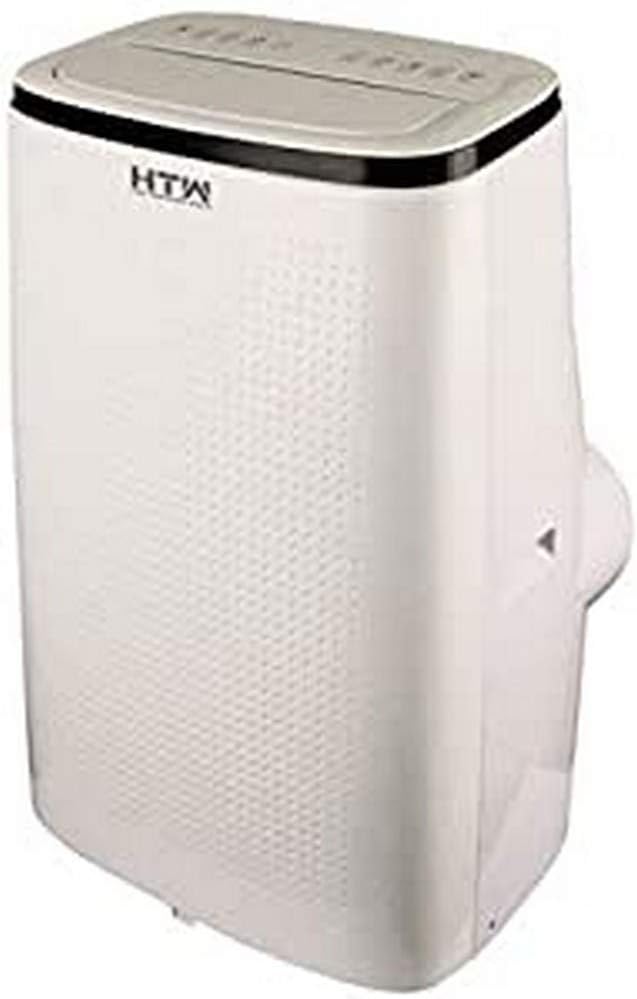
చిత్రం 3.1: ముందు మరియు వైపు view of the HTW PC-041P31 Portable Air Conditioner. This image shows the main body of the unit, including the control panel on top and the air outlet louvers.

మూర్తి 3.2: వైపు view of the HTW PC-041P31 Portable Air Conditioner. This image highlights the compact design and the handle for easy portability.

చిత్రం 3.3: వెనుక view of the HTW PC-041P31 Portable Air Conditioner. This view displays the air intake grille, exhaust air outlet, and drainage port.
భాగాలు:
- నియంత్రణ ప్యానెల్
- ఎయిర్ అవుట్లెట్ లౌవర్స్
- Air Filter (behind intake grille)
- ఎగ్జాస్ట్ ఎయిర్ అవుట్లెట్
- డ్రైనేజ్ పోర్ట్
- పవర్ కార్డ్
- కాస్టర్లు (చక్రాలు)
- రిమోట్ కంట్రోల్
- Window Kit (Exhaust hose, window slider kit, adapters)
4. సెటప్ మరియు ఇన్స్టాలేషన్
4.1 అన్ప్యాకింగ్
- దాని ప్యాకేజింగ్ నుండి ఎయిర్ కండిషనర్ను జాగ్రత్తగా తొలగించండి.
- Remove all packing materials and ensure no components are missing.
- భవిష్యత్తులో నిల్వ లేదా రవాణా కోసం ప్యాకేజింగ్ను ఉంచండి.
4.2 ప్లేస్మెంట్
- కావలసిన గదిలో యూనిట్ను దృఢమైన, స్థాయి ఉపరితలంపై ఉంచండి.
- సరైన గాలి ప్రసరణ కోసం యూనిట్ చుట్టూ కనీసం 20 సెం.మీ స్థలం ఉందని నిర్ధారించుకోండి.
- ఎగ్జాస్ట్ గొట్టం సంస్థాపన కోసం యూనిట్ను కిటికీ లేదా తలుపు దగ్గర ఉంచండి.
4.3 విండో కిట్ ఇన్స్టాలేషన్
The included window kit is essential for exhausting hot air outside, ensuring efficient cooling.
- Attach the exhaust hose to the exhaust air outlet on the back of the unit. Twist clockwise until secure.
- Connect the other end of the exhaust hose to the window slider kit adapter.
- Adjust the window slider kit to fit your window opening. Secure it in place.
- Insert the window slider kit adapter into the opening of the window slider kit.
- Ensure the window is sealed around the kit to prevent hot air from re-entering the room.
5. ఆపరేటింగ్ సూచనలు
The HTW PC-041P31 features a user-friendly control panel and a remote control for convenient operation.
5.1 నియంత్రణ ప్యానెల్
The control panel is located on the top of the unit. It typically includes buttons for Power, Mode, Fan Speed, Timer, and Temperature Adjustment.
5.2 రిమోట్ కంట్రోల్
The remote control allows you to operate the unit from a distance. Ensure batteries are correctly inserted.
5.3 ప్రాథమిక ఆపరేషన్
- పవర్ ఆన్/ఆఫ్: నొక్కండి శక్తి యూనిట్ని ఆన్ లేదా ఆఫ్ చేయడానికి బటన్.
- మోడ్ ఎంపిక: నొక్కండి మోడ్ button to cycle through available modes. This model is cooling-only, so the primary mode will be Cooling. Other modes may include Fan-only and Dehumidify (Dry).
- ఉష్ణోగ్రత సర్దుబాటు: శీతలీకరణ మోడ్లో, ఉపయోగించండి UP మరియు డౌన్ arrows to set your desired temperature.
- ఫ్యాన్ వేగం: నొక్కండి ఫంకా వేగము button to select between Low, Medium, and High fan speeds.
- టైమర్ ఫంక్షన్: ఉపయోగించండి టైమర్ button to set a delay for the unit to turn on or off. Refer to the remote control section for detailed timer settings.
This unit features an auto-restart system, which means it will automatically resume operation with the previous settings after a power outage.
6. నిర్వహణ
క్రమం తప్పకుండా నిర్వహణ సరైన పనితీరును నిర్ధారిస్తుంది మరియు మీ ఎయిర్ కండిషనర్ యొక్క జీవితకాలం పొడిగిస్తుంది.
6.1 ఎయిర్ ఫిల్టర్ను శుభ్రపరచడం
గాలి నాణ్యత మరియు దాని వాడకాన్ని బట్టి ప్రతి రెండు వారాలకు ఒకసారి లేదా అంతకంటే ఎక్కువసార్లు ఎయిర్ ఫిల్టర్ను శుభ్రం చేయాలి.
- పవర్ అవుట్లెట్ నుండి ఎయిర్ కండిషనర్ను అన్ప్లగ్ చేయండి.
- Locate the air filter, typically behind the intake grille on the rear of the unit.
- ఫిల్టర్ను జాగ్రత్తగా తొలగించండి.
- ఫిల్టర్ను గోరువెచ్చని నీరు మరియు తేలికపాటి డిటర్జెంట్తో కడగాలి. బాగా కడగాలి.
- ఫిల్టర్ను తిరిగి ఇన్స్టాల్ చేసే ముందు గాలికి పూర్తిగా ఆరనివ్వండి. ప్రత్యక్ష సూర్యకాంతికి గురికావద్దు.
6.2 పేరుకుపోయిన నీటిని తీసివేయడం
The unit collects condensation during operation. When the internal water tank is full, the unit will stop operating and display an indicator. You will need to drain the water.
- ఎయిర్ కండీషనర్ను అన్ప్లగ్ చేయండి.
- Position a shallow pan or container under the drainage port at the bottom rear of the unit.
- డ్రెయిన్ ప్లగ్ తొలగించండి. నీరు బయటకు ప్రవహించడం ప్రారంభమవుతుంది.
- నీరంతా బయటకు పోయాక, డ్రెయిన్ ప్లగ్ను సురక్షితంగా మార్చండి.
For continuous drainage in Dehumidify (Dry) mode, you can connect a drain hose (not included) to the drainage port.
6.3 యూనిట్ బాహ్య భాగాన్ని శుభ్రపరచడం
- ఒక మృదువైన, d తో బాహ్య తుడవడంamp గుడ్డ.
- కఠినమైన రసాయనాలు, అబ్రాసివ్లు లేదా ద్రావకాలను ఉపయోగించవద్దు, ఎందుకంటే ఇవి ఉపరితలాన్ని దెబ్బతీస్తాయి.
7. ట్రబుల్షూటింగ్
కస్టమర్ సపోర్ట్ను సంప్రదించే ముందు, సాధారణ సమస్యల కోసం దయచేసి కింది ట్రబుల్షూటింగ్ గైడ్ను చూడండి.
| సమస్య | సాధ్యమైన కారణం | పరిష్కారం |
|---|---|---|
| యూనిట్ ఆన్ చేయబడలేదు. | No power, power cord loose, water tank full. | Check power connection, plug firmly, drain water tank. |
| యూనిట్ తగినంతగా చల్లబడటం లేదు. | Window kit not properly sealed, room too large, air filter dirty, air intake/outlet blocked. | Ensure window kit is sealed, clean air filter, clear obstructions, verify room size is within unit capacity. |
| యూనిట్ ధ్వనించే ఉంది. | యూనిట్ సమతల ఉపరితలంపై లేదు, ఫ్యాన్ వేగం చాలా ఎక్కువగా ఉంది. | Place on a level surface, select a lower fan speed. |
| యూనిట్ నుండి నీరు లీక్ అవుతుంది. | డ్రెయిన్ ప్లగ్ వదులుగా ఉంది, యూనిట్ వంగి ఉంది. | డ్రెయిన్ ప్లగ్ సురక్షితంగా ఉందని నిర్ధారించుకోండి, యూనిట్ను సమతల ఉపరితలంపై ఉంచండి. |
8. స్పెసిఫికేషన్లు
Technical specifications for the HTW PC-041P31 Portable Air Conditioner.
| ఫీచర్ | స్పెసిఫికేషన్ |
|---|---|
| మోడల్ సంఖ్య | HTW-PC-041P31 పరిచయం |
| శీతలీకరణ సామర్థ్యం | 3,500 frig/h (4.1 kW) |
| సిఫార్సు చేయబడిన గది పరిమాణం | 30 m² వరకు |
| శబ్దం స్థాయి | 53 డిబి |
| ఫ్యాన్ స్పీడ్ల సంఖ్య | 3 |
| ఎనర్జీ ఎఫిషియెన్సీ క్లాస్ | A |
| వాల్యూమ్tage | 220V |
| కొలతలు (W x D x H) | 47 x 38.2 x 75.2 సెం.మీ |
| బరువు | 28.5 కిలోలు |
| ప్రత్యేక లక్షణాలు | Programmable, Auto Restart, Water Tank Full Indicator |
9. వారంటీ మరియు మద్దతు
HTW products are manufactured to high-quality standards. For warranty information and customer support, please refer to the warranty card included with your purchase or contact your local HTW dealer or service center. Keep your purchase receipt as proof of purchase.
For technical assistance or inquiries, please visit the official HTW webసైట్ లేదా వారి కస్టమర్ సేవా విభాగాన్ని సంప్రదించండి.


