
1. పరిచయం
Thank you for choosing the Brightech Saturn Floor Lamp. This contemporary floor lamp features a unique design with three circular LED lights, offering versatile illumination for your living room, bedroom, or office. Its energy-efficient LED technology and durable construction ensure long-lasting performance. This manual provides essential information for safe setup, operation, and maintenance of your new lamp.

Image 1.1: The Brightech Saturn Floor Lamp in a modern setting.
2. భద్రతా సమాచారం
- విద్యుత్ భద్రత: ఎల్ను ఎల్లప్పుడూ అన్ప్లగ్ చేయండిamp from the power outlet before cleaning or performing any maintenance. Do not operate the lamp దెబ్బతిన్న త్రాడు లేదా ప్లగ్తో.
- ఇండోర్ ఉపయోగం మాత్రమే: ఈ ఎల్amp is designed for indoor use. Do not expose it to water or high humidity.
- స్థిరమైన స్థానం: l ని నిర్ధారించుకోండిamp is placed on a stable, level surface to prevent tipping. The weighted base provides stability.
- LED లైట్లు: The integrated LED lights do not generate significant heat, reducing the risk of accidental burns compared to traditional bulbs. However, avoid direct prolonged eye exposure to the light.
- పిల్లలు మరియు పెంపుడు జంతువులు: ఎల్ ఉంచండిamp ప్రమాదవశాత్తు నష్టం లేదా గాయాన్ని నివారించడానికి చిన్న పిల్లలు మరియు పెంపుడు జంతువులకు దూరంగా ఉంచండి.
3. ప్యాకేజీ విషయాలు
Carefully unpack your Brightech Saturn Floor Lamp and ensure all components are present:
- Lamp Pole with integrated arms
- వెయిటెడ్ బేస్
- 3 x LED Light Rings (pre-attached or to be attached during assembly)
- Power Cord with Foot Pedal Switch

Image 3.1: Unpacked components of the Saturn Floor Lamp.
4. సెటప్ సూచనలు
Follow these steps to assemble your Brightech Saturn Floor Lamp:
- ఆధారాన్ని అటాచ్ చేయండి: l ను జాగ్రత్తగా స్క్రూ చేయండిamp pole into the weighted base until secure. Ensure the power cord passes through the designated opening in the base.
- Attach LED Rings: The three LED light rings are designed to attach to the arms extending from the lamp pole. Gently push each ring onto its respective arm until it clicks securely into place. Ensure the electrical contacts align for proper illumination.
- L ను ఉంచండిamp: అమర్చిన l ని ఉంచండిamp in your desired location, ensuring the power cord can reach an outlet without being strained or creating a tripping hazard.
- ప్లగ్ ఇన్: పవర్ కార్డ్ను ప్రామాణిక ఎలక్ట్రికల్ అవుట్లెట్లోకి ప్లగ్ చేయండి.

Image 4.1: Attaching an LED light ring to the lamp చేయి.
5. ఆపరేటింగ్ సూచనలు
Your Brightech Saturn Floor Lamp సాధారణ ఆపరేషన్ కోసం రూపొందించబడింది:
- పవర్ ఆన్/ఆఫ్: ది ఎల్amp is controlled by an on/off foot pedal switch located on the power cord. Step on the pedal once to turn the lamp న.
- ప్రకాశాన్ని సర్దుబాటు చేయండి: The foot pedal switch also cycles through three brightness settings. Step on the pedal repeatedly to adjust the light intensity from low to medium to high, and then off.
- టచ్ కంట్రోల్: ది ఎల్amp also features touch control. Gently tap the metal pole or the base to cycle through the brightness settings and turn the lamp ఆన్/ఆఫ్.

Image 5.1: The convenient foot pedal switch for operation.
వీడియో 5.2: ఒక ఓవర్view of the Saturn Floor Lamp, demonstrating its features and operation.
6. నిర్వహణ
To keep your Brightech Saturn Floor Lamp సరైన స్థితిలో:
- శుభ్రపరచడం: l ని నిర్ధారించుకోండిamp is unplugged before cleaning. Wipe the lamp pole and LED rings with a soft, dry microfiber cloth. Avoid using abrasive cleaners or solvents, as these may damage the finish or LED components.
- LED జీవితకాలం: The integrated LED lights are designed for a long lifespan (approximately 3000 hours). They are not user-replaceable.
7. ట్రబుల్షూటింగ్
మీరు మీ l తో సమస్యలను ఎదుర్కొంటేamp, కింది సాధారణ పరిష్కారాలను చూడండి:
- Lamp ఆన్ చేయడం లేదు:
- పవర్ కార్డ్ పనిచేసే అవుట్లెట్లోకి సురక్షితంగా ప్లగ్ చేయబడిందో లేదో తనిఖీ చేయండి.
- Ensure the foot pedal switch is fully pressed.
- Verify that all LED rings are properly attached to their respective arms, ensuring good electrical contact.
- Lights Flickering or Dimming Unexpectedly:
- Check for loose connections at the LED rings or the power cord.
- l ని నిర్ధారించుకోండిamp is not connected to a dimmer switch other than its integrated one, as this can cause compatibility issues.
- One LED Ring Not Lighting Up:
- Gently re-seat the affected LED ring onto its arm to ensure proper contact.
- సమస్య కొనసాగితే, సహాయం కోసం కస్టమర్ సపోర్ట్ని సంప్రదించండి.
8. స్పెసిఫికేషన్లు
| ఫీచర్ | వివరాలు |
|---|---|
| మోడల్ సంఖ్య | FL-SATRN-BRS |
| ఉత్పత్తి కొలతలు | 1.18"డి x 1.97"వా x 66"హ |
| వస్తువు బరువు | 6.5 పౌండ్లు |
| ముగింపు రకం | Gold/Brass |
| బేస్ మెటీరియల్ | ఇత్తడి |
| కాంతి మూలం రకం | LED |
| కాంతి వనరుల సంఖ్య | 3 |
| వాట్tage | 14 వాట్స్ |
| ప్రకాశం | 1150 ల్యూమెన్స్ |
| లేత రంగు | వెచ్చని తెలుపు |
| నియంత్రణ పద్ధతి | Foot Pedal Switch, Touch |
| శక్తి మూలం | కార్డెడ్ ఎలక్ట్రిక్ |
| గది రకం | లివింగ్ రూమ్, బెడ్ రూమ్, ఆఫీస్ |
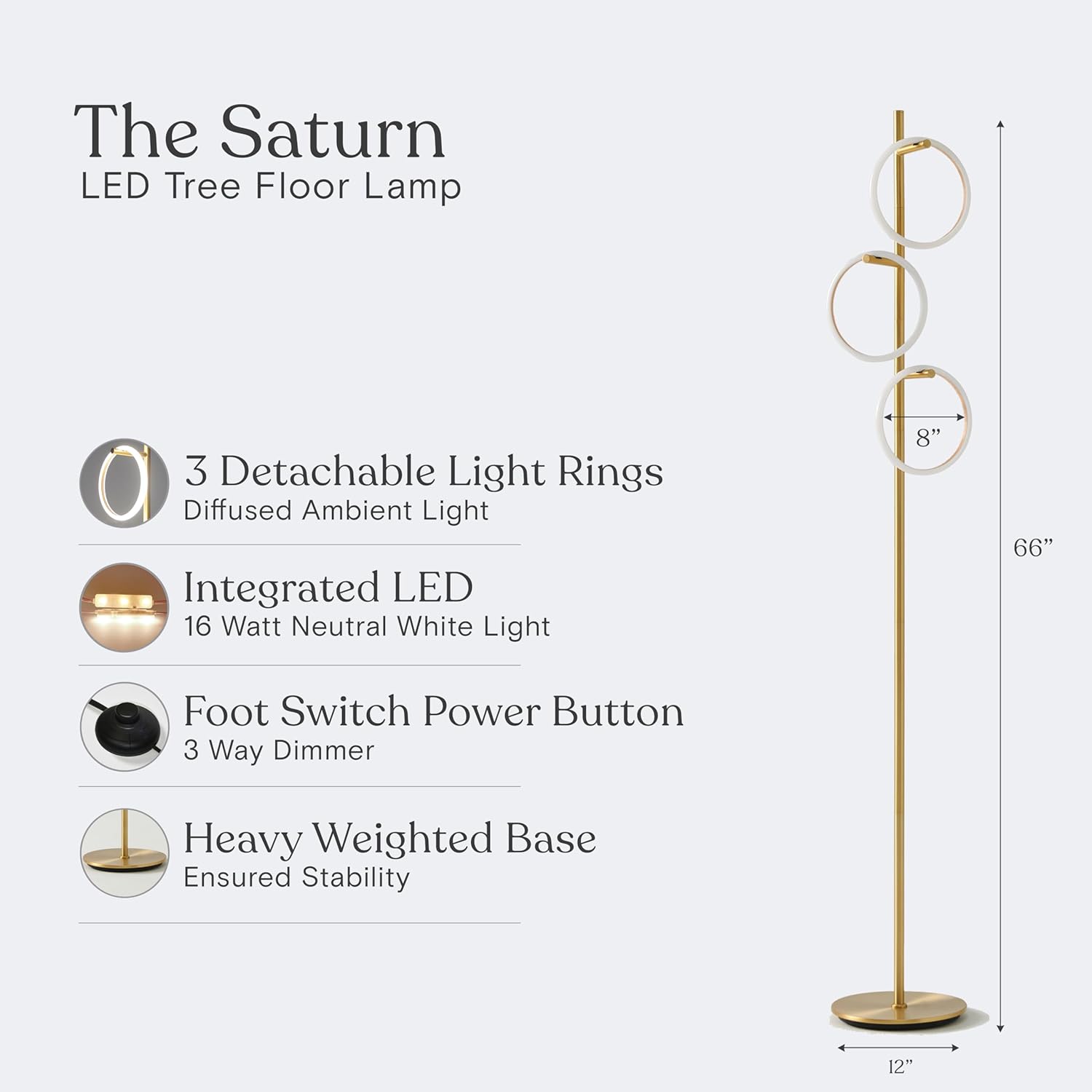
Image 8.1: Product dimensions and key features.

Image 8.2: Lighting Facts and estimated yearly energy cost.
9. వారంటీ & సపోర్ట్
Brightech USA stands behind the quality of its products. The Brightech Saturn Floor Lamp పరిశ్రమ-ప్రముఖునితో వస్తుంది 3 సంవత్సరాల వారంటీ covering defects, malfunctions, or sudden failures when purchased through Brightech. For any questions, troubleshooting assistance, or warranty claims, please contact our friendly USA-based support team.
For more information and to explore other Brightech products, visit the Brightech Store.