
1. పరిచయం
Thank you for choosing the tectake Gaming Chair Model 403209. This ergonomic office and computer chair is designed to provide comfort and support for both focused work and intense gaming sessions. Featuring a robust construction, thick padding, adjustable armrests, and a continuously adjustable gas lift, this chair ensures a comfortable seating experience. The five smooth-rolling double casters are floor-friendly and highly wear-resistant. This manual provides essential information for assembly, operation, maintenance, and troubleshooting to ensure optimal use and longevity of your chair.

Image 1.1: The tectake Gaming Chair Model 403209 in a typical usage environment.
2. భద్రతా సూచనలు
- అసెంబ్లీ మరియు ఉపయోగం ముందు అన్ని సూచనలను జాగ్రత్తగా చదవండి.
- ఉక్కిరిబిక్కిరి అయ్యే ప్రమాదాలను నివారించడానికి అన్ని ప్యాకేజింగ్ పదార్థాలను పిల్లలకు దూరంగా ఉంచండి.
- ఉపయోగించే ముందు అన్ని స్క్రూలు మరియు బోల్ట్లు సురక్షితంగా బిగించబడ్డాయని నిర్ధారించుకోండి. కాలానుగుణంగా తనిఖీ చేసి, అవసరమైతే తిరిగి బిగించండి.
- Do not stand on the chair. Use it only for seating.
- ఏవైనా భాగాలు దెబ్బతిన్నా లేదా కనిపించకపోయినా కుర్చీని ఉపయోగించవద్దు. భర్తీ భాగాల కోసం కస్టమర్ మద్దతును సంప్రదించండి.
- పదార్థం క్షీణించకుండా నిరోధించడానికి కుర్చీని ప్రత్యక్ష సూర్యకాంతికి లేదా తీవ్రమైన ఉష్ణోగ్రతలకు గురిచేయకుండా ఉండండి.
- Maximum weight capacity: 120 kg (264 lbs). Do not exceed this limit.
- కుర్చీ ఒరిగిపోకుండా ఉండటానికి దాన్ని సమతల ఉపరితలంపై ఉపయోగించండి.
3. ప్యాకేజీ విషయాలు
Before assembly, please ensure all components are present and undamaged. If any parts are missing or damaged, do not proceed with assembly. Contact tectake customer service for assistance.
- బ్యాక్రెస్ట్
- సీటు
- ఆర్మ్రెస్ట్లు (2x)
- Star base
- కాస్టర్లు (5x)
- గ్యాస్ లిఫ్ట్ సిలిండర్
- Gas lift cover
- Mechanism plate
- Lumbar support cushion
- మెడ కుషన్
- Hardware kit (screws, washers, Allen key)
- అసెంబ్లీ సూచనలు (ఈ మాన్యువల్)

చిత్రం 3.1: ముందు view of the chair, illustrating the main components.
4. అసెంబ్లీ సూచనలు
సరైన అసెంబ్లీ కోసం ఈ దశలను జాగ్రత్తగా అనుసరించండి. దెబ్బతినకుండా ఉండటానికి కుర్చీని మృదువైన, శుభ్రమైన ఉపరితలంపై సమీకరించాలని సిఫార్సు చేయబడింది.
- స్టార్ బేస్కు క్యాస్టర్లను అటాచ్ చేయండి: ఐదు క్యాస్టర్లలో ప్రతి ఒక్కటి స్టార్ బేస్ చివర ఉన్న రంధ్రాలలోకి సురక్షితంగా క్లిక్ అయ్యే వరకు చొప్పించండి.
- గ్యాస్ లిఫ్ట్ చొప్పించు: Place the gas lift cylinder into the central hole of the star base. Cover the gas lift with the telescopic plastic cover.
- మెకానిజం ప్లేట్ను సీటుకు అటాచ్ చేయండి: Align the mechanism plate with the pre-drilled holes on the underside of the seat. Ensure the front of the mechanism plate faces the front of the seat. Secure with screws provided in the hardware kit.
- సీటుకు ఆర్మ్రెస్ట్లను అటాచ్ చేయండి: Secure the armrests to the sides of the seat using the provided screws. Do not overtighten initially, allow for minor adjustments.
- బ్యాక్రెస్ట్ను సీటుకు అటాచ్ చేయండి: Align the backrest with the mounting brackets on the seat. Secure with screws. Once all screws are in place, tighten all armrest and backrest screws firmly.
- సీట్ అసెంబ్లీని గ్యాస్ లిఫ్ట్కి కనెక్ట్ చేయండి: Carefully place the assembled seat and backrest onto the gas lift cylinder, ensuring the central hole of the mechanism plate aligns with the top of the gas lift. Press down firmly to secure.
- కుషన్లను అటాచ్ చేయండి: Place the lumbar support cushion and neck cushion onto the chair. The lumbar cushion typically attaches with straps around the backrest, and the neck cushion can be positioned as desired.
5. ఆపరేటింగ్ సూచనలు
Your tectake Gaming Chair offers several adjustment options for personalized comfort.
5.1 ఎత్తు సర్దుబాటు
To adjust the chair height, locate the lever on the right side, beneath the seat (Image 5.1). While seated, pull the lever up to lower the chair. To raise the chair, stand up and pull the lever up. Release the lever to lock the height.

Image 5.1: Control levers for chair adjustments.
5.2. బ్యాక్రెస్ట్ రిక్లైన్
To recline the backrest, pull the lever on the left side of the chair (Image 5.1). Lean back to the desired angle (88-125 degrees) and release the lever to lock the position. To return the backrest to an upright position, pull the lever and lean forward slightly.

Image 5.2: Illustration of the backrest recline mechanism.
5.3. ఆర్మ్రెస్ట్ సర్దుబాటు
The armrests are height-adjustable. Locate the button or lever on the side of each armrest (Image 5.3). Press or lift it and move the armrest up or down to your preferred height. Release the button/lever to lock the armrest in place.

Image 5.3: Armrest height adjustment feature.
5.4. Lumbar and Neck Cushion Adjustment
The lumbar and neck cushions are removable and adjustable. The lumbar cushion can be moved up or down along the backrest to provide support where you need it most (Image 5.4). The neck cushion can be positioned for optimal head and neck support.

Image 5.4: Lumbar cushion adjustment for personalized support.
5.5. Swivel and Casters
The chair features a 360-degree swivel function for easy movement. The five double casters (Image 5.5) are designed for smooth gliding on various floor types, providing mobility within your workspace.
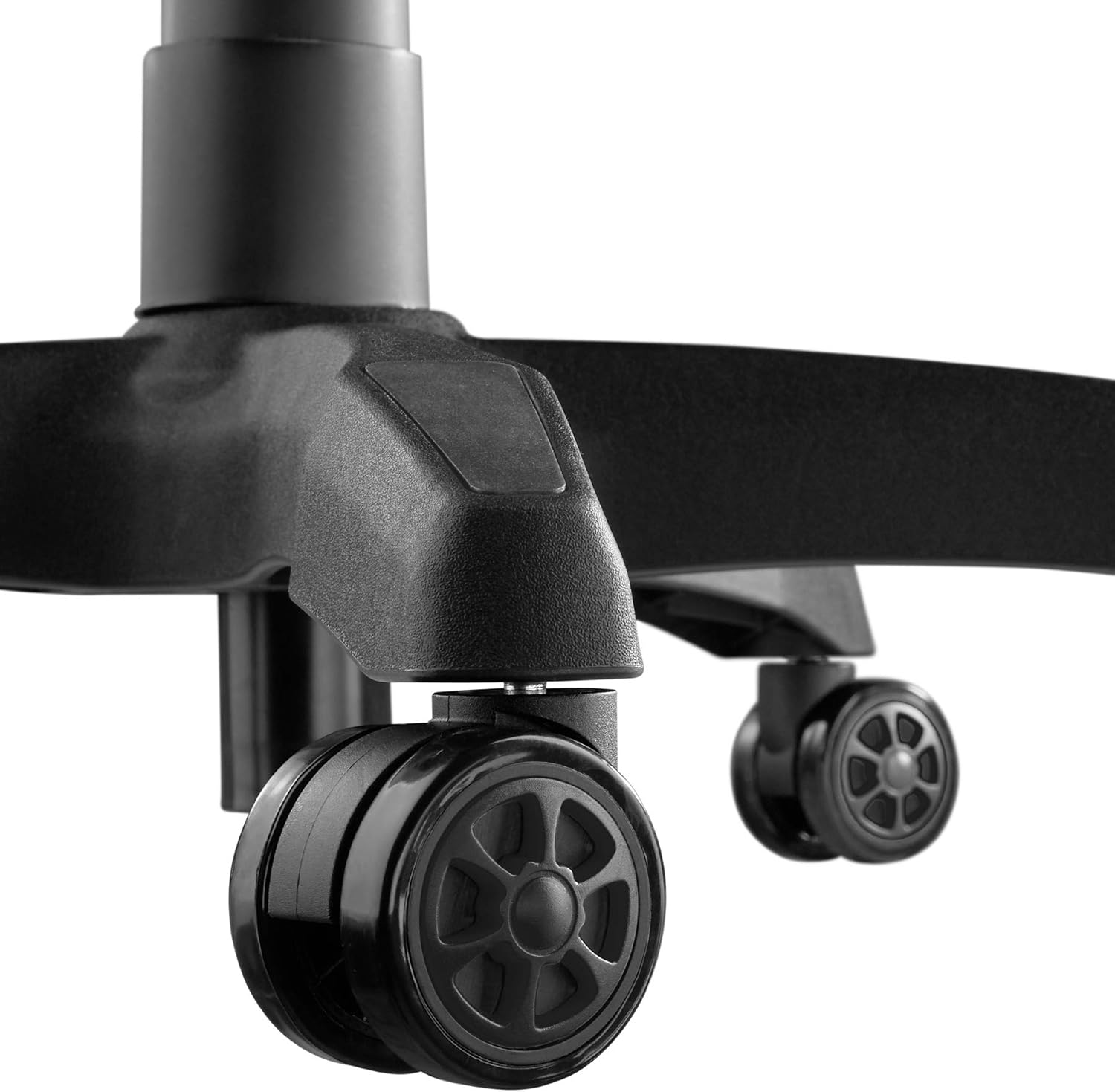
Image 5.5: Durable double casters for smooth mobility.
6. నిర్వహణ
6.1. శుభ్రపరచడం
- కుర్చీ ఉపరితలాన్ని మృదువైన, డి-ప్యాక్తో తుడవండి.amp గుడ్డ.
- For stubborn stains, use a mild soap solution and wipe immediately with a clean, damp వస్త్రం, తర్వాత పూర్తిగా ఆరబెట్టండి.
- Avoid using abrasive cleaners, solvents, or harsh chemicals, as these can damage the PU/PVC material.
- Regularly vacuum or wipe the casters to remove dust and debris that could hinder smooth movement.
6.2. సాధారణ సంరక్షణ
- అన్ని స్క్రూలు మరియు బోల్ట్లు బిగుతుగా ఉన్నాయని నిర్ధారించుకోవడానికి కాలానుగుణంగా వాటిని తనిఖీ చేయండి. స్థిరత్వం మరియు భద్రతను కాపాడుకోవడానికి అవసరమైతే మళ్ళీ బిగించండి.
- Avoid placing heavy objects on the armrests or backrest when not seated.
- Keep the chair away from sharp objects that could puncture or tear the upholstery.
7. ట్రబుల్షూటింగ్
| సమస్య | సాధ్యమైన కారణం | పరిష్కారం |
|---|---|---|
| కుర్చీ ఊగుతుంది లేదా అస్థిరంగా అనిపిస్తుంది. | వదులైన స్క్రూలు లేదా అసమాన నేల. | అన్ని అసెంబ్లీ స్క్రూలను తనిఖీ చేసి బిగించండి. కుర్చీ చదునైన, సమతల ఉపరితలంపై ఉందని నిర్ధారించుకోండి. |
| కుర్చీ ఎత్తు సర్దుబాటు చేయదు. | Gas lift lever not engaged or gas lift cylinder faulty. | ఎత్తు సర్దుబాటు లివర్ పూర్తిగా లాగబడిందని నిర్ధారించుకోండి. సమస్య కొనసాగితే, గ్యాస్ లిఫ్ట్ను మార్చాల్సి రావచ్చు. సపోర్ట్ను సంప్రదించండి. |
| క్యాస్టర్లు సజావుగా చుట్టవు. | కాస్టర్లలో చిక్కుకున్న శిథిలాలు లేదా దెబ్బతిన్న కాస్టర్లు. | Clean casters to remove hair, dust, or other debris. If damaged, replace casters. |
| బ్యాక్రెస్ట్ వంగదు లేదా లాక్ అవ్వదు. | Recline lever not engaged or mechanism faulty. | Ensure the recline lever is fully pulled/released. Check for any obstructions in the mechanism. |
| కీచుమనే శబ్దాలు. | భాగాల మధ్య వదులుగా ఉండే కనెక్షన్లు లేదా ఘర్షణ. | అన్ని స్క్రూలను బిగించండి. అవసరమైతే కదిలే భాగాలకు కొద్ది మొత్తంలో సిలికాన్ లూబ్రికెంట్ను పూయండి, అప్హోల్స్టరీని నివారించండి. |
8. స్పెసిఫికేషన్లు

Image 8.1: Key dimensions of the tectake Gaming Chair.
| ఫీచర్ | వివరాలు |
|---|---|
| మోడల్ సంఖ్య | 403209 |
| మొత్తం కొలతలు (W x D x H) | Approx. 68 x 69 x 117.5 - 125 cm (26.8 x 27.2 x 46.3 - 49.2 inches) |
| సీటు ఎత్తు | సుమారు 42.5 - 50 సెం.మీ (16.7 - 19.7 అంగుళాలు) |
| సీటు కొలతలు (పశ్చిమ x ఉ) | సుమారు 51 x 50 సెం.మీ (20.1 x 19.7 అంగుళాలు) |
| సీటు మందం | సుమారు 8 సెం.మీ (3.1 అంగుళాలు) |
| Lumbar Cushion Dimensions (W x D x H) | సుమారుగా 29 x 7.5 x 19 సెం.మీ (11.4 x 3.0 x 7.5 అంగుళాలు) |
| Neck Cushion Dimensions (W x D x H) | సుమారుగా 26 x 10 x 17.5 సెం.మీ (10.2 x 3.9 x 6.9 అంగుళాలు) |
| బ్యాక్రెస్ట్ ఎత్తు | సుమారు 81 సెం.మీ (31.9 అంగుళాలు) |
| బ్యాక్రెస్ట్ రిక్లైన్ యాంగిల్ | 88 - 125 డిగ్రీలు |
| Armrest Dimensions (W x D) | సుమారు 7.5 x 28 సెం.మీ (3.0 x 11.0 అంగుళాలు) |
| Armrest Height from Floor | సుమారు 57 - 71.5 సెం.మీ (22.4 - 28.1 అంగుళాలు) |
| Armrest Height Adjustment Range | సుమారు 7 సెం.మీ (2.8 అంగుళాలు) |
| Star Base Diameter | సుమారు 70 సెం.మీ (27.6 అంగుళాలు) |
| Caster Diameter/Width | Approx. 6 cm / 5.6 cm (2.4 inches / 2.2 inches) |
| గరిష్ట లోడ్ సామర్థ్యం | 120 కిలోలు (264 పౌండ్లు) |
| బరువు | సుమారు 19 కిలోలు (41.9 పౌండ్లు) |
| మెటీరియల్ | Polyurethane (PU), Polyvinyl Chloride (PVC), Plastic |
| రంగు | నలుపు |
9. వారంటీ మరియు మద్దతు
For warranty information, replacement parts, or technical support, please refer to the purchase documentation or contact tectake customer service directly. Keep your proof of purchase for any warranty claims.
Contact information for tectake can typically be found on their official webసైట్ లేదా ఉత్పత్తిని కొనుగోలు చేసిన రిటైలర్ ద్వారా.