
Everycom X10
Everycom X10 Projector User Manual
మోడల్: ఎక్స్ 10
1. పరిచయం
ధన్యవాదాలు, ధన్యవాదాలు.asing the Everycom X10 Home & Business Native Full HD 1080p LED Projector. This projector is designed to provide a superior viewing experience with its impressive native resolution of 1920 x 1080, 5500 Lumens of brightness, and a high contrast ratio of 5000:1. This manual provides detailed instructions for setting up, operating, and maintaining your projector to ensure optimal performance and longevity. Please read this manual thoroughly before using the product and keep it for future reference.
2. భద్రతా సమాచారం
అగ్ని ప్రమాదం లేదా విద్యుత్ షాక్ను నివారించడానికి, ఈ ఉపకరణాన్ని వర్షం లేదా తేమకు గురిచేయవద్దు. విద్యుత్ షాక్ను నివారించడానికి, క్యాబినెట్ను తెరవవద్దు. అర్హత కలిగిన సిబ్బందికి మాత్రమే సర్వీసింగ్ను సూచించండి.
- వెంటిలేషన్ ఓపెనింగ్స్ను నిరోధించవద్దు.
- తయారీదారు పేర్కొన్న జోడింపులు/యాక్సెసరీలను మాత్రమే ఉపయోగించండి.
- మెరుపు తుఫానుల సమయంలో లేదా ఎక్కువ కాలం ఉపయోగించనప్పుడు ఈ ఉపకరణాన్ని అన్ప్లగ్ చేయండి.
- ప్రత్యేకించి ప్లగ్లు, కన్వీనియన్స్ రెసెప్టాకిల్స్ మరియు అవి ఉపకరణం నుండి నిష్క్రమించే ప్రదేశంలో నడవడం లేదా పించ్ చేయడం నుండి పవర్ కార్డ్ను రక్షించండి.
- l ఉన్నప్పుడు ప్రొజెక్టర్ లెన్స్లోకి నేరుగా చూడకండిamp ఆన్లో ఉంది.
- ప్రొజెక్టర్ స్థిరమైన, స్థాయి ఉపరితలంపై ఉంచబడిందని నిర్ధారించుకోండి.
3. పెట్టెలో ఏముంది
దయచేసి మీ ప్యాకేజీలో ఈ క్రింది అన్ని అంశాలు చేర్చబడ్డాయో లేదో తనిఖీ చేయండి:
- Everycom X10 Projector
- రిమోట్ కంట్రోల్
- వినియోగదారు మాన్యువల్
- AV కేబుల్
- HDMI కేబుల్
- పవర్ కార్డ్
4. ఉత్పత్తి ముగిసిందిview
4.1 ఫ్రంట్ View
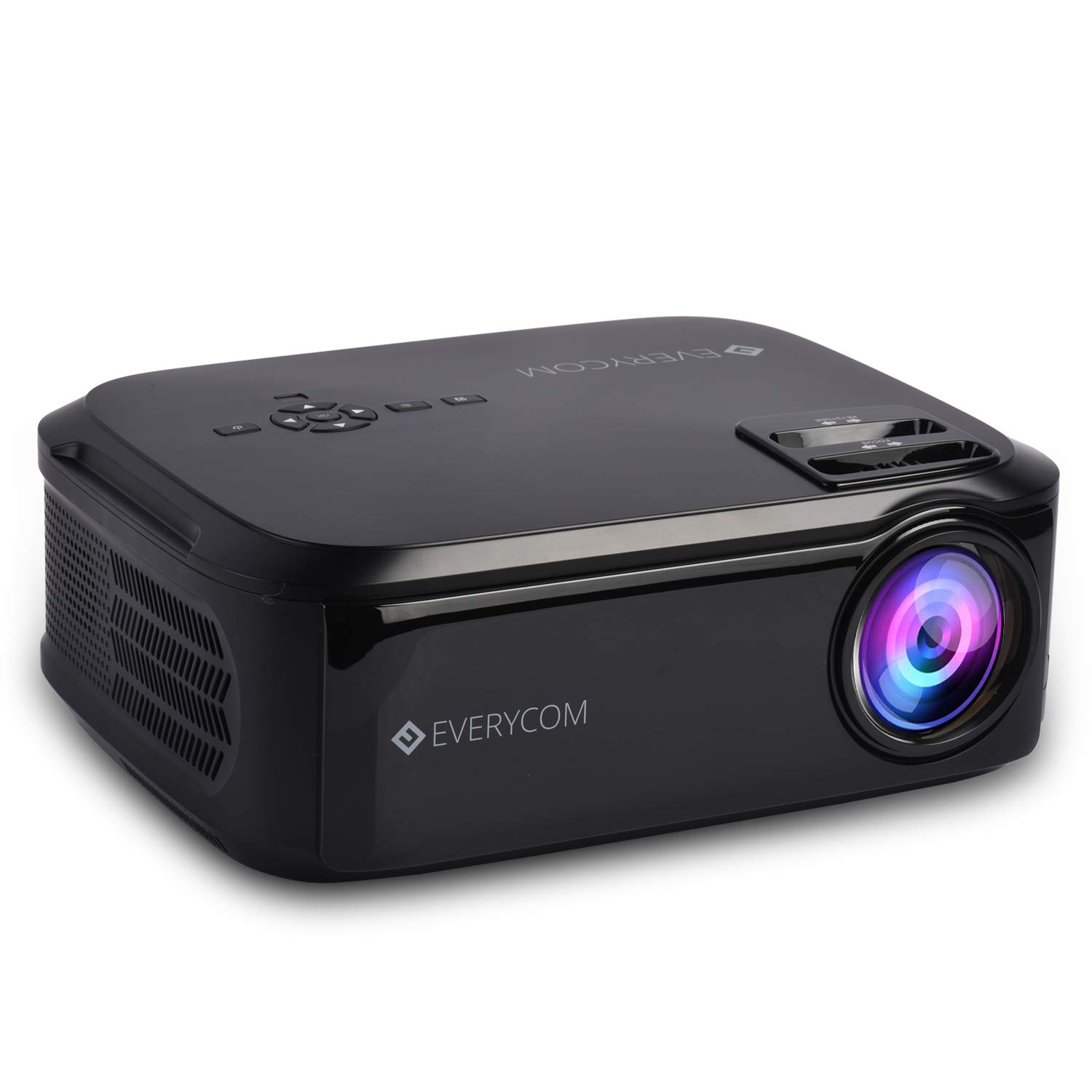
This image displays the front of the Everycom X10 projector, highlighting the main lens and the sleek black casing. The lens is the primary component for projecting images onto a screen or wall.
4.2 వైపు View (ఓడరేవులు)

This image shows the side of the Everycom X10 projector, featuring the various input and output ports. These include two HDMI inputs, two USB inputs, and a VGA port, allowing for versatile connectivity with different devices.
4.3 టాప్ View (నియంత్రణలు)

టాప్ view of the Everycom X10 projector displays the integrated control panel and the focus and keystone adjustment dials. The control panel allows for basic navigation and settings adjustments directly on the unit, while the dials are used to fine-tune image clarity and shape.
4.4 దిగువ View

This image shows the bottom of the Everycom X10 projector, revealing the product label with model information, serial number, and certification marks. It also shows the adjustable feet for leveling and mounting points.
5. సెటప్
5.1 ప్లేస్మెంట్
Place the projector on a stable, flat surface. Ensure there is adequate ventilation around the projector to prevent overheating. The projection distance can range from 1.6m to 7.1m to achieve a screen size of 45" to 200".
5.2 పవర్ కనెక్షన్
- ప్రొజెక్టర్ యొక్క పవర్ ఇన్పుట్ పోర్ట్కు పవర్ కార్డ్ను కనెక్ట్ చేయండి.
- పవర్ కార్డ్ యొక్క మరొక చివరను పవర్ అవుట్లెట్లోకి ప్లగ్ చేయండి.
5.3 ఇన్పుట్ పరికరాలను కనెక్ట్ చేయడం
The Everycom X10 supports multiple input sources:
- HDMI: Connect your PC, laptop, gaming console, Amazon Fire TV, or Chromecast using an HDMI cable to one of the two HDMI ports.
- USB: Insert a USB stick or connect a media player to one of the two USB ports.
- వీజీఏ: Connect older PCs or laptops using a VGA cable.
- యొక్క: Use the provided AV cable to connect DVD players or other devices with AV output.
5.4 ఫోకస్ మరియు కీస్టోన్ సర్దుబాటు
- దృష్టి: Rotate the focus ring on the top of the projector until the projected image is clear and sharp.
- కీస్టోన్: Use the keystone correction dial (vertical ±15 degrees) to adjust the image shape if it appears trapezoidal. This ensures the projected image is rectangular.
6. ఆపరేటింగ్ సూచనలు
6.1 పవర్ చేయడం ఆన్/ఆఫ్
- పవర్ ఆన్: Press the power button on the projector or the remote control. The indicator light will turn on.
- పవర్ ఆఫ్: Press the power button again. The projector will shut down. Always allow the projector to cool down properly before unplugging it.
6.2 మూలం ఎంపిక
After powering on, select the desired input source:
- Press the 'Source' button on the remote control or the projector's control panel.
- Use the arrow keys to navigate through the input options (HDMI1, HDMI2, USB1, USB2, VGA, AV).
- Press 'OK' to confirm your selection.
6.3 మెనూ నావిగేషన్
Use the 'Menu' button on the remote or projector to access settings:
- చిత్ర సెట్టింగ్లు: Adjust brightness, contrast, color, and aspect ratio (16:9/4:3).
- సౌండ్ సెట్టింగ్లు: Control volume and audio modes for the built-in dual stereo speakers.
- సమయ సెట్టింగ్లు: Set sleep timer or adjust time-related functions.
- ఎంపిక సెట్టింగ్లు: General settings like language, factory reset, etc.
7. నిర్వహణ
7.1 లెన్స్ శుభ్రపరచడం
Use a soft, lint-free cloth or lens cleaning paper to gently wipe the lens. Do not use abrasive cleaners or solvents.
7.2 ప్రొజెక్టర్ బాడీని శుభ్రపరచడం
Wipe the projector's exterior with a soft, dry cloth. For stubborn dirt, dampగుడ్డను నీటితో మరియు తేలికపాటి డిటర్జెంట్తో కొద్దిగా తుడిచి, ఆపై పొడిగా తుడవండి.
7.3 ఫ్యాన్ నిర్వహణ
The projector features an innovative cooling system with heat dispersion and noise suppression. Ensure the ventilation vents are clear of dust and obstructions to maintain efficient cooling.
8. ట్రబుల్షూటింగ్
| సమస్య | సాధ్యమైన కారణం | పరిష్కారం |
|---|---|---|
| ఏ చిత్రం ప్రదర్శించబడలేదు | Power cord loose; Incorrect input source; Device not connected properly. | పవర్ కనెక్షన్ను తనిఖీ చేయండి; సరైన ఇన్పుట్ సోర్స్ను ఎంచుకోండి; ఇన్పుట్ పరికరాన్ని తిరిగి కనెక్ట్ చేయండి. |
| చిత్రం అస్పష్టంగా ఉంది | ఫోకస్ సర్దుబాటు కాలేదు; ప్రొజెక్టర్ చాలా దూరంగా/దగ్గరగా ఉంది. | Adjust focus ring; Adjust projection distance. |
| చిత్రం ట్రాపెజోయిడల్ గా ఉంది | Keystone not adjusted. | Adjust keystone correction dial. |
| శబ్దం లేదు | Volume too low; Audio cable not connected; Source device audio settings. | Increase volume; Check audio connections; Adjust audio output on source device. |
| ప్రొజెక్టర్ వేడెక్కుతుంది | Ventilation blocked; Prolonged use in hot environment. | Ensure vents are clear; Operate in a well-ventilated area; Allow cool-down periods. |
9. స్పెసిఫికేషన్లు
| ఫీచర్ | స్పెసిఫికేషన్ |
|---|---|
| బ్రాండ్ | ఎవ్రీకామ్ |
| మోడల్ | X10 |
| స్థానిక రిజల్యూషన్ | 1920 x 1080 (పూర్తి HD) |
| ప్రకాశం | 5500 ల్యూమెన్స్ |
| కాంట్రాస్ట్ రేషియో | 5000:1 |
| కారక నిష్పత్తి | 16:9 / 4:3 |
| ప్రొజెక్షన్ పరిమాణం | 45" నుండి 200" వరకు |
| ప్రొజెక్షన్ దూరం | 1.6 మీ నుండి 7.1 మీ |
| కీస్టోన్ దిద్దుబాటు | ±15° నిలువు |
| ఇన్పుట్ పోర్ట్లు | 2 x HDMI, 2 x USB, 1 x VGA, 1 x AV |
| ఆడియో | Built-in Dual Stereo Speakers |
| ఉత్పత్తి కొలతలు | 32 x 26 x 12 సెం.మీ |
| వస్తువు బరువు | 2.6 కిలోలు |
10. వారంటీ మరియు మద్దతు
10.1 వారంటీ సమాచారం

The Everycom X10 Projector comes with a Nationwide 1 Year Indian Warranty. This product is also Bureau of Indian Standards (BIS) certified.
10.2 కస్టమర్ మద్దతు

For any assistance, queries, or support regarding your Everycom X10 Projector, please contact our customer service team:
- టోల్-ఫ్రీ నంబర్: 1800 121 4480
- Customer Support Working Hours: Monday - Saturday, 10:00 AM - 6:30 PM (Except on Public Holidays)
Ask a question about this manual
Ask about setup, troubleshooting, compatibility, parts, safety, or missing instructions. Manuals+ will review the question and use this page’s manual context to help answer it.