
1. ఓవర్view
The SONICAKE Fazy Cream is a compact, 100% analog circuit fuzz guitar effect pedal designed to deliver a classic muff-style fuzz sound. It is suitable for both guitar and bass, offering a wide tone control range from dark, smooth fuzz to aggressively blasting distortion. The pedal features a true bypass footswitch to maintain signal integrity when disengaged.

Image 1: The SONICAKE Fazy Cream Fuzz Pedal, highlighting its classic sound capabilities.
2. సెటప్
2.1 విద్యుత్ సరఫరా
The Fazy Cream pedal requires a 9V DC power supply with a center-negative polarity. The power supply is not included with the pedal. Ensure you use a compatible power supply to prevent damage to the unit.
2.2 పెడల్ను కనెక్ట్ చేయడం
Connect your guitar to the INPUT jack on the right side of the pedal using a standard 1/4-inch audio cable. Connect the OUTPUT jack on the left side of the pedal to your amplifier or the next effect in your signal chain using another 1/4-inch audio cable. Plug in the 9V DC power supply to the DC 9V input at the top of the pedal.
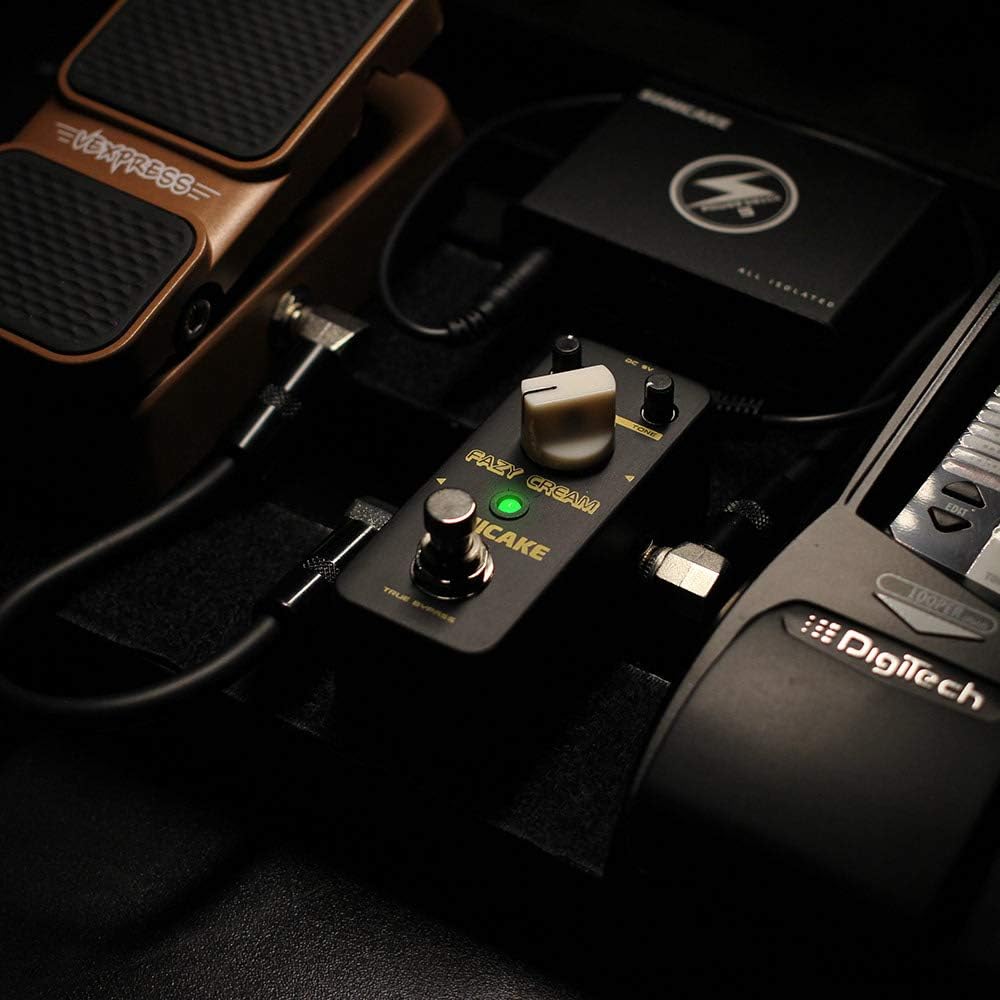
Image 2: The Fazy Cream pedal connected within a typical guitar pedalboard setup.
3. ఆపరేటింగ్ నియంత్రణలు
The Fazy Cream pedal features three main control knobs and a footswitch:
- స్థాయి: ప్రభావం యొక్క మొత్తం అవుట్పుట్ వాల్యూమ్ను నియంత్రిస్తుంది.
- FUZZ: Adjusts the amount of fuzz/gain. Turning clockwise increases the intensity of the fuzz effect.
- టోన్: Shapes the tonal character of the fuzz, ranging from dark and thick to bright and aggressive.
- ఫుట్ స్విచ్: Engages or bypasses the effect. The LED indicator illuminates when the effect is active.

Image 3: Close-up of the Fazy Cream pedal's control knobs.
3.1 Video Demonstration of Controls
Video 1: A demonstration of the SONICAKE Fazy Cream Fuzz Pedal's sound and control adjustments.
4 ఫీచర్లు
- 100% Analog Circuit: Delivers authentic vintage fuzz tones.
- Muff Style Fuzz: Designed to produce classic creamy fuzz to high-gain fuzzy distortion, suitable for both guitar and bass.
- Wide Tone Control Range: Allows for versatile sound shaping, from deep, dark tones to bright, aggressively blasting sounds.
- నిజమైన బైపాస్ ఫుట్స్విచ్: Ensures a clean signal path when the effect is disengaged, preserving your instrument's natural tone.

Image 4: The Fazy Cream pedal illustrating its True Bypass feature for a clean signal path.
5. స్పెసిఫికేషన్లు
| మోడల్ సంఖ్య | QSS11-20 |
| వస్తువు బరువు | 7.4 ఔన్సులు (0.21 కిలోగ్రాములు) |
| ఉత్పత్తి కొలతలు | 3.68 x 1.65 x 2.05 అంగుళాలు (93.5 x 42 x 52 మిమీ) |
| బాడీ మెటీరియల్ | Metal (Zinc-alloy die cast casing) |
| కనెక్టర్ రకం | 1/4 అంగుళాల ఆడియో జాక్ |
| హార్డ్వేర్ ఇంటర్ఫేస్ | 1/4-అంగుళాల ఆడియో |
| సిగ్నల్ ఫార్మాట్ | అనలాగ్ |
| వాల్యూమ్tage | 9 Volts DC (Center Negative) |

Image 5: Dimensions of the SONICAKE Fazy Cream Fuzz Pedal.
6. నిర్వహణ
To ensure the longevity and optimal performance of your Fazy Cream pedal, follow these maintenance guidelines:
- మృదువైన, పొడి గుడ్డతో తుడిచి పెడల్ను శుభ్రంగా ఉంచండి. రాపిడి క్లీనర్లు లేదా ద్రావకాలను ఉపయోగించకుండా ఉండండి.
- Protect the pedal from extreme temperatures, humidity, and direct sunlight.
- Always use the specified 9V DC center-negative power supply. Using an incorrect power supply can damage the unit and void the warranty.
- Disconnect the power supply when the pedal is not in use for extended periods.
7. ట్రబుల్షూటింగ్
If you encounter issues with your Fazy Cream pedal, try the following steps:
- ధ్వని లేదు:
- Check all cable connections (guitar, pedal, amplifier, power supply).
- Ensure the power supply is correctly connected and providing power (LED should light up when engaged).
- Test with different cables, guitar, and ampసమస్యను వేరుచేయడానికి లైఫైయర్.
- అవాంఛిత శబ్దం/హమ్:
- Ensure you are using a regulated 9V DC center-negative power supply. Unregulated power supplies can introduce noise.
- Check for ground loop issues by trying the pedal in a different power outlet or with an isolated power supply.
- అన్ని కేబుల్స్ మంచి స్థితిలో ఉన్నాయని మరియు సరిగ్గా కవచం ఉంచబడ్డాయని నిర్ధారించుకోండి.
- ప్రభావం ఆకర్షణీయంగా లేదు:
- Verify the footswitch is functioning correctly (LED should toggle on/off).
- Check power supply as described above.
8. వారంటీ & సపోర్ట్
For warranty information and technical support, please refer to the official SONICAKE webసైట్ లేదా మీ స్థానిక పంపిణీదారుని సంప్రదించండి. ఏవైనా వారంటీ క్లెయిమ్లకు కొనుగోలు రుజువుగా మీ కొనుగోలు రసీదును ఉంచండి.


