
RS PRO RSDS 1052 DL+
RS PRO RSDS 1052 DL+ డిజిటల్ స్టోరేజ్ ఓసిల్లోస్కోప్ యూజర్ మాన్యువల్
Model: RSDS 1052 DL+
1. పరిచయం
This manual provides comprehensive instructions for the safe and effective operation, maintenance, and troubleshooting of the RS PRO RSDS 1052 DL+ Digital Storage Oscilloscope. Please read this manual thoroughly before using the device to ensure proper functionality and to prevent damage or injury.
The RS PRO RSDS 1052 DL+ is a versatile 2-channel digital storage oscilloscope with a 50 MHz bandwidth, designed for precise signal analysis. It features a 7-inch TFT LCD display for clear waveform visualization and supports various measurement parameters and mathematical operations.
2. భద్రతా సమాచారం
Always adhere to the following safety precautions to prevent electric shock, fire, or damage to the instrument.
- శక్తి మూలం: Ensure the oscilloscope is connected to a power source within the specified voltage range (100-240V AC, 50/60Hz).
- గ్రౌండింగ్: The instrument must be properly grounded to prevent electric shock. Do not defeat the grounding plug.
- పర్యావరణం: Operate the oscilloscope in a dry, well-ventilated area, away from direct sunlight, high temperatures, and excessive dust.
- ప్రోబ్స్: Use only probes supplied or recommended by RS PRO. Ensure probes are correctly rated for the voltagఇ కొలుస్తారు.
- నిర్వహణ: అన్ని సర్వీసింగ్లను అర్హత కలిగిన సేవా సిబ్బందికి సూచించండి. ఇన్స్ట్రుమెంట్ను తెరవడానికి ప్రయత్నించవద్దు casing unless explicitly instructed.
- భద్రతా వర్గం: This device is rated CAT I, CAT II. Observe all safety warnings on the device and in this manual.
3. ఉత్పత్తి ముగిసిందిview మరియు భాగాలు
ఈ విభాగం ఓవర్ను అందిస్తుందిview of the RS PRO RSDS 1052 DL+ oscilloscope and its main components.
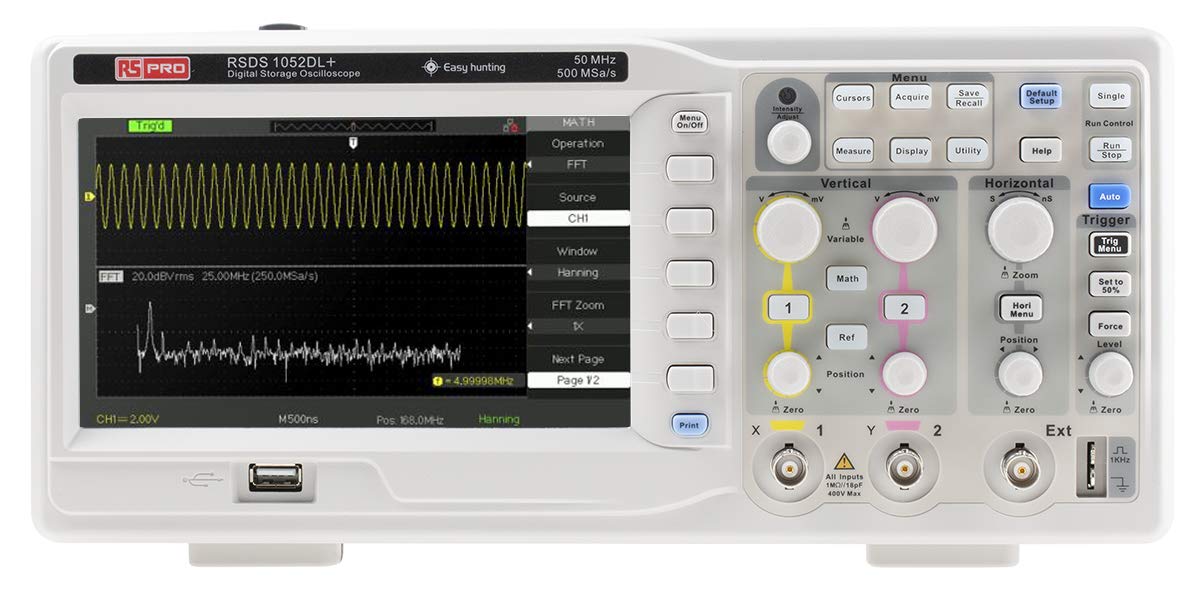
మూర్తి 3.1: ముందు View of the Oscilloscope. This image shows the front panel of the RS PRO RSDS 1052 DL+ oscilloscope, highlighting the 7-inch TFT LCD display, control knobs, function buttons, and input connectors for channels 1 and 2. The screen displays a typical waveform and FFT analysis.

చిత్రం 3.2: కోణీయ View of the Oscilloscope. This image provides an angled perspective of the RS PRO RSDS 1052 DL+ oscilloscope, showcasing its compact design and integrated handle for portability. The side ventilation grilles are also visible.

చిత్రం 3.3: వెనుక View of the Oscilloscope. This image displays the rear panel of the RS PRO RSDS 1052 DL+ oscilloscope, featuring the power input, USB device port, USB host port, LAN port, and Pass/Fail output. Safety warnings and product labels are also visible.
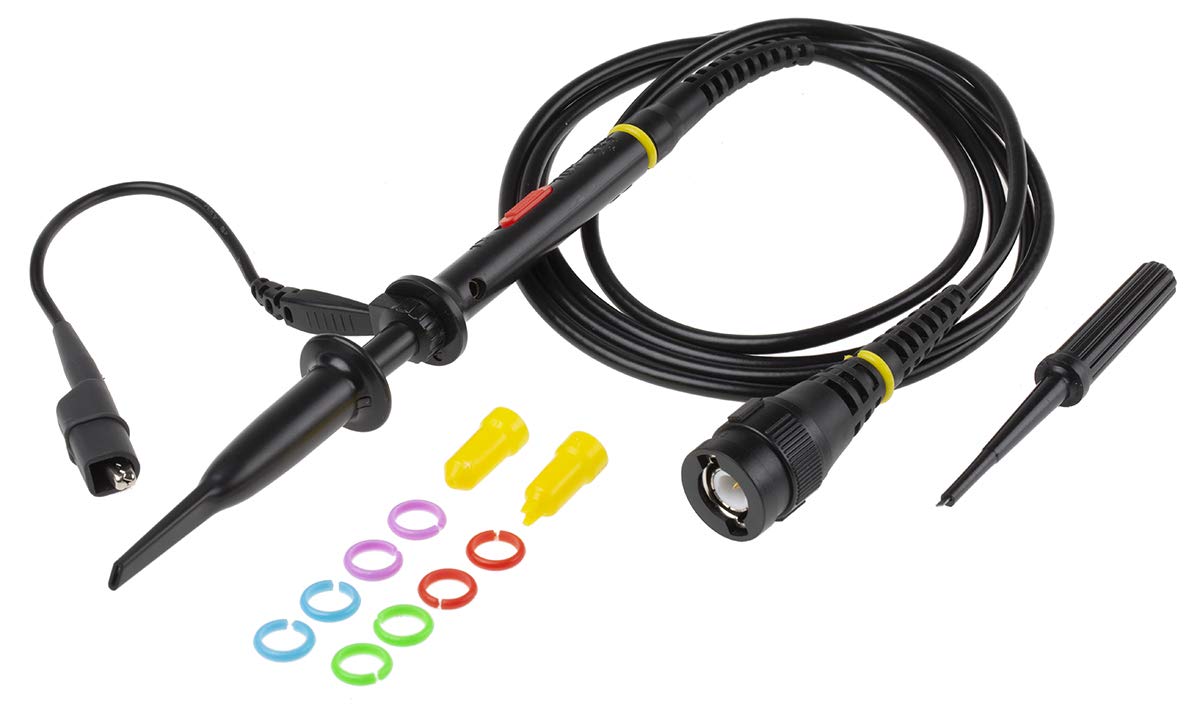
Figure 3.4: Oscilloscope Probe and Accessories. This image shows a passive oscilloscope probe (1:1/10:1) along with various accessories, including colored rings for channel identification and probe tip covers. These are essential for connecting signals to the oscilloscope.

Figure 3.5: Power Plugs and Probe Tip. This image displays an assortment of power plugs (EU, UK, US types) that may be included with the oscilloscope, along with a specialized probe tip. These ensure compatibility with various power outlets and provide versatility for measurements.
3.1 చేర్చబడిన ఉపకరణాలు
The RS PRO RSDS 1052 DL+ typically includes the following accessories:
- Passive Probe 1:1/10:1 (x2)
- USB కేబుల్
- త్వరిత ప్రారంభ గైడ్
- నాణ్యత సర్టిఫికేట్
- Power Cord (region-specific)
- CD (including User Manual and EasyScopeX software)
4. సెటప్
4.1 అన్ప్యాకింగ్ మరియు తనిఖీ
- Carefully remove the oscilloscope and all accessories from the packaging.
- Inspect the instrument for any signs of physical damage during transit. If damage is found, contact your supplier immediately.
- Verify that all included accessories listed in Section 3.1 are present.
4.2 పవర్ కనెక్షన్
- వెనుక ప్యానెల్లోని పవర్ స్విచ్ ఆఫ్ స్థానంలో ఉందని నిర్ధారించుకోండి.
- Connect the provided power cord to the AC input on the rear panel of the oscilloscope.
- Plug the other end of the power cord into a grounded AC power outlet. The oscilloscope supports 100-240V AC, 50/60Hz.
4.3 Probe Connection and Compensation
- Connect the BNC connector of the passive probe to one of the input channels (CH1 or CH2) on the front panel.
- Attach the probe tip to the probe compensation output (usually a square wave test signal) on the front panel.
- Adjust the compensation trimmer on the probe until the displayed square wave is flat-topped, without overshoot or undershoot. This ensures accurate measurements.
5. ఆపరేటింగ్ సూచనలు
5.1 ప్రాథమిక ఆపరేషన్
- పవర్ ఆన్/ఆఫ్: Press the power button on the front panel to turn the oscilloscope on or off.
- స్వీయ సెటప్: నొక్కండి ఆటో button to automatically adjust vertical, horizontal, and trigger settings for a stable waveform display.
- Vertical Controls: ఉపయోగించండి VOLTS/DIV knob to adjust the vertical scale (voltage per division) and the స్థానం knob to move the waveform vertically.
- క్షితిజ సమాంతర నియంత్రణలు: ఉపయోగించండి SEC/DIV knob to adjust the horizontal scale (time per division) and the స్థానం knob to move the waveform horizontally.
- Trigger Controls: సర్దుబాటు చేయండి స్థాయి knob to set the trigger threshold. The trigger ensures a stable display of repetitive waveforms.
5.2 అధునాతన విధులు
- కొలత విధులు: నొక్కండి కొలత button to access automatic measurement parameters such as Vpp, Vmax, Vmin, Freq, Period, etc.
- గణిత విధులు: నొక్కండి గణితం button to perform mathematical operations on waveforms (e.g., Add, Subtract, Multiply, Divide, FFT).
- Storage and Recall: ఉపయోగించండి సేవ్/రీకాల్ buttons to save waveform data, setups, or screenshots to internal memory or a USB drive.
- USB కనెక్టివిటీ: Connect a USB drive to the front panel USB host port for data storage. Use the rear USB device port to connect the oscilloscope to a PC for data transfer and control via EasyScopeX software.
6. నిర్వహణ
6.1 శుభ్రపరచడం
- శుభ్రపరిచే ముందు పవర్ కార్డ్ని డిస్కనెక్ట్ చేయండి.
- ఒక మృదువైన ఉపయోగించండి, డిamp cloth with mild detergent to clean the exterior of the instrument.
- Do not use abrasive cleaners or solvents that may damage the plastic parts.
- Ensure no liquid enters the instrument.
6.2 క్రమాంకనం
The oscilloscope is factory calibrated. For optimal performance, periodic calibration by qualified personnel is recommended, typically every 12-24 months, depending on usage and environmental conditions.
6.3 నిల్వ
When not in use for extended periods, store the oscilloscope in a dry, dust-free environment, away from extreme temperatures and humidity.
7. ట్రబుల్షూటింగ్
ఈ విభాగం మీరు ఎదుర్కొనే సాధారణ సమస్యలకు పరిష్కారాలను అందిస్తుంది.
| సమస్య | సాధ్యమైన కారణం | పరిష్కారం |
|---|---|---|
| శక్తి లేదు | Power cord disconnected; Power switch off; Blown fuse | Check power cord connection; Turn power switch on; Contact service for fuse replacement. |
| తరంగ రూపం ప్రదర్శించబడలేదు | Input signal too small/large; Incorrect vertical/horizontal settings; Trigger not set correctly; Probe not connected | Adjust VOLTS/DIV and SEC/DIV; Use Auto Setup; Adjust trigger level; Ensure probe is connected and compensated. |
| అస్థిర తరంగ రూపం | Incorrect trigger settings; No trigger source selected | Adjust trigger level and mode; Select appropriate trigger source (e.g., CH1, CH2, Ext). |
| వక్రీకరించిన తరంగ రూపం | Probe compensation incorrect; Probe damaged; Input overloaded | Perform probe compensation; Try a different probe; Check input signal ampలిటుడే. |
If the problem persists after attempting these solutions, please contact RS PRO customer support.
8. స్పెసిఫికేషన్లు
Key technical specifications for the RS PRO RSDS 1052 DL+ Digital Storage Oscilloscope:
- అనలాగ్ ఛానెల్లు: 2
- Oscilloscope Type: డిజిటల్ నిల్వ
- బ్యాండ్విడ్త్: 50 MHz
- రియల్ టైమ్ ఎస్ampలే రేటు: Up to 500 MSa/s
- మెమరీ డెప్త్: 32 Kpts
- ప్రదర్శన రకం: TFT LCD
- ప్రదర్శన పరిమాణం: 7 inches (800 x 480 pixels)
- Vertical Sensitivity: 2mV/div to 10V/div
- Time Base Range: 10ns/div నుండి 50s/div వరకు
- విద్యుత్ సరఫరా: Mains operated (100-240V AC, 50/60Hz)
- బరువు: 2.5 కిలోలు
- భద్రతా వర్గం: CAT I, CAT II
- ఇంటర్ఫేస్లు: RS232, USB Host, USB Device, LAN
9. వారంటీ మరియు మద్దతు
RS PRO products are manufactured to high standards and are typically covered by a manufacturer's warranty. Please refer to the warranty card included with your product or visit the official RS PRO webవివరణాత్మక వారంటీ నిబంధనలు మరియు షరతుల కోసం సైట్.
For technical support, service, or inquiries regarding your RS PRO RSDS 1052 DL+ oscilloscope, please contact RS PRO customer service through their official channels. Contact information can usually be found on the RS PRO website or in the documentation provided with the product.
RS PRO Official Webసైట్: https://uk.rs-online.com/web/
Ask a question about this manual
Ask about setup, troubleshooting, compatibility, parts, safety, or missing instructions. Manuals+ will review the question and use this page’s manual context to help answer it.