
MateStar BlackBlue4p10ft_1208
MateStar 40W USB C Charger Block Instruction Manual
Model: BlackBlue4p10ft_1208
1. పరిచయం
Thank you for choosing the MateStar 40W USB C Charger Block. This product is designed to provide efficient and fast charging for multiple devices simultaneously. With its compact design and advanced safety features, it is an ideal charging solution for home, office, and travel. This manual provides essential information on how to safely and effectively use your new charger.

Image: Two MateStar 40W USB C Charger Blocks, showcasing their compact form factor and multiple ports.
2. భద్రతా సమాచారం
Your MateStar charger block is equipped with a smart chip to ensure safe and reliable operation. It includes multiple protection mechanisms:
- ఓవర్ కరెంట్ రక్షణ: Prevents damage from excessive current.
- ఓవర్వోల్tagఇ రక్షణ: వాల్యూమ్ నుండి రక్షణలుtagఇ ఉప్పొంగుతుంది.
- వేడెక్కడం రక్షణ: Regulates temperature to prevent overheating.
- షార్ట్ సర్క్యూట్ రక్షణ: విద్యుత్ షార్ట్స్ నుండి రక్షిస్తుంది.
The charger is constructed from ABS + PC fireproof material for enhanced stability and safety. Always ensure the charger is used in a well-ventilated area and avoid covering it during operation. Do not expose the charger to liquids or extreme temperatures.

Image: An illustration highlighting the internal smart chip and various safety protections, including over-voltage, over-current, over-temperature, and short circuit protection.
3. ప్యాకేజీ విషయాలు
మీ ప్యాకేజీని తెరిచినప్పుడు, మీరు ఈ క్రింది అంశాలను కనుగొనాలి:
- 2 x MateStar 40W USB Charger Block (Black)
ఏవైనా వస్తువులు తప్పిపోయినా లేదా దెబ్బతిన్నా, దయచేసి వెంటనే కస్టమర్ సపోర్ట్ను సంప్రదించండి.
4. ఉత్పత్తి లక్షణాలు
The MateStar 40W USB C Charger Block offers a range of features designed for optimal charging performance:
- 40W ఫాస్ట్ ఛార్జింగ్: Supports Power Delivery (PD) and Quick Charge (QC) functions for rapid charging. The USB-C port delivers up to 20W, and the USB-A port offers 3.1A/5V.
- 4-in-1 Compact Design: Features dual USB-C ports and dual USB-A ports, allowing simultaneous charging of up to four devices. This design minimizes the need for multiple wall sockets and saves space.
- యూనివర్సల్ అనుకూలత: Compatible with a wide range of devices, including iPhones, Samsung Galaxy phones, iPads, tablets, and more.
- సురక్షితమైనది మరియు నమ్మదగినది: Built-in smart chip with multi-protection features (overcurrent, overvoltage, overheating, short circuit) and fireproof ABS + PC material.

Image: A visual representation of the MateStar 4-port charger highlighting its key features: dual USB-C ports, dual USB-A ports, quick charging capability, and travel-friendly design.

Image: A graphic illustrating the speed of PD fast charging, indicating it is 3 times faster than standard charging methods.
5. సెటప్
Setting up your MateStar 40W USB C Charger Block is straightforward:
- Unpack the charger block from its packaging.
- Insert the charger block into a standard wall outlet (110 Volts input).
- మీ పరికరం యొక్క ఛార్జింగ్ కేబుల్ను ఛార్జర్లో అందుబాటులో ఉన్న USB-C లేదా USB-A పోర్ట్లలో ఒకదానికి కనెక్ట్ చేయండి.
- ఛార్జింగ్ కేబుల్ యొక్క మరొక చివరను మీ పరికరానికి కనెక్ట్ చేయండి.
The charger is designed to be compact and space-saving, reducing clutter from multiple adapters.

Image: A visual comparison demonstrating how the 4-in-1 compact design of the charger reduces cable and adapter clutter compared to using multiple individual chargers.
6. ఆపరేటింగ్ సూచనలు
Once connected, the charger will automatically detect your device and begin charging. The smart chip optimizes power delivery to ensure efficient and safe charging for each connected device.
- For optimal fast charging, use high-quality USB-C to USB-C cables for devices supporting Power Delivery (PD) and appropriate USB-A cables for Quick Charge (QC) compatible devices.
- You can charge up to four devices simultaneously. The charger intelligently distributes power across the ports.
- Disconnect devices once fully charged or when not in use.

Image: A person utilizing the MateStar charger to power multiple electronic devices, including a smartphone, tablet, and e-reader, demonstrating its multi-device charging capability in a practical setting.
7. అనుకూలత
The MateStar 40W USB C Charger Block offers broad compatibility with a wide range of electronic devices:
- స్మార్ట్ఫోన్లు: Compatible with iPhone 16/16 Plus/16 Pro/16 Pro Max, iPhone 15/15 Plus/15 Pro/15 Pro Max, iPhone 14/14 Plus/14 Pro/14 Pro Max, iPhone 13/13 Mini/13 Pro/13 Pro Max, iPhone 12/12 Mini/12 Pro/12 Pro Max, iPhone 11/11 Pro/11 Pro Max, iPhone XS Max/XS/XR/X/8/8 Plus/7/7 Plus/6/6S/SE. Also compatible with Samsung Galaxy S24/S23/S22/S21/S20/Note 10/Note 20/S10/S9/S8, Google Pixel series, LG, Huawei, Xiaomi, OPPO, Vivo, and more.
- మాత్రలు: Compatible with iPad Pro/mini, iPad Air/Mini, Samsung Galaxy Tab S8/S7/S6/Tab A8/A7, Amazon Fire HD, and other tablets.
- ఇతర పరికరాలు: Nintendo Switch, Echo/Alexa devices, AirPods, Smart Buds, iWatch Series, and other USB-powered devices.
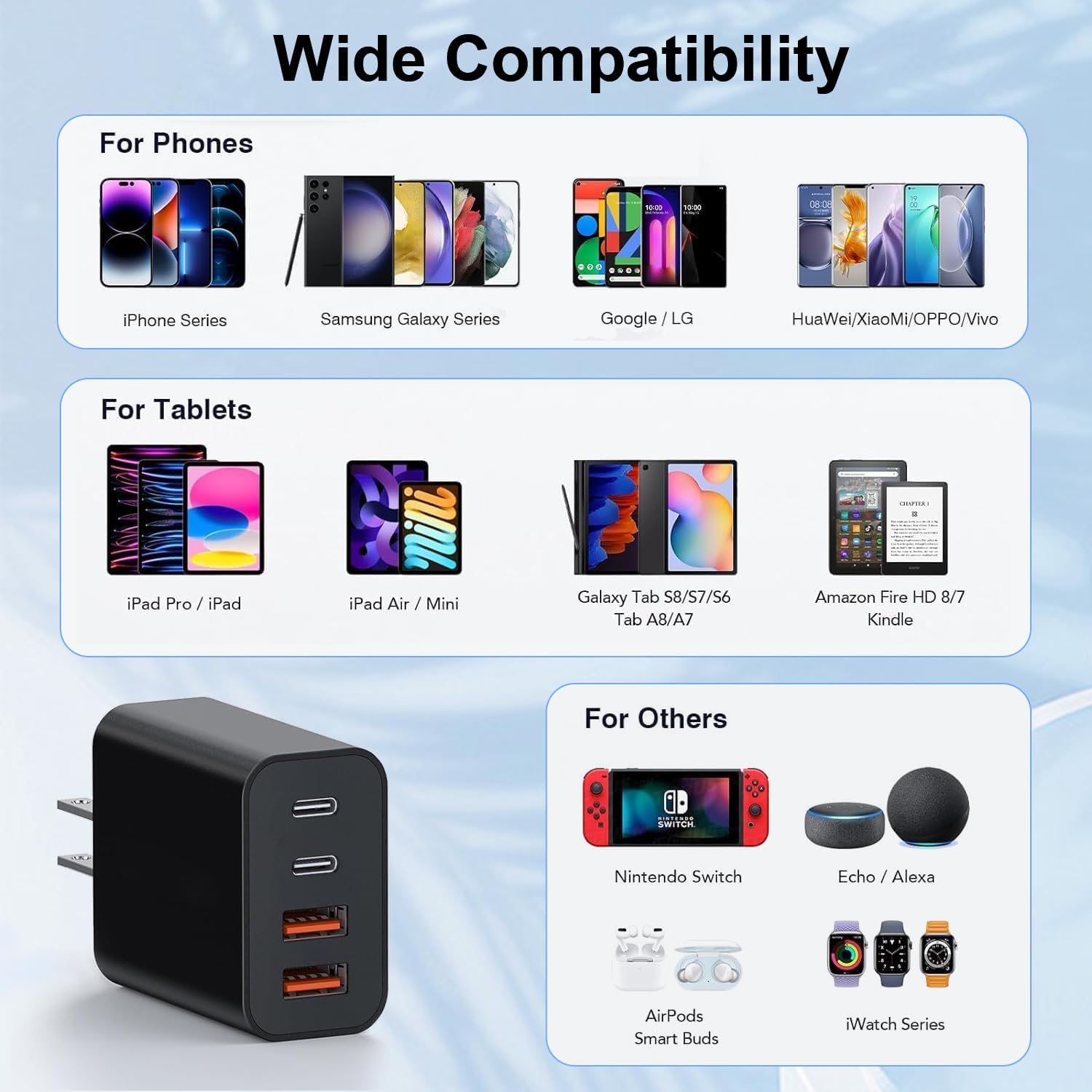
Image: A comprehensive compatibility chart displaying various phone models (iPhone, Samsung Galaxy, Google/LG, Huawei/Xiaomi/OPPO/Vivo), tablets (iPad Pro/iPad, iPad Air/Mini, Galaxy Tab, Amazon Fire HD/Kindle), and other devices (Nintendo Switch, Echo/Alexa, AirPods, iWatch Series) that are compatible with the charger.
8. స్పెసిఫికేషన్లు
| ఫీచర్ | వివరాలు |
|---|---|
| మోడల్ సంఖ్య | BlackBlue4p10ft_1208 |
| మొత్తం విద్యుత్ అవుట్పుట్ | 40W (గరిష్టంగా) |
| USB-C పోర్ట్ అవుట్పుట్ | 20W (గరిష్టంగా) |
| USB-A పోర్ట్ అవుట్పుట్ | 3.1A/5V |
| ఇన్పుట్ వాల్యూమ్tage | 110 వోల్ట్లు |
| కనెక్టివిటీ టెక్నాలజీ | USB |
| కనెక్టర్ రకం | USB టైప్ C, USB టైప్ A |
| ప్రత్యేక లక్షణాలు | Lightweight Design, Fast Charging |
| కొలతలు | 3.58 x 2.09 x 1.14 అంగుళాలు |
| వస్తువు బరువు | 0.212 ఔన్సులు |
| మెటీరియల్ | ABS + PC అగ్నినిరోధక పదార్థం |
9. నిర్వహణ
To ensure the longevity and optimal performance of your MateStar charger block, follow these maintenance guidelines:
- శుభ్రపరచడం: శుభ్రపరిచే ముందు పవర్ అవుట్లెట్ నుండి ఛార్జర్ను డిస్కనెక్ట్ చేయండి. ఉపరితలాన్ని తుడవడానికి మృదువైన, పొడి వస్త్రాన్ని ఉపయోగించండి. ద్రవ క్లీనర్లను లేదా రాపిడి పదార్థాలను ఉపయోగించవద్దు.
- నిల్వ: ఛార్జర్ను ఉపయోగంలో లేనప్పుడు ప్రత్యక్ష సూర్యకాంతి మరియు తేమకు దూరంగా చల్లని, పొడి ప్రదేశంలో నిల్వ చేయండి.
- నిర్వహణ: Avoid dropping or subjecting the charger to strong impacts. Do not attempt to disassemble or modify the charger.
- కేబుల్ కేర్: Ensure charging cables are not bent sharply or tangled, as this can damage the cables and affect charging performance.
10. ట్రబుల్షూటింగ్
If you encounter any issues with your MateStar charger block, please refer to the following common troubleshooting steps:
- పరికరం ఛార్జ్ చేయబడదు:
- ఛార్జర్ వర్కింగ్ వాల్ అవుట్లెట్లోకి సురక్షితంగా ప్లగ్ చేయబడిందని నిర్ధారించుకోండి.
- ఛార్జింగ్ కేబుల్ ఛార్జర్ మరియు మీ పరికరం రెండింటికీ సరిగ్గా కనెక్ట్ చేయబడిందో లేదో తనిఖీ చేయండి.
- తప్పుగా ఉన్న కేబుల్ను తోసిపుచ్చడానికి వేరే ఛార్జింగ్ కేబుల్ని ఉపయోగించి ప్రయత్నించండి.
- Test the charger with a different device to confirm the charger's functionality.
- నెమ్మదిగా ఛార్జింగ్:
- Verify that your device and cable support fast charging (PD or QC) and are connected to the appropriate port (USB-C for PD, USB-A for QC).
- మీ పరికరంలోని బ్యాక్గ్రౌండ్ అప్లికేషన్లు ఏవీ అధిక శక్తిని వినియోగించడం లేదని నిర్ధారించుకోండి.
- Charging multiple devices simultaneously may distribute the total 40W output, potentially reducing individual port speeds.
- ఛార్జర్ వేడెక్కడం:
- Disconnect the charger and allow it to cool down.
- ఛార్జర్ బాగా వెంటిలేషన్ ఉన్న ప్రదేశంలో ఉందని మరియు కవర్ చేయబడలేదని నిర్ధారించుకోండి.
- వేడెక్కడం కొనసాగితే, వాడకాన్ని ఆపివేసి, కస్టమర్ సపోర్ట్ను సంప్రదించండి.
ఈ దశలు మీ సమస్యను పరిష్కరించకపోతే, దయచేసి మరింత సహాయం కోసం కస్టమర్ మద్దతును సంప్రదించండి.
11. వారంటీ మరియు మద్దతు
MateStar provides a 24 నెలల హామీ for your USB C Charger Block. This warranty covers manufacturing defects and ensures your product performs as expected under normal use.
For any questions, concerns, or warranty claims, please contact MateStar customer support. We are committed to resolving your problems within 24 hours.
You can visit the official MateStar store for more information and support: MateStar Store
Ask a question about this manual
Ask about setup, troubleshooting, compatibility, parts, safety, or missing instructions. Manuals+ will review the question and use this page’s manual context to help answer it.