
పరిచయం
This manual provides essential information for setting up, operating, maintaining, and troubleshooting your Lenovo ThinkPad T470 laptop. Please read this guide thoroughly to ensure proper use and longevity of your device.
The Lenovo ThinkPad T470 is a 14-inch business laptop featuring an Intel Core i7-7600U processor, 8 GB RAM, and a 256 GB SSD, running Windows 10 Pro. This particular unit is a renewed product, professionally inspected and tested to function like new.
1. సెటప్
1.1 అన్బాక్సింగ్ మరియు ప్రారంభ తనిఖీ
Carefully remove all components from the packaging. The box should contain the Lenovo ThinkPad T470 laptop and an AC adapter.

Image: Lenovo ThinkPad T470 laptop, open and viewed from an angle, displaying a desktop screen.
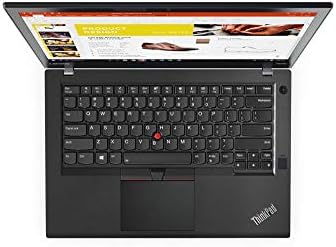
Image: AC power adapter for the Lenovo ThinkPad T470 laptop.
1.2 పవర్ అడాప్టర్ను కనెక్ట్ చేస్తోంది
- Connect the AC adapter cable to the power port on your laptop.
- Plug the AC adapter into a functional electrical outlet.
- ప్రారంభ వినియోగానికి ముందు కనీసం 30 నిమిషాలు లేదా బ్యాటరీ సూచిక తగినంత ఛార్జ్ చూపించే వరకు బ్యాటరీని ఛార్జ్ చేయడానికి అనుమతించండి.
1.3 ప్రారంభ పవర్ ఆన్
- ల్యాప్టాప్ మూత తెరవండి.
- సాధారణంగా కీబోర్డ్ పైన లేదా పక్కన ఉండే పవర్ బటన్ను నొక్కండి.
- Follow the on-screen instructions to complete the Windows 10 Pro setup process. This may include setting up user accounts, network connections, and basic preferences.

Image: Lenovo ThinkPad T470 laptop displaying the Windows 10 desktop.
1.4 కనెక్ట్ పెరిఫెరల్స్
Your ThinkPad T470 supports various external devices:
- USB పరికరాలు: Connect USB devices such as external drives, mice, or keyboards to the available USB ports.
- ఈథర్నెట్: For a wired network connection, plug an Ethernet cable into the LAN port.
- బ్లూటూత్: Enable Bluetooth in Windows settings to pair with Bluetooth-enabled devices like headphones or speakers.
- బాహ్య ప్రదర్శన: Use the HDMI or DisplayPort outputs to connect to an external monitor.

చిత్రం: వైపు view of the Lenovo ThinkPad T470 laptop showing various ports.
2. ఆపరేటింగ్ సూచనలు
2.1 పవర్ ఆన్ మరియు ఆఫ్
- పవర్ ఆన్: పవర్ బటన్ను నొక్కండి.
- షట్ డౌన్: విండోస్ స్టార్ట్ బటన్ను క్లిక్ చేసి, ఆపై పవర్ > షట్ డౌన్ ఎంచుకోండి.
- పునఃప్రారంభించు: విండోస్ స్టార్ట్ బటన్ పై క్లిక్ చేసి, ఆపై పవర్ > రీస్టార్ట్ ఎంచుకోండి.
- నిద్ర: Close the laptop lid or click the Windows Start button, then select Power > Sleep.
2.2 కీబోర్డ్ మరియు టచ్ప్యాడ్
The ThinkPad T470 features a Chiclet-style keyboard and a touchpad for navigation.

చిత్రం: పై నుండి క్రిందికి view of the Lenovo ThinkPad T470 laptop keyboard and touchpad.
- కీబోర్డ్: Standard QWERTY layout. Use function keys (Fn) in combination with F1-F12 for special features like volume control, brightness adjustment, and wireless toggling.
- టచ్ప్యాడ్: Supports multi-touch gestures. Use it to move the cursor, click, scroll, and zoom. The TrackPoint (red dot in the center of the keyboard) can also be used for precise cursor control with its dedicated buttons below the spacebar.
2.3 ప్రదర్శన సెట్టింగ్లు
- ప్రకాశం: Adjust screen brightness using the dedicated function keys (usually F5 and F6) or through Windows Display settings.
- రిజల్యూషన్: The native resolution is 1366 x 768 pixels, with a maximum display resolution of 1920x1080. You can change the display resolution in Windows Display settings.
2.4 కనెక్టివిటీ
- Wi-Fi: Connect to wireless networks via the Wi-Fi settings in Windows.
- బ్లూటూత్: Pair Bluetooth devices through the Bluetooth & other devices settings.
- ఈథర్నెట్: Provides a stable wired network connection up to 1000 Mbps.
3. నిర్వహణ
3.1 మీ ల్యాప్టాప్ను శుభ్రపరచడం
- స్క్రీన్: కొద్దిగా మెత్తని, మెత్తని బట్టను ఉపయోగించండి dampనీరు లేదా స్క్రీన్ క్లీనర్తో కలిపి ఉంచండి. కఠినమైన రసాయనాలను నివారించండి.
- కీబోర్డ్ మరియు చాసిస్: ఉపరితలాలను తుడవడానికి మృదువైన గుడ్డను ఉపయోగించండి. కంప్రెస్డ్ ఎయిర్ డబ్బా కీల మధ్య నుండి దుమ్మును తొలగించగలదు.
- ల్యాప్టాప్ను శుభ్రం చేయడానికి ముందు ఎల్లప్పుడూ పవర్ ఆఫ్ చేసి, అన్ప్లగ్ చేయండి.
3.2 బ్యాటరీ సంరక్షణ
- బ్యాటరీ జీవితకాలాన్ని పొడిగించడానికి, బ్యాటరీని తరచుగా పూర్తిగా డిశ్చార్జ్ చేయకుండా ఉండండి.
- ల్యాప్టాప్ను ఎక్కువ సేపు ఉపయోగించకపోతే చల్లని, పొడి ప్రదేశంలో నిల్వ చేయండి.
- The laptop has a Lithium-Battery Energy Content of 45 Watt Hours.
3.3 సాఫ్ట్వేర్ నవీకరణలు
Regularly update your Windows operating system and drivers to ensure optimal performance and security. You can check for updates via Windows Update in the Settings menu.
4. ట్రబుల్షూటింగ్
ఈ విభాగం మీరు ఎదుర్కొనే సాధారణ సమస్యలను పరిష్కరిస్తుంది.
4.1 విద్యుత్ సమస్యలు
- ల్యాప్టాప్ ఆన్ కావడం లేదు: AC అడాప్టర్ సురక్షితంగా కనెక్ట్ చేయబడిందని మరియు పవర్ అవుట్లెట్ పనిచేస్తుందని నిర్ధారించుకోండి. బ్యాటరీ తగినంత ఛార్జ్ కలిగి ఉందో లేదో తనిఖీ చేయండి.
- బ్యాటరీ ఛార్జింగ్ కాదు: Verify the AC adapter and cable are not damaged. Try a different power outlet.
4.2 ప్రదర్శన సమస్యలు
- ప్రదర్శన లేదు: Connect an external monitor to check if the issue is with the laptop's internal screen. Restart the laptop.
- మసక స్క్రీన్: Adjust brightness using function keys or Windows settings.
4.3 కనెక్టివిటీ సమస్యలు
- Wi-Fi కనెక్ట్ కావడం లేదు: Ensure Wi-Fi is enabled in Windows settings. Restart your router and laptop.
- బ్లూటూత్ పరికరం జత కావడం లేదు: పరికరం జత చేసే మోడ్లో మరియు పరిధిలో ఉందని నిర్ధారించుకోండి. ల్యాప్టాప్లో బ్లూటూత్ సెట్టింగ్లను తనిఖీ చేయండి.
4.4 సాధారణ పనితీరు
- నెమ్మది పనితీరు: Close unnecessary applications. Check for malware. Ensure sufficient free disk space.
- వ్యవస్థ స్తంభించిపోతుంది: Perform a hard shutdown by holding the power button for several seconds. Restart the laptop.
5. స్పెసిఫికేషన్లు
Below are the key technical specifications for the Lenovo ThinkPad T470 laptop:
| ఫీచర్ | వివరాలు |
|---|---|
| బ్రాండ్ | లెనోవో |
| మోడల్ పేరు | 20HD0057US |
| స్క్రీన్ పరిమాణం | 14 అంగుళాలు |
| CPU మోడల్ | Core i7-7600U (7th Gen) |
| ప్రాసెసర్ వేగం | 2.8 GHz |
| RAM మెమరీ ఇన్స్టాల్ చేయబడిన పరిమాణం | 8 GB |
| RAM మెమరీ గరిష్ట పరిమాణం | 32 GB |
| హార్డ్ డిస్క్ పరిమాణం | 256 GB SSD |
| ఆపరేటింగ్ సిస్టమ్ | Windows 10 ప్రో |
| గ్రాఫిక్స్ కార్డ్ వివరణ | ఇంటిగ్రేటెడ్ |
| స్థానిక రిజల్యూషన్ | 1366 x 768 పిక్సెల్లు |
| గరిష్ట డిస్ప్లే రిజల్యూషన్ | 1920x1080 |
| కనెక్టివిటీ టెక్నాలజీ | Ethernet, USB, Wireless, Bluetooth |
| మొత్తం USB పోర్ట్లు | 2 |
| ఈథర్నెట్ పోర్ట్స్ | 1 (1000 Mbps) |
| వీడియో అవుట్పుట్ | HDMI, డిస్ప్లేపోర్ట్ |
| వస్తువు బరువు | 5 పౌండ్లు |
| Lithium-Battery Energy Content | 45 వాట్ గంటలు |
| UPC | 786513207630 |
6. వారంటీ మరియు మద్దతు
6.1 వారంటీ సమాచారం
This renewed Lenovo ThinkPad T470 laptop comes with a 90-రోజుల పరిమిత వారంటీ. Please refer to your purchase documentation for specific terms and conditions regarding returns, replacements, or refunds under the Amazon Renewed Guarantee.
6.2 కస్టమర్ మద్దతు
For further assistance, technical support, or warranty claims, please contact the seller or refer to the official Lenovo support webసాధారణ ఉత్పత్తి సమాచారం మరియు డ్రైవర్ల కోసం సైట్.