
1. పరిచయం
Thank you for choosing the Proscenic Ultenic H8 Smart Warm and Cool Mist Ultrasonic Humidifier. This manual provides essential information for the safe operation, maintenance, and troubleshooting of your device. Please read it thoroughly before use and retain it for future reference.
The Ultenic H8 humidifier is designed to improve air quality and comfort in your home by providing both warm and cool mist options. It features a large 4.3L water tank, smart app control, and an LED touch screen for convenient operation.
2. ముఖ్యమైన భద్రతా సూచనలు
- హ్యూమిడిఫైయర్ను ఎల్లప్పుడూ ప్రత్యక్ష సూర్యకాంతి మరియు ఉష్ణ వనరులకు దూరంగా దృఢమైన, చదునైన, నీటి నిరోధక ఉపరితలంపై ఉంచండి.
- తేమకు సున్నితంగా ఉండే ఫర్నిచర్ లేదా ఉపకరణాల దగ్గర హ్యూమిడిఫైయర్ను ఉంచవద్దు.
- Ensure the power cord is not damaged and is placed safely to prevent tripping hazards.
- హ్యూమిడిఫైయర్ నింపడానికి, శుభ్రం చేయడానికి లేదా తరలించడానికి ముందు దాన్ని అన్ప్లగ్ చేయండి.
- బేస్ యూనిట్ను నీరు లేదా ఇతర ద్రవాలలో ముంచవద్దు.
- పిల్లలు మరియు పెంపుడు జంతువులకు దూరంగా ఉంచండి.
- శుభ్రమైన, చల్లని కుళాయి నీటిని మాత్రమే వాడండి. ఖనిజాలు పేరుకుపోకుండా నిరోధించడానికి డిస్టిల్డ్ లేదా డీమినరలైజ్డ్ నీటిని సిఫార్సు చేస్తారు.
- Do not add essential oils directly into the water tank; use the designated aroma box.
- పొగమంచు అవుట్లెట్ను నిరోధించవద్దు.
- హ్యూమిడిఫైయర్ అసాధారణ శబ్దాలు, వాసనలు లేదా పొగను విడుదల చేస్తే, వెంటనే దాన్ని అన్ప్లగ్ చేసి, కస్టమర్ సపోర్ట్ను సంప్రదించండి.
3. ఉత్పత్తి ముగిసిందిview
Familiarize yourself with the components of your Ultenic H8 humidifier:
- మిస్ట్ అవుట్లెట్: Where the mist is dispersed.
- నీటి ట్యాంక్: 4.3L capacity for water.
- బేస్ యూనిట్: అల్ట్రాసోనిక్ ట్రాన్స్డ్యూసర్ మరియు హీటింగ్ ఎలిమెంట్ను కలిగి ఉంటుంది.
- Control Panel/LED Display: For manual operation and status display.
- అరోమా బాక్స్: For adding essential oils (do not add directly to water tank).
- పవర్ కార్డ్: Connects to an electrical outlet.
- రిమోట్ కంట్రోల్: దూరం నుండి అనుకూలమైన ఆపరేషన్ కోసం.
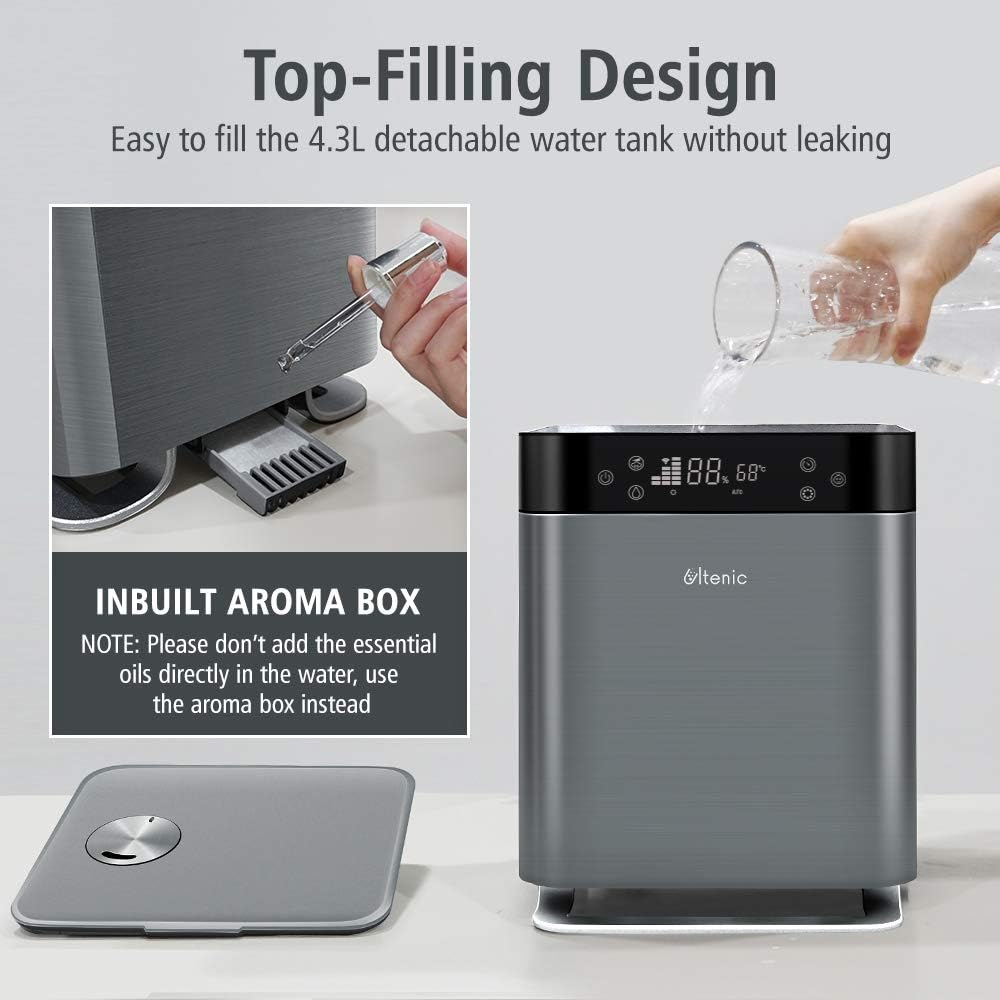
చిత్రం: The Ultenic H8 humidifier showcasing its top-filling design and the integrated aroma box. The image highlights the ease of refilling the 4.3L detachable water tank without leakage and provides a note to use the aroma box for essential oils instead of adding them directly to the water.
4. సెటప్
4.1 ప్రారంభ నియామకం
- హ్యూమిడిఫైయర్ మరియు అన్ని ఉపకరణాలను అన్ప్యాక్ చేయండి.
- Place the humidifier on a flat, stable surface at least 6 inches (15 cm) away from walls and other objects.
- పవర్ కార్డ్ సులభంగా యాక్సెస్ చేయగలదని మరియు అడ్డంకులు లేకుండా చూసుకోండి.
4.2 వాటర్ ట్యాంక్ నింపడం
- హ్యూమిడిఫైయర్ పై కవర్ తొలగించండి.
- Fill the 4.3L water tank directly from the top opening with clean, cool tap water. For best results and to prevent mineral buildup, use distilled or demineralized water.
- Do not fill past the MAX water level indicator.
- పై కవర్ను సురక్షితంగా భర్తీ చేయండి.
4.3 పవర్ కనెక్షన్
Plug the power cord into a standard electrical outlet. The humidifier will enter standby mode.
5. ఆపరేటింగ్ సూచనలు
5.1 కంట్రోల్ ప్యానెల్ ఆపరేషన్
The LED touch screen allows for easy adjustment of settings and displays real-time humidity levels.
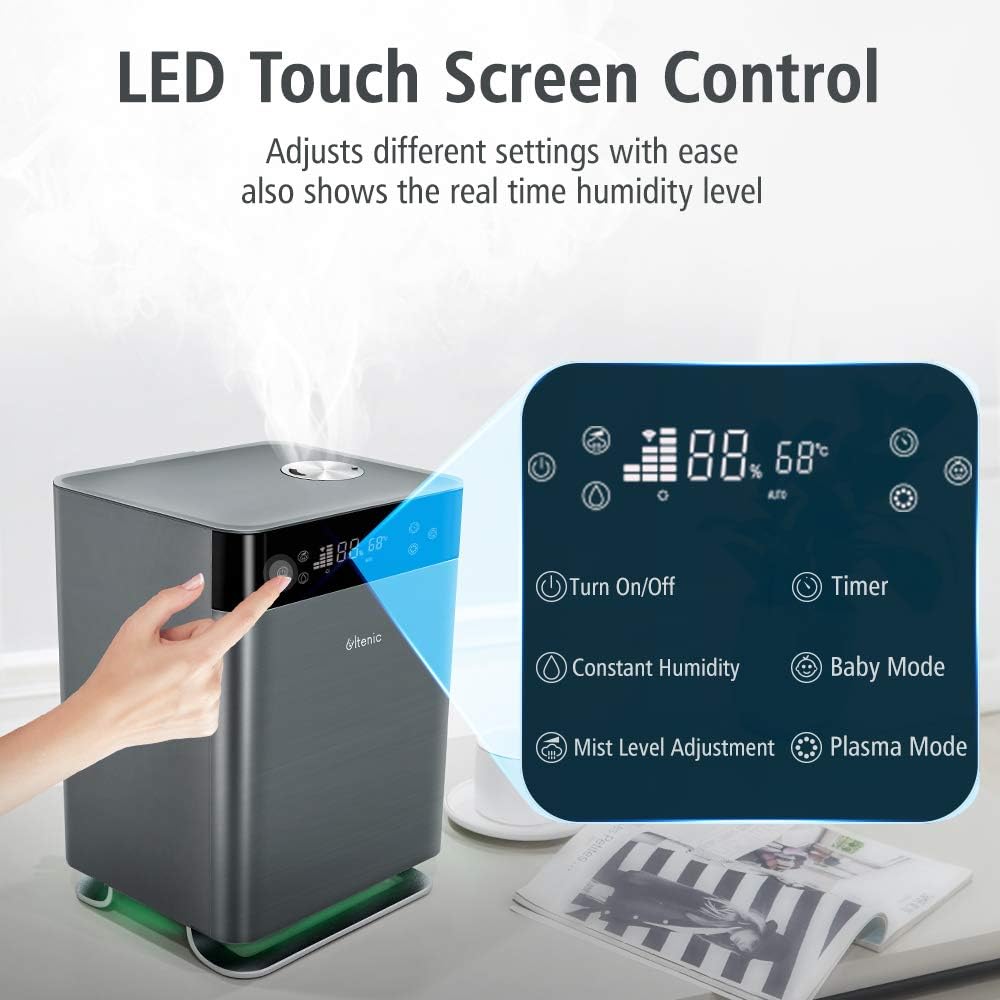
చిత్రం: Close-up of the Ultenic H8 humidifier's LED touch screen control panel. The image illustrates various touch buttons for functions such as Turn On/Off, Timer, Constant Humidity, Baby Mode, Mist Level Adjustment, and Plasma Mode, along with the digital display showing humidity and temperature.
- పవర్ బటన్: Press to turn the humidifier On/Off.
- పొగమంచు స్థాయి సర్దుబాటు: Cycle through different mist output levels.
- Constant Humidity Mode: Set a desired humidity level; the humidifier will automatically adjust output to maintain it.
- Warm Mist/Cool Mist: వెచ్చని లేదా చల్లని పొగమంచు అవుట్పుట్ మధ్య ఎంచుకోండి.
- బేబీ మోడ్: Optimized settings for a baby's room.
- Plasma Mode: Activates the plasma function for air purification.
- రాత్రి కాంతి: Turn the integrated night light On/Off.
- టైమర్: Set an operating duration (e.g., 1-12 hours).
5.2 స్మార్ట్ యాప్ నియంత్రణ
Download the Ultenic app from your smartphone's app store to control your humidifier remotely and access additional features.

చిత్రం: The Ultenic H8 humidifier with a smartphone displaying the smart app interface and an Amazon Echo device. The image highlights features like Alexa & Google Home voice control, Baby Mode, Warm Mist, 3-Levels Mist, Timer, Night Light, and Schedule, all controllable via the app.
- అనువర్తనాన్ని డౌన్లోడ్ చేయండి: కోసం వెతకండి "Ultenic" in the App Store (iOS) or Google Play Store (Android).
- నమోదు/లాగిన్: ఖాతాను సృష్టించండి లేదా మీకు ఇప్పటికే ఒకటి ఉంటే లాగిన్ చేయండి.
- పరికరాన్ని జోడించండి: Follow the in-app instructions to add your H8 humidifier. Ensure your phone is connected to a 2.4GHz Wi-Fi network during setup.
- నియంత్రణ లక్షణాలు:
- రిమోట్ ఆన్/ఆఫ్
- Adjust mist levels and modes (Warm/Cool, Baby Mode, Constant Humidity, Plasma)
- షెడ్యూల్లు మరియు టైమర్లను సెట్ చేయండి
- Control night light
- Monitor indoor temperature and humidity
- Voice control integration with Alexa and Google Home (requires separate setup within their respective apps).
5.3 Mist Output and Coverage

చిత్రం: The Ultenic H8 humidifier demonstrating its 360° effective coverage, providing continuous mist for rooms up to 50m² (323 ft²). The image visually separates warm mist (balancing heated air in winter) and cool mist (keeping skin hydrated in hot & dry weather) functions.
The H8 humidifier offers 360° effective coverage, suitable for rooms up to 50m² (323 ft²), providing up to 30 hours of continuous mist. Choose between warm mist to balance heated air in winter or cool mist for hydration in hot and dry weather.
6. నిర్వహణ
మీ హ్యూమిడిఫైయర్ యొక్క సరైన పనితీరు మరియు దీర్ఘాయువు కోసం క్రమం తప్పకుండా శుభ్రపరచడం మరియు నిర్వహణ చాలా కీలకం.
6.1 రోజువారీ నిర్వహణ
- Empty any remaining water from the tank and base unit daily.
- Rinse the water tank and base unit with fresh water.
- Refill with fresh, clean water before each use.
6.2 వీక్లీ క్లీనింగ్
- అన్ప్లగ్: శుభ్రం చేసే ముందు ఎల్లప్పుడూ హ్యూమిడిఫైయర్ను అన్ప్లగ్ చేయండి.
- ఖాళీ నీరు: Empty all water from the tank and base unit.
- క్లీన్ వాటర్ ట్యాంక్:
- నీటి ట్యాంక్ తొలగించండి.
- Wipe the inside of the tank with a soft cloth.
- For mineral buildup, fill the tank with a mixture of 1 teaspoon of white vinegar and 1 gallon of water. Let it stand for 30 minutes, then rinse thoroughly.
- క్లీన్ బేస్ యూనిట్:
- Gently wipe the surface of the ultrasonic transducer (the small disc in the center of the base) with a soft brush or cloth. Do not scrape.
- Clean the heating element (if applicable) and other internal surfaces with a soft, damp గుడ్డ.
- బేస్ యూనిట్ను నీటిలో ముంచవద్దు.
- కడిగి ఆరబెట్టండి: Rinse all parts thoroughly with clean water and allow them to air dry completely before reassembling.
6.3 నిల్వ
If the humidifier will not be used for an extended period, clean it thoroughly as described above, ensure all parts are dry, and store it in a cool, dry place.
7. ట్రబుల్షూటింగ్
| సమస్య | సాధ్యమైన కారణం | పరిష్కారం |
|---|---|---|
| పొగమంచు లేదు లేదా తక్కువ పొగమంచు అవుట్పుట్ |
|
|
| అసాధారణ వాసన |
|
|
| "EF" error message on display |
|
|
| హ్యూమిడిఫైయర్ Wi-Fi/యాప్కి కనెక్ట్ కావడం లేదు |
|
|
8. స్పెసిఫికేషన్లు
| బ్రాండ్ | ప్రోసెనిక్ |
| మోడల్ పేరు | H8 (Cool Mist Ultrasonic) |
| ఆపరేషన్ మోడ్ | అల్ట్రాసోనిక్ |
| కెపాసిటీ | 4.3 లీటర్లు |
| ప్రత్యేక లక్షణాలు | Night Light, Quiet Operation (less than 30dB), Remote Control, Smart APP Control (Warm and Cool Mist) |
| గది రకం | Bedroom (suitable for up to 50m² / 323 ft²) |
| ఉత్పత్తి కొలతలు | 9.84 x 9.45 x 13.78 అంగుళాలు |
| వస్తువు బరువు | 8.33 పౌండ్లు |
| చేర్చబడిన భాగాలు | Cleaning Brush, Instruction Manual |

చిత్రం: The Ultenic H8 humidifier operating quietly in a bedroom setting, with a person sleeping peacefully. The image emphasizes its ultra-quiet operation (less than 30dB) and the presence of a night light that can be turned off.
9. వారంటీ మరియు మద్దతు
Proscenic products are manufactured to the highest quality standards. For detailed warranty information, please refer to the warranty card included with your purchase or visit the official Proscenic webసైట్.
If you encounter any issues or have questions regarding your Ultenic H8 humidifier, please contact Proscenic Customer Support for assistance. Contact details can typically be found on the product packaging, warranty card, or the official webసైట్.