
పరిచయం
ధన్యవాదాలు, ధన్యవాదాలు.asing the Azpen Dockall D115. This device combines a 15W fast wireless charger, dual Bluetooth speakers, a built-in microphone for hands-free calls, and additional USB charging ports into a single, convenient unit. This manual provides detailed instructions for setup, operation, maintenance, and troubleshooting to ensure optimal performance and longevity of your device.
భద్రతా సమాచారం
- పరికరాన్ని తీవ్రమైన ఉష్ణోగ్రతలు, ప్రత్యక్ష సూర్యకాంతి లేదా అధిక తేమకు గురిచేయవద్దు.
- పరికరాన్ని వదలడం లేదా బలమైన ప్రభావాలకు గురి చేయడం మానుకోండి.
- పరికరాన్ని మీరే విడదీయవద్దు, మరమ్మతు చేయవద్దు లేదా సవరించవద్దు. అవసరమైతే అర్హత కలిగిన సేవా సిబ్బందిని సంప్రదించండి.
- పరికరాన్ని నీరు లేదా ఇతర ద్రవాలకు దూరంగా ఉంచండి.
- Ensure proper ventilation when using the device, especially during charging.
- నష్టాన్ని నివారించడానికి అందించిన పవర్ అడాప్టర్ను మాత్రమే ఉపయోగించండి.
ప్యాకేజీ విషయాలు
ప్యాకేజీలో అన్ని అంశాలు ఉన్నాయని నిర్ధారించుకోండి:
- Azpen Dockall D115 Unit
- పవర్ అడాప్టర్
- వినియోగదారు మాన్యువల్
ఉత్పత్తి ముగిసిందిview
Familiarize yourself with the components of your Azpen Dockall D115.

Figure 1: Azpen Dockall D115 with a smartphone wirelessly charging, another phone connected via USB, and a smartwatch charging via USB.
ముందు ప్యానెల్ నియంత్రణలు:
- VOL- / VOL+ బటన్లు: స్పీకర్ వాల్యూమ్ను సర్దుబాటు చేయండి.
- Previous / Next Track Buttons: Navigate music playback.
- ప్లే/పాజ్ బటన్: Control music playback and answer/end calls.
- MIC: హ్యాండ్స్-ఫ్రీ కాల్ల కోసం అంతర్నిర్మిత మైక్రోఫోన్.
- కాల్ బటన్: Initiate or end phone calls.

మూర్తి 2: టాప్ view of the Dockall D115, showing the Qi wireless charging symbol and control buttons.
వెనుక ప్యానెల్ పోర్టులు:

చిత్రం 3: వెనుక view of the Dockall D115, indicating the locations of USB1A, USB2A, DC power input, and power switch.
- USB1A Port: Standard USB charging output.
- USB2A Port: Standard USB charging output.
- DC ఇన్పుట్: పవర్ అడాప్టర్ను ఇక్కడ కనెక్ట్ చేయండి.
- పవర్ స్విచ్: పరికరాన్ని ఆన్/ఆఫ్ చేయండి.
సెటప్
1. పవర్ కనెక్షన్
- Connect the provided power adapter to the DC input port on the rear of the Dockall D115.
- పవర్ అడాప్టర్ను వాల్ అవుట్లెట్లోకి ప్లగ్ చేయండి.
- Flip the Power Switch on the rear of the unit to the 'ON' position. The device will announce "Power on, Bluetooth mode."
2. ప్రారంభ బ్లూటూత్ జత చేయడం
- Ensure the Dockall D115 is powered on and in Bluetooth pairing mode (indicated by the voice prompt).
- On your smartphone or Bluetooth-enabled device, go to 'Settings' and enable Bluetooth.
- Scan for available devices. You should see 'DOCK ALL' or 'Azpen Dockall' listed.
- Select 'DOCK ALL' to connect. A chime will sound, indicating a successful connection.
Video 1: This video demonstrates the process of connecting a smartphone to the Azpen Dockall D115 via Bluetooth, including powering on the device and selecting it from the phone's Bluetooth settings.
ఆపరేటింగ్ సూచనలు
1. వైర్లెస్ ఛార్జింగ్
The Dockall D115 features 3 vertical charging coils, allowing for flexible placement of your device.
- Place your Qi-compatible smartphone or tablet on the charging pad in either vertical or horizontal orientation.
- Ensure the device is centered on the charging area for optimal charging.
- The charger supports 15W fast wireless charging for compatible devices.
- The Dockall D115 is case-friendly and can charge through most plastic phone cases up to 5mm thick. Metal cases or cases with metal components may interfere with charging.
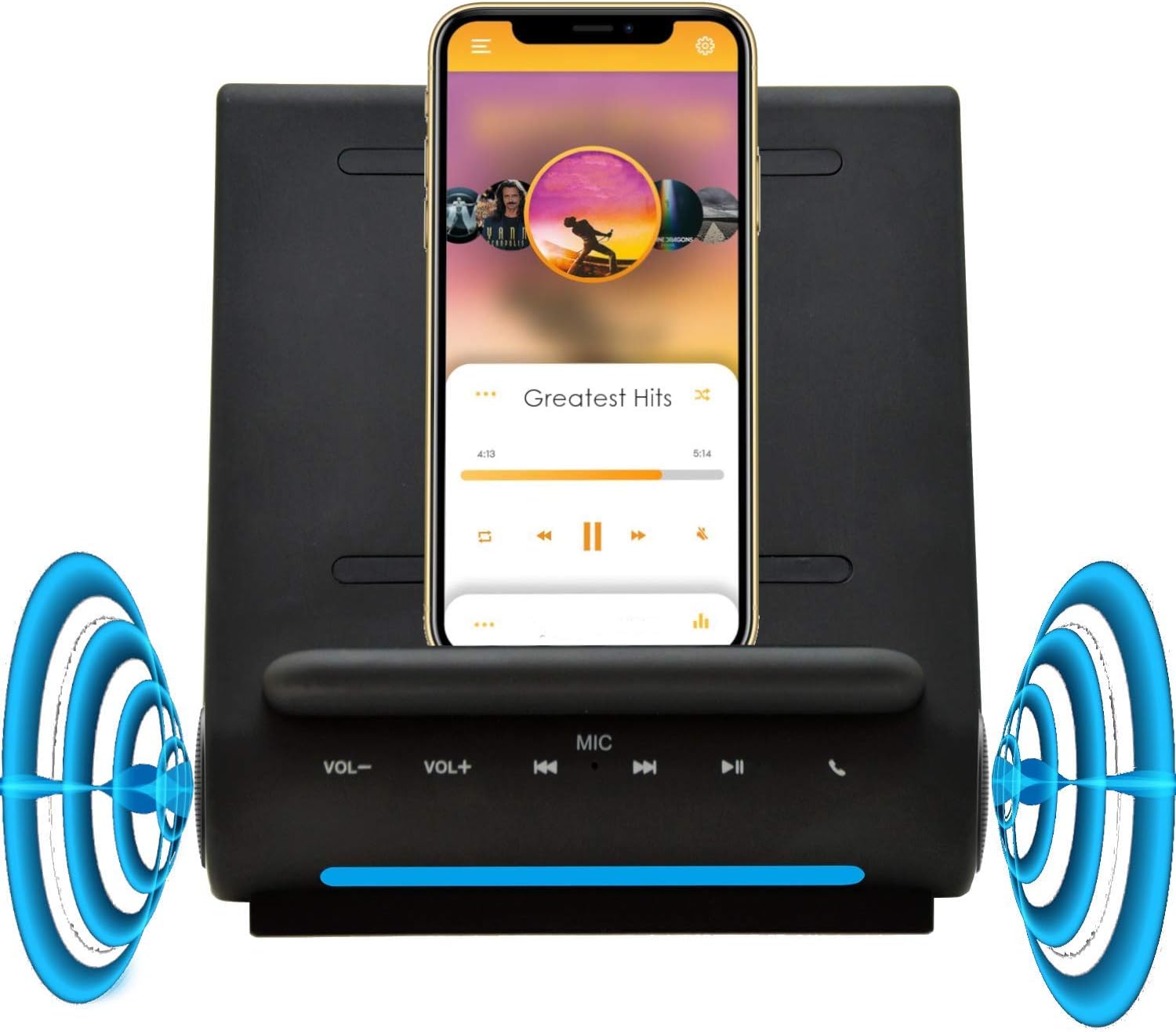
Figure 4: A smartphone wirelessly charging on the Dockall D115, demonstrating its upright viewing angle and integrated speakers.

Figure 5: A tablet positioned on the Dockall D115, showcasing its ability to hold larger devices for viewఛార్జింగ్ చేస్తున్నప్పుడు ing.
2. Using Bluetooth Speakers
- Once your device is paired via Bluetooth, audio will automatically stream through the Dockall D115's dual 5W speakers.
- Use the VOL- / VOL+ buttons on the front panel or your connected device to adjust the volume.
- Use the Previous / Next Track and Play/Pause buttons to control music playback.
3. హ్యాండ్స్-ఫ్రీ కాలింగ్
అంతర్నిర్మిత మైక్రోఫోన్ స్పష్టమైన హ్యాండ్స్-ఫ్రీ కమ్యూనికేషన్ను అనుమతిస్తుంది.
- When a call comes in, press the Call button on the front panel to answer.
- Speak towards the MIC on the front panel.
- కాల్ ముగించడానికి కాల్ బటన్ను మళ్ళీ నొక్కండి.
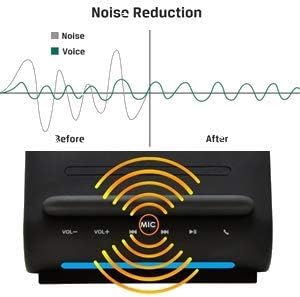
Figure 6: A graphic demonstrating the noise reduction capabilities of the Dockall D115's built-in microphone, enhancing call clarity.
4. USB ఛార్జింగ్ పోర్టులను ఉపయోగించడం
In addition to wireless charging, the Dockall D115 provides two USB ports for wired charging.
- Connect your device's USB charging cable to either the USB1A or USB2A port on the rear of the Dockall D115.
- You can charge up to three devices simultaneously (one wirelessly, two via USB).
5. Reconnecting Bluetooth
If your smartphone disconnects from the Dockall D115, you can easily reconnect it.
- Long-press the Play/Pause button on the front panel of the Dockall D115.
- The device will indicate that it is reconnected with a chime.
Video 2: This video demonstrates how to reconnect a previously paired Bluetooth device to the Azpen Dockall D115 by long-pressing the Play/Pause button.
నిర్వహణ
- పరికరాన్ని మృదువైన, పొడి వస్త్రంతో శుభ్రం చేయండి. రాపిడి క్లీనర్లను లేదా ద్రావకాలను ఉపయోగించవద్దు.
- Keep the charging surface free of dust and debris to ensure efficient wireless charging.
- ఎక్కువ కాలం ఉపయోగంలో లేనప్పుడు పరికరాన్ని చల్లని, పొడి ప్రదేశంలో నిల్వ చేయండి.
ట్రబుల్షూటింగ్
| సమస్య | సాధ్యమైన కారణం | పరిష్కారం |
|---|---|---|
| పరికరం ఆన్ చేయడం లేదు. | Power adapter not connected or faulty; Power switch is OFF. | Ensure power adapter is securely connected and plugged into a working outlet. Flip the Power switch to ON. |
| వైర్లెస్ ఛార్జింగ్ పనిచేయడం లేదు. | Device not Qi-compatible; Misaligned on charging pad; Phone case too thick or metallic; Foreign object on pad. | Verify device supports Qi wireless charging. Reposition device on the pad. Remove phone case. Remove any foreign objects. |
| Bluetooth not connecting/pairing. | Dockall D115 not in pairing mode; Bluetooth disabled on phone; Device too far from Dockall. | Ensure Dockall is powered on and in pairing mode. Enable Bluetooth on your phone. Move phone closer to the Dockall. Try long-pressing the Play/Pause button to force reconnection. |
| ఆడియో నాణ్యత సరిగా లేదు లేదా శబ్దం లేదు. | Volume too low; Device not properly connected; Audio source issue. | Increase volume on both Dockall and connected device. Re-pair Bluetooth. Check audio source on your device. |
| Phone overheating during wireless charging. | Improper alignment; Phone case interfering; Environmental factors. | Ensure phone is correctly aligned. Remove phone case. Avoid charging in direct sunlight or hot environments. If issue persists, discontinue use and contact support. |
స్పెసిఫికేషన్లు
| ఫీచర్ | వివరాలు |
|---|---|
| బ్రాండ్ | అజ్పెన్ |
| మోడల్ సంఖ్య | D115 |
| వైర్లెస్ ఛార్జింగ్ అవుట్పుట్ | 15W |
| బ్లూటూత్ స్పీకర్లు | ద్వంద్వ 5W |
| USB ఛార్జింగ్ పోర్ట్లు | 2 (USB1A, USB2A) |
| ఇన్పుట్ వాల్యూమ్tage | 20 వోల్ట్లు |
| వస్తువు బరువు | 1.6 పౌండ్లు |
| అనుకూల పరికరాలు | Qi-enabled smartphones (e.g., iPhone 11-17, Samsung Galaxy S20-S25) |
వారంటీ సమాచారం
The Azpen Dockall D115 comes with an 18-month warranty from the date of purchase. This warranty covers manufacturing defects and malfunctions under normal use. It does not cover damage caused by misuse, accidents, unauthorized modifications, or natural disasters. Please retain your proof of purchase for warranty claims.
మద్దతు
For technical support, warranty claims, or further assistance, please contact Azpen customer service:
- Webసైట్: www.azpenpc.com
- ఇమెయిల్: support@azpenpc.com (exampలే)
- ఫోన్: 1-800-XXX-XXXX (ఉదాampలే)