
1. ఉత్పత్తి ముగిసిందిview
The VENTION USB 3.0 Hub (Model CHL) is a compact and portable 4-port USB splitter designed to expand the connectivity of your laptop or PC. It offers high-speed data transfer and broad compatibility with various USB devices.
ముఖ్య లక్షణాలు:
- 4-పోర్ట్ విస్తరణ: Provides four additional USB ports for connecting multiple peripherals simultaneously.
- హై-స్పీడ్ డేటా బదిలీ: Utilizes USB 3.0 technology for data sync speeds up to 5Gbps, which is up to 10 times faster than USB 2.0.
- ప్లగ్ మరియు ప్లే: Requires no driver installation for immediate use.
- బాహ్య విద్యుత్ మద్దతు: Includes a micro USB port for optional external power supply when connecting power-hungry devices. Avoid power adapters exceeding 5V/2A.
- కాంపాక్ట్ మరియు పోర్టబుల్: Ultra-slim and lightweight design for easy transport and use on the go.
- విస్తృత అనుకూలత: Supports Windows 10/8/7/Vista/XP, Mac OS x 10.6-10.12 or later, and Linux 2.6.14 or later.
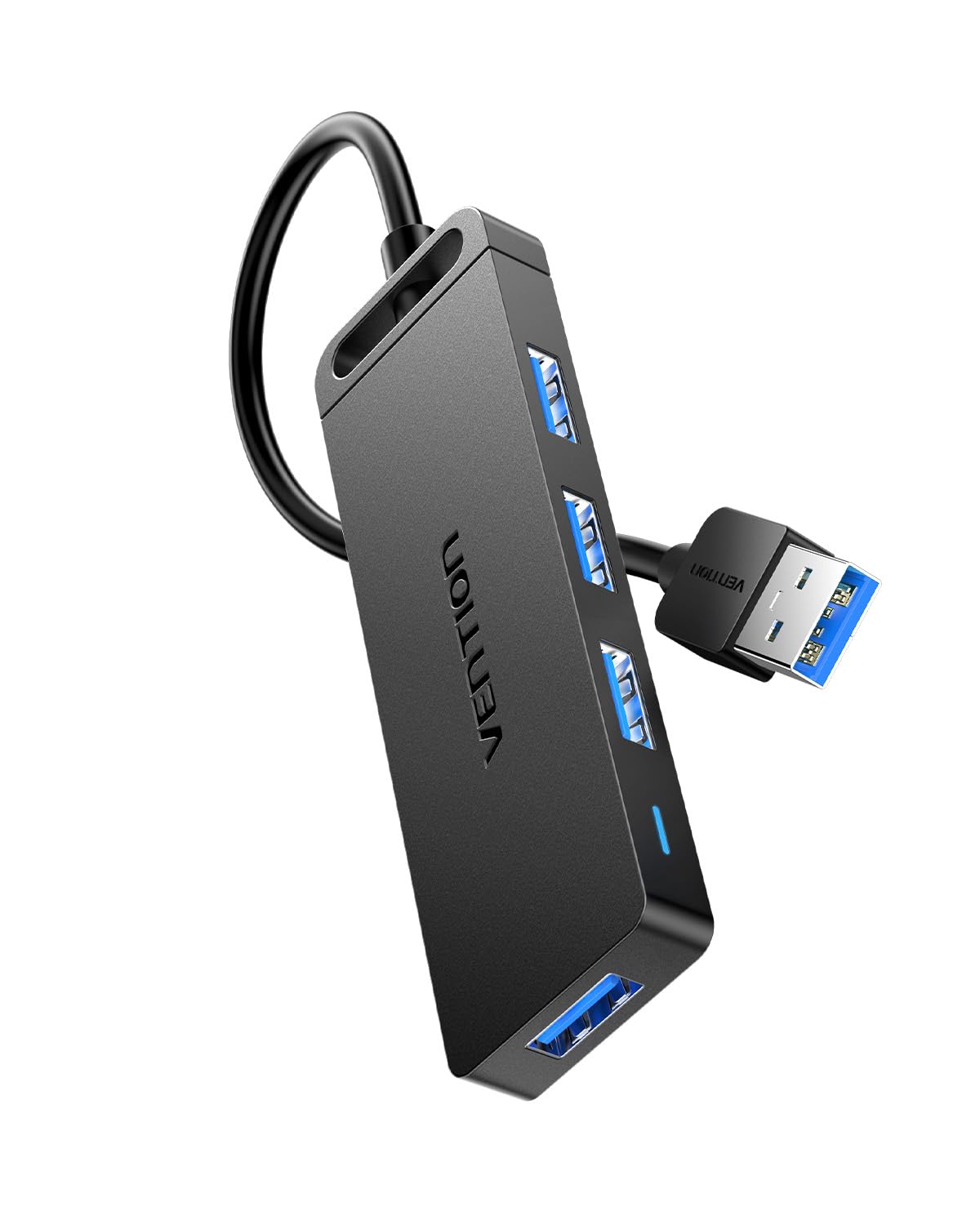
Figure 1: VENTION USB 3.0 Hub (Model CHL)
2. సెటప్ సూచనలు
Follow these steps to set up your VENTION USB 3.0 Hub:
- హోస్ట్ పరికరానికి కనెక్ట్ చేయండి: Plug the USB-A connector of the VENTION USB 3.0 Hub into an available USB 3.0 port on your laptop, PC, or other compatible host device. The hub is plug-and-play, so no additional drivers are required.
- Observe Indicator Light: Once connected, a blue indicator light on the hub will illuminate, signifying that the device is powered and operational.
- ఐచ్ఛిక బాహ్య శక్తి: If you plan to connect power-hungry devices such as external hard drives, connect a micro USB power adapter (not included) to the micro USB port on the hub. Ensure the power adapter does not exceed 5V/2A to prevent damage.

Figure 2: Connecting the USB Hub to a laptop.
Video 1: Demonstrates connecting the VENTION USB 3.0 Hub to a laptop, showing the indicator light, internal chip, data transfer capabilities, and smart phone charging support.
3. ఆపరేటింగ్ సూచనలు
Once the hub is connected, you can begin using its ports:
- కనెక్ట్ చేసే పరికరాలు: Insert your USB devices (e.g., flash drives, external hard drives, mouse, keyboard, printer) into any of the four available USB 3.0 ports on the hub.
- డేటా బదిలీ: The hub supports high-speed data transfer up to 5Gbps. This allows for quick transfer of large files, such as a 1GB file దాదాపు 3 సెకన్లలో.
- ఛార్జింగ్: The USB 3.0 ports can also support charging for smart phones and other compatible devices, especially when the hub is connected to an external power source.
- వెనుకకు అనుకూలత: The hub is backward compatible with USB 2.0 and USB 1.0 devices, ensuring versatility with older peripherals, though data transfer speeds will be limited to the device's capabilities.
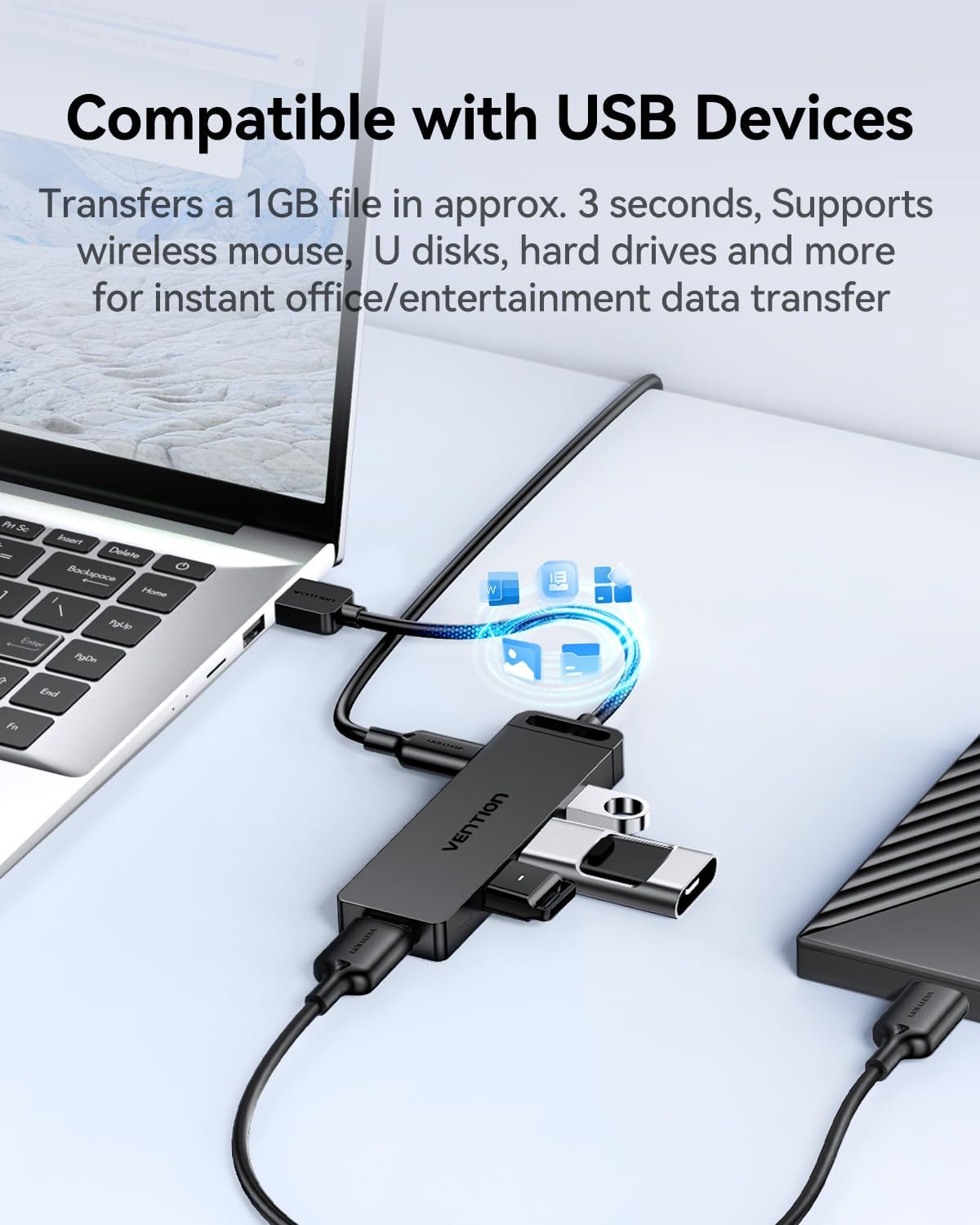
Figure 3: The VENTION USB 3.0 Hub connected to a laptop with multiple USB devices.

Figure 4: The 4-in-1 USB 3.0 Multiport Hub helps maintain a tidy workspace by consolidating connections.
Video 2: Shows the VENTION USB 3.0 Hub in use, connecting multiple devices to a tablet and demonstrating its utility.
4. నిర్వహణ
To ensure the longevity and optimal performance of your VENTION USB 3.0 Hub, follow these maintenance guidelines:
- శుభ్రపరచడం: Use a soft, dry cloth to wipe the exterior of the hub. Avoid liquid cleaners or abrasive materials that could damage the surface or internal components.
- నిల్వ: ఉపయోగంలో లేనప్పుడు, హబ్ను ప్రత్యక్ష సూర్యకాంతి మరియు తీవ్రమైన ఉష్ణోగ్రతలకు దూరంగా చల్లని, పొడి ప్రదేశంలో నిల్వ చేయండి.
- కేబుల్ కేర్: Avoid bending or twisting the integrated USB cable excessively to prevent internal wire damage.
- వేడి వెదజల్లడం: The hub features a durable, scratch-resistant ABS shell designed to improve heat dissipation. Ensure it is not covered or placed in an enclosed space during operation to allow for proper airflow.

Figure 5: The durable ABS shell of the VENTION USB 3.0 Hub is designed for effective heat dissipation.
5. ట్రబుల్షూటింగ్
If you encounter issues with your VENTION USB 3.0 Hub, refer to the following common problems and solutions:
- పరికరం గుర్తించబడలేదు:
- Ensure the hub is securely plugged into your computer's USB port.
- మీ కంప్యూటర్లోని వేరొక USB పోర్ట్కు హబ్ను కనెక్ట్ చేయడానికి ప్రయత్నించండి.
- Restart your computer and reconnect the hub.
- If connecting a power-hungry device (e.g., external HDD), ensure an external micro USB power adapter (5V/2A max) is connected to the hub.
- నెమ్మది డేటా బదిలీ వేగం:
- Verify that both the hub and your connected device support USB 3.0 for optimal speeds. If either is USB 2.0, speeds will be limited to USB 2.0 rates.
- Ensure the hub is connected to a USB 3.0 port on your computer (often identified by a blue interior).
- Avoid connecting too many power-hungry devices simultaneously without an external power supply.
- అడపాదడపా కనెక్షన్:
- అన్ని కేబుల్ కనెక్షన్లు వదులుగా ఉన్నాయా అని తనిఖీ చేయండి.
- Ensure the USB cable of the hub is not damaged.
- Test with different USB devices to isolate if the issue is with a specific peripheral.
If these steps do not resolve the issue, please contact VENTION customer service for further assistance.
6. స్పెసిఫికేషన్లు
| ఫీచర్ | వివరాలు |
|---|---|
| బ్రాండ్ | VENTION |
| మోడల్ సంఖ్య | సిహెచ్ఎల్ |
| ఉత్పత్తి కొలతలు | 3.9 x 1.2 x 0.4 అంగుళాలు |
| వస్తువు బరువు | 1.38 ఔన్సులు |
| హార్డ్వేర్ ఇంటర్ఫేస్ | USB 3.0 |
| డేటా బదిలీ వేగం | 5Gbps వరకు |
| ప్రత్యేక లక్షణాలు | Fast Data Transfer, Heat Resistant, Indicator Light, Lightweight, Portable |
| అనుకూల పరికరాలు | Computers, Laptops, Keyboards, Mouse, USB sound cards, Flash Drives, HDDs, Printers |
| విద్యుత్ సరఫరా | USB Bus-powered; Micro USB for optional external power (5V/2A max) |
| ఆపరేటింగ్ సిస్టమ్స్ | Windows 10/8/7/Vista/XP, Mac OS x 10.6-10.12+, Linux 2.6.14+ |
7. వారంటీ మరియు మద్దతు
The VENTION USB 3.0 Hub (Model CHL) comes with a 1 సంవత్సరాల వారంటీ కొనుగోలు చేసిన తేదీ నుండి. ఈ వారంటీ తయారీ లోపాలను కవర్ చేస్తుంది మరియు సాధారణ ఉపయోగంలో ఉత్పత్తి దాని పేర్కొన్న పనితీరు ప్రమాణాలకు అనుగుణంగా ఉందని నిర్ధారిస్తుంది.
For any questions, technical support, or warranty claims, please contact VENTION customer service. You can typically find contact information on the product packaging or the official VENTION webసైట్.