
1. ఉత్పత్తి ముగిసిందిview
The VENTION Cat 6 Ethernet Extension Cable is designed to extend the reach of your existing Cat 6 Ethernet cable. This 3-foot (0.91 meter) shielded RJ45 male-to-female connector cable provides a reliable solution for situations where your original Ethernet cable is too short, eliminating the need to purchase a new, longer cable. It also helps protect your device's network ports from wear caused by frequent plugging and unplugging.
This extension cable supports high-speed data transmission, ensuring your network performance remains consistent. Its robust construction and high-quality materials contribute to its durability and signal integrity.

Image 1.1: VENTION Cat 6 Ethernet Extension Cable highlighting 1000Mbps speed and 250MHz bandwidth.
2. సెటప్ సూచనలు
The VENTION Cat 6 Ethernet Extension Cable is designed for straightforward installation. Follow these steps to extend your network connection:
- కనెక్షన్ పాయింట్లను గుర్తించండి: Locate the Ethernet port on your device (e.g., PC, laptop, router, smart TV) and the male RJ45 connector of your existing Ethernet cable.
- ఇప్పటికే ఉన్న కేబుల్ను కనెక్ట్ చేయండి: Insert the male RJ45 connector of your existing Ethernet cable into the female RJ45 port of the VENTION extension cable. Ensure it clicks securely into place.
- పరికరానికి కనెక్ట్ చేయండి: Insert the male RJ45 connector of the VENTION extension cable into the Ethernet port of your target device. Ensure it clicks securely into place.
- కనెక్షన్ని ధృవీకరించండి: Check the network indicator lights on your device or router to confirm a successful connection.
The cable can be used in two primary ways:
- Extension for Network Cable: Connect the extension cable to an existing network cable to increase its length.
- Extension for Network Port: Connect the extension cable directly to a device's network port to provide an easily accessible extension point, protecting the device's original port.

Image 2.1: Illustrates connecting the extension cable to an existing network cable or directly to a device's network port.

Image 2.2: A VENTION Cat 6 Ethernet Extension Cable connected to a laptop, demonstrating a typical setup.
3. ఆపరేటింగ్ సూచనలు
Once properly connected, the VENTION Cat 6 Ethernet Extension Cable operates seamlessly to maintain your network connection. It is designed to support high-speed data transfer without degradation.
- హై-స్పీడ్ ట్రాన్స్మిషన్: The cable supports a maximum data transfer speed of 1000 Mbps (1 Gigabit per second) and a bandwidth of up to 250MHz. This ensures that extending your cable does not compromise your network speed for most home and office applications.
- యూనివర్సల్ అనుకూలత: This RJ45 extension cable is fully compatible with all Cat 6 Ethernet cables and is backward compatible with Cat 5 and Cat 5e cables. It can connect various LAN network components, including PCs, laptops, computer servers, switches, routers, modems, network media players, smart TVs, network printers, and gaming consoles like PS5 and PS4.

Image 3.1: Illustration of fast data transfer speed with VENTION Cat 6 RJ45 Extension cable compared to Cat 5.

చిత్రం 3.2: ఉదాamples of compatible devices for the VENTION Ethernet extension cable.
4. నిర్వహణ మరియు సంరక్షణ
The VENTION Cat 6 Extension Cable is built for durability and requires minimal maintenance. Adhering to these guidelines will ensure its longevity and optimal performance:
- మన్నిక: The cable is designed to withstand at least 10,000 bends, making it highly resistant to damage from flexing.
- ఉష్ణోగ్రత పరిధి: It operates effectively in temperatures ranging from -15 to 65 degrees Celsius, suitable for both indoor and outdoor wiring.
- నిల్వ: Store the cable in a cool, dry place away from direct sunlight and extreme temperatures when not in use.
- శుభ్రపరచడం: If necessary, gently wipe the cable and connectors with a dry, soft cloth. Avoid using harsh chemicals or abrasive materials.
- నిర్వహణ: Avoid excessive pulling or bending of the connectors to prevent damage to the internal wiring or the RJ45 clips.
5. ట్రబుల్షూటింగ్
If you encounter issues with your VENTION Cat 6 Ethernet Extension Cable, consider the following troubleshooting steps:
- నెట్వర్క్ కనెక్షన్ లేదు:
- Ensure both ends of the extension cable are securely plugged into the existing Ethernet cable and the device's network port. Listen for a click when inserting the RJ45 connectors.
- Test the original Ethernet cable without the extension to confirm it is functioning correctly.
- Try connecting the extension cable to a different device or port to rule out a port-specific issue.
- Restart your network devices (router, modem, computer).
- నెమ్మదించిన నెట్వర్క్ వేగం:
- While the extension cable is designed not to diminish speed, ensure all components in your network chain (router, modem, original cable) are rated for Cat 6 or higher speeds to achieve optimal performance.
- Check for other network congestion or issues with your internet service provider.
- Ensure the cable is not excessively bent or kinked, which can affect signal quality.
- అడపాదడపా కనెక్షన్:
- Verify that the connectors are clean and free from dust or debris.
- Ensure the cable is not near strong electromagnetic interference sources. The double shielding helps minimize interference, but extreme sources can still cause issues.
- ఏదైనా కనిపించే నష్టం కోసం కేబుల్ను తనిఖీ చేయండి.
6. సాంకేతిక లక్షణాలు
| ఫీచర్ | స్పెసిఫికేషన్ |
|---|---|
| బ్రాండ్ | VENTION |
| మోడల్ పేరు | IBL |
| కనెక్టర్ రకం | RJ45 |
| కేబుల్ రకం | ఈథర్నెట్ |
| కనెక్టర్ లింగం | మగ-ఆడ |
| ఈథర్నెట్ కేబుల్ వర్గం | పిల్లి 6 |
| డేటా బదిలీ రేటు | 1 Gigabits Per Second (1000 Mbps) |
| ఫ్రీక్వెన్సీ | 250 MHz |
| ప్రత్యేక ఫీచర్ | Braided, Data Transfer, High Speed, Shielded (SSTP) |
| అనుకూల పరికరాలు | Laptop, Modem, PC, Router, Smart TV, Gaming Consoles |
| రంగు | నలుపు |
| బాహ్య పదార్థం | Textile (PVC jacket) |
| షీల్డింగ్ | Double shielding (Aluminum foil + braided mesh) |
| కండక్టర్ మెటీరియల్ | ఆక్సిజన్ లేని రాగి |
| ఇండోర్/అవుట్డోర్ వినియోగం | ఇండోర్, అవుట్డోర్ |
| వస్తువు బరువు | 2.08 ఔన్సులు |
| కొలతలు (ప్యాకేజీ) | 8.5 x 5.71 x 0.87 అంగుళాలు |
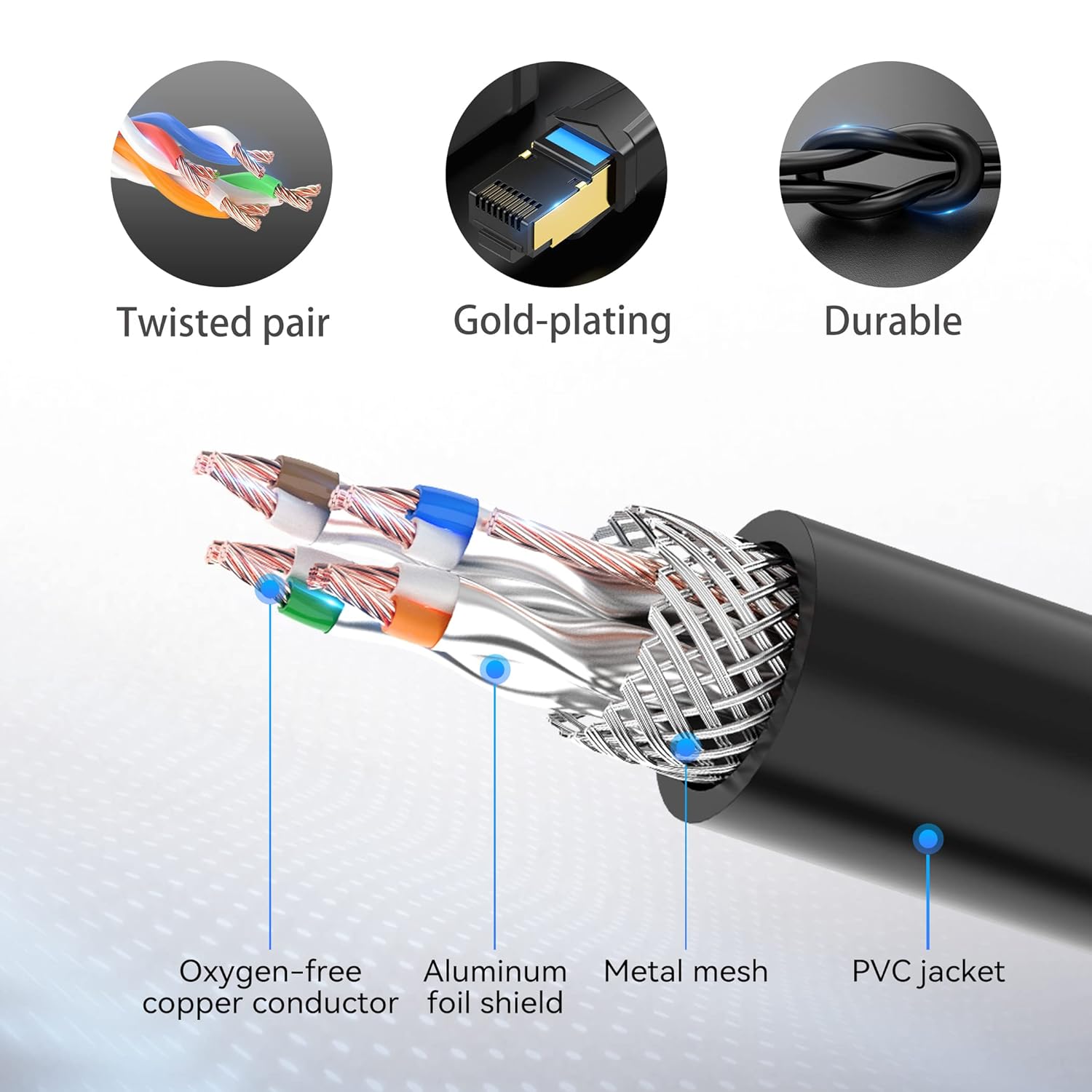
Image 6.1: Internal structure of the VENTION Cat 6 Ethernet Extension Cable, highlighting its shielded design.

Image 6.2: Dimensions of the VENTION Cat 6 Ethernet Extension Cable connectors.

Image 6.3: FLUKE Networks Test report confirming compliance with Cat 6 standards.
7. వారంటీ మరియు కస్టమర్ మద్దతు
VENTION products are designed for reliability and performance. This Ethernet Extension Cable has undergone rigorous quality tests and holds CE, FCC, and RoHS certifications, ensuring it meets international standards for safety and environmental compliance.
For any questions regarding your product, technical assistance, or warranty claims, please contact VENTION customer service. Our team is committed to providing reliable support and will respond to your inquiries within 24 hours.
Please refer to the product packaging or the official VENTION webనిర్దిష్ట వారంటీ నిబంధనలు మరియు సంప్రదింపు సమాచారం కోసం సైట్.

Image 7.1: Product certifications for quality and compliance.