
1. పరిచయం
This manual provides essential information for the safe and effective use of your ProForm Sport 3.0 Treadmill. Please read all instructions thoroughly before assembly and operation. Retain this manual for future reference.
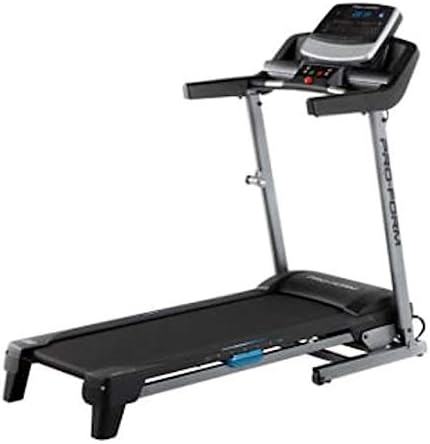
Image: The ProForm Sport 3.0 Treadmill, showcasing its overall design and console.
2. ముఖ్యమైన భద్రతా సమాచారం
To reduce the risk of serious injury, read the following important precautions before using the treadmill:
- ఏదైనా వ్యాయామ కార్యక్రమాన్ని ప్రారంభించే ముందు వైద్యుడిని సంప్రదించండి.
- The treadmill is designed to support a maximum user weight of 125 కిలోగ్రాములు (275 పౌండ్లు).
- Recommended for users 15 సంవత్సరాలు మరియు అంతకంటే ఎక్కువ వయస్సు గలవారు.
- Always attach the భద్రతా కీ to your clothing before starting the treadmill. The treadmill will stop if the safety key is disengaged.
- ఆపరేషన్ సమయంలో పిల్లలు మరియు పెంపుడు జంతువులను ట్రెడ్మిల్ నుండి దూరంగా ఉంచండి.
- Place the treadmill on a level surface with at least 2 meters (6.5 feet) of clear space behind it and 0.5 meters (1.6 feet) on each side.
- తగిన వ్యాయామ దుస్తులు మరియు అథ్లెటిక్ బూట్లు ధరించండి.
- ట్రెడ్మిల్కు దెబ్బతిన్న పవర్ కార్డ్ లేదా ప్లగ్ ఉంటే, లేదా అది సరిగ్గా పని చేయకపోతే దాన్ని ఆపరేట్ చేయవద్దు.
3. అసెంబ్లీ సూచనలు
The ProForm Sport 3.0 Treadmill requires assembly. Please refer to the separate assembly guide included with your product for detailed, step-by-step instructions. Ensure all components listed in the assembly guide are present before beginning. A tool kit is included to assist with assembly.
The treadmill features a స్పేస్ సేవర్ design, allowing it to be folded for storage after use. Follow the assembly guide for instructions on how to properly fold and unfold the treadmill.
4. ఆపరేటింగ్ సూచనలు

చిత్రం: క్లోజప్ view of the ProForm Sport 3.0 Treadmill console.
4.1 పవర్ ఆన్ మరియు ఆఫ్
- Connect the power cord to a grounded outlet. The treadmill operates on 9Vcc 2.0A.
- Locate the main power switch, usually near the front of the treadmill base, and flip it to the 'ON' position.
- To power off, flip the main power switch to 'OFF' and unplug the power cord.
4.2 కన్సోల్ ఓవర్view
The console features a 5-inch Multi-Color Display that shows workout metrics such as speed, incline, time, distance, and heart rate. It includes an audio port compatible with two 2-inch speakers for entertainment during your workout.
4.3 వ్యాయామం ప్రారంభించడం
- ట్రెడ్మిల్ బెల్ట్ మీద అడుగు పెట్టండి, మీ పాదాలను సైడ్ రైల్స్పై ఉంచండి.
- అటాచ్ చేయండి భద్రతా కీ clip to your clothing. Insert the safety key into its designated slot on the console.
- Press the 'START' button on the console. The belt will begin to move at a low speed.

Image: A user engaging in a workout on the ProForm Sport 3.0 Treadmill.
4.4 వేగం మరియు వంపు సర్దుబాటు
- ఉపయోగించండి డిజిటల్ స్పీడ్ కంట్రోల్ buttons (usually '+' and '-') to adjust the belt speed from 0 నుండి 10 MPH.
- ఉపయోగించండి Digital Incline Control buttons to adjust the incline from 0% నుండి 10%.
- Quick speed and incline buttons may also be available for rapid adjustments.
4.5 ప్రీ-సెట్ ప్రోగ్రామ్లను ఉపయోగించడం
The treadmill includes 16 Pre-set Training Programs. Select a program from the console. The treadmill will automatically adjust speed and incline according to the program's profile. స్క్రీన్ పై కనిపించే ప్రాంప్ట్లను అనుసరించండి.
4.6 హృదయ స్పందన పర్యవేక్షణ
The treadmill is equipped with an EKG Pulse Sensor. To monitor your heart rate, grasp the metal contacts on the handlebars firmly with both hands. Your heart rate will be displayed on the console after a few seconds.
5. నిర్వహణ
క్రమం తప్పకుండా నిర్వహణ మీ ట్రెడ్మిల్ యొక్క దీర్ఘాయువు మరియు సరైన పనితీరును నిర్ధారిస్తుంది.
- శుభ్రపరచడం: ప్రకటనతో కన్సోల్ మరియు ఇతర ఉపరితలాలను తుడవండిamp ప్రతి ఉపయోగం తర్వాత వస్త్రాన్ని శుభ్రం చేయండి. రాపిడి క్లీనర్లు లేదా ద్రావకాలను ఉపయోగించడం మానుకోండి.
- బెల్ట్ తనిఖీ: Periodically check the walking belt for wear and tear. Ensure the belt is centered and properly tensioned. Refer to the assembly guide for belt adjustment procedures.
- సరళత: The walking belt may require lubrication over time. Consult your assembly guide or manufacturer's recommendations for the correct lubricant and application frequency.
- కాంపోనెంట్ చెక్: Regularly inspect all nuts, bolts, and moving parts for tightness and proper function. Tighten any loose fasteners.
6. ట్రబుల్షూటింగ్
If you experience issues with your treadmill, refer to the following common problems and solutions:
| సమస్య | సాధ్యమైన కారణం | పరిష్కారం |
|---|---|---|
| ట్రెడ్మిల్ పవర్ ఆన్ అవ్వదు. | Power cord not plugged in; main power switch off; circuit breaker tripped. | Ensure power cord is securely plugged in. Turn main power switch to 'ON'. Check household circuit breaker. |
| బెల్ట్ కదలదు. | Safety key not inserted; motor overload; belt misalignment. | Insert the safety key fully. Reduce user weight if exceeding capacity. Refer to assembly guide for belt alignment. |
| Inaccurate heart rate reading. | సెన్సార్లపై చేతులు గట్టిగా లేకపోవడం; పొడి చేతులు; జోక్యం. | Ensure firm, consistent contact with EKG pulse sensors. Moisten hands slightly if dry. Avoid electronic interference. |
| ఆపరేషన్ సమయంలో అసాధారణ శబ్దం. | Loose components; belt friction; motor issue. | Check and tighten all visible bolts and screws. Lubricate belt if necessary (refer to manual). If noise persists, contact support. |
7. స్పెసిఫికేషన్లు
| మోడల్ సంఖ్య | క్రీడ 3.0 |
| మోటార్ పవర్ | 2.5 HP |
| గరిష్ట వినియోగదారు బరువు | 125 కిలోలు (275 పౌండ్లు) |
| స్పీడ్ రేంజ్ | 0 - 10 MPH (Digital Control) |
| ఇంక్లైన్ రేంజ్ | 0 - 10% (Digital Control) |
| రన్నింగ్ బెల్ట్ కొలతలు | 16 x 50 అంగుళాలు (సుమారు 40.6 x 127 సెం.మీ) |
| ప్రదర్శన రకం | 5-inch Multi-Color LCD |
| ముందుగా సెట్ చేసిన ప్రోగ్రామ్లు | 16 |
| కుషనింగ్ సిస్టమ్ | ProShoxTM Plus |
| ఫ్రేమ్ మెటీరియల్ | స్టీల్ మిశ్రమం |
| ఉత్పత్తి కొలతలు (L x W x H) | 170 x 70 x 30 సెం.మీ (సుమారుగా 67 x 27.5 x 11.8 అంగుళాలు) |
| ఉత్పత్తి బరువు | 50 కిలోలు (110 పౌండ్లు) |
| శక్తి అవసరం | 9Vcc 2.0A (Cable Eléctrico) |
| చేర్చబడిన భాగాలు | Power cable, Tool kit, Space Saver system, ProShoxTM Plus cushioning, Safety key braking system |
8. వారంటీ మరియు మద్దతు
For information regarding your product's warranty, please refer to the warranty card included with your purchase or visit the official ProForm website. If you require technical assistance, replacement parts, or have questions not covered in this manual, please contact ProForm customer support directly.
Extended protection plans may be available for purchase separately. Please consult your retailer for details on available extended warranty options.