
1. పరిచయం
The Ewent EW1538 Dual Monitor Desk Mount is designed to create an ergonomic and space-saving workspace. This gas spring-powered desk mount allows you to position two monitors (13-27 inches, 2-7 kg each) at your ideal height and viewing angle with ease. Its flexible adjustments help reduce strain on your neck, back, and shoulders, promoting a more comfortable and productive environment. The integrated cable management system keeps your workspace tidy.

Image 1.1: Ewent EW1538 Dual Monitor Desk Mount without monitors.
2. భద్రతా సమాచారం
Please read all instructions carefully before assembly and use. Failure to follow these instructions may result in property damage, serious injury, or death.
- బరువు సామర్థ్యం: Do not exceed the maximum weight capacity of 7 kg (15.4 lbs) per monitor. Ensure your monitors are within the specified weight range.
- మానిటర్ పరిమాణం: This mount is suitable for monitors between 13 and 27 inches.
- VESA అనుకూలత: Ensure your monitors have VESA mounting patterns (75x75mm or 100x100mm).
- డెస్క్ మందం: Verify your desk is thick enough and structurally sound to support the combined weight of the mount and monitors.
- పించ్ పాయింట్లు: Be aware of moving parts and potential pinch points during assembly and adjustment. Keep hands clear.
- అసెంబ్లీ: Assemble the product exactly as described in this manual. Do not modify the mount.
- పిల్లలు: Keep children away from the assembly area. Small parts may be a choking hazard.
3. ప్యాకేజీ విషయాలు
Before assembly, ensure all parts are present and undamaged. If any parts are missing or damaged, contact your retailer for assistance.
- డెస్క్ బేస్
- ప్రధాన పోల్
- డ్యూయల్ మానిటర్ ఆర్మ్ అసెంబ్లీ
- VESA Mounting Plates (x2)
- హార్డ్వేర్ కిట్ (స్క్రూలు, వాషర్లు, స్పేసర్లు)
- Allen Keys / Wrenches
- కేబుల్ నిర్వహణ క్లిప్లు
4. సెటప్ సూచనలు
Follow these steps to assemble and install your Ewent EW1538 Dual Monitor Desk Mount.
4.1. Attach Base to Pole
- Place the desk base on a stable surface.
- Insert the main pole into the designated slot on the desk base.
- Secure the pole to the base using the provided screws and an Allen key from underneath the base. Tighten firmly.
4.2. Attach Monitor Arm Assembly to Pole
- Slide the dual monitor arm assembly onto the main pole.
- Adjust the arm to your desired initial height and secure it by tightening the locking screw on the back of the arm assembly with an Allen key.

చిత్రం 4.1: ముగిసిందిview of the monitor mount components and assembly.
4.3. Attach VESA Plates to Monitors
- మీ మానిటర్ ముఖాన్ని మృదువైన, శుభ్రమైన ఉపరితలంపై జాగ్రత్తగా ఉంచండి.
- Attach a VESA mounting plate to the back of each monitor using the appropriate screws and washers from the hardware kit. Ensure the screws are tightened securely but do not overtighten.

Image 4.2: Detail of VESA plate attachment to a monitor.
4.4. ఆయుధాలకు మానిటర్లను అమర్చండి
- With assistance, carefully lift each monitor and slide the VESA plate attached to the monitor onto the corresponding arm bracket.
- Ensure the monitor is securely seated on the bracket. Some brackets may have a quick-release or locking mechanism; engage it if present.
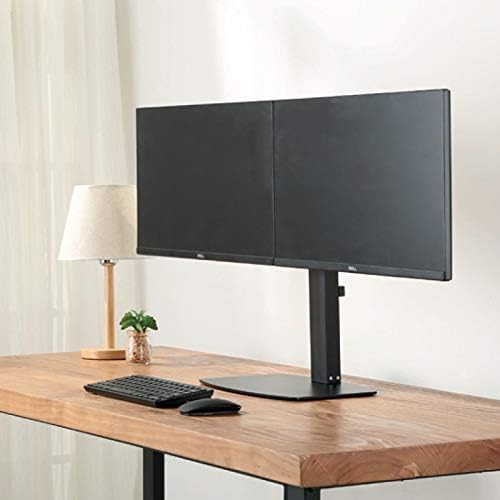
చిత్రం 4.3: ముందు view of two monitors mounted on the desk stand.
4.5. గ్యాస్ స్ప్రింగ్ టెన్షన్ని సర్దుబాటు చేయండి
- The gas spring tension may need adjustment to properly support your monitor's weight.
- Locate the tension adjustment screw on the arm (usually near the VESA plate or the arm pivot point).
- If the monitor sags, turn the screw clockwise to increase tension. If the monitor floats up too easily, turn the screw counter-clockwise to decrease tension. Adjust until the monitor stays in place when moved.
4.6. కేబుల్ నిర్వహణ
- Route your monitor cables (power, video) through the integrated cable management clips or channels on the monitor arms and down the main pole.
- This helps keep your workspace organized and prevents cable clutter.
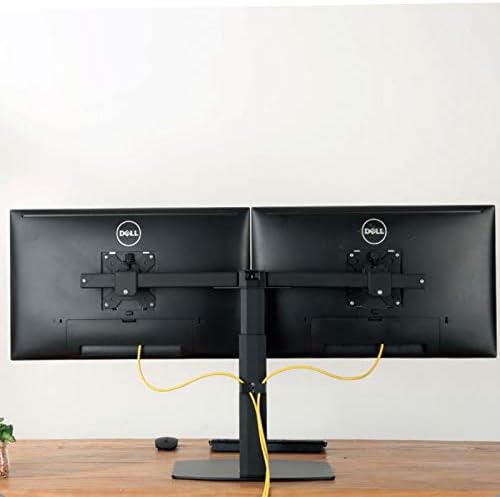
చిత్రం 4.4: వెనుక view illustrating cable management with monitors mounted.
5. ఆపరేటింగ్ సూచనలు
The Ewent EW1538 offers various adjustments for optimal viewing సౌకర్యం.
- ఎత్తు సర్దుబాటు: Gently push or pull the monitor up or down to adjust its height. The gas spring mechanism will hold it in place.
- వంపు సర్దుబాటు: Tilt the monitor screen up or down to reduce glare and find your preferred viewing కోణం.
- స్వివెల్ సర్దుబాటు: మీ స్క్రీన్ను షేర్ చేయడానికి లేదా మీ సర్దుబాటు చేయడానికి మానిటర్ను ఎడమ లేదా కుడి వైపుకు తిప్పండి viewing స్థానం.
- భ్రమణం: ల్యాండ్స్కేప్ మరియు పోర్ట్రెయిట్ ఓరియంటేషన్ల మధ్య మారడానికి మానిటర్ను 360 డిగ్రీలు తిప్పండి.

Image 5.1: Monitors adjusted to different orientations (landscape and portrait).
6. నిర్వహణ
క్రమం తప్పకుండా నిర్వహణ మీ మానిటర్ మౌంట్ యొక్క దీర్ఘాయువు మరియు సరైన పనితీరును నిర్ధారిస్తుంది.
- శుభ్రపరచడం: మౌంట్ను మృదువైన, డి-క్లాత్తో శుభ్రం చేయండి.amp వస్త్రం. రాపిడి క్లీనర్లు లేదా ద్రావకాలను నివారించండి.
- కనెక్షన్లను తనిఖీ చేయండి: అన్ని స్క్రూలు మరియు కనెక్షన్లు బిగుతుగా ఉన్నాయని నిర్ధారించుకోవడానికి కాలానుగుణంగా వాటిని తనిఖీ చేయండి. అవసరమైతే తిరిగి బిగించండి.
- గ్యాస్ స్ప్రింగ్: The gas spring is designed for long-term use and generally requires no maintenance. If adjustment becomes difficult, re-check the tension setting.
7. ట్రబుల్షూటింగ్
If you encounter issues with your monitor mount, refer to the following common solutions:
| సమస్య | సాధ్యమైన కారణం | పరిష్కారం |
|---|---|---|
| కుంగిపోవడం లేదా పడిపోవడాన్ని పర్యవేక్షించండి | మానిటర్ బరువుకు గ్యాస్ స్ప్రింగ్ టెన్షన్ చాలా తక్కువగా ఉంది. | సర్దుబాటు స్క్రూను సవ్యదిశలో తిప్పడం ద్వారా గ్యాస్ స్ప్రింగ్ టెన్షన్ను పెంచండి. |
| Monitor floats up too easily | మానిటర్ బరువుకు గ్యాస్ స్ప్రింగ్ టెన్షన్ చాలా ఎక్కువగా ఉంది. | సర్దుబాటు స్క్రూను అపసవ్య దిశలో తిప్పడం ద్వారా గ్యాస్ స్ప్రింగ్ టెన్షన్ను తగ్గించండి. |
| మానిటర్లు స్థాయిలో లేవు | Minor height discrepancy between arms or VESA plates. | Adjust the individual VESA plate height or arm tilt to level the monitors. |
| మౌంట్ అస్థిరంగా అనిపిస్తుంది | Base screws are loose or desk is not sturdy. | Ensure all assembly screws are tightened. Verify desk stability. |
8. స్పెసిఫికేషన్లు
- మోడల్: EW1538
- బ్రాండ్: ఎవెంట్
- స్క్రీన్ పరిమాణం అనుకూలత: 13 - 27 అంగుళాలు
- బరువు సామర్థ్యం: 2 - 7 kg (4.4 - 15.4 lbs) per monitor
- VESA అనుకూలత: 75x75mm, 100x100mm
- ఉద్యమం: Height adjustment (gas spring), Tilt (up to 15 degrees), Swivel, 360° Rotation
- మెటీరియల్: మన్నికైన మెటల్ మరియు ప్లాస్టిక్ నిర్మాణం
- రంగు: నలుపు
- ఉత్పత్తి బరువు: సుమారు 6 కిలోలు (13.2 పౌండ్లు)
9. వారంటీ మరియు మద్దతు
For warranty information or technical support, please refer to the documentation provided with your purchase or visit the official Ewent webసైట్. కస్టమర్ సేవ కోసం సంప్రదింపు వివరాలను సాధారణంగా అక్కడ చూడవచ్చు.