
1. పరిచయం
This manual provides essential instructions for the safe and efficient use of your Savio Tws-04 Wireless Bluetooth Earphones. Please read this manual thoroughly before using the product and retain it for future reference.
2. భద్రతా సమాచారం
- ఇయర్ఫోన్లు లేదా ఛార్జింగ్ కేసును తీవ్రమైన ఉష్ణోగ్రతలు, తేమ లేదా ద్రవాలకు బహిర్గతం చేయవద్దు.
- పరికరాన్ని పడవేయడం, ప్రభావితం చేయడం లేదా విడదీయడం మానుకోండి.
- పిల్లలకు దూరంగా ఉంచండి.
- ఆమోదించబడిన ఛార్జర్లు మరియు కేబుల్లను మాత్రమే ఉపయోగించండి.
- అధిక వాల్యూమ్ స్థాయిలలో ఎక్కువసేపు వినడం వలన వినికిడి దెబ్బతినవచ్చు.
3. ప్యాకేజీ విషయాలు
ప్యాకేజీలో అన్ని వస్తువులు ఉన్నాయని నిర్ధారించుకోండి:
- Savio Tws-04 Wireless Bluetooth Earphones (Left and Right)
- ఛార్జింగ్ కేసు
- USB ఛార్జింగ్ కేబుల్
- బహుళ పరిమాణాల చెవి చిట్కాలు
- వినియోగదారు మాన్యువల్

Image 3.1: Contents of the Savio Tws-04 package, showing the earphones, charging case, and various ear tip sizes.
4. ఉత్పత్తి ముగిసిందిview
The Savio Tws-04 earphones are designed for wireless audio playback and hands-free communication. They come with a portable charging case for convenience.

Image 4.1: Savio Tws-04 earphones displayed with their charging case.
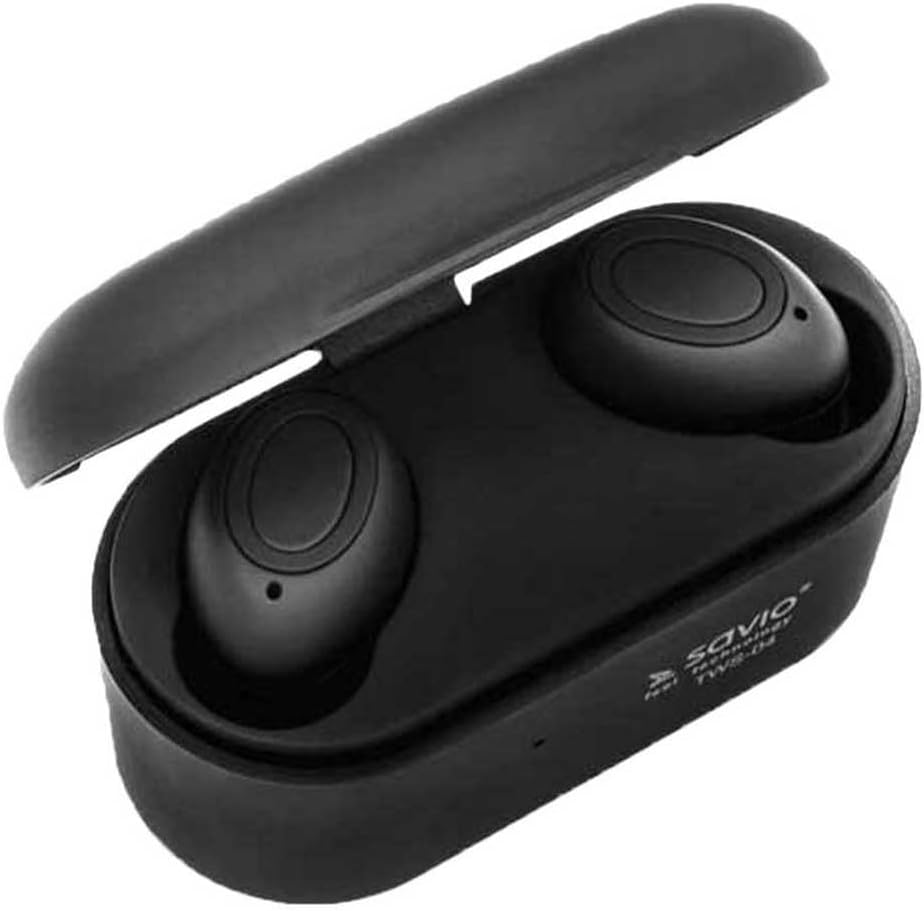
Image 4.2: The Savio Tws-04 earphones seated within their open charging case, showing charging contacts.
5. సెటప్
5.1. ఇయర్ఫోన్లు మరియు కేస్ను ఛార్జ్ చేయడం
- ప్రారంభ ఛార్జ్: మొదటిసారి ఉపయోగించే ముందు, ఇయర్ఫోన్లు మరియు ఛార్జింగ్ కేస్ రెండింటినీ పూర్తిగా ఛార్జ్ చేయండి.
- అభియోగం కేసు: Connect the USB charging cable to the charging port on the case and to a power source (e.g., computer USB port, wall adapter). The indicator light on the case will show charging status.
- ఇయర్ఫోన్లను ఛార్జ్ చేయండి: Place the earphones into the charging slots inside the case. Ensure they are properly seated. The indicator lights on the earphones will illuminate to show they are charging.
- పూర్తి ఛార్జ్: Once fully charged, the indicator lights will change or turn off. Disconnect the charging cable.

Image 5.1: An earphone placed in the charging case, illustrating the charging process.
5.2. బ్లూటూత్ పరికరంతో జత చేయడం
- పవర్ ఆన్: ఛార్జింగ్ కేస్ నుండి రెండు ఇయర్ఫోన్లను బయటకు తీయండి. అవి స్వయంచాలకంగా పవర్ ఆన్ అవుతాయి మరియు ఒకదానితో ఒకటి జత చేయడానికి ప్రయత్నిస్తాయి.
- జత చేసే మోడ్: Once paired with each other, one earphone's indicator light will flash, indicating it is ready to pair with your device.
- బ్లూటూత్ని ప్రారంభించండి: మీ స్మార్ట్ఫోన్ లేదా ఇతర బ్లూటూత్-ప్రారంభించబడిన పరికరంలో, బ్లూటూత్ సెట్టింగ్లకు వెళ్లి బ్లూటూత్ను ప్రారంభించండి.
- పరికరాన్ని ఎంచుకోండి: కోసం వెతకండి available devices and select "Savio Tws-04" from the list.
- కనెక్షన్ నిర్ధారణ: Once successfully paired, the earphone indicator light will stop flashing, and you may hear an audio prompt.
- మళ్లీ కనెక్షన్: పరికరంలో బ్లూటూత్ ప్రారంభించబడితే, ఇయర్ఫోన్లను కేస్ నుండి బయటకు తీసినప్పుడు అవి చివరిగా జత చేసిన పరికరానికి స్వయంచాలకంగా తిరిగి కనెక్ట్ అవుతాయి.
6. ఇయర్ఫోన్లను ఆపరేట్ చేయడం
6.1. పవర్ ఆన్/ఆఫ్
- పవర్ ఆన్: Take earphones out of the charging case. They will power on automatically. Alternatively, press and hold the multi-function button on both earphones for approximately 3 seconds.
- పవర్ ఆఫ్: Place earphones back into the charging case. They will power off automatically. Alternatively, press and hold the multi-function button on both earphones for approximately 5 seconds.
6.2. మ్యూజిక్ ప్లేబ్యాక్
- ప్లే/పాజ్: ఏ ఇయర్ఫోన్లోనైనా మల్టీ-ఫంక్షన్ బటన్ను ఒకసారి నొక్కండి.
- తదుపరి ట్రాక్: కుడి ఇయర్ఫోన్లోని మల్టీ-ఫంక్షన్ బటన్ను రెండుసార్లు నొక్కండి.
- మునుపటి ట్రాక్: ఎడమ ఇయర్ఫోన్లోని మల్టీ-ఫంక్షన్ బటన్ను రెండుసార్లు నొక్కండి.
- వాల్యూమ్ నియంత్రణ: (Note: Volume control may be managed directly from your connected device. Refer to your device's manual for specific instructions.)
6.3. కాల్ నిర్వహణ
- సమాధానం/ముగింపు కాల్: ఏ ఇయర్ఫోన్లోనైనా మల్టీ-ఫంక్షన్ బటన్ను ఒకసారి నొక్కండి.
- కాల్ని తిరస్కరించండి: Press and hold the multi-function button on either earphone for approximately 2 seconds.
- వాయిస్ అసిస్టెంట్: Triple tap the multi-function button on either earphone to activate your device's voice assistant (e.g., Siri, Google Assistant).
7. నిర్వహణ
- శుభ్రపరచడం: ఇయర్ఫోన్లు మరియు ఛార్జింగ్ కేసును శుభ్రం చేయడానికి మృదువైన, పొడి, మెత్తటి బట్టను ఉపయోగించండి. రాపిడి క్లీనర్లను లేదా ద్రావకాలను ఉపయోగించవద్దు.
- చెవి చిట్కాలు: ప్రకటనతో చెవి చివరలను క్రమం తప్పకుండా తీసివేసి శుభ్రం చేయండి.amp గుడ్డ. తిరిగి అతికించే ముందు అవి పూర్తిగా పొడిగా ఉన్నాయని నిర్ధారించుకోండి.
- నిల్వ: ఉపయోగంలో లేనప్పుడు, ఇయర్ఫోన్లను వాటి ఛార్జింగ్ కేసులో నిల్వ చేయండి, తద్వారా వాటిని రక్షించవచ్చు మరియు వాటిని ఛార్జ్ చేయవచ్చు. చల్లని, పొడి ప్రదేశంలో నిల్వ చేయండి.
- బ్యాటరీ సంరక్షణ: బ్యాటరీ జీవితకాలాన్ని పొడిగించడానికి, బ్యాటరీని తరచుగా పూర్తిగా డిశ్చార్జ్ చేయకుండా ఉండండి. ఎక్కువసేపు ఉపయోగంలో లేనప్పటికీ, పరికరాన్ని క్రమం తప్పకుండా ఛార్జ్ చేయండి.
8. ట్రబుల్షూటింగ్
| సమస్య | సాధ్యమైన పరిష్కారం |
|---|---|
| ఇయర్ఫోన్లు పవర్ ఆన్ చేయవు. | ఇయర్ఫోన్లు మరియు ఛార్జింగ్ కేసు పూర్తిగా ఛార్జ్ అయ్యాయని నిర్ధారించుకోండి. |
| ఇయర్ఫోన్లు పరికరంతో జత కావు. |
|
| Only one earphone is working. |
|
| పేలవమైన ఆడియో నాణ్యత. |
|
9. స్పెసిఫికేషన్లు
| ఫీచర్ | వివరాలు |
|---|---|
| మోడల్ పేరు | Savio Tws-04 |
| కనెక్టివిటీ టెక్నాలజీ | Wireless (Bluetooth, NFC) |
| ఫారమ్ ఫ్యాక్టర్ | ఇన్-ఇయర్ |
| రంగు | నలుపు |
| మెటీరియల్ | అల్యూమినియం |
| నీటి నిరోధక స్థాయి | జలనిరోధిత |
| అనుకూల పరికరాలు | సెల్యులార్ ఫోన్ |
| నియంత్రణ రకం | అనువర్తన నియంత్రణ |
| వస్తువు బరువు | 2 కిలోలు |
Note: The listed item weight of 2 Kilograms may refer to the packaged shipping weight rather than the actual product weight. The form factor is visually identified as In-Ear, despite a specification listing 'Supra-Auriculaire'.
10. వారంటీ మరియు మద్దతు
Savio products are designed for reliability and performance. For warranty information, technical support, or service inquiries, please refer to the warranty card included with your product or visit the official Savio webవారంటీ క్లెయిమ్ల కోసం మీ కొనుగోలు రుజువును ఉంచండి.
Availability of spare parts in the EU: 2 Years.