
పరిచయం
The AgraTronix Ag-MAC Plus is a precision instrument designed for accurately measuring the moisture content and test weight of various grains. This manual provides essential information for the proper setup, operation, and maintenance of your device to ensure reliable performance.
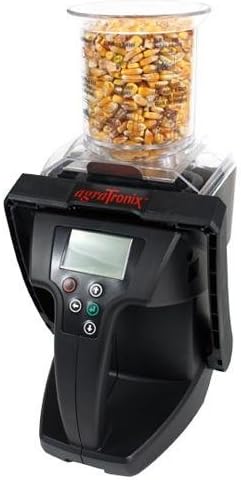
Image: The AgraTronix Ag-MAC Plus Grain Moisture Tester, shown with a sample of corn in its transparent hopper, ready for measurement. The device features an LCD display and control buttons.
ఉత్పత్తి లక్షణాలు
- Direct readout for 20 different grain scales.
- Displays grain test weight without the need for pre-weighing.
- Measures moisture content quickly and accurately.
- Non-compaction design ensures consistent sample సాంద్రత.
- Integrated LCD display for clear readings.
- USB compatibility for data transfer.
- Automatic temperature compensation for enhanced accuracy.
సెటప్
1. అన్ప్యాకింగ్
Carefully remove the Ag-MAC Plus tester and all accessories from its packaging. Inspect the device for any signs of damage. Retain the packaging for future storage or transport.
2. బ్యాటరీ ఇన్స్టాలేషన్
- Locate the battery compartment, typically on the underside or rear of the unit.
- కంపార్ట్మెంట్ కవర్ తెరవండి.
- కంపార్ట్మెంట్ లోపల సూచించిన విధంగా సరైన ధ్రువణత (+/-) ఉండేలా చూసుకోవడానికి నాలుగు (4) AA బ్యాటరీలను చొప్పించండి.
- బ్యాటరీ కంపార్ట్మెంట్ కవర్ను సురక్షితంగా మూసివేయండి.
3. ప్రారంభ పవర్-ఆన్
Press the power button to turn on the device. The LCD display should illuminate, indicating the device is ready for operation. If the display does not turn on, recheck battery installation or replace with fresh batteries.
ఆపరేటింగ్ సూచనలు
1. Selecting Grain Scale
- Turn on the Ag-MAC Plus tester.
- Use the navigation buttons (usually up/down arrows) to scroll through the available grain scales on the LCD display.
- Select the appropriate grain type that matches your sample.
2. S లోడ్ అవుతోందిample
- లను నిర్ధారించుకోండిample hopper is clean and empty.
- Pour the grain sample into the hopper. The non-compaction design allows for consistent sample loading without manual packing.
- Fill the hopper to the indicated level for accurate measurement.
3. Taking a Reading
- Once the grain scale is selected and the sample is loaded, press the 'Measure' or 'Enter' button (refer to device specific button labels).
- The device will automatically perform the measurement, including temperature compensation.
- The moisture content (in percentage) and grain test weight will be displayed on the LCD.
4. Understanding Readings
The display resolution for moisture is 0.1%. The device provides direct readings, eliminating the need for manual calculations. Automatic temperature compensation ensures accuracy across varying environmental conditions.
Supported Grain Scales
The AgraTronix Ag-MAC Plus supports direct readout for the following grain types:
- Barley 2R
- Barley 6R
- మొక్కజొన్న
- ఓట్స్
- Rapeseed (Canola)
- రై
- కుసుమ పువ్వు
- జొన్న (మిలో)
- సోయాబీన్స్
- సన్ఫ్లవర్ ఆయిల్
- ట్రిటికేల్
- Wheat: Durum
- Wheat: Hard Red Spring
- Wheat: Hard Red Winter
- Wheat: Soft Red Winter
నిర్వహణ
1. శుభ్రపరచడం
క్రమం తప్పకుండా శుభ్రం చేయు రుample hopper and any grain contact surfaces to prevent contamination and ensure accurate readings. Use a soft, dry cloth or brush. Do not use abrasive cleaners or immerse the device in water.
2. నిల్వ
Store the Ag-MAC Plus tester in a cool, dry place away from direct sunlight and extreme temperatures. If storing for extended periods, remove the batteries to prevent leakage.
3. బ్యాటరీ భర్తీ
Replace batteries when the low battery indicator appears on the LCD or if the device fails to power on. Always use fresh AA alkaline batteries.
ట్రబుల్షూటింగ్
- పరికరం ఆన్ చేయడం లేదు: బ్యాటరీ ఇన్స్టాలేషన్ను తనిఖీ చేయండి మరియు బ్యాటరీలు తాజాగా ఉన్నాయని నిర్ధారించుకోండి.
- సరికాని రీడింగ్లు: Ensure the correct grain scale is selected. Verify the sample hopper is clean and free of debris. Ensure the sample is loaded correctly without compaction.
- ప్రదర్శన సమస్యలు: If the LCD is dim or flickering, replace the batteries.
- ఎర్రర్ కోడ్లు: Refer to the full manufacturer's manual for specific error code interpretations and solutions.
స్పెసిఫికేషన్లు
| తేమ పరిధి | 6% – 45% (depending on grain tested) |
|---|---|
| ఉష్ణోగ్రత పరిధి | 40 ° - 113 ° F (5 ° - 45 ° C) |
| పునరావృతం & ఖచ్చితత్వం | ±0.3% in normal moisture range for stored grain |
| డిస్ప్లే రిజల్యూషన్ | 0.1% తేమ |
| శక్తి మూలం | 4 AA బ్యాటరీలు |
| డిజైన్ | Non-compaction |
| కనెక్టివిటీ | USB అనుకూలమైనది |
వారంటీ మరియు మద్దతు
The AgraTronix Ag-MAC Plus Grain Moisture Tester is covered by a manufacturer's warranty. For detailed information regarding warranty terms, conditions, and duration, please refer to the documentation included with your product or visit the official AgraTronix website. For technical support, service, or parts, please contact AgraTronix customer service directly.