
1. పరిచయం
This manual provides detailed instructions for the setup, operation, and maintenance of the Ikan Lite-Puter CX-804 8-Channel DMX Lighting Console. The CX-804 is designed for controlling DMX512 compatible lighting fixtures, offering 8 dimming channels, 8 scene memory slots, and a chaser function for dynamic lighting effects. Please read this manual thoroughly before using the device to ensure proper and safe operation.
2. భద్రతా సమాచారం
- విద్యుత్ సరఫరా వాల్యూమ్ నిర్ధారించుకోండిtage యూనిట్లో పేర్కొన్న అవసరాలకు సరిపోలుతుంది.
- అగ్ని లేదా విద్యుత్ షాక్ను నివారించడానికి యూనిట్ను వర్షం లేదా తేమకు గురిచేయవద్దు.
- సి ని తెరవవద్దుasing. లోపల వినియోగదారు-సేవ చేయగల భాగాలు లేవు. అన్ని సర్వీసింగ్లను అర్హత కలిగిన సిబ్బందికి సూచించండి.
- Place the console on a stable, flat surface.
- Keep the unit away from excessive heat sources, direct sunlight, and strong vibrations.
- శుభ్రం చేయడానికి ముందు లేదా ఎక్కువసేపు ఉపయోగంలో లేనప్పుడు విద్యుత్తును డిస్కనెక్ట్ చేయండి.
3. ప్యాకేజీ విషయాలు
ప్యాకేజీలో అన్ని అంశాలు ఉన్నాయని నిర్ధారించుకోండి:
- Lite-Puter CX-804 DMX Lighting Console
- పవర్ అడాప్టర్ (DC 12V)
- వినియోగదారు మాన్యువల్ (ఈ పత్రం)
4. ఉత్పత్తి ముగిసిందిview
4.1 ఫ్రంట్ ప్యానెల్ నియంత్రణలు
The front panel provides access to all primary control functions for DMX channels, scenes, and chaser operations.
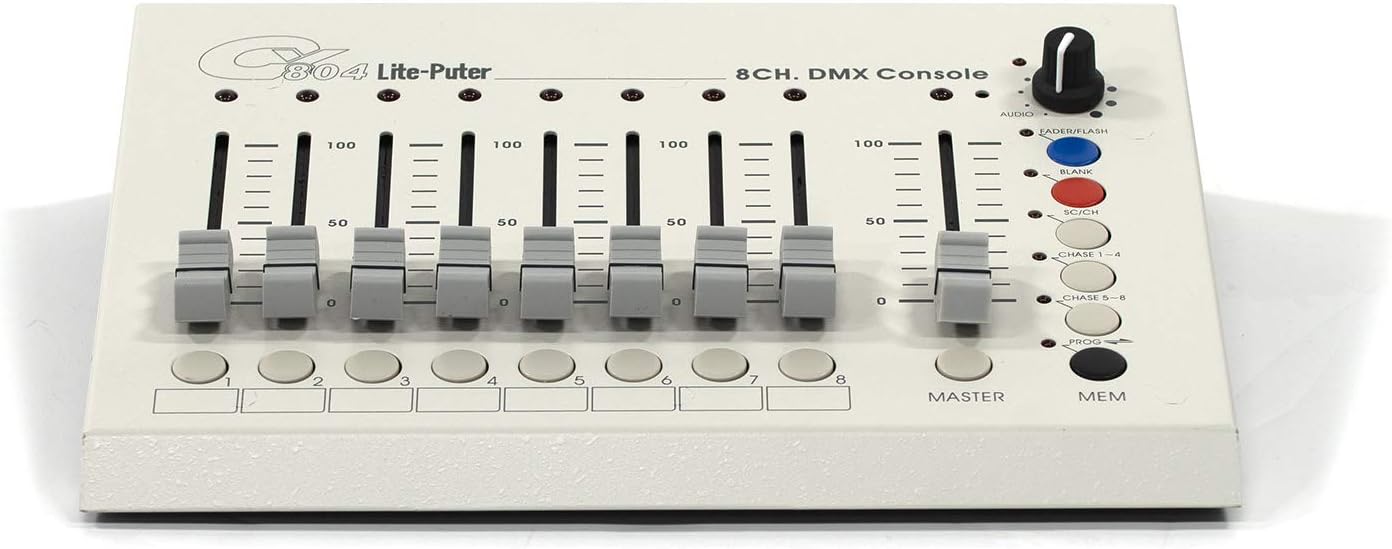
Figure 4.1: Front Panel Layout of the CX-804 Console.
- Channel Faders (1-8): Eight individual sliders to control the DMX output level (0-100%) for each of the 8 channels.
- Channel Buttons (1-8): Buttons corresponding to each channel, typically used for scene programming or selection.
- మాస్టర్ ఫేడర్: Controls the overall output level of all active DMX channels.
- MEM బటన్: Used to save or recall programmed scenes.
- PROG బటన్: Activates programming mode for scenes or chasers.
- CHASE 1-4 / CHASE 5-8 Buttons: Selects between different chaser patterns.
- SC/CH బటన్: Toggles between Scene and Channel mode.
- BLANK Button: Instantly blacks out all DMX output.
- FADERFLASH Button: Momentarily activates the current fader settings.
- AUDIO Knob: Adjusts the sensitivity of the audio input for sound-to-light functions.
4.2 వెనుక ప్యానెల్ కనెక్షన్లు
The rear panel houses all input and output connections for power, audio, and DMX signals.

Figure 4.2: Rear Panel Connections of the CX-804 Console.
- DC 12V IN: Power input jack for the included DC 12V power adapter.
- స్విచ్ ఆన్/ఆఫ్: Main power switch for the console.
- ఆడియోలో: 1/4-inch (6.35mm) jack for connecting an audio source for sound-to-light synchronization.
- SENSES: Sensitivity adjustment for the audio input.
- DMX అవుట్: DMX512 output ports (XLR 3-pin and 5-pin, and RJ45) for connecting to DMX lighting fixtures.
5. సెటప్
5.1 పవర్ కనెక్షన్
- Ensure the console's ON/OFF switch is in the OFF position.
- Connect the provided DC 12V power adapter to the 'DC 12V IN' jack on the rear panel.
- పవర్ అడాప్టర్ను తగిన ఎలక్ట్రికల్ అవుట్లెట్లోకి ప్లగ్ చేయండి.
5.2 DMX కనెక్షన్
- Connect a DMX cable (3-pin XLR, 5-pin XLR, or RJ45, depending on your fixtures) from one of the 'DMX OUT' ports on the CX-804 to the DMX IN port of your first DMX lighting fixture.
- For multiple fixtures, daisy-chain them by connecting the DMX OUT of the first fixture to the DMX IN of the next, and so on.
- Ensure the last fixture in the chain has a DMX terminator installed to prevent signal reflection.
5.3 Audio Input Connection (Optional)
- If using sound-to-light functions, connect an audio source (e.g., mixer output) to the 'AUDIO IN' jack using a 1/4-inch (6.35mm) audio cable.
- Adjust the 'SENSES' knob to fine-tune the audio input sensitivity.
6. ఆపరేటింగ్ సూచనలు
6.1 Basic DMX Control
- Turn on the console using the ON/OFF switch.
- Ensure the SC/CH button is in Channel mode (LED off).
- తరలించు మాస్టర్ ఫేడర్ to the desired overall output level.
- Adjust individual Channel Faders (1-8) to control the intensity or specific parameters of your DMX fixtures assigned to those channels.
- నొక్కండి ఖాళీ button to momentarily black out all output. Release to restore.
- ఉపయోగించండి FADERFLASH button to momentarily activate the current fader settings.
6.2 Programming and Recalling Scenes
The CX-804 allows you to store up to 8 scenes.
6.2.1 Programming a Scene
- నొక్కండి PROG button to enter programming mode (PROG LED will illuminate).
- Set the desired lighting levels using the Channel Faders (1-8) మరియు ది మాస్టర్ ఫేడర్.
- నొక్కండి MEM బటన్.
- ఒకటి నొక్కండి Channel Buttons (1-8) to save the current lighting state to that scene number. The PROG LED will flash to confirm.
- నొక్కండి PROG again to exit programming mode.
6.2.2 Recalling a Scene
- Ensure the console is not in programming mode (PROG LED off).
- నొక్కండి SC/CH button to switch to Scene mode (SC/CH LED will illuminate).
- కావలసిన నొక్కండి Channel Button (1-8) to recall the corresponding saved scene.
- సర్దుబాటు చేయండి మాస్టర్ ఫేడర్ to control the overall intensity of the recalled scene.
6.3 Chaser Function
The chaser function allows for dynamic, automated lighting sequences.
- Ensure the console is not in programming mode.
- నొక్కండి చేజ్ 1-4 or చేజ్ 5-8 button to activate a chaser pattern.
- The speed and pattern of the chaser can often be adjusted via internal settings or by the AUDIO knob if in sound-to-light mode. Refer to specific chaser programming details if available in advanced documentation.
- To deactivate the chaser, press the active CHASE button again or select a scene/channel mode.
6.4 Audio Input Control
When an audio source is connected to the 'AUDIO IN' jack, the console can synchronize lighting effects with music.
- Ensure an audio source is connected to the 'AUDIO IN' jack.
- సర్దుబాటు చేయండి AUDIO knob to set the sensitivity of the audio input. Higher sensitivity will make the lights react to quieter sounds.
- The chaser function or other programmed effects may respond to the audio input, creating sound-activated lighting.
7. నిర్వహణ
7.1 శుభ్రపరచడం
- శుభ్రం చేయడానికి ముందు పవర్ అడాప్టర్ను డిస్కనెక్ట్ చేయండి.
- కన్సోల్ యొక్క బాహ్య భాగాన్ని తుడవడానికి మృదువైన, పొడి వస్త్రాన్ని ఉపయోగించండి.
- Do not use abrasive cleaners, solvents, or chemical sprays, as these can damage the finish and internal components.
7.2 నిల్వ
- Store the console in a cool, dry place away from direct sunlight and extreme temperatures.
- If storing for an extended period, it is recommended to place the unit in its original packaging or a protective case.
8. ట్రబుల్షూటింగ్
| సమస్య | సాధ్యమైన కారణం | పరిష్కారం |
|---|---|---|
| కన్సోల్ ఆన్ అవ్వదు. | Power adapter not connected or faulty. Power switch off. | Ensure power adapter is securely connected and plugged into a live outlet. Verify ON/OFF switch is in the ON position. Test with another compatible power adapter if available. |
| No DMX output to fixtures. | Incorrect DMX cabling. Fixtures not addressed correctly. Master fader at zero. BLANK button active. | Check DMX cable connections. Ensure fixtures are set to correct DMX addresses. Raise the Master Fader. Ensure BLANK button is not active. |
| Scenes not recalling or saving. | Incorrect mode (not in Scene mode for recall, not in PROG mode for saving). | For recall, ensure SC/CH LED is illuminated. For saving, ensure PROG LED is illuminated and follow the save procedure correctly. |
| Audio-to-light function not working. | Audio cable not connected. AUDIO knob set too low. No audio signal. | Verify audio cable connection. Increase the AUDIO knob sensitivity. Check the audio source for output. |
9. స్పెసిఫికేషన్లు
| ఫీచర్ | వివరాలు |
|---|---|
| మోడల్ | CX-804 |
| బ్రాండ్ | Ikan (Manufactured by Lite-Puter) |
| కంట్రోల్ ప్రోటోకాల్ | ప్రామాణిక DMX 512 |
| DMX ఛానెల్లు | 8 Dimming Control Sliders |
| దృశ్యాలు | 8 దృశ్యాలు |
| విధులు | Chaser function, Audio input |
| ఆడియో ఇన్పుట్ | Yes (1/4-inch jack) |
| పవర్ ఇన్పుట్ | DC 12V |
| వస్తువు బరువు | 3.3 పౌండ్లు |
| ASIN | B08NKC5L5J |
10. వారంటీ మరియు మద్దతు
For warranty information and technical support, please refer to the documentation provided with your purchase or contact the retailer or manufacturer directly. Keep your proof of purchase for any warranty claims.