
1. పరిచయం
This manual provides essential information for setting up, operating, maintaining, and troubleshooting your Lenovo ThinkCentre M710q Tiny mini PC. The ThinkCentre M710q Tiny is a compact and powerful desktop computer designed for efficiency and reliability, suitable for various computing tasks. This unit is a renewed product, ensuring quality and performance.

Image: Microsoft Authorized Refurbisher logo, indicating the product has been professionally restored.
2. పెట్టెలో ఏముంది
Carefully unpack your ThinkCentre M710q Tiny and ensure all components are present:
- Lenovo ThinkCentre M710q Tiny Unit
- ఎసి పవర్ అడాప్టర్
- USB కీబోర్డ్
- USB మౌస్
- (Note: Additional accessories such as speakers may vary with renewed products.)

Image: Included USB keyboard and mouse, essential for basic computer operation.
3. Physical Features and Ports
Familiarize yourself with the various ports and features on your ThinkCentre M710q Tiny for proper connectivity.
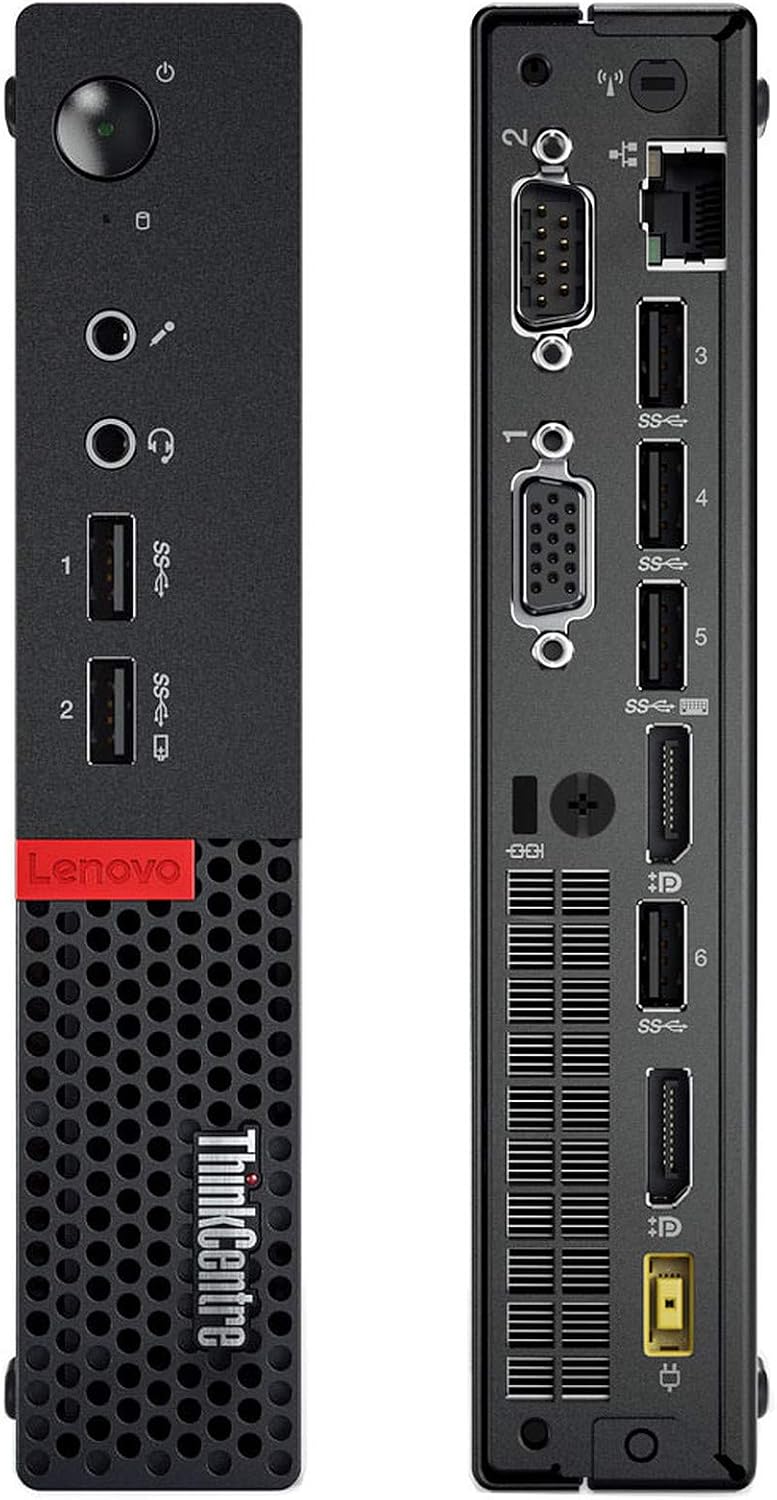
చిత్రం: ముందు మరియు వెనుక views of the Lenovo ThinkCentre M710q Tiny, highlighting all available ports.
ముందు ప్యానెల్
- పవర్ బటన్: పరికరాన్ని ఆన్ లేదా ఆఫ్ చేయడానికి.
- USB 3.0 పోర్ట్లు (x2): హై-స్పీడ్ USB పరికరాలను కనెక్ట్ చేయడానికి.
- హెడ్ఫోన్ జాక్: హెడ్ఫోన్లు లేదా బాహ్య స్పీకర్లకు ఆడియో అవుట్పుట్ కోసం.
- మైక్రోఫోన్ జాక్: For audio input from a microphone.
వెనుక ప్యానెల్
- USB 3.0 పోర్ట్లు (x4): USB పరికరాల కోసం అదనపు పోర్టులు.
- డిస్ప్లేపోర్ట్ (x2): డిజిటల్ డిస్ప్లేలను కనెక్ట్ చేయడానికి.
- VGA పోర్ట్ (x2): For connecting analog displays.
- ఈథర్నెట్ పోర్ట్: వైర్డు నెట్వర్క్ కనెక్షన్ కోసం.
- పవర్ కనెక్టర్: AC పవర్ అడాప్టర్ను కనెక్ట్ చేయడానికి.
4. సెటప్ సూచనలు
Follow these steps to set up your ThinkCentre M710q Tiny:
- పెరిఫెరల్స్ కనెక్ట్ చేయండి:
- Connect your monitor(s) to the DisplayPort or VGA ports on the rear panel.
- Plug the USB keyboard and mouse into any available USB ports (front or rear).
- Connect any other desired peripherals such as external drives or speakers.
- నెట్వర్క్కు కనెక్ట్ చేయండి:
- For a wired connection, plug an Ethernet cable into the Ethernet port on the rear panel.
- For Wi-Fi, the system is equipped with wireless capabilities. You will configure this during the initial Windows setup or later.
- పవర్ కనెక్ట్ చేయండి:
- Connect the AC power adapter to the power connector on the rear of the unit.
- Plug the power adapter into a wall outlet or surge protector.
- ప్రారంభ బూట్-అప్:
- ముందు ప్యానెల్లోని పవర్ బటన్ను నొక్కండి.
- The system will boot into Windows 10 Pro. Follow any on-screen prompts to complete the initial setup, including language, region, and user account creation.
5. ఆపరేటింగ్ సూచనలు
Once set up, your ThinkCentre M710q Tiny is ready for use:
- పవర్ ఆన్/ఆఫ్: కంప్యూటర్ను ఆన్ చేయడానికి పవర్ బటన్ను నొక్కండి. షట్ డౌన్ చేయడానికి, విండోస్లో స్టార్ట్ బటన్ను క్లిక్ చేసి, ఆపై పవర్ > షట్ డౌన్ ఎంచుకోండి.
- విండోస్ 10 ప్రో: Explore the Windows 10 Pro operating system. You can customize settings, install applications, and manage files.
- నెట్వర్క్ కనెక్టివిటీ: If using Wi-Fi, click the network icon in the taskbar to connect to your preferred wireless network. For wired connections, ensure the Ethernet cable is securely plugged in.
- సాఫ్ట్వేర్ ఇన్స్టాలేషన్: Install any necessary software or applications required for your work or personal use.
- USB పరికరాలు: Connect USB storage devices, printers, or other peripherals to the available USB ports.
6. నిర్వహణ
క్రమం తప్పకుండా నిర్వహణ మీ మినీ PC యొక్క దీర్ఘాయువు మరియు సరైన పనితీరును నిర్ధారించడంలో సహాయపడుతుంది:
- శుభ్రపరచడం: Keep the exterior of the unit clean with a soft, dry cloth. Ensure that the ventilation grilles are free from dust and obstructions to prevent overheating. Do not use liquid cleaners directly on the unit.
- సాఫ్ట్వేర్ అప్డేట్లు: సిస్టమ్ స్థిరత్వం మరియు భద్రతను నిర్ధారించడానికి విండోస్ నవీకరణలు మరియు డ్రైవర్ నవీకరణలను క్రమం తప్పకుండా తనిఖీ చేయండి మరియు ఇన్స్టాల్ చేయండి.
- డేటా బ్యాకప్: మీ ముఖ్యమైన వాటిని కాలానుగుణంగా బ్యాకప్ చేయండి files and data to an external drive or cloud storage to prevent data loss.
- యాంటీవైరస్ రక్షణ: Ensure your system has up-to-date antivirus software to protect against malware and viruses.
7. ట్రబుల్షూటింగ్
If you encounter issues with your ThinkCentre M710q Tiny, try these common troubleshooting steps:
- శక్తి లేదు:
- Verify that the AC power adapter is securely connected to both the PC and a working power outlet.
- మరొక పరికరాన్ని ప్లగ్ చేయడం ద్వారా పవర్ అవుట్లెట్ పనిచేస్తుందో లేదో తనిఖీ చేయండి.
- ప్రదర్శన లేదు:
- Ensure the monitor is powered on and the video cable (DisplayPort or VGA) is securely connected to both the PC and the monitor.
- Try connecting the monitor to a different video port on the PC or using a different cable if available.
- Test the monitor with another device to confirm it is working.
- నెమ్మదిగా పనితీరు:
- నేపథ్యంలో నడుస్తున్న అనవసరమైన అప్లికేషన్లను మూసివేయండి.
- Check disk space and free up storage if it is nearly full.
- Run a full system scan with your antivirus software.
- పెరిఫెరల్ పనిచేయడం లేదు:
- Ensure the peripheral (keyboard, mouse, etc.) is properly connected to a USB port.
- పరిధీయ పరికరాన్ని వేరే USB పోర్ట్కి కనెక్ట్ చేయడానికి ప్రయత్నించండి.
- కంప్యూటర్ పునఃప్రారంభించండి.
- మద్దతును సంప్రదించండి: If these steps do not resolve the issue, please contact the seller (TekRefurbs) for further assistance.
8. స్పెసిఫికేషన్లు
Key technical specifications for the Lenovo ThinkCentre M710q Tiny:
| ఫీచర్ | స్పెసిఫికేషన్ |
|---|---|
| ప్రాసెసర్ | Intel Core i5-6500T (2.5 GHz, up to 3.6 GHz Turbo Boost) |
| RAM | 16 GB DDR4-2400MHz |
| నిల్వ | 256 GB SSD |
| గ్రాఫిక్స్ | ఇంటెల్ HD గ్రాఫిక్స్ 630 |
| ఆపరేటింగ్ సిస్టమ్ | Windows 10 ప్రో 64-బిట్ |
| కనెక్టివిటీ | వైఫై, ఈథర్నెట్ |
| ఓడరేవులు | USB 3.0, DisplayPort, VGA, Headphone, Microphone |
| వస్తువు బరువు | సుమారు 5 పౌండ్లు |
| రంగు | నలుపు |
9. వారంటీ మరియు మద్దతు
As a renewed product, your Lenovo ThinkCentre M710q Tiny is backed by a return policy:
- రిటర్న్ పాలసీ: This product is eligible for a 90-day refund or replacement policy. Please refer to your purchase documentation for specific terms and conditions.
- సాంకేతిక మద్దతు: For any technical issues, questions, or support needs, please contact the seller, TekRefurbs, directly. They are best equipped to provide assistance for your renewed product.
- Microsoft Authorized Refurbisher: This product has been processed by a Microsoft Authorized Refurbisher, ensuring it meets high standards for quality and includes a genuine Windows 10 Pro license.