
VPFET 52-542
VPFET 4K60Hz HDMI Audio Extractor User Manual
మోడల్: 52-542
1. పరిచయం
The VPFET 4K60Hz HDMI Audio Extractor is designed to separate audio signals from an HDMI source and output them to an external sound system via optical SPDIF or 3.5mm audio interfaces. This device supports high-resolution video up to 4K at 60Hz, HDMI 2.0b, HDCP 2.2, and HDR10, making it suitable for various home entertainment and professional audio-video setups. It allows users to enjoy high-quality audio from HDMI sources on audio receivers, soundbars, or headphones that may not have HDMI input capabilities.
2 కీ ఫీచర్లు
- HDMI Audio Extraction: Extracts audio from an HDMI signal to optical SPDIF and 3.5mm stereo outputs.
- అధిక రిజల్యూషన్ మద్దతు: Compatible with 4K@60Hz (YUV444), 1080P@144Hz, and 1080P@120Hz video resolutions.
- HDMI 2.0b Standard: Supports 18Gbps bandwidth, HDCP 2.2, and DVI compliance.
- HDR10 మద్దతు: Enhances visual quality with High Dynamic Range (HDR10). Use HDMI 2.0 certified cables for optimal HDR10 compatibility.
- ఆడియో ఎస్ampలింగ్ రేటు: Supports audio sampling rates up to 192kHz.
- Multiple Audio Modes: Features 2.0CH, 5.1CH, and TV audio modes for flexible output configuration.
- తక్కువ విద్యుత్ వినియోగం: Powered via a 5V USB port, requiring minimal power.
- విస్తృత అనుకూలత: Suitable for various HDMI source devices such as Blu-ray/DVD players, gaming consoles (Xbox, PlayStation), PCs/laptops, and streaming devices.
- ప్లగ్ మరియు ప్లే: Designed for easy installation and immediate use.
3. ప్యాకేజీ విషయాలు
ప్యాకేజీలో అన్ని అంశాలు ఉన్నాయని నిర్ధారించుకోండి:
- 1x VPFET HDMI Audio Extractor
- 1x HDMI కేబుల్
- 1x USB పవర్ కేబుల్
- 1x L/R RCA Audio Cable (3.5mm to RCA)
- 1x వినియోగదారు మాన్యువల్

చిత్రం 1: ప్యాకేజీ కంటెంట్లు మరియు పరికర కొలతలు
This image displays the VPFET HDMI Audio Extractor unit along with all the cables and documentation included in the product package. It also shows the device's approximate dimensions: 2.3 inches (length) x 2.1 inches (width) x 0.9 inches (height).
4. ఉత్పత్తి ముగిసిందిview
The VPFET HDMI Audio Extractor features clearly labeled ports and controls for easy connection and operation.

Figure 2: Front Panel of the Audio Extractor
ఈ చిత్రం స్పష్టమైన view of the front panel of the VPFET HDMI Audio Extractor. Key components visible include the HDMI OUT port for video passthrough, a 'SIG' indicator light for signal status, an OPTICAL (SPDIF) port for digital audio output, and a 3.5mm AUX port for analog stereo audio output.

Figure 3: Rear Panel of the Audio Extractor
This image shows the rear panel of the VPFET HDMI Audio Extractor. It highlights the 'MODE' switch, which allows selection between 5.1CH, 2CH, and TV audio output modes. Also visible are the HDMI IN port for connecting the source device, a 'PW' indicator light for power status, and the USB 5V port for power input.
5. సెటప్ సూచనలు
Follow these steps to connect your VPFET HDMI Audio Extractor:
- HDMI మూలాన్ని కనెక్ట్ చేయండి: Use an HDMI cable to connect your source device (e.g., Blu-ray player, gaming console, PC) to the HDMI-IN ఆడియో ఎక్స్ట్రాక్టర్లోని పోర్ట్.
- డిస్ప్లేను కనెక్ట్ చేయండి: Use another HDMI cable to connect your display device (e.g., TV, monitor, projector) to the HDMI అవుట్ ఆడియో ఎక్స్ట్రాక్టర్లోని పోర్ట్.
- ఆడియో అవుట్పుట్ని కనెక్ట్ చేయండి:
- For digital audio (5.1CH or 2.0CH PCM): Connect an optical cable from the ఆప్టికల్ port on the extractor to your audio receiver or soundbar.
- For analog stereo audio (2.0CH PCM): Connect a 3.5mm audio cable from the 3.5mm AUX port on the extractor to your headphones or stereo speakers. The included L/R RCA cable can be used if your audio system requires RCA inputs.
- పరికరానికి శక్తినివ్వండి: Connect the provided USB power cable to the USB 5V port on the extractor and plug the other end into a 5V USB power source (e.g., a USB port on your TV, a phone charger, or a dedicated 5V1A USB power adapter). The 'PW' indicator light will illuminate.
- ఆడియో మోడ్ని ఎంచుకోండి: సర్దుబాటు చేయండి మోడ్ switch on the extractor according to your audio output requirements (refer to Section 6: Operating Modes).

చిత్రం 4: సాధారణ కనెక్షన్ రేఖాచిత్రం
This diagram illustrates a common setup for the HDMI Audio Extractor. An input device (e.g., Blu-ray player) connects to the HDMI IN port. The HDMI OUT port connects to a TV for video. Audio is extracted via the Optical port to an amplifier or via the 3.5mm AUX port to headphones. A crucial note indicates that the device does not support ARC (Audio Return Channel) or eARC functionality.
Video 1: HDMI Audio Extractor Connection Diagram
This video demonstrates the step-by-step connection process for the VPFET HDMI Audio Extractor, showing how to connect source devices, displays, and audio output devices using HDMI, optical, and 3.5mm cables. It also illustrates the different audio output modes and their corresponding connections.
6. ఆపరేటింగ్ మోడ్లు
The audio extractor features a MODE switch to select the desired audio output format:
- 5.1CH మోడ్:
In this mode, the optical output will provide 5.1 channel audio. This mode is ideal if your sound equipment (e.g., AV receiver, soundbar) supports Dolby Digital or DTS formats. The 3.5mm output is not active in this mode.

Figure 5: 5.1CH Optical Audio Setup
This image illustrates the connection for 5.1CH optical audio. A laptop (source) is connected to the HDMI IN of the extractor. The HDMI OUT goes to a TV. The optical output from the extractor is connected to a 5.1 speaker system, providing surround sound.
- 2.0CH మోడ్:
When 2.0CH mode is selected, both the 3.5mm stereo output and the optical output will provide 2-channel PCM stereo audio. For this mode, ensure your HDMI source device's audio output is set to PCM format. This mode is suitable for headphones or stereo speaker systems.
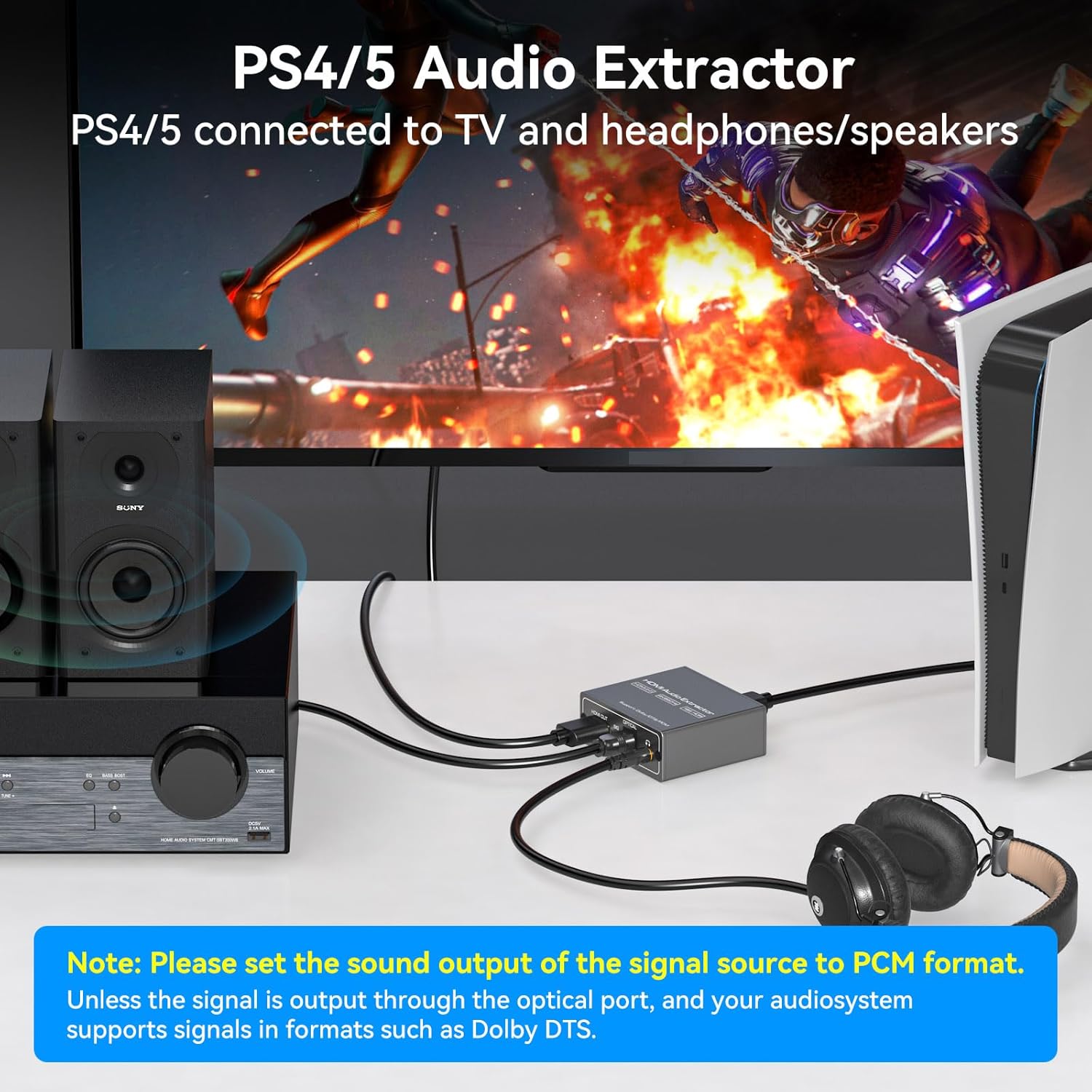
Figure 6: 2.0CH Headphone Audio Setup
This image demonstrates connecting a PlayStation 4 or 5 to the HDMI Audio Extractor. The video signal is passed through to a TV, while the 3.5mm audio output is connected to headphones, allowing for private listening during gaming.
- టీవీ మోడ్:
In TV mode, the audio format output will follow the parameters supported by your connected TV. Use this mode if you encounter no audio signal when using 5.1CH or 2.0CH modes, especially if your display device uses a DVI interface or has specific audio handling requirements.
ముఖ్యమైన గమనిక: If no sound is obtained, please ensure the audio output setting on your signal source device (e.g., Blu-ray player, game console, PC) is configured to PCM format, especially when using 2.0CH mode for 3.5mm output.
7. ట్రబుల్షూటింగ్
- ఆడియో అవుట్పుట్ లేదు:
- Ensure the audio extractor is properly powered via the USB 5V port and the 'PW' indicator light is on.
- Verify that all HDMI and audio cables are securely connected.
- తనిఖీ చేయండి మోడ్ switch setting on the extractor. If using 3.5mm output, select 2.0CH mode. If using optical output for surround sound, select 5.1CH mode.
- Confirm that your HDMI source device's audio output is set to PCM format, especially for 2.0CH output. For 5.1CH optical output, ensure your audio receiver supports Dolby Digital or DTS.
- Increase the volume on both your signal source and the connected audio receiver/speakers/headphones.
- No Video Output or Poor Video Quality:
- అన్ని HDMI కేబుల్లు సురక్షితంగా కనెక్ట్ అయ్యాయని నిర్ధారించుకోండి.
- Use high-quality, HDMI 2.0 certified cables, especially for 4K@60Hz and HDR10 signals.
- Verify that your display device supports the resolution and refresh rate being output by your source.
- ARC/eARC Not Working:
ఈ పరికరం చేస్తుంది కాదు support ARC (Audio Return Channel) or eARC functionality. Audio must be extracted from the HDMI source before it reaches the TV, or from the TV's dedicated audio output ports if available.
- Low Audio Volume:
If the audio output is too low, increase the volume on your signal source device and the connected audio output device (e.g., headphones, speakers, ampజీవితకాలం).
8. స్పెసిఫికేషన్లు
| ఫీచర్ | వివరాలు |
|---|---|
| ఉత్పత్తి కొలతలు (L x W x H) | 4.8 x 2.2 x 0.8 అంగుళాలు |
| వస్తువు బరువు | 0.317 ఔన్సులు |
| మోడల్ సంఖ్య | 52-542 |
| HDMI వెర్షన్ | HDMI 2.0b |
| HDCP వెర్షన్ | HDCP 2.2 |
| గరిష్ట రిజల్యూషన్ మద్దతు | 4K@60Hz (YUV444), 1080P@144Hz, 1080P@120Hz |
| బ్యాండ్విడ్త్ | 18Gbps |
| HDR మద్దతు | HDR10 |
| ఆడియో అవుట్పుట్ పోర్ట్లు | Optical (SPDIF), 3.5mm AUX |
| పవర్ ఇన్పుట్ | USB 5V |
| రంగు | నలుపు |
| అనుకూల పరికరాలు | PC, TV, Blu-ray/DVD players, gaming consoles, streaming devices |
9. నిర్వహణ
To ensure the longevity and optimal performance of your VPFET HDMI Audio Extractor:
- Keep the device in a cool, dry place, away from direct sunlight and excessive heat.
- పరికరాన్ని తేమ లేదా ద్రవాలకు బహిర్గతం చేయకుండా ఉండండి.
- మెత్తటి, పొడి గుడ్డతో బయటి భాగాన్ని శుభ్రం చేయండి. కఠినమైన రసాయనాలు లేదా రాపిడి క్లీనర్లను ఉపయోగించవద్దు.
- వేడెక్కకుండా నిరోధించడానికి పరికరం చుట్టూ సరైన వెంటిలేషన్ ఉండేలా చూసుకోండి.
- కేబుల్స్ మరియు కనెక్టర్లకు నష్టం జరగకుండా సున్నితంగా నిర్వహించండి.
10. వారంటీ మరియు మద్దతు
VPFET is committed to providing quality products and customer satisfaction. This audio splitter comes with a user manual and necessary cables. If you encounter any problems with your device, including defective products or operational issues, please contact our professional technical support team immediately. We are dedicated to assisting you until your issue is resolved and offer replacement services for product problems.
For support, please refer to the contact information provided in your product packaging or visit the official VPFET webసైట్.
Ask a question about this manual
Ask about setup, troubleshooting, compatibility, parts, safety, or missing instructions. Manuals+ will review the question and use this page’s manual context to help answer it.