
పరిచయం
This manual provides comprehensive instructions for the safe and effective use of your SelfieShow 61-inch Extendable Selfie Stick Tripod, Model LDP-L05. Please read this manual thoroughly before operating the device and retain it for future reference.
ఏమి చేర్చబడింది
ప్యాకేజీ కింది అంశాలను కలిగి ఉంది:
- 1x Tripod Selfie Stick
- 1x Universal Phone Holder
- 1x GoPro Adapter
- 1x Wireless Remote Shutter
SelfieShow provides a 1-year hassle-free warranty and 24-hour friendly customer service for this product.
ఉత్పత్తి ముగిసిందిview
The SelfieShow LDP-L05 is a versatile accessory designed for capturing photos and videos with enhanced stability and flexibility. It functions as both an extendable selfie stick and a stable tripod.

Figure 1: SelfieShow 61-inch Selfie Stick Tripod in various configurations.
ముఖ్య భాగాలు మరియు లక్షణాలు:
- Selfie Stick Tripod Combo: The device integrates a phone holder and a camera quick release plate. The phone clip is adjustable to accommodate devices between 6.5-10cm. A standard 1/4-inch screw allows for camera mounting.
- పొడిగించదగిన పొడవు: The stick extends from 13.2 inches to 61.4 inches, offering a longer reach than standard models for wider shots and group photos.
- Adjustable Rotation: Features a 225° neck rotation and a 360° head rotation, allowing for flexible angle adjustments for optimal shooting.
- వైర్లెస్ రిమోట్ షట్టర్: A pocket-sized wireless remote control enables easy photo and video capture from up to 30 feet away. It offers fast response and stable connection, compatible with most smartphones without requiring app downloads.
- విస్తృత అనుకూలత: The universal phone holder fits most smartphones (with or without a case) and is compatible with various iPhone and Android models. The 1/4-inch screw allows mounting of digital cameras, DSLRs, SLRs, action cameras (like GoPro), webcams, and camcorders.

మూర్తి 2: వివరంగా view of the tripod's components and features.

Figure 3: The tripod's adjustable height settings.

Figure 4: Illustrates the 360° panoramic shooting feature.

Figure 5: Demonstrates the swivel panning head's range of motion.

Figure 6: The wireless remote control in use.
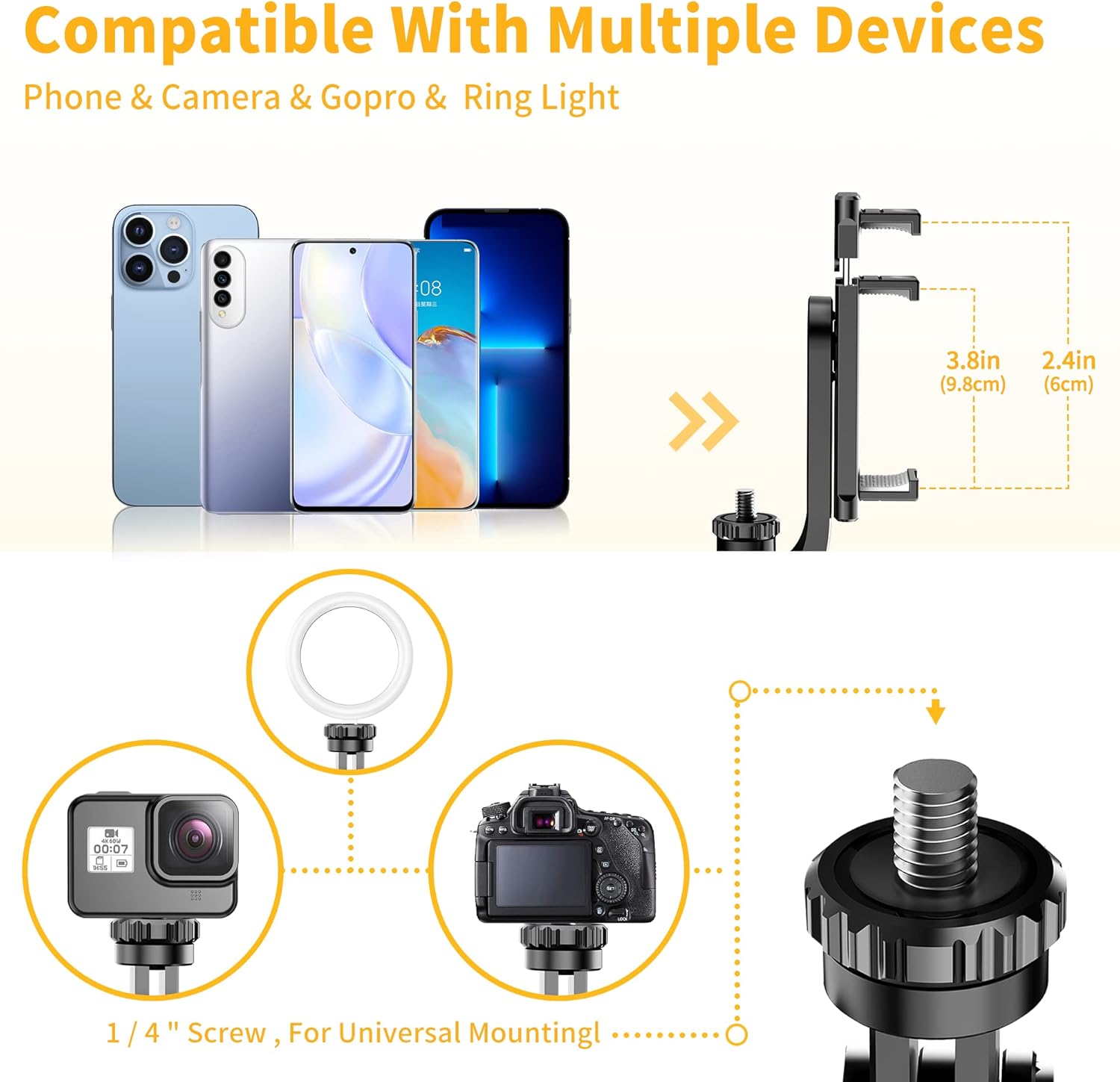
Figure 7: Compatibility with multiple devices.
సెటప్ సూచనలు
1. త్రిపాదను విప్పడం:
- హ్యాండిల్ను గట్టిగా పట్టుకోండి.
- Gently pull the bottom part of the handle downwards to release the tripod legs.
- Spread the three legs outwards until they form a stable base.
2. Attaching Your Device:
- స్మార్ట్ఫోన్ల కోసం: Extend the universal phone holder to fit your smartphone securely. Ensure the phone is centered and stable within the holder.
- For Cameras/GoPro: If using a camera or GoPro, remove the phone holder (if attached) and screw your device onto the 1/4-inch screw mount. Ensure it is tightened securely.
3. Pairing the Wireless Remote Shutter:
- Locate the wireless remote shutter, typically integrated into the handle. Slide it out to detach.
- Turn on the remote by pressing and holding the power button until an indicator light (usually blue) flashes.
- మీ స్మార్ట్ఫోన్లో, బ్లూటూత్ సెట్టింగ్లకు వెళ్లి అందుబాటులో ఉన్న పరికరాల కోసం శోధించండి.
- Select the device named "Selfie" or similar (refer to remote for exact name) to pair. The indicator light will stop flashing once successfully paired.
- The remote is now ready to use for capturing photos and videos.
Video 1: Demonstration of the SelfieShow 61-inch Selfie Stick Tripod's setup and features, including remote pairing and extension.
ఆపరేటింగ్ సూచనలు
1. Using as a Selfie Stick:
- త్రిపాద కాళ్ళు మడతపెట్టి, హ్యాండిల్ లోపల భద్రంగా ఉన్నాయని నిర్ధారించుకోండి.
- Extend the aluminum alloy rod to your desired length.
- Adjust the phone holder or camera to the desired angle using the 225° neck rotation and 360° head rotation.
- Use the wireless remote shutter to capture photos or start/stop video recording.
2. Using as a Tripod:
- Unfold the tripod legs as described in the Setup section, ensuring a stable base on a flat surface.
- Extend the rod to the required height.
- Position your device using the adjustable head for optimal framing.
- Utilize the wireless remote shutter for hands-free operation.

Figure 8: Various usage scenarios for the tripod.
వీడియో 2: ముగిసిందిview of the SelfieShow Selfie Stick Tripod's features and operational modes.
నిర్వహణ
- పరికరాన్ని మృదువైన, పొడి వస్త్రంతో శుభ్రం చేయండి. కఠినమైన రసాయనాలు లేదా రాపిడి పదార్థాలను ఉపయోగించడం మానుకోండి.
- త్రిపాదను ప్రత్యక్ష సూర్యకాంతి మరియు తీవ్రమైన ఉష్ణోగ్రతలు లేకుండా చల్లని, పొడి ప్రదేశంలో నిల్వ చేయండి.
- Ensure all screws and connections are tightened before each use to maintain stability.
- If the remote control battery needs replacement, refer to the remote's specific instructions for battery type and replacement procedure.
ట్రబుల్షూటింగ్
రిమోట్ కంట్రోల్ కనెక్ట్ కావడం లేదు:
- Ensure the remote is charged or has a fresh battery.
- మీ స్మార్ట్ఫోన్లో బ్లూటూత్ ప్రారంభించబడిందని ధృవీకరించండి.
- Make sure the remote is within the 30-foot operating range.
- మీ ఫోన్ బ్లూటూత్ సెట్టింగ్లలో రిమోట్ను అన్పెయిర్ చేసి, తిరిగి పెయిర్ చేయడానికి ప్రయత్నించండి.
త్రిపాద అస్థిరత:
- Ensure the tripod legs are fully extended and locked into position on a flat, stable surface.
- Check that your device is securely mounted and balanced on the holder.
- Avoid extending the rod to its maximum length in windy conditions or on uneven terrain.
Phone Holder Not Gripping Securely:
- Ensure your phone's dimensions are within the specified range (6.5-10cm).
- Check for any obstructions or debris in the phone holder's grip pads.
స్పెసిఫికేషన్లు
| ఫీచర్ | వివరాలు |
|---|---|
| ఉత్పత్తి కొలతలు | 2.95 x 1.48 x 13.23 అంగుళాలు |
| వస్తువు బరువు | 12.5 ఔన్సులు (355 గ్రాములు) |
| మోడల్ సంఖ్య | LDP-L05 |
| బ్యాటరీలు | 1 లిథియం మెటల్ బ్యాటరీ అవసరం (చేర్చబడింది) |
| బ్రాండ్ | సెల్ఫీ షో |
| రంగు | Black (with handle) |
| అనుకూల పరికరాలు | Smartphone, Digital Camera, DSLR, SLR, Action Camera, Gopro, Webcam, Camcorder |
| ప్రత్యేక ఫీచర్ | Remote Control, Portable |
| మెటీరియల్ | అక్రిలోనిట్రైల్ బ్యూటాడిన్ స్టైరీన్ (ABS), స్టెయిన్లెస్ స్టీల్ |
| బరువు పరిమితి | 3 కిలోలు |
| గరిష్ట ఎత్తు | 149 సెంటీమీటర్లు (సుమారు 61 అంగుళాలు) |
| ట్రైపాడ్ హెడ్ రకం | బాల్ హెడ్స్ |
వారంటీ మరియు మద్దతు
Your SelfieShow 61-inch Extendable Selfie Stick Tripod is covered by a 1-year hassle-free warranty. For any inquiries, technical assistance, or warranty claims, please contact SelfieShow customer service. Our team is available 24 hours to provide friendly support.