
ABKO EC10
ABKO EC10 Active Noise Cancelling True Wireless Earbuds User Manual
మోడల్: EC10
పరిచయం
The ABKO EC10 Active Noise Cancelling True Wireless Earbuds are designed to provide an immersive audio experience with advanced noise cancellation and clear communication features. This manual provides detailed instructions for setup, operation, maintenance, and troubleshooting to ensure optimal performance of your earbuds.
పెట్టెలో ఏముంది
- 1 x EC10 Earbud Set (Left and Right)
- 1 x USB-C Type Charging Cable
- 4 x చెవి చిట్కాలు (వివిధ పరిమాణాలు)
- 1 x యూజర్ మాన్యువల్ (ఈ పత్రం)

Image: The ABKO EC10 earbuds shown inside their charging case, with the USB-C charging cable and extra ear tips.
సెటప్
1. ఇయర్బడ్లు మరియు కేస్ను ఛార్జ్ చేయడం
Before first use, fully charge the earbuds and the charging case. The case supports both USB-C wired charging and wireless charging.
- వైర్డు ఛార్జింగ్: అందించిన USB-C కేబుల్ను కేస్లోని ఛార్జింగ్ పోర్ట్కు మరియు USB పవర్ సోర్స్కి కనెక్ట్ చేయండి.
- వైర్లెస్ ఛార్జింగ్: ఛార్జింగ్ కేసును అనుకూలమైన వైర్లెస్ ఛార్జింగ్ ప్యాడ్లో ఉంచండి.
The charging time for both the cradle and earbuds is approximately 1.5 hours.

Image: The ABKO EC10 charging case placed on a wireless charging pad, illustrating its wireless charging capability.
2. మీ పరికరంతో జత చేయడం
The EC10 earbuds feature fast auto-pairing for convenience.
- మీ పరికరం యొక్క బ్లూటూత్ ఆన్ చేయబడిందని నిర్ధారించుకోండి.
- ఛార్జింగ్ కేస్ను తెరవండి. ఇయర్బడ్లు ఆటోమేటిక్గా జత చేసే మోడ్లోకి ప్రవేశిస్తాయి.
- On your device, search for Bluetooth devices and select "ABKO EC10" from the list.
- కనెక్ట్ అయిన తర్వాత, మీరు వినగల నిర్ధారణను వింటారు.
The earbuds use Bluetooth Version 5.0 and have an operation distance of up to 10 meters.
Video: An official product video demonstrating the features and usage of the ABKO Wireless ANC Earbuds EC10, including pairing and various modes.
ఇయర్బడ్లను ఆపరేట్ చేస్తోంది
యాక్టివ్ నాయిస్ క్యాన్సిలేషన్ (ANC)
The EC10 earbuds feature Active Noise Cancellation (ANC) technology, which analyzes surrounding noise and generates a "counter-noise" to cancel it, reducing ambient noise by up to 28 dB. They also offer Passive Noise Cancelling through ergonomically designed ear tips for a secure fit.
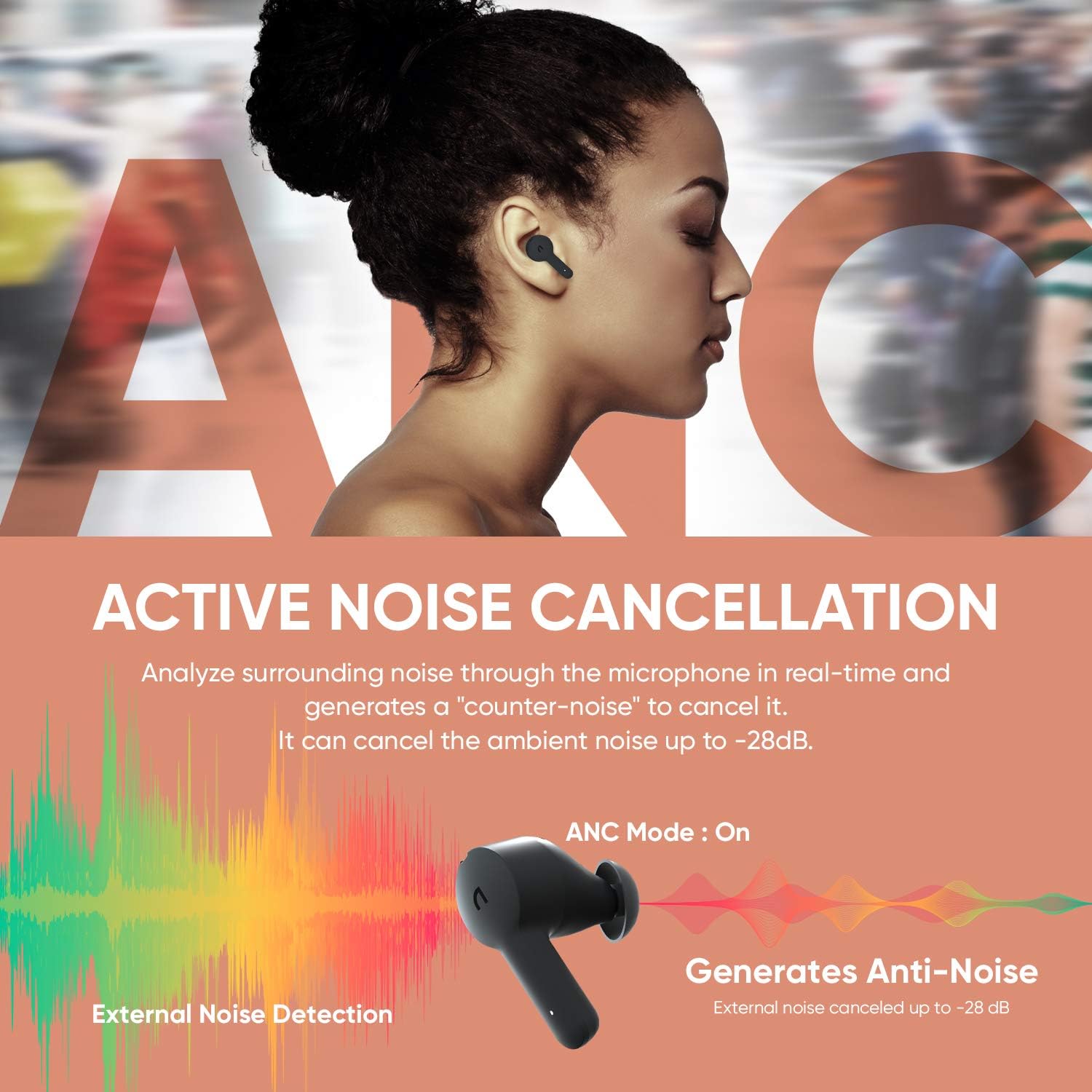
Image: Visual representation of the Active Noise Cancellation feature, showing how external noise is detected and counter-noise is generated to cancel it.
పారదర్శకత మోడ్
Activate Transparency Mode by touching the button on the left earbud for 1.5 seconds. This mode allows you to hear your surroundings without removing the earbuds, which is useful for interacting with people or being aware of traffic.

Image: Two individuals interacting while wearing the earbuds, illustrating the use of Transparency Mode to hear ambient sounds.
వాయిస్ కాల్స్ క్లియర్ చేయండి
Each earbud is equipped with MEMS dual microphones. One microphone senses and cancels ambient noise, while the other picks up and isolates your voice, ensuring clear calls even in noisy environments.
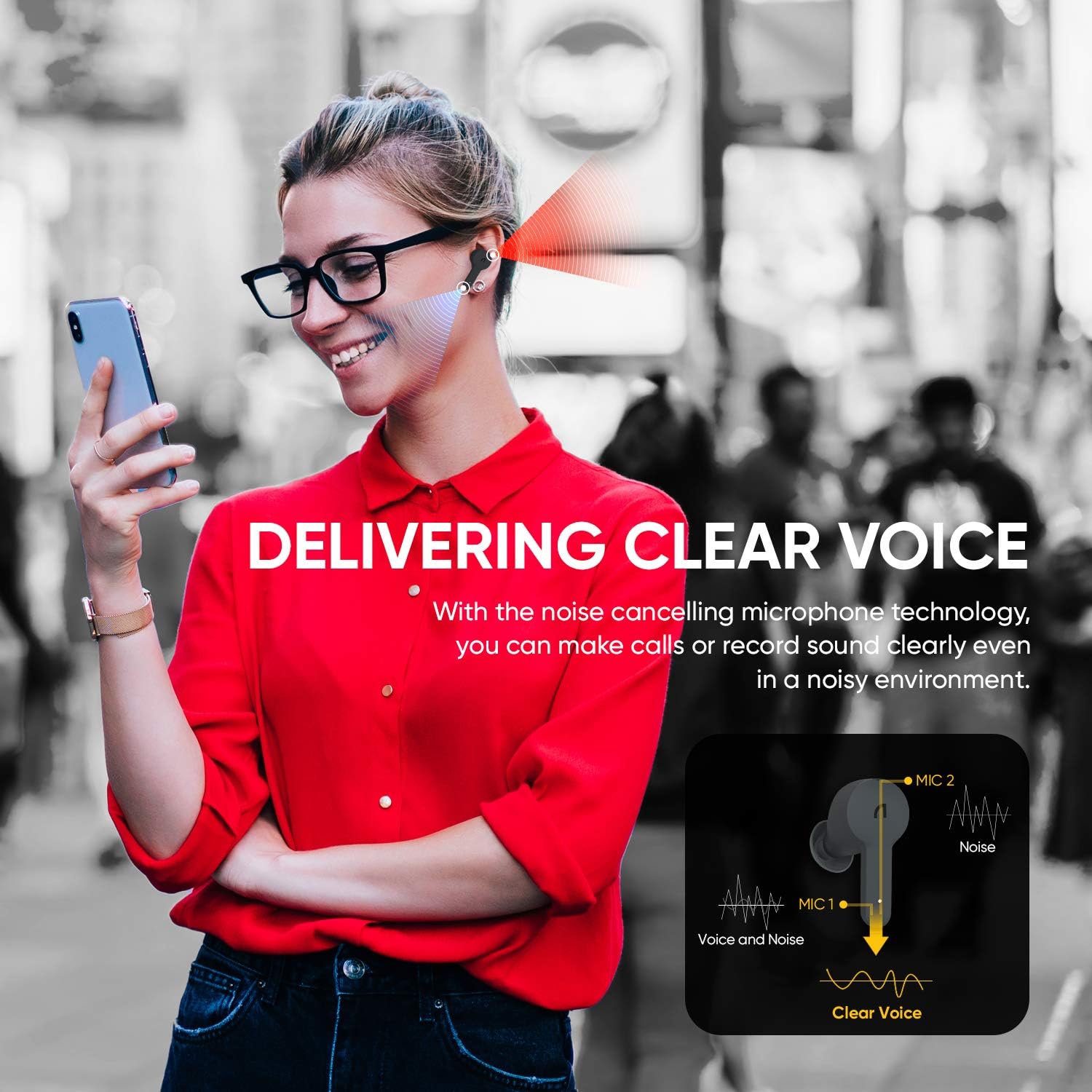
Image: A person on a phone call with the earbuds, showing the microphone noise cancelling technology at work to deliver clear voice.
ఆడియో నాణ్యత
The EC10 earbuds feature a 10mm large dynamic driver for deep bass and support AAC/SBC codecs for high-quality audio decoding, providing well-balanced sound for all types of music.

చిత్రం: పేలినది view of the earbud highlighting the 10mm large dynamic driver, emphasizing its role in delivering clear sound and rich bass.
నియంత్రణలు
The earbuds feature touch controls for media playback and call management. Refer to the quick start guide included in the box for specific touch commands.
నిర్వహణ
క్లీనింగ్
Regularly clean your earbuds and charging case to maintain optimal performance and hygiene. Use a soft, dry, lint-free cloth. For ear tips, remove them and clean with mild soap and water, then dry thoroughly before reattaching.
నీటి నిరోధకత (IPX5)
The EC10 earbuds are IPX5 waterproof, meaning they are resistant to sweat and light splashes of water. They are not designed for submersion in water. Ensure earbuds are dry before placing them back in the charging case.

Image: A person exercising with the earbuds, illustrating their resistance to rain and sweat due to IPX5 waterproof rating.
ట్రబుల్షూటింగ్
- Earbuds not pairing/only one earbud working:
Ensure both earbuds are charged. Place both earbuds back into the charging case, close the lid, wait a few seconds, then open the lid again to re-initiate pairing. If issues persist, try resetting the earbuds (refer to the quick start guide for specific reset instructions).
- శబ్దం లేదు:
Check the volume level on your connected device. Ensure the earbuds are properly paired and connected. Try disconnecting and re-pairing the earbuds.
- ఛార్జింగ్ సమస్యలు:
Ensure the charging cable is securely connected and the power source is active. For wireless charging, ensure the case is correctly positioned on the charging pad. Clean the charging contacts on both the earbuds and the case.
- పేలవమైన ధ్వని నాణ్యత:
Ensure the ear tips provide a good seal in your ear. Try different sized ear tips. Clean any debris from the earbud speakers. Move closer to your connected device to avoid interference.
స్పెసిఫికేషన్లు
| మోడల్ పేరు | EC10 |
| బ్లూటూత్ వెర్షన్ | BT 5.0 |
| బ్లూటూత్ ప్రోfile | హెచ్ఎఫ్పి / హెచ్ఎస్పి / ఎ2డిపి / ఎవిఆర్సిపి |
| ఫ్రీక్వెన్సీ రెస్పాన్స్ | 20Hz - 20KHz |
| Charging Time (Cradle) | 1.5 గంటలు |
| Charging Time (Earbud) | 1.5 గంటలు |
| ప్లేటైమ్ (ANC ఆన్) | 4 గంటలు |
| ప్లేటైమ్ (ANC ఆఫ్) | 5 గంటలు |
| Total Playtime (with Cradle) | 20 గంటల వరకు |
| Cradle Battery Capacity | 3.7V / 500mAh |
| ఇయర్బడ్ బ్యాటరీ సామర్థ్యం | 3.7V / 55mAh |
| ఆపరేషన్ దూరం | 10 M |
| జలనిరోధిత రేటు | IPX5 |
| వైర్లెస్ ఛార్జింగ్ | అందుబాటులో ఉంది |
| నియంత్రణ రకం | టచ్, మీడియా కంట్రోల్ |
| ఆడియో డ్రైవర్ రకం | డైనమిక్ డ్రైవర్ |
వారంటీ మరియు మద్దతు
For warranty information and customer support, please refer to the warranty card included in your product packaging or visit the official ABKO webవారంటీ క్లెయిమ్ల కోసం మీ కొనుగోలు రుజువును ఉంచండి.
తయారీదారు: ABKO
Ask a question about this manual
Ask about setup, troubleshooting, compatibility, parts, safety, or missing instructions. Manuals+ will review the question and use this page’s manual context to help answer it.