
1. పరిచయం
Thank you for choosing Brightown Solar String Lights. This manual provides essential information for the safe and efficient use of your new solar-powered outdoor lighting. These lights are designed to enhance your outdoor spaces with warm white illumination, featuring 8 lighting modes and automatic operation. Please read these instructions carefully before installation and retain for future reference.
2. భద్రతా సమాచారం
- సాధారణ భద్రత: Keep the product away from open flames, heat sources, and flammable materials.
- నీటి నిరోధకత: The lights are IP65 waterproof, meaning they are protected against dust and low-pressure water jets. Do not submerge the solar panel or string lights in water.
- సంస్థాపన: Ensure the solar panel is placed in a location that receives at least 6-8 hours of direct sunlight daily for optimal charging. Avoid placing it under shade or near strong light sources at night, as this may interfere with the automatic on/off function.
- పిల్లలు మరియు పెంపుడు జంతువులు: Keep the product out of reach of small children and pets to prevent accidental ingestion or entanglement.
- నిర్వహణ: Do not attempt to modify or repair the product yourself. Contact customer support if issues arise.
3. ప్యాకింగ్ జాబితా
Each Brightown Solar String Light 2-pack includes the following components:
- Solar String Lights (2 sets, 60 LEDs each, 36.5 ft each)
- Solar Panel with integrated control unit (2 units)
- Ground Stake (2 sets, consisting of a rod and a spike)
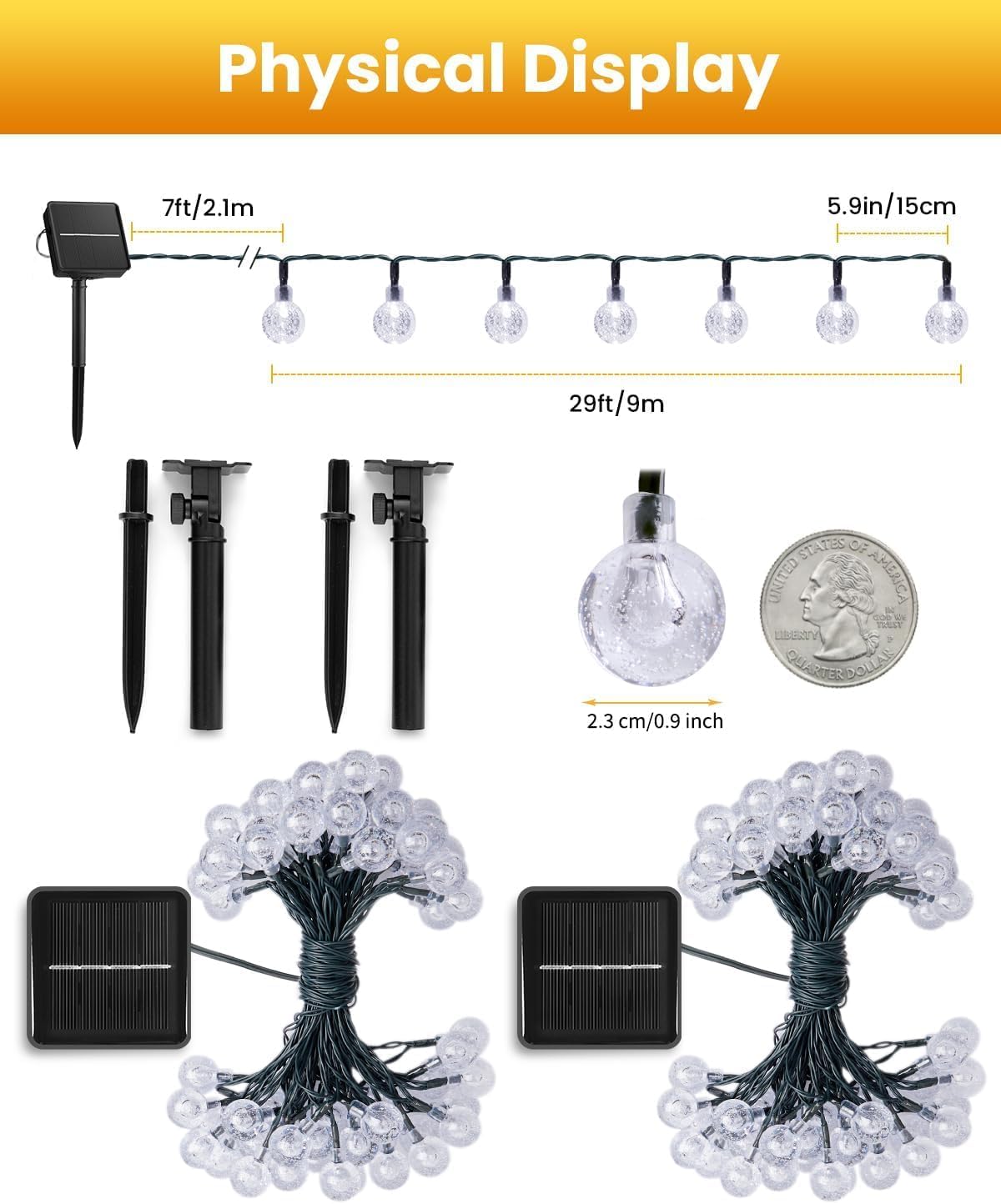
Figure 1: Physical Display and Components. This image illustrates the two sets of solar string lights, each with its solar panel and ground stake. Dimensions for the string length (29ft/9m of lights, 7ft/2.1m lead wire) and individual bulb size (2.3cm/0.9 inch) are provided.
4. సెటప్ & ఇన్స్టాలేషన్
Follow these steps to set up your Brightown Solar String Lights:
- సోలార్ ప్యానెల్ను యాక్టివేట్ చేయండి: Locate the ON/OFF button on the back of the solar panel and press it to turn the unit ON.
- ప్రొటెక్టివ్ ఫిల్మ్ని తీసివేయండి: Carefully peel off the transparent protective film from the surface of the solar panel to ensure maximum sunlight absorption.
- గ్రౌండ్ స్టేక్ను సమీకరించండి: Connect the two parts of the ground stake (rod and spike) firmly together.
- Attach Solar Panel to Stake: Securely attach the solar panel unit to the assembled ground stake.
- సోలార్ ప్యానెల్ను ఉంచండి: Insert the ground stake into soft ground in a location that receives at least 6-8 hours of direct sunlight daily. Adjust the angle of the solar panel to face the sun directly for optimal charging efficiency.
- Arrange the String Lights: Unwind the string lights and arrange them in your desired outdoor area, such as along a fence, patio railing, or around plants.

Figure 2: Solar Panel Assembly and Placement. This image visually guides you through the simple assembly of the solar panel and its optimal placement for charging.
Video 1: Brightown Solar String Lights Overview. This official seller video demonstrates the product's features, including the packing list, setup steps, and various lighting modes. It provides a visual guide to the installation process.
5. ఆపరేటింగ్ సూచనలు
Your Brightown Solar String Lights are designed for ease of use with automatic functions and multiple lighting options.
ఆటోమేటిక్ ఆన్/ఆఫ్ ఫంక్షన్
The integrated light sensor automatically turns the lights on at dusk and off at dawn. Ensure the solar panel is not obstructed and is not exposed to other light sources at night, which could prevent the lights from activating.
ఛార్జింగ్
The solar panel charges the built-in battery during the day. For optimal performance, allow the solar panel to receive at least 6-8 hours of direct sunlight. A full charge typically provides 8-10 hours of illumination at night.
లైటింగ్ మోడ్లు
The control unit on the solar panel features a "MODE" button to cycle through 8 different lighting effects. A built-in memory chip will save your last selected mode for convenience.
- కలయిక
- తరంగాలలో
- సీక్వెన్షియల్
- స్లో-గ్లో
- Chasinగ్రా/ఫ్లాష్
- నెమ్మదిగా ఫేడ్
- ట్వింకిల్/ఫ్లాష్
- స్థిరంగా ఉంది
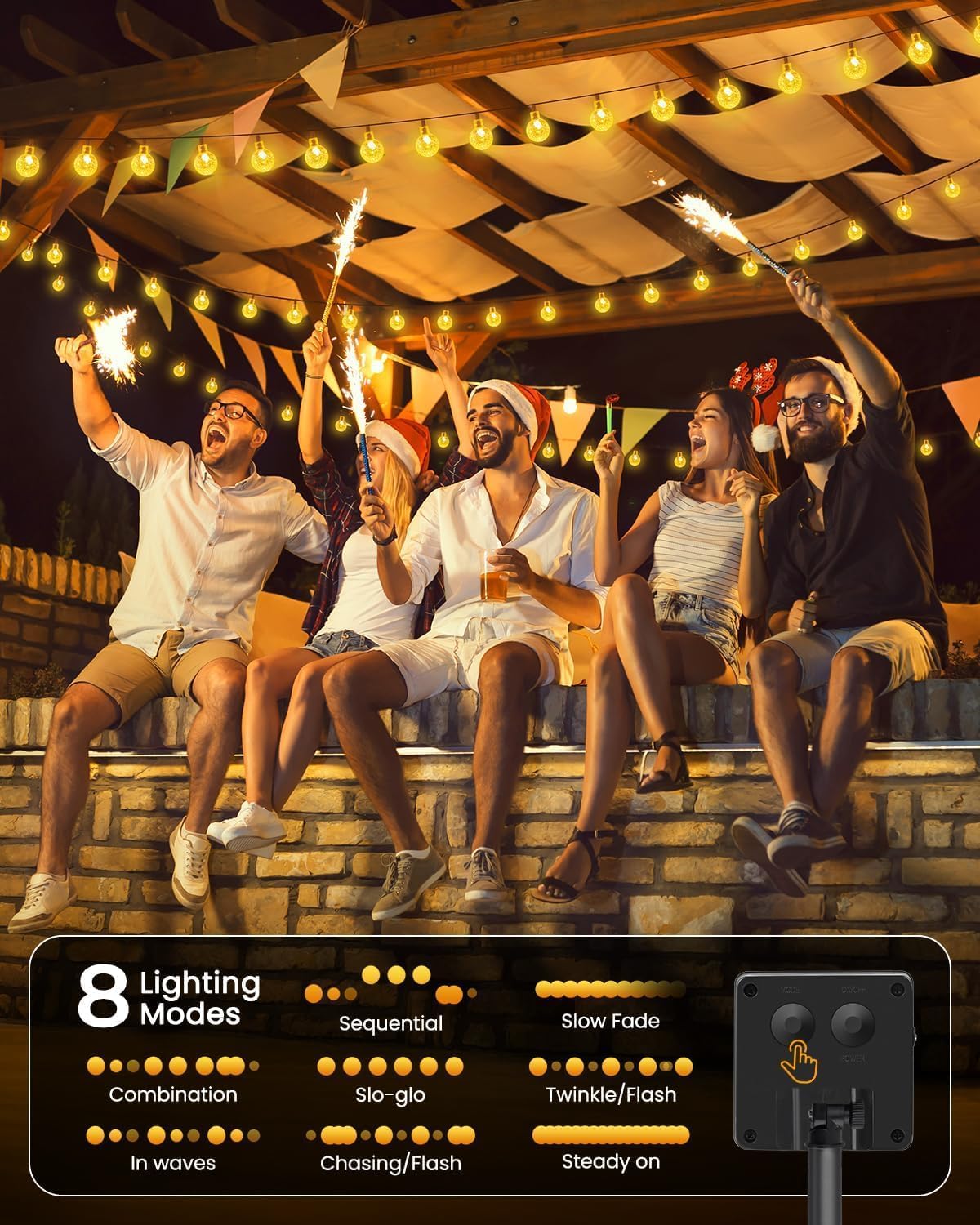
Figure 3: 8 Lighting Modes. This image displays the various lighting patterns available and highlights the control buttons on the solar panel for mode selection.
6. నిర్వహణ
Proper maintenance ensures the longevity and optimal performance of your solar string lights.
- సోలార్ ప్యానెల్ క్లీనింగ్: సోలార్ ప్యానెల్ను మృదువైన, d తో క్రమం తప్పకుండా తుడవండి.amp దుమ్ము, ధూళి లేదా చెత్తను తొలగించడానికి వస్త్రం. శుభ్రమైన ప్యానెల్ సమర్థవంతమైన ఛార్జింగ్ను నిర్ధారిస్తుంది.
- ప్లేస్మెంట్ తనిఖీ: Periodically check that the solar panel remains in a location with direct sunlight and is not becoming shaded by growing plants or new obstructions.
- శీతాకాల సంరక్షణ: While the lights are weather-resistant, during prolonged periods of extreme cold or heavy snow, it is advisable to bring the solar panel indoors to protect the battery and extend its lifespan.
- నిల్వ: లైట్లను ఎక్కువ కాలం నిల్వ చేస్తుంటే, నిల్వ చేసే ముందు సోలార్ ప్యానెల్ పూర్తిగా ఛార్జ్ అయ్యిందని నిర్ధారించుకోండి. చల్లని, పొడి ప్రదేశంలో నిల్వ చేయండి.

చిత్రం 4: IP65 జలనిరోధక డిజైన్. The lights are designed to withstand outdoor elements, including rain and splashes, ensuring durability.
7. ట్రబుల్షూటింగ్
If your solar string lights are not functioning as expected, try the following solutions:
| సమస్య | సాధ్యమైన కారణం | పరిష్కారం |
|---|---|---|
| రాత్రిపూట లైట్లు వెలగవు. | 1. Solar panel is not turned ON. 2. ఛార్జింగ్ చేయడానికి తగినంత సూర్యకాంతి లేకపోవడం. 3. సోలార్ ప్యానెల్ మురికిగా ఉంది. 4. Strong ambient light at night. | 1. Press the "ON/OFF" button on the back of the solar panel. 2. Relocate the solar panel to an area receiving 6-8 hours of direct sunlight. 3. Clean the solar panel surface. 4. Ensure the solar panel is not near streetlights or other bright light sources at night. |
| Lights turn on but only for a short period. | 1. Insufficient charging during the day. 2. Battery capacity reduced over time. | 1. Ensure the solar panel receives maximum direct sunlight for 6-8 hours. 2. Consider replacing the internal rechargeable battery if performance significantly degrades after extended use (consult customer support). |
| కొన్ని బల్బులు వెలగడం లేదు. | Loose connection or damaged LED. | Gently check connections. If an individual LED is damaged, the string may still function due to parallel wiring. Contact customer support if multiple LEDs fail. |
8. స్పెసిఫికేషన్లు
| ఫీచర్ | వివరాలు |
|---|---|
| మోడల్ సంఖ్య | DY-SB-1-500 |
| బ్రాండ్ | ప్రకాశవంతమైన పట్టణం |
| పరిమాణం | 2 String Light Sets |
| LED కౌంట్ | 60 LEDs per string (120 LEDs total) |
| స్ట్రింగ్ పొడవు | 36.5 feet (11.1 meters) per string |
| లేత రంగు | వెచ్చని తెలుపు (2700 కెల్విన్) |
| శక్తి మూలం | సోలార్ పవర్డ్ |
| జలనిరోధిత రేటింగ్ | IP65 |
| నియంత్రణ రకం | Button Control (ON/OFF, MODE) |
| లైటింగ్ మోడ్లు | 8 modes (Combination, In Waves, Sequential, Slo-Glo, Chasing/ఫ్లాష్, స్లో ఫేడ్, ట్వింకిల్/ఫ్లాష్, స్టెడీ ఆన్) |
| బ్యాటరీ | Built-in 800mAh rechargeable battery (per solar panel) |
| మెటీరియల్ | ప్లాస్టిక్ |
| వినియోగ పర్యావరణం | అవుట్డోర్ |
| UPC | 701555958012 |
9. వారంటీ & సపోర్ట్
Brightown provides a 1-సంవత్సరం తయారీదారు వారంటీ for this product, covering defects in materials and workmanship from the date of purchase.
For warranty claims, technical support, or any questions regarding your Brightown Solar String Lights, please contact our customer service team:
- ఇమెయిల్: support@brightown.com
- Webసైట్: www.brightown.com
Please have your model number (DY-SB-1-500) and proof of purchase ready when contacting support.