
1. పరిచయం
This manual provides detailed instructions for the installation, operation, and maintenance of the Aideepen PWM DC Motor Speed Controller, Model BLM-30A. This device is designed to control the speed of DC motors by adjusting the Pulse Width Modulation (PWM) signal. It features a wide input voltage range, high current capacity, and a clear LED display for precise speed monitoring.
ముఖ్య లక్షణాలు:
- మన్నికైన నిర్మాణం: Manufactured from robust materials for enhanced durability and wear resistance.
- సులభమైన సంస్థాపన: Equipped with screw terminals for convenient and quick wiring.
- LED డిజిటల్ డిస్ప్లే: మోటార్ వేగాన్ని శాతంగా చూపుతుందిtage of the maximum speed, allowing for easy data reading.
- వైడ్ వాల్యూమ్tagఇ పరిధి: Supports DC input voltages from 6V to 60V, compatible with 12V, 24V, 36V, and 48V power supplies.
- High Output Current: Provides an adjustable output current from 0A to 30A.
- స్థిరమైన పనితీరు: Features an instant start/stop switch and a rotary potentiometer for reliable and precise speed control.
2. భద్రతా సమాచారం
దయచేసి ఈ పరికరాన్ని ఇన్స్టాల్ చేయడానికి లేదా ఆపరేట్ చేయడానికి ముందు అన్ని భద్రతా సూచనలను చదివి అర్థం చేసుకోండి. ఈ సూచనలను పాటించడంలో విఫలమైతే విద్యుత్ షాక్, అగ్ని ప్రమాదం లేదా తీవ్రమైన గాయం సంభవించవచ్చు.
- Ensure the power supply is disconnected before making any wiring connections.
- ఇన్పుట్ వాల్యూమ్ అని ధృవీకరించండిtage and current ratings match the specifications of the controller and your motor.
- గరిష్టంగా రేట్ చేయబడిన కరెంట్ 30Aని మించకూడదు.
- మండే పదార్థాలకు దూరంగా, పొడి, బాగా వెంటిలేషన్ ఉన్న ప్రదేశంలో కంట్రోలర్ను ఇన్స్టాల్ చేయండి.
- Avoid short circuits during wiring and operation.
- This device is intended for DC motors only. Do not connect to AC power.
3. ఉత్పత్తి ముగిసిందిview
The Aideepen PWM DC Motor Speed Controller features a compact design with an intuitive interface.

మూర్తి 3.1: ముందు view of the speed controller, highlighting the LED display, SET button, PWM OUT indicator, and the multi-function rotary knob for speed adjustment and start/stop control.

Figure 3.2: Close-up of the LED digital display, which indicates the motor speed as a percentage.

Figure 3.3: Close-up of the rotary knob, used for adjusting speed and initiating motor start/stop functions.
4. స్పెసిఫికేషన్లు
| పరామితి | విలువ |
|---|---|
| మోడల్ సంఖ్య | BLM-30A (A7XI0023) |
| ఇన్పుట్ వాల్యూమ్tagఇ పరిధి | డిసి 6 వి - 60 వి |
| అవుట్పుట్ కరెంట్ | 0A - 30A (Continuous current: 20A) |
| స్పీడ్ రేంజ్ | 0% - 100% |
| నియంత్రణ రకం | కరెంట్ని నియంత్రించండి |
| నియంత్రణ ఫ్రీక్వెన్సీ | 15 kHz |
| సర్దుబాటు పద్ధతి | Potentiometer (Rotary Knob) |
| వైరింగ్ రకం | స్క్రూ టెర్మినల్ |
| ఉత్పత్తి కొలతలు (L x W x H) | 9 x 6 x 3.5 సెం.మీ (సుమారుగా 3.54 x 2.36 x 1.38 అంగుళాలు) |
| బరువు | 100 గ్రాములు |
5. సెటప్ మరియు ఇన్స్టాలేషన్
Follow these steps to correctly install and wire your motor speed controller.
వైరింగ్ సూచనలు:

Figure 5.1: Wiring diagram illustrating the connection points for power input and motor output.
- పవర్ ఇన్పుట్: Connect your DC power supply to the terminals labeled 'Input positive 6-60V' (positive) and 'negative power supply' (negative). Ensure the voltage is within the 6V-60V DC range.
- మోటార్ అవుట్పుట్: Connect your DC motor to the terminals labeled 'motor positive' (positive) and 'motor negative' (negative).
- సురక్షిత కనెక్షన్లు: Tighten all screw terminals to ensure a secure and stable connection. Loose connections can cause overheating or malfunction.
Always double-check your wiring before applying power to prevent damage to the controller or motor.
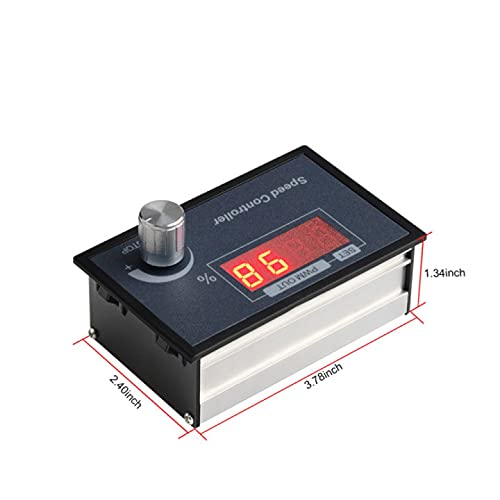
Figure 5.2: Detail of the screw terminals for power and motor connections.
6. ఆపరేటింగ్ సూచనలు
Once the controller is correctly wired and powered on, you can begin operating your DC motor.
- పవర్ ఆన్: Apply power to the controller. The LED display will illuminate, showing the current speed percentage.
- Start/Stop Function: The rotary knob also functions as a start/stop switch. A short press of the knob will start or stop the motor.
- వేగం సర్దుబాటు: Rotate the knob clockwise to increase the motor speed and counter-clockwise to decrease it. The LED display will show the speed as a percentagఇ (0-100%).
- Setting Mode (Advanced): A long press of the rotary knob will enter the setting mode for advanced parameters. Refer to specific product documentation or manufacturer support for details on advanced settings if needed.

Figure 6.1: Controller interface with labels for function, parameter value, and rotary knob operation.
7. నిర్వహణ
To ensure the longevity and optimal performance of your Aideepen PWM DC Motor Speed Controller, follow these maintenance guidelines:
- శుభ్రపరచడం: Periodically clean the exterior of the controller with a soft, dry cloth. Do not use liquid cleaners or solvents.
- తనిఖీ: Regularly inspect the wiring connections for any signs of looseness, corrosion, or damage. Tighten connections as needed.
- వెంటిలేషన్: వేడెక్కకుండా ఉండటానికి వెంటిలేషన్ ఓపెనింగ్లు అడ్డుకోకుండా చూసుకోండి.
- నిల్వ: If storing the controller for an extended period, keep it in a dry, dust-free environment.
8. ట్రబుల్షూటింగ్
If you encounter issues with your motor speed controller, refer to the following troubleshooting guide:
| సమస్య | సాధ్యమైన కారణం | పరిష్కారం |
|---|---|---|
| మోటారు ప్రారంభం కాదు | No power supply; Incorrect wiring; Motor in stop mode; Faulty motor. | విద్యుత్ కనెక్షన్లు మరియు సరఫరా వాల్యూమ్ను తనిఖీ చేయండిtage; Verify wiring according to Figure 5.1; Short press the rotary knob to start the motor; Test motor independently. |
| మోటారు వేగాన్ని సర్దుబాటు చేయడం సాధ్యం కాదు. | Rotary knob malfunction; Controller fault. | Ensure the knob rotates freely; If issue persists, contact support. |
| LED display is off or flickering | No power; Low input voltage; వదులైన కనెక్షన్. | Check power supply; Ensure input voltage is within 6-60V; Inspect and tighten all wiring connections. |
| కంట్రోలర్ వేడెక్కుతుంది | Overload; Poor ventilation; Short circuit. | Reduce motor load; Ensure adequate airflow around the controller; Check for short circuits in wiring. |
9. వారంటీ మరియు మద్దతు
Information regarding specific warranty terms and conditions for the Aideepen PWM DC Motor Speed Controller is not available in this document. For warranty claims, technical support, or further assistance, please contact your retailer or the manufacturer directly through their official support channels.
Please have your product model (BLM-30A) and purchase details ready when contacting support.