
పరిచయం
ధన్యవాదాలు, ధన్యవాదాలు.asing the LEDWOOD ACCESS100 Portable Bluetooth Speaker. This manual provides detailed instructions for setting up, operating, and maintaining your speaker to ensure optimal performance and longevity. Please read this manual thoroughly before using the product.

Image: The LEDWOOD ACCESS100 portable Bluetooth speaker, showcasing its cylindrical design and integrated carrying strap.
ప్యాకేజీ విషయాలు
క్రింద జాబితా చేయబడిన అన్ని వస్తువులు మీ ప్యాకేజీలో ఉన్నాయని నిర్ధారించుకోండి:
- 1 x LEDWOOD ACCESS100 Bluetooth Speaker
- 1 x Charging Cable (USB-A to Micro-USB)
- 1 x Audio Cable (3.5mm AUX)
- 1 x వినియోగదారు మాన్యువల్
- 1 x క్యారీయింగ్ స్ట్రాప్

Image: The LEDWOOD ACCESS100 speaker shown within its retail packaging box.
ఉత్పత్తి ముగిసిందిview
నియంత్రణలు మరియు పోర్టులు
Familiarize yourself with the speaker's controls and connection ports:

చిత్రం: వివరణాత్మక view of the speaker's control panel, showing buttons and input ports.
- మైక్రో SD కార్డ్ స్లాట్: Insert a MicroSD card for direct music playback.
- USB పోర్ట్: Insert a USB flash drive for direct music playback.
- DC 5V ఛార్జింగ్ పోర్ట్: ఛార్జింగ్ కేబుల్ను ఇక్కడ కనెక్ట్ చేయండి.
- AUX ఇన్పుట్: Connect external audio devices using the 3.5mm audio cable.
- Previous Track / Volume Down (V-): మునుపటి ట్రాక్ కోసం షార్ట్ ప్రెస్ చేయండి, వాల్యూమ్ తగ్గించడానికి లాంగ్ ప్రెస్ చేయండి.
- Next Track / Volume Up (V+): తదుపరి ట్రాక్ కోసం షార్ట్ ప్రెస్ చేయండి, వాల్యూమ్ పెంచడానికి లాంగ్ ప్రెస్ చేయండి.
- పవర్ బటన్: Long press to power on/off. Short press to play/pause in Bluetooth/USB/MicroSD mode.
- మోడ్ (M) బటన్: Short press to switch between Bluetooth, AUX, USB, MicroSD, and FM Radio modes.
- Play/Pause / TWS Button: Short press to play/pause. Long press to activate TWS pairing (in Bluetooth mode).
సెటప్
స్పీకర్పై ఆరోపణలు చేస్తున్నారు
మొదటిసారి ఉపయోగించే ముందు, స్పీకర్ను పూర్తిగా ఛార్జ్ చేయండి.
- Connect the provided USB charging cable to the DC 5V port on the speaker.
- USB కేబుల్ యొక్క మరొక చివరను USB పవర్ అడాప్టర్ (చేర్చబడలేదు) లేదా కంప్యూటర్ యొక్క USB పోర్ట్కు కనెక్ట్ చేయండి.
- ఛార్జింగ్ ఇండికేటర్ లైట్ ఛార్జింగ్ సమయంలో వెలుగుతుంది మరియు పూర్తిగా ఛార్జ్ అయిన తర్వాత ఆపివేయబడుతుంది.
పవర్ ఆన్/ఆఫ్
- To power on, long press the పవర్ బటన్ మీరు వినగల ప్రాంప్ట్ వినే వరకు.
- To power off, long press the పవర్ బటన్ మళ్ళీ స్పీకర్ ఆగిపోయే వరకు.
ఆపరేటింగ్ సూచనలు
బ్లూటూత్ మోడ్
The speaker enters Bluetooth pairing mode automatically when powered on, or when selected via the Mode button.
- Ensure the speaker is powered on and in Bluetooth mode (indicated by an audible prompt).
- మీ స్మార్ట్ఫోన్, టాబ్లెట్ లేదా ఇతర అనుకూల పరికరంలో బ్లూటూత్ను ప్రారంభించండి.
- కోసం వెతకండి "LEDWOOD ACCESS100" in your device's Bluetooth settings and select it to pair.
- Once paired, you will hear a confirmation sound. You can now play audio from your device through the speaker.
- నియంత్రణలు:
- షార్ట్ ప్రెస్ పవర్ బటన్ ప్లే / పాజ్ చేయడానికి.
- షార్ట్ ప్రెస్ V- for Previous Track.
- షార్ట్ ప్రెస్ V+ for Next Track.
- లాంగ్ ప్రెస్ చేయండి V- to Decrease Volume.
- లాంగ్ ప్రెస్ చేయండి V+ to Increase Volume.

Image: An icon representing wireless connectivity, indicating Bluetooth functionality.
నిజమైన వైర్లెస్ స్టీరియో (TWS) ఫంక్షన్
The TWS function allows you to pair two LEDWOOD ACCESS100 speakers together for a stereo sound experience.
- Ensure both ACCESS100 speakers are powered on and in Bluetooth mode, but not yet connected to any device.
- On one of the speakers (this will be the primary speaker), long press the Play/Pause / TWS Button. You will hear an indication sound.
- The two speakers will automatically search and pair with each other. Once successfully paired, you will hear a confirmation sound.
- Now, connect your smartphone or tablet to the primary speaker via Bluetooth as described in the "Bluetooth Mode" section.
- ఆడియో ఇప్పుడు రెండు స్పీకర్ల ద్వారా స్టీరియోలో ప్లే అవుతుంది.

Image: An icon representing True Wireless Stereo (TWS) functionality, showing two interconnected loops.
AUX మోడ్
Use the AUX mode to connect devices without Bluetooth capability.
- Connect one end of the 3.5mm audio cable to the AUX input port on the speaker.
- మరొక చివరను మీ బాహ్య పరికరం (ఉదా. MP3 ప్లేయర్, కంప్యూటర్) యొక్క ఆడియో అవుట్పుట్ జాక్కి కనెక్ట్ చేయండి.
- నొక్కండి మోడ్ (M) బటన్ repeatedly until you hear the "AUX mode" prompt.
- మీ కనెక్ట్ చేయబడిన పరికరం నుండి నేరుగా ప్లేబ్యాక్ మరియు వాల్యూమ్ను నియంత్రించండి.
USB / MicroSD Card Mode
Play music directly from a USB flash drive or MicroSD card.
- Insert a USB flash drive into the USB port or a MicroSD card into the MicroSD card slot.
- The speaker will automatically switch to the corresponding mode and begin playing music. If not, press the మోడ్ (M) బటన్ to select USB or MicroSD mode.
- నియంత్రణలు:
- షార్ట్ ప్రెస్ పవర్ బటన్ ప్లే / పాజ్ చేయడానికి.
- షార్ట్ ప్రెస్ V- for Previous Track.
- షార్ట్ ప్రెస్ V+ for Next Track.
- లాంగ్ ప్రెస్ చేయండి V- to Decrease Volume.
- లాంగ్ ప్రెస్ చేయండి V+ to Increase Volume.
FM రేడియో మోడ్
మీకు ఇష్టమైన FM రేడియో స్టేషన్లను వినండి.
- నొక్కండి మోడ్ (M) బటన్ repeatedly until you hear the "FM Radio" prompt.
- To automatically scan and save available stations, long press the Play/Pause / TWS Button. స్పీకర్ స్టేషన్లను స్కాన్ చేసి నిల్వ చేస్తుంది.
- To switch between saved stations, short press the V- or V+ బటన్లు.
- లాంగ్ ప్రెస్ చేయండి V- to Decrease Volume.
- లాంగ్ ప్రెస్ చేయండి V+ to Increase Volume.
నిర్వహణ
- శుభ్రపరచడం: స్పీకర్ ఉపరితలాన్ని శుభ్రం చేయడానికి మృదువైన, పొడి వస్త్రాన్ని ఉపయోగించండి. రాపిడి క్లీనర్లను లేదా ద్రావకాలను ఉపయోగించవద్దు.
- నిల్వ: స్పీకర్ను ప్రత్యక్ష సూర్యకాంతి మరియు తీవ్రమైన ఉష్ణోగ్రతలకు దూరంగా చల్లని, పొడి ప్రదేశంలో నిల్వ చేయండి.
- బ్యాటరీ సంరక్షణ: బ్యాటరీ జీవితకాలాన్ని పొడిగించడానికి, స్పీకర్ను తరచుగా పూర్తిగా డిశ్చార్జ్ చేయకుండా ఉండండి. ఎక్కువసేపు ఉపయోగంలో లేనప్పటికీ, దానిని క్రమం తప్పకుండా ఛార్జ్ చేయండి.
- నీటి నిరోధకత: ఈ స్పీకర్ కాదు waterproof. Avoid exposure to water or excessive moisture.
ట్రబుల్షూటింగ్
| సమస్య | సాధ్యమైన కారణం | పరిష్కారం |
|---|---|---|
| స్పీకర్ పవర్ ఆన్ చేయదు. | తక్కువ బ్యాటరీ. | స్పీకర్ను పూర్తిగా ఛార్జ్ చేయండి. |
| స్పీకర్ నుండి శబ్దం లేదు. | వాల్యూమ్ చాలా తక్కువగా ఉంది; తప్పు మోడ్; పరికరం కనెక్ట్ కాలేదు. | Increase volume on speaker and connected device. Ensure correct mode (Bluetooth, AUX, USB, MicroSD, FM). Re-pair Bluetooth device or check cable connection. |
| బ్లూటూత్ జత చేయడం విఫలమైంది. | స్పీకర్ జత చేసే మోడ్లో లేదు; పరికరం చాలా దూరంలో ఉంది; జోక్యం. | Ensure speaker is in Bluetooth pairing mode. Move device closer to speaker (within 10 meters). Turn off other Bluetooth devices. |
| TWS జత చేయడం విఫలమైంది. | Speakers not in TWS pairing mode; too far apart. | Ensure both speakers are in Bluetooth mode and not connected to any device. Long press the TWS button on one speaker. Keep speakers close during pairing. |
| USB/MicroSD playback issues. | మద్దతు లేదు file format; corrupted media; incorrect mode. | ఆడియోను నిర్ధారించుకోండి files are in a supported format (e.g., MP3). Try a different USB drive or MicroSD card. Press Mode button to select correct input. |
| FM రేడియో స్పందన సరిగా లేదు. | బలహీనమైన సిగ్నల్; పర్యావరణ జోక్యం. | Move the speaker to a different location. Re-scan for stations. |
స్పెసిఫికేషన్లు
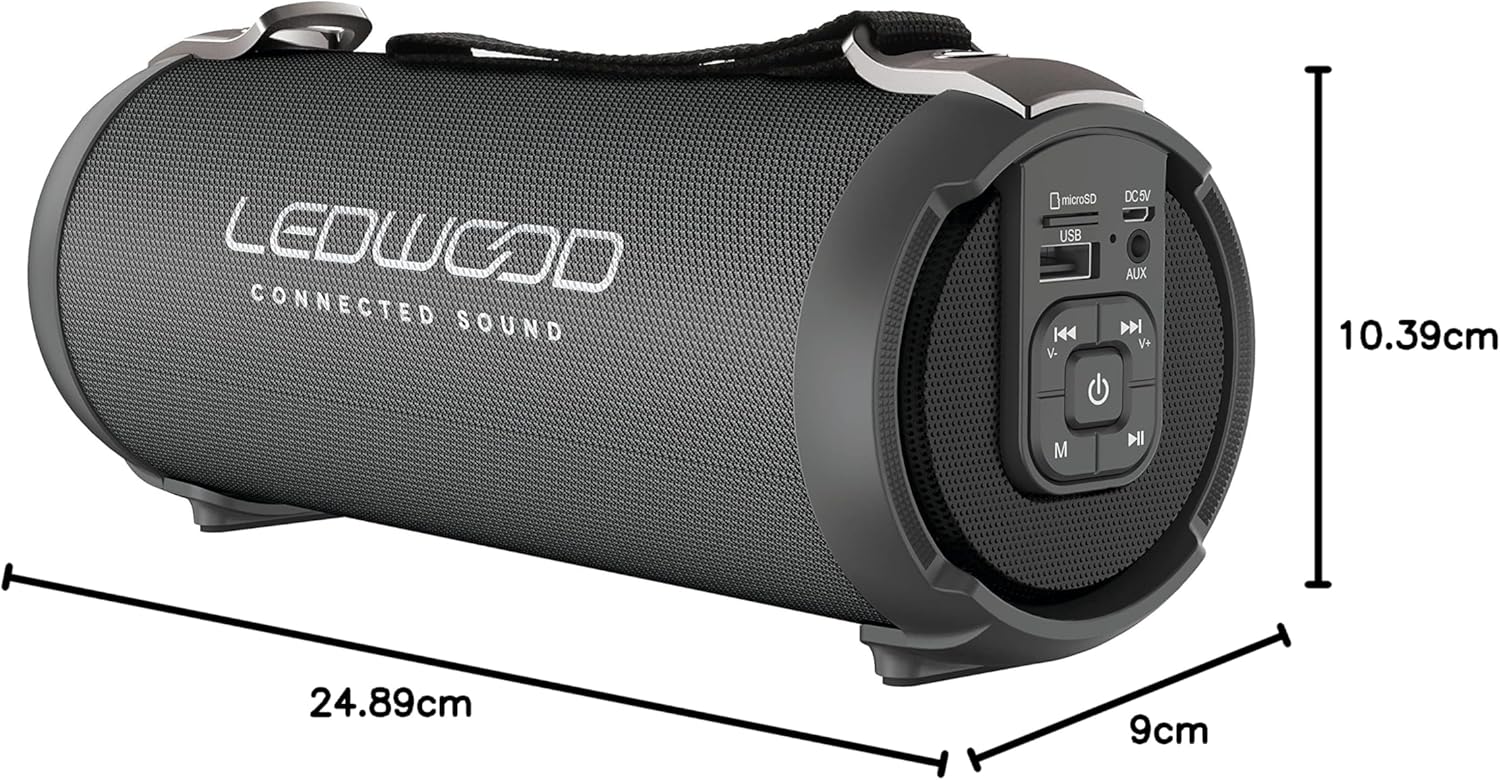
Image: The LEDWOOD ACCESS100 speaker with its length, width, and height dimensions indicated.
| ఫీచర్ | వివరాలు |
|---|---|
| మోడల్ పేరు | యాక్సెస్ 100 |
| బ్రాండ్ | Ledwood |
| కనెక్టివిటీ టెక్నాలజీ | బ్లూటూత్ |
| వైర్లెస్ రేంజ్ | 10 మీటర్లు (33 అడుగులు) వరకు |
| ఆడియో అవుట్పుట్ మోడ్ | స్టీరియో (2.0 ఛానల్) |
| Speaker Output Power (RMS) | 8.5 వాట్స్ |
| పీక్ పవర్ అవుట్పుట్ | 100 వాట్స్ |
| ప్రత్యేక లక్షణాలు | USB Port, MicroSD Card Slot, AUX Input, FM Radio, TWS Function |
| శక్తి మూలం | Battery Powered (rechargeable via USB cable) |
| ఉత్పత్తి కొలతలు (L x W x H) | 24.9 cm x 9 cm x 10.4 cm (9.8 x 3.5 x 4.1 అంగుళాలు) |
| బరువు | 820 గ్రాములు (1.8 పౌండ్లు) |
| రంగు | నలుపు |
| జలనిరోధిత | నం |
| అనుకూల పరికరాలు | స్మార్ట్ఫోన్లు, టాబ్లెట్లు |
భద్రతా సమాచారం
- స్పీకర్ను తీవ్రమైన ఉష్ణోగ్రతలు, ప్రత్యక్ష సూర్యకాంతి లేదా అధిక తేమకు గురిచేయవద్దు.
- స్పీకర్ను మీరే విడదీయవద్దు, మరమ్మతు చేయవద్దు లేదా సవరించవద్దు. ఇది వారంటీని రద్దు చేస్తుంది.
- పిల్లలు మరియు పెంపుడు జంతువుల నుండి స్పీకర్ను దూరంగా ఉంచండి.
- అందించిన ఛార్జింగ్ కేబుల్ లేదా సర్టిఫైడ్ దానికి సమానమైన దాన్ని మాత్రమే ఉపయోగించండి.
- వినికిడి దెబ్బతినకుండా నిరోధించడానికి ఎక్కువ కాలం పాటు అధిక వాల్యూమ్లలో వినడం మానుకోండి.
- స్థానిక నిబంధనల ప్రకారం ఉత్పత్తిని మరియు దాని బ్యాటరీని బాధ్యతాయుతంగా పారవేయండి.
వారంటీ మరియు మద్దతు
This product comes with a standard manufacturer's warranty. For detailed warranty terms and conditions, please refer to the warranty card included in your package or contact Ledwood customer support.
For technical support, troubleshooting assistance, or general inquiries, please visit the official Ledwood webసైట్లో లేదా వారి కస్టమర్ సర్వీస్ విభాగాన్ని సంప్రదించండి. సంప్రదింపు సమాచారం సాధారణంగా ఉత్పత్తి ప్యాకేజింగ్ లేదా బ్రాండ్ యొక్క అధికారిక వెబ్సైట్లో చూడవచ్చు. webసైట్.