
1. ఉత్పత్తి ముగిసిందిview
The BESTTEN USOT-D-3A-L is a heavy-duty digital programmable timer designed for outdoor use. It features a 7-day programming cycle, a built-in clock, and three grounded outlets, allowing for automated control of outdoor lighting, decorations, and appliances. Its weatherproof construction ensures reliable operation in various outdoor conditions.
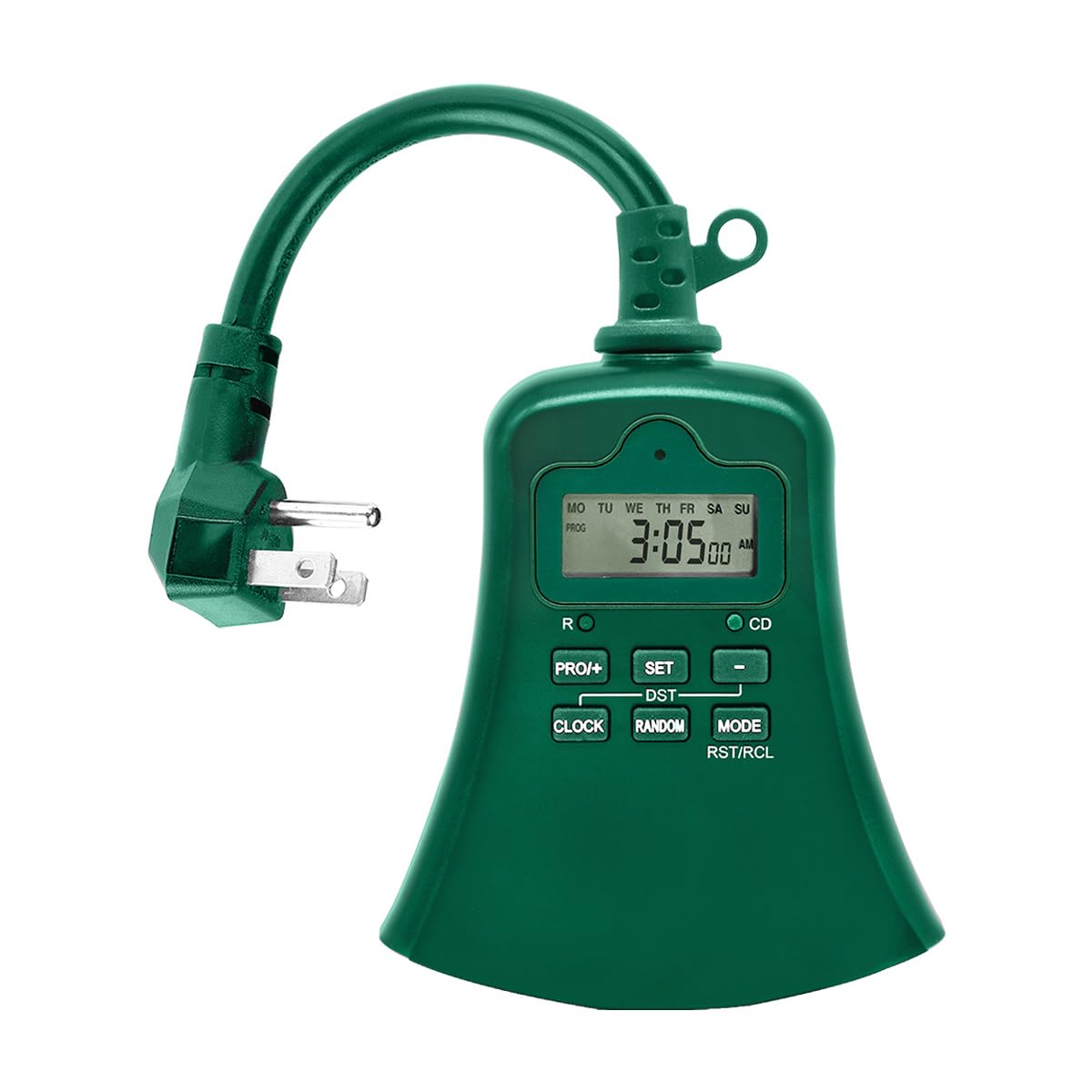
చిత్రం 1.1: ముందు view of the BESTTEN USOT-D-3A-L Outdoor Digital Programmable Timer, showing the display, control buttons, and three grounded outlets.
2. ముఖ్యమైన భద్రతా సూచనలు
Please read and understand all safety instructions before using this product. Failure to follow these instructions may result in fire, electric shock, or injury.
- బాహ్య వినియోగం మాత్రమే: This timer is designed for outdoor use. Ensure it is installed in a location protected from direct water spray, though its weatherproof design offers protection against rain.
- గ్రౌండింగ్: ఎల్లప్పుడూ టైమర్ను గ్రౌండెడ్ 3-ప్రాంగ్ అవుట్లెట్లోకి ప్లగ్ చేయండి. గ్రౌండింగ్ ప్రాంగ్ను తీసివేయవద్దు.
- ఎలక్ట్రికల్ రేటింగ్: Do not exceed the electrical ratings of the timer. Refer to the specifications section for details.
- నీటిలో ముంచడం: టైమర్ను నీటిలో ముంచవద్దు.
- పిల్లలు: పిల్లలకు దూరంగా ఉంచండి.
- నిర్వహణ: Do not attempt to open or repair the timer. Refer all servicing to qualified personnel.
- పొడిగింపు త్రాడులు: If using an extension cord, ensure it is rated for outdoor use and can handle the total amperage of the connected devices.
3. ఉత్పత్తి లక్షణాలు
- 7-Day Digital Programming: Set up to 20 ON/OFF programs per day for individual days or groups of days.
- 3 గ్రౌండెడ్ అవుట్లెట్లు: Control multiple devices simultaneously.
- వాతావరణ నిరోధక డిజైన్: బహిరంగ వాతావరణాలకు అనువైన మన్నికైన నిర్మాణం.
- కౌంట్డౌన్ టైమర్ ఫంక్షన్: Set a specific duration for devices to remain ON.
- మాన్యువల్ ఓవర్రైడ్: Easily switch between ON, OFF, and AUTO modes.
- అంతర్నిర్మిత బ్యాటరీ బ్యాకప్: Retains programming during power outages.
- ETL జాబితా చేయబడింది: భద్రత మరియు నాణ్యతా ప్రమాణాలకు సర్టిఫై చేయబడింది.
4. ప్యాకేజీ విషయాలు
ప్యాకేజీని తెరిచినప్పుడు అన్ని అంశాలు ఉన్నాయని నిర్ధారించుకోండి:
- BESTTEN USOT-D-3A-L Outdoor Digital Programmable Timer
- ఇన్స్ట్రక్షన్ మాన్యువల్
5. సంస్థాపన
- ఒక స్థానాన్ని ఎంచుకోండి: Select a suitable outdoor location for the timer. Ensure it is near a grounded 3-prong electrical outlet and where the connected devices will reach. While weatherproof, avoid locations where it might be submerged or exposed to direct, high-pressure water spray.
- మౌంటు (ఐచ్ఛికం): The timer can be hung using the integrated keyhole slot on the back. Use a screw (not included) appropriate for your mounting surface.
- Plug In the Timer: Insert the timer's plug into a grounded 3-prong outdoor electrical outlet. The display should illuminate.
- పరికరాలను కనెక్ట్ చేయండి: Plug your outdoor lights or appliances into the three grounded outlets on the bottom of the timer. Ensure the total load does not exceed the timer's maximum rating.
Image 5.1: Illustration of the timer plugged into an outdoor GFCI outlet, with three devices connected to its outlets.
6. సెటప్ మరియు ప్రోగ్రామింగ్
Before programming, familiarize yourself with the control buttons:
- గడియారం: ప్రస్తుత సమయం మరియు రోజును సెట్ చేయడానికి ఉపయోగించబడుతుంది.
- ప్రోగ్: Used to enter and exit programming mode for ON/OFF times.
- ON/OFF/AUTO: Cycles through ON, OFF, and AUTO modes.
- DAY: Adjusts the day of the week during time setting or program setting.
- గంట: Adjusts the hour during time setting or program setting.
- నిమి: Adjusts the minute during time setting or program setting.
- RST/RCL: Resets the timer or recalls program settings.
6.1. Initial Reset
It is recommended to perform a full reset before first use or after a prolonged period of inactivity.
- చిన్నదాన్ని గుర్తించండి RST/RCL బటన్.
- Using a pointed object (e.g., a pen tip), press the RST/RCL button. The display will clear, and the timer will reset to default settings.
6.2. ప్రస్తుత సమయం మరియు రోజును సెట్ చేయడం
- నొక్కండి మరియు పట్టుకోండి గడియారం button. The display will show the current time.
- పట్టుకొని ఉండగా గడియారం, నొక్కండి DAY button repeatedly until the correct day of the week is displayed (MO, TU, WE, TH, FR, SA, SU).
- పట్టుకొని ఉండగా గడియారం, నొక్కండి గంట button repeatedly to set the correct hour (12-hour format with AM/PM).
- పట్టుకొని ఉండగా గడియారం, నొక్కండి MIN సరైన నిమిషాన్ని సెట్ చేయడానికి పదే పదే బటన్ను నొక్కండి.
- విడుదల చేయండి గడియారం button. The current time and day are now set.
6.3. ఆన్/ఆఫ్ సమయాలను ప్రోగ్రామింగ్ చేయడం
The timer allows for up to 20 ON/OFF programs. Each program consists of an ON time and an OFF time.
- నొక్కండి PROG button once. The display will show "1 ON" and the time will flash. This is for the first ON program.
- నొక్కండి DAY repeatedly to select the desired day(s) for this program. Options include: specific day (MO, TU, etc.), all weekdays (MO TU WE TH FR), all weekend days (SA SU), all 7 days (MO TU WE TH FR SA SU), or various combinations.
- నొక్కండి గంట కావలసిన ON గంటను సెట్ చేయడానికి.
- నొక్కండి MIN కావలసిన ON నిమిషాన్ని సెట్ చేయడానికి.
- నొక్కండి PROG again. The display will show "1 OFF" and the time will flash. This is for the first OFF program.
- Repeat steps 2-4 to set the desired OFF time for the first program. The day selection will automatically match the ON program.
- నొక్కండి PROG again to move to the next program ("2 ON"). Repeat the process for up to 20 programs.
- To exit programming mode at any time, press the గడియారం బటన్.
To clear a program: కాగా viewing the specific ON or OFF program you wish to clear, press the RST/RCL button. The program will be replaced with "--:--".
6.4. Countdown Timer Function
The countdown function allows you to turn on or off a device for a specific duration.
- టైమర్ ఆన్లో ఉందని నిర్ధారించుకోండి ఆటో మోడ్.
- నొక్కండి మరియు పట్టుకోండి ఆన్/ఆఫ్/ఆటో button for approximately 3 seconds. The display will show "CD" (Countdown).
- ఉపయోగించండి గంట మరియు MIN కావలసిన కౌంట్డౌన్ వ్యవధిని సెట్ చేయడానికి బటన్లు.
- నొక్కండి ఆన్/ఆఫ్/ఆటో again to start the countdown. The connected device will turn ON (if currently OFF) or OFF (if currently ON) for the set duration.
- కౌంట్డౌన్ను రద్దు చేయడానికి, ఆన్/ఆఫ్/ఆటో మరోసారి.
7. ఆపరేటింగ్ మోడ్లు
నొక్కండి ఆన్/ఆఫ్/ఆటో ఆపరేటింగ్ మోడ్ల ద్వారా సైకిల్ చేయడానికి బటన్ను పదే పదే నొక్కండి:
- దానంతట అదే: The timer operates according to the programmed ON/OFF times. This is the standard operating mode for automated control.
- పై: The connected devices will remain continuously ON, overriding any programmed settings. The display will show "ON".
- ఆఫ్: The connected devices will remain continuously OFF, overriding any programmed settings. The display will show "OFF".
ఎల్లప్పుడూ టైమర్ ఆన్లో ఉందని నిర్ధారించుకోండి ఆటో mode for programmed schedules to function.
8. నిర్వహణ
- శుభ్రపరచడం: శుభ్రపరిచే ముందు పవర్ అవుట్లెట్ నుండి టైమర్ను డిస్కనెక్ట్ చేయండి. బాహ్య భాగాన్ని మృదువైన, d గ్లాసర్తో తుడవండి.amp వస్త్రం. కఠినమైన రసాయనాలు లేదా రాపిడి క్లీనర్లను ఉపయోగించవద్దు.
- నిల్వ: If storing the timer for an extended period, disconnect it from power and store it in a cool, dry place.
- బ్యాటరీ: The internal battery is designed to retain settings during power outages. If the display is consistently blank or settings are lost frequently, the internal battery may need servicing by a qualified technician.
9. ట్రబుల్షూటింగ్
| సమస్య | సాధ్యమైన కారణం | పరిష్కారం |
|---|---|---|
| టైమర్ డిస్ప్లే ఖాళీగా ఉంది. | టైమర్కు పవర్ లేదు; అంతర్గత బ్యాటరీ అయిపోయింది. | Ensure the timer is securely plugged into a live outlet. If the problem persists, the internal battery may need charging (leave plugged in for 24 hours) or replacement. |
| Devices are not turning ON/OFF at programmed times. | Timer is not in AUTO mode; incorrect program settings; devices not properly connected. | నొక్కండి ఆన్/ఆఫ్/ఆటో "AUTO" ప్రదర్శించబడే వరకు. తిరిగిview your program settings (Section 6.3) for accuracy. Ensure devices are securely plugged into the timer. |
| Timer is ON/OFF continuously, ignoring programs. | Timer is in ON or OFF mode. | నొక్కండి ఆన్/ఆఫ్/ఆటో "AUTO" ప్రదర్శించబడే వరకు. |
| ప్రోగ్రామింగ్లో ఇబ్బంది. | Incorrect button sequence; unfamiliarity with controls. | Refer to Section 6.3 for detailed programming steps. Perform an initial reset (Section 6.1) and try again. |
10. స్పెసిఫికేషన్లు
| మోడల్ సంఖ్య | USOT-D-3A-L |
| ఎలక్ట్రికల్ రేటింగ్ | 125V AC, 60Hz, 15A Resistive, 1875W |
| అవుట్లెట్ల సంఖ్య | 3 గ్రౌండ్డ్ అవుట్లెట్లు |
| ప్రోగ్రామింగ్ సైకిల్స్ | 7-Day, up to 20 ON/OFF programs |
| మెటీరియల్ | పాలికార్బోనేట్ |
| వస్తువు బరువు | 8.5 ఔన్సులు (0.53 పౌండ్లు) |
| ధృవపత్రాలు | ETL జాబితా చేయబడింది |
11. వారంటీ మరియు కస్టమర్ మద్దతు
BESTTEN products are designed and manufactured to the highest quality standards. For warranty information, technical support, or customer service inquiries, please contact BESTTEN directly through their official webఉత్పత్తిని కొనుగోలు చేసిన సైట్ లేదా రిటైలర్.
Please have your model number (USOT-D-3A-L) and purchase information ready when contacting support.