
Mcilpoog WS-T6
Mcilpoog WS-T6 సూపర్ ఆటోమేటిక్ ఎస్ప్రెస్సో కాఫీ మెషిన్ యూజర్ మాన్యువల్
Model: WS-T6
1. పరిచయం
This manual provides essential instructions for the safe and efficient operation, maintenance, and troubleshooting of your Mcilpoog WS-T6 Super Automatic Espresso Coffee Machine. Please read this manual thoroughly before using the appliance and retain it for future reference.
2. ఉత్పత్తి ముగిసిందిview
The Mcilpoog WS-T6 is a super automatic espresso machine designed for convenience and quality. It features a built-in milk jug and a user-friendly touchscreen interface.
2.1 యంత్ర భాగాలు
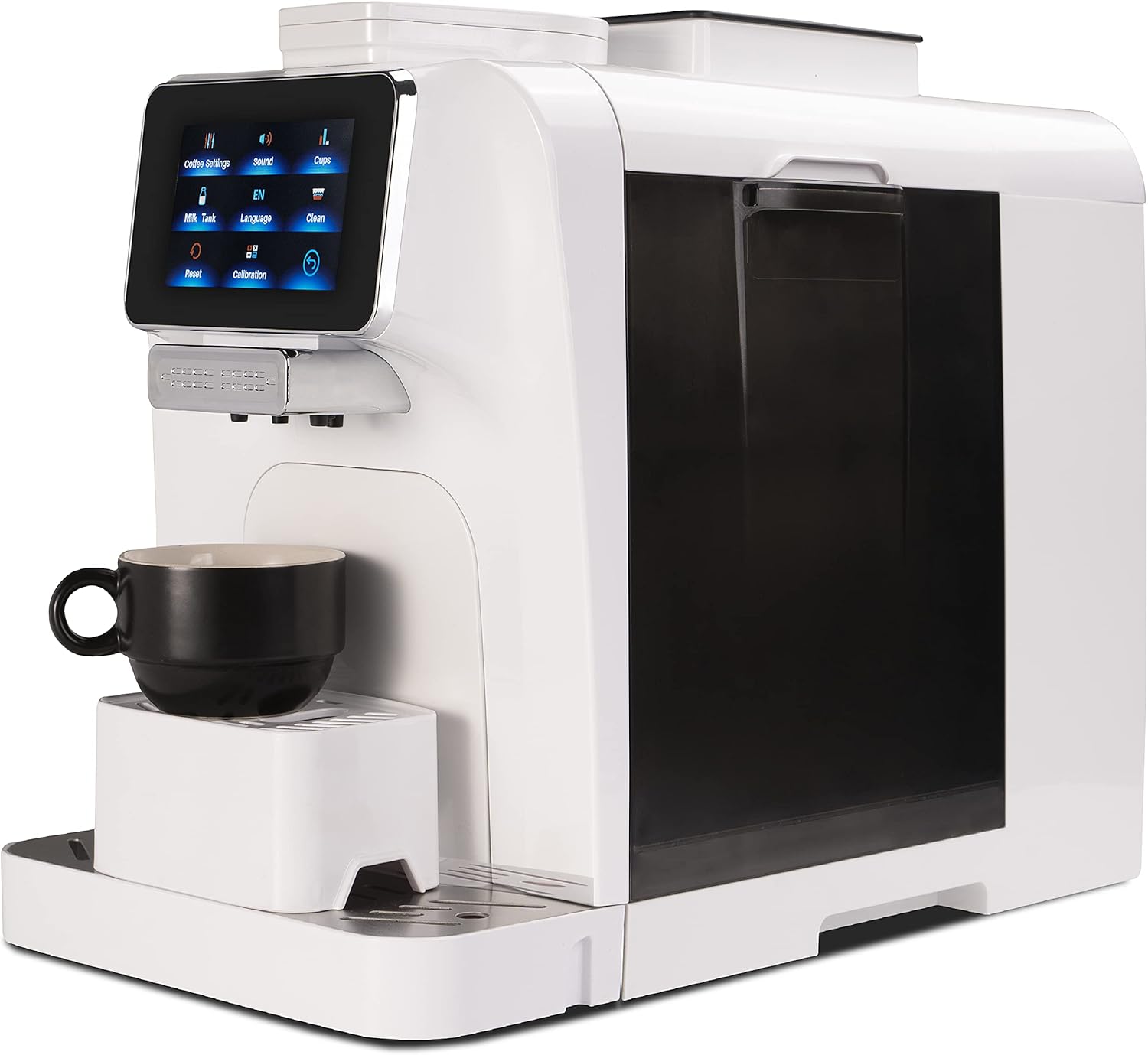
మూర్తి 1: ముందు view of the Mcilpoog WS-T6 Espresso Machine. This image shows the sleek white design of the machine with its touchscreen display and coffee dispenser.
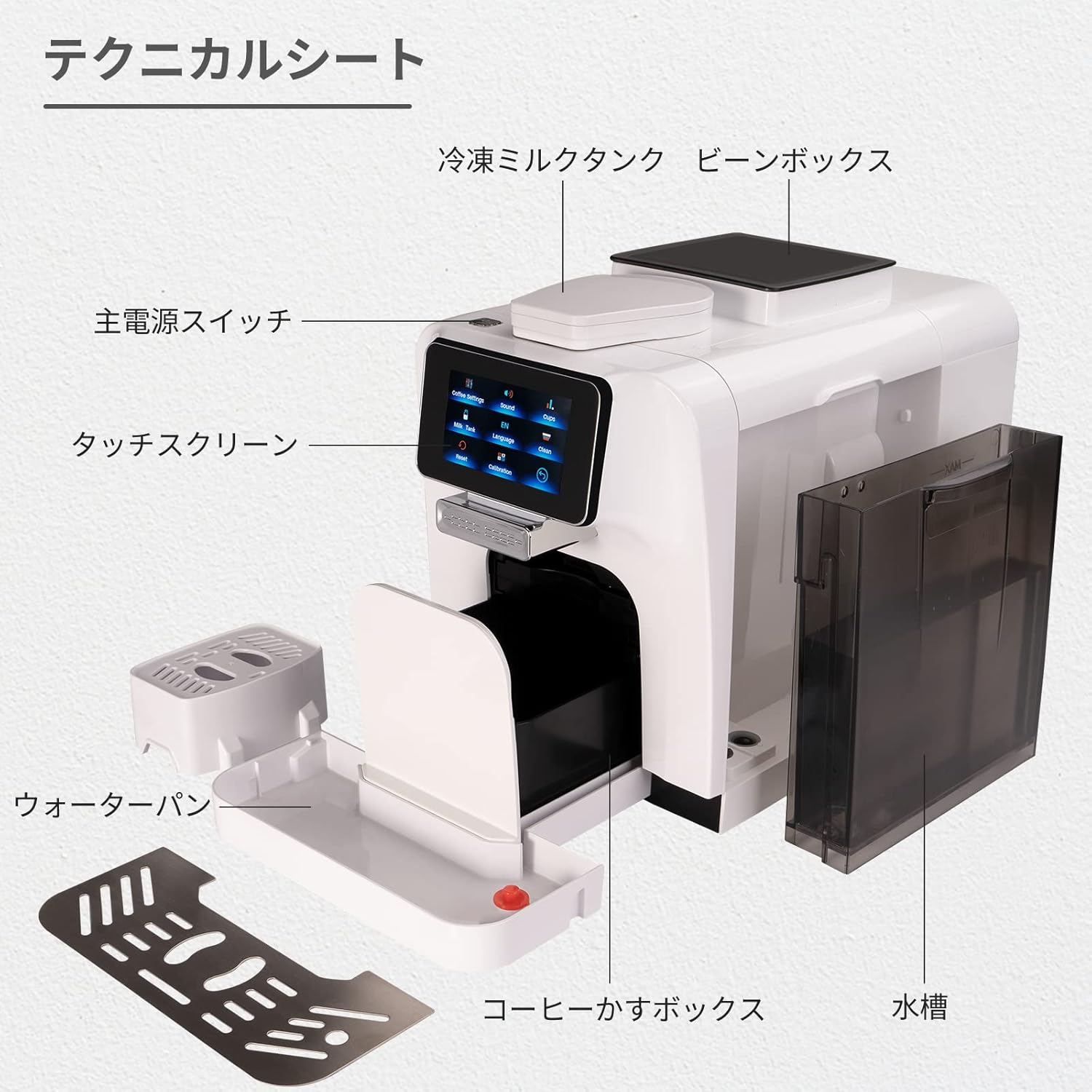
మూర్తి 2: పేలింది view diagram of the Mcilpoog WS-T6 components. Key parts include the main power switch, touchscreen, cold milk tank, bean box, water pan, coffee grounds box, and water tank.
- టచ్స్క్రీన్ డిస్ప్లే: For selecting beverages and adjusting settings.
- Coffee Bean Hopper: గ్రైండ్ చేయడానికి మొత్తం కాఫీ గింజలను పట్టుకుంటుంది.
- నీటి ట్యాంక్: మంచినీటి కోసం తొలగించగల ట్యాంక్.
- Milk Jug/Frother: Integrated system for milk-based beverages.
- బిందు ట్రే: Collects excess liquids.
- గ్రౌండ్స్ కంటైనర్: ఉపయోగించిన కాఫీ గ్రౌండ్లను సేకరిస్తుంది.
2.2 ముఖ్య లక్షణాలు
- పూర్తిగా ఆటోమేటిక్ ఆపరేషన్
- Integrated Milk System
- టచ్స్క్రీన్ నియంత్రణ
- Adjustable Coffee Settings (strength, volume, temperature)
- Multiple Beverage Options
- Automatic Cleaning Functions
3. ప్రారంభ సెటప్
- అన్ప్యాకింగ్: అన్ని ప్యాకేజింగ్ మెటీరియల్లను జాగ్రత్తగా తీసివేసి, అన్ని భాగాలు ఉన్నాయని నిర్ధారించుకోండి.
- ప్లేస్మెంట్: Place the machine on a stable, level surface away from heat sources and direct sunlight. Ensure adequate ventilation.
- నీటి ట్యాంక్: Remove the water tank, rinse it, and fill it with fresh, cold water up to the MAX line. Reinsert it securely.
- Coffee Bean Hopper: Open the lid of the coffee bean hopper and fill it with whole coffee beans. Do not use ground coffee in the bean hopper.
- పాల వ్యవస్థ: If using the milk system, ensure the milk jug is clean and properly connected.
- పవర్ కనెక్షన్: పవర్ కార్డ్ను గ్రౌన్దేడ్ ఎలక్ట్రికల్ అవుట్లెట్లోకి ప్లగ్ చేయండి.
- ప్రారంభ శుభ్రం చేయు చక్రం: Follow the on-screen prompts for the initial rinse cycle to prime the system. This is crucial for optimal performance.
4. ఆపరేటింగ్ సూచనలు
4.1 టచ్స్క్రీన్ నావిగేషన్
The machine is operated via its intuitive touchscreen display. Navigate through menus by tapping the icons.

Figure 3: Touchscreen interface showing language selection. Users can select their preferred language from the available options.
4.2 Preparing a Beverage
- ఆన్ చేయండి: మెషీన్ను ఆన్ చేయడానికి పవర్ బటన్ను నొక్కండి. ఇది క్లుప్తంగా స్వీయ-తనిఖీని నిర్వహిస్తుంది.
- పానీయాన్ని ఎంచుకోండి: On the touchscreen, select your desired beverage (e.g., Espresso, Cappuccino, Latte).
- అనుకూలీకరించు (ఐచ్ఛికం): For some beverages, you can adjust settings like coffee strength, volume, or milk foam quantity via the touchscreen.
- ప్లేస్ కప్: Position a cup under the coffee dispenser. For milk-based drinks, ensure the milk frother spout is correctly positioned over the cup.
- బ్రూయింగ్ ప్రారంభించండి: Press the 'Start' button on the screen. The machine will automatically grind beans, brew coffee, and froth milk as required.
- ఆనందించండి: Once the brewing cycle is complete, your beverage is ready.

Figure 4: Beverage selection screen. This image displays the variety of coffee drinks that can be prepared with a single touch.
4.3 గ్రైండ్ సెట్టింగ్లను సర్దుబాటు చేయడం
The grind setting can be adjusted inside the bean hopper. Only adjust the grind setting while the grinder is operating to prevent damage. Refer to the specific instructions on the machine for precise adjustment.
5. నిర్వహణ మరియు శుభ్రపరచడం
క్రమం తప్పకుండా శుభ్రపరచడం మరియు నిర్వహణ మీ ఎస్ప్రెస్సో యంత్రం యొక్క దీర్ఘాయువు మరియు సరైన పనితీరును నిర్ధారిస్తాయి.
5.1 రోజువారీ శుభ్రపరచడం
- డ్రిప్ ట్రే మరియు గ్రౌండ్స్ కంటైనర్: ప్రతిరోజూ ఖాళీ చేసి శుభ్రం చేసుకోండి.
- పాల వ్యవస్థ: After each use, run the automatic milk system cleaning cycle. Disassemble and rinse milk components regularly.
- నీటి ట్యాంక్: ప్రతిరోజూ శుభ్రం చేసి, మంచినీటితో నింపండి.
- బాహ్య: ఒక మృదువైన, d తో బాహ్య తుడవడంamp గుడ్డ.
5.2 వారం/నెలవారీ శుభ్రపరచడం
- బ్రూ యూనిట్: The removable brew unit should be rinsed under lukewarm water weekly. Allow it to air dry before reinserting.
- కాఫీ చిమ్ము: Clean the coffee spout with a small brush to remove any coffee residue.
5.3 డెస్కలింగ్
The machine will indicate when descaling is required. Follow the on-screen instructions and use a descaling solution specifically designed for espresso machines. Descaling removes mineral buildup and is crucial for machine performance and lifespan.
6. ట్రబుల్షూటింగ్
మీ యంత్రంతో మీకు సమస్యలు ఎదురైతే, ఈ క్రింది సాధారణ సమస్యలు మరియు పరిష్కారాలను చూడండి:
- మెషిన్ ఆన్ చేయడం లేదు:
Ensure the power cord is securely plugged into a working outlet. Check the main power switch on the machine. - కాఫీ పంపిణీ చేయబడదు:
Check if the water tank is filled and correctly inserted. Ensure the coffee bean hopper has beans. Clean the brew unit and coffee spout. - యంత్రం లీకేజీ:
Verify the water tank is properly seated. Check for any blockages in the drip tray or internal components. If leaking persists, contact customer support. - Milk Frother Not Working/Poor Foam:
Ensure the milk system components are clean and free of blockages. Use fresh, cold milk. Check that all milk system parts are correctly assembled. - ప్రదర్శనలో దోష సందేశాలు:
Refer to the specific error code displayed on the screen. The manual or manufacturer's website may provide a list of error codes and their solutions. Often, emptying the grounds container or refilling the water tank resolves these. - Coffee Tastes Weak/Watery:
Adjust the grind setting to a finer consistency. Increase the coffee strength setting on the touchscreen. Ensure fresh coffee beans are used.
ఈ పరిష్కారాలను ప్రయత్నించిన తర్వాత కూడా సమస్య కొనసాగితే, దయచేసి కస్టమర్ మద్దతును సంప్రదించండి.
7. స్పెసిఫికేషన్లు
| ఫీచర్ | వివరాలు |
|---|---|
| బ్రాండ్ | Mcilpoog |
| మోడల్ సంఖ్య | WS-T6 |
| ఉత్పత్తి కొలతలు | 9.69"డి x 6"వా x 14.57"హ |
| వస్తువు బరువు | 31.2 పౌండ్లు |
| కెపాసిటీ | 1200 మిల్లీలీటర్లు (నీటి ట్యాంక్) |
| కాఫీ మేకర్ రకం | ఎస్ప్రెస్సో మెషిన్ |
| ఆపరేషన్ మోడ్ | పూర్తిగా ఆటోమేటిక్ |
| మానవ ఇంటర్ఫేస్ ఇన్పుట్ | టచ్స్క్రీన్ |
| చేర్చబడిన భాగాలు | మిల్క్ ఫ్రెదర్ |
| UPC | 601673773637 |
8. వారంటీ మరియు మద్దతు
For warranty information and customer support, please refer to the documentation included with your product or visit the official Mcilpoog webవారంటీ క్లెయిమ్ల కోసం కొనుగోలు రుజువుగా మీ కొనుగోలు రసీదును ఉంచండి.
Ask a question about this manual
Ask about setup, troubleshooting, compatibility, parts, safety, or missing instructions. Manuals+ will review the question and use this page’s manual context to help answer it.