
1. పరిచయం
This manual provides instructions for the ZdalaMit replacement remote control, designed for specific Vizio Soundbar models. This remote control is pre-programmed and requires no additional setup for compatible devices. Please ensure your soundbar model is listed under the compatibility section before use.
2. అనుకూలత
This replacement remote control is compatible with the following Vizio Soundbar models:
- VHT210
- VHT510
- VHT215
గమనిక: This is not a universal remote control. Verify your soundbar model for proper functionality.
3. ప్యాకేజీ విషయాలు
ప్యాకేజీ వీటిని కలిగి ఉంటుంది:
- 1x ZdalaMit Replacement Remote Control
గమనిక: Batteries are not included and must be purchased separately. Refer to the Setup section for battery requirements.
4. సెటప్
The remote control requires battery installation before first use. No programming or pairing is needed for operation with compatible Vizio soundbars.
4.1 బ్యాటరీ ఇన్స్టాలేషన్
- రిమోట్ కంట్రోల్ వెనుక బ్యాటరీ కంపార్ట్మెంట్ను గుర్తించండి.
- బ్యాటరీ కంపార్ట్మెంట్ కవర్ తెరవండి.
- Insert two CR2032 coin cell batteries, ensuring correct polarity (+ and -). While the remote may come with a CR2025 battery, a CR2032 battery is recommended for reliable contact and operation.
- బ్యాటరీ కంపార్ట్మెంట్ కవర్ను సురక్షితంగా మూసివేయండి.

Figure 1: ZdalaMit Replacement Remote Control. The remote features a main control area and a slide-out panel for advanced settings.
ముఖ్యమైన: If the remote does not function after installing batteries, try replacing the CR2025 battery with a CR2032 battery. The slightly thicker profile of the CR2032 often ensures better electrical contact, as noted by some users.
5. ఆపరేటింగ్ సూచనలు
The remote control features a main control area and a slide-out panel for additional functions. Point the remote directly at your Vizio soundbar for optimal performance.
5.1 Main Control Functions

Figure 2: Main control area of the remote.
- పవర్ బటన్ (⏻ ⏻ తెలుగు): సౌండ్బార్ను ఆన్ లేదా ఆఫ్ చేస్తుంది.
- వాల్యూమ్ అప్ (+): Increases the soundbar volume.
- వాల్యూమ్ డౌన్ (-): Decreases the soundbar volume.
- మ్యూట్ బటన్: సౌండ్బార్ ఆడియోను మ్యూట్ చేస్తుంది లేదా అన్మ్యూట్ చేస్తుంది.
- Playback Controls (Play/Pause, Skip Forward, Skip Backward): Used for media playback if supported by the soundbar and connected device.
5.2 Slide-Out Panel Functions
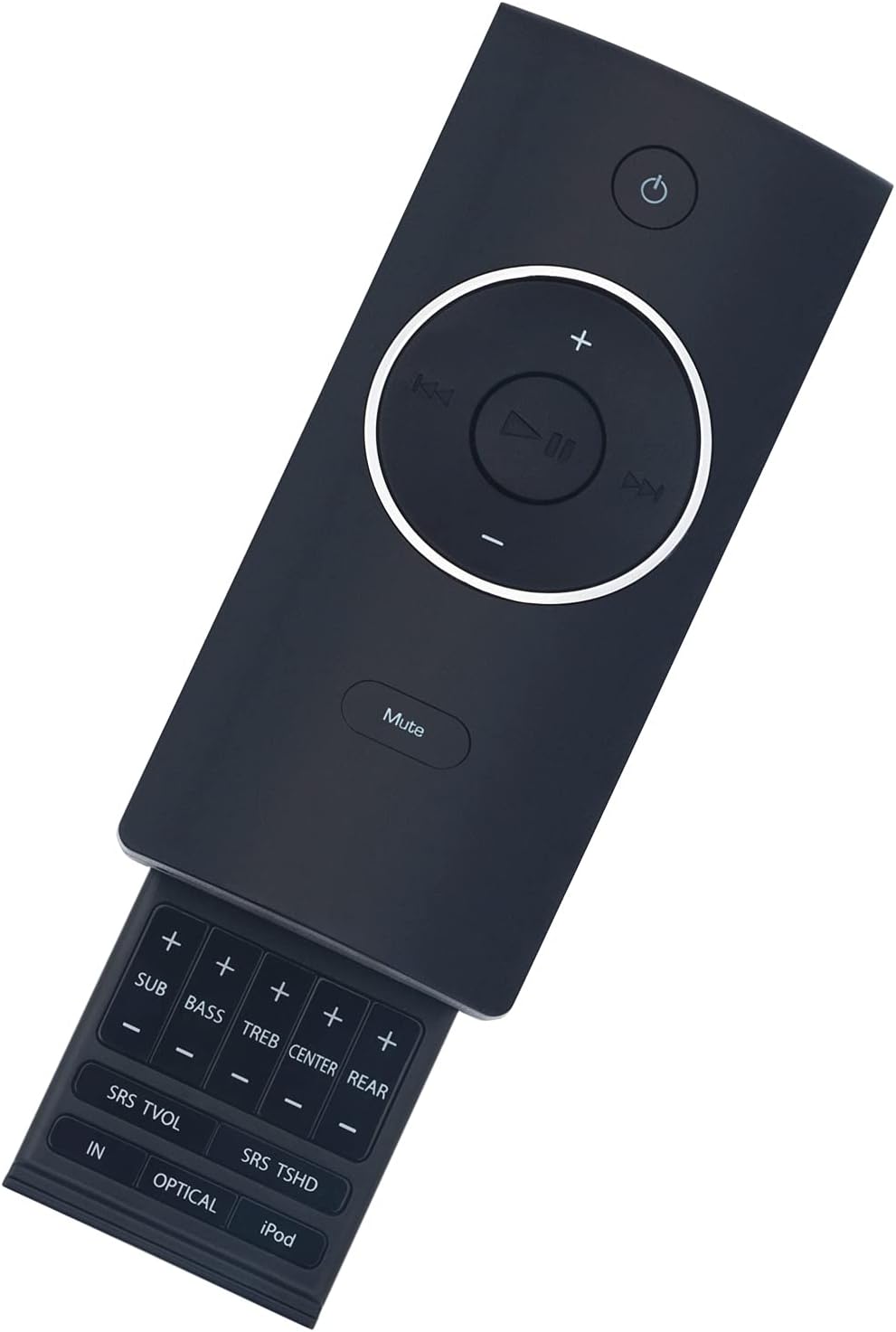
Figure 3: Slide-out panel with advanced audio and input controls.
Slide down the bottom section of the remote to reveal additional controls:
- SUB (+/-): సబ్ వూఫర్ స్థాయిని సర్దుబాటు చేస్తుంది.
- BASS (+/-): బాస్ స్థాయిని సర్దుబాటు చేస్తుంది.
- TREB (+/-): ట్రెబుల్ స్థాయిని సర్దుబాటు చేస్తుంది.
- CENTER (+/-): Adjusts center channel level.
- REAR (+/-): Adjusts rear speaker level (if applicable).
- SRS TVOL: Activates SRS TruVolume feature.
- SRS TSHD: Activates SRS TruSurround HD feature.
- IN: Cycles through available audio inputs.
- ఆప్టికల్: Selects the optical audio input.
- ఐపాడ్: Selects the iPod input (if applicable).
6. ట్రబుల్షూటింగ్
If you experience issues with your ZdalaMit replacement remote control, refer to the following common solutions:
- రిమోట్ స్పందించడం లేదు:
- Ensure fresh batteries are installed with correct polarity.
- Replace the CR2025 battery (if supplied) with a CR2032 battery. The CR2032 is slightly thicker and often provides better electrical contact, resolving non-responsiveness.
- Point the remote directly at the soundbar's infrared receiver.
- రిమోట్ మరియు సౌండ్బార్ మధ్య ఏవైనా అడ్డంకులను తొలగించండి.
- Confirm your soundbar model is listed as compatible (VHT210, VHT510, VHT215).
- బటన్లు పనిచేయడం లేదు:
- బటన్ల కింద ఏవైనా భౌతిక అడ్డంకులు లేదా చెత్త ఉన్నాయా అని తనిఖీ చేయండి.
- Ensure batteries are properly seated and have sufficient charge.
7. స్పెసిఫికేషన్లు
| బ్రాండ్ | ZdalaMit |
| అనుకూల నమూనాలు | Vizio Soundbar VHT210, VHT510, VHT215 |
| కనెక్టివిటీ టెక్నాలజీ | ఇన్ఫ్రారెడ్ (IR) |
| ప్రత్యేక ఫీచర్ | Pre-programmed, no pairing required |
| బ్యాటరీ రకం | 2x CR2032 coin cell (recommended, not included) |
| గరిష్ట పరిధి | సుమారు 33 అడుగులు (10 మీటర్లు) |
| రంగు | నలుపు |
| కొలతలు (L x W x H) | 4.57" x 1.99" x 0.55" (11.6 సెం.మీ x 5.05 సెం.మీ x 1.4 సెం.మీ) |
| వస్తువు బరువు | 40 గ్రా (1.41 oz) |
8. వారంటీ మరియు మద్దతు
This product comes with a 1-year warranty from the manufacturer, ZdalaMit Factory.
For any queries or support, please contact the seller or manufacturer directly. Refer to your purchase documentation for contact information.