
1. పరిచయం
Thank you for choosing the MEDION X64060 Party Speaker. This manual provides essential information for the safe and efficient use of your device. Please read it thoroughly before operating the speaker and keep it for future reference.
The MEDION X64060 is a versatile party speaker designed for various entertainment needs, featuring powerful audio output, integrated DJ and karaoke functions, and dynamic light effects.
2. భద్రతా సూచనలు
- ఉపయోగం ముందు అన్ని సూచనలను జాగ్రత్తగా చదవండి.
- స్పీకర్ను నీరు, తేమ మరియు తీవ్రమైన ఉష్ణోగ్రతల నుండి దూరంగా ఉంచండి.
- వెంటిలేషన్ ఓపెనింగ్స్ను నిరోధించవద్దు.
- Use only the power cord supplied with the device.
- పరికరాన్ని మీరే రిపేర్ చేయడానికి ప్రయత్నించవద్దు. అన్ని సర్వీసింగ్లను అర్హత కలిగిన సిబ్బందికి సూచించండి.
- Ensure the speaker is placed on a stable, level surface to prevent tipping.
- వినికిడి దెబ్బతినకుండా నిరోధించడానికి అధిక వాల్యూమ్ స్థాయిలకు ఎక్కువసేపు బహిర్గతం చేయకుండా ఉండండి.
3. ప్యాకేజీ విషయాలు
దయచేసి ఈ క్రింది అంశాల కోసం ప్యాకేజీని తనిఖీ చేయండి:
- MEDION X64060 Party Speaker
- 1 x మైక్రోఫోన్
- పవర్ కార్డ్
- వినియోగదారు మాన్యువల్ (ఈ పత్రం)
4. ఉత్పత్తి ముగిసిందిview
Familiarize yourself with the main components and controls of your MEDION X64060 Party Speaker.

Image: Control Panel Overview
This image displays a close-up of the speaker's top control panel, showing various knobs and buttons for audio adjustments, DJ functions, and input selections.

Image: Speaker Dimensions and Connections
This image illustrates the overall dimensions of the speaker (980mm height, 350mm width, 340mm depth) and highlights the available connection ports: 1x USB, 2x Microphone (6.3 mm), 1x Guitar (6.3 mm), 1x Audio Input (3.5 mm), and 1x Audio Input (RCA).
4.1 ఫ్రంట్ ప్యానెల్
- స్పీకర్లు: Two main speakers with integrated LED lighting.
- కాంతి ప్రభావాలు: Dynamic LED lights that synchronize with music.
4.2 టాప్ కంట్రోల్ ప్యానెల్
- పవర్ బటన్: To turn the speaker on/off.
- వాల్యూమ్ నియంత్రణలు: Main volume, microphone volume (MIC1 VOL, MIC2 VOL), guitar volume (GUITAR VOL), and echo volume (ECHO VOL).
- ఈక్వలైజర్ (EQ): 5-band equalizer for sound adjustment.
- ఇన్పుట్ ఎంపికదారులు: Buttons for Bluetooth, USB, AUX.
- DJ Functions: Cross-fader, scratch wheel, drum pads (HI-HAT, SNARE, BASS DRUM, CYMBAL, TOM1, TOM2), and record function.
- USB పోర్ట్: USB ప్లేబ్యాక్ కోసం.
- మైక్రోఫోన్ ఇన్పుట్లు: Two 6.3 mm jack inputs.
- గిటార్ ఇన్పుట్: One 6.3 mm jack input.
- AUX ఇన్పుట్: 3.5 mm jack input.
4.3 వెనుక ప్యానెల్
- పవర్ ఇన్పుట్: పవర్ కార్డ్ కనెక్ట్ చేయడానికి.
- RCA Audio Input: Additional audio input.
4.4 Mobility Features
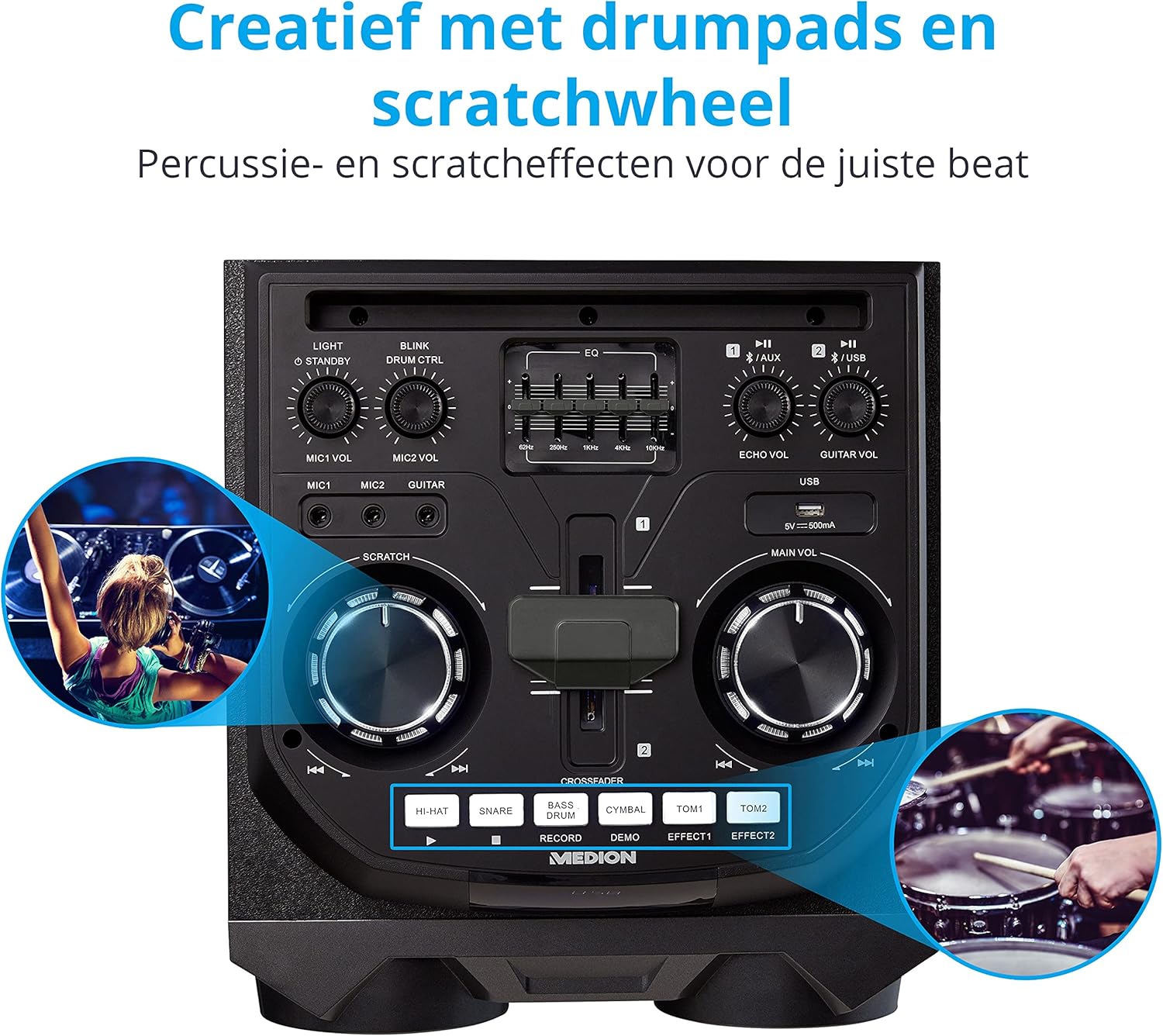
Image: Integrated Wheels for Portability
This image shows the back of the speaker, highlighting the integrated wheels at the bottom, designed for easy transport.
- ఇంటిగ్రేటెడ్ వీల్స్: For easy transportation of the speaker.
- హ్యాండిల్స్: Ergonomic handles for lifting and moving.
5. సెటప్
5.1 ప్రారంభ నియామకం
Place the speaker on a stable, flat surface. Ensure there is adequate ventilation around the unit. Avoid placing it near heat sources or in direct sunlight.
5.2 పవర్ కనెక్షన్
- Connect the supplied power cord to the power input on the rear of the speaker.
- పవర్ కార్డ్ యొక్క మరొక చివరను తగిన గోడ అవుట్లెట్లోకి ప్లగ్ చేయండి.
- Press the power button on the top control panel to turn on the speaker. The LED lights will illuminate.
5.3 Connecting a Microphone or Guitar
For karaoke or live instrument performance:
- Plug your microphone(s) into the MIC1 or MIC2 6.3 mm jack inputs on the top panel.
- Plug your guitar into the GUITAR 6.3 mm jack input on the top panel.
- Adjust the respective volume knobs (MIC1 VOL, MIC2 VOL, GUITAR VOL) and ECHO VOL to your preference.
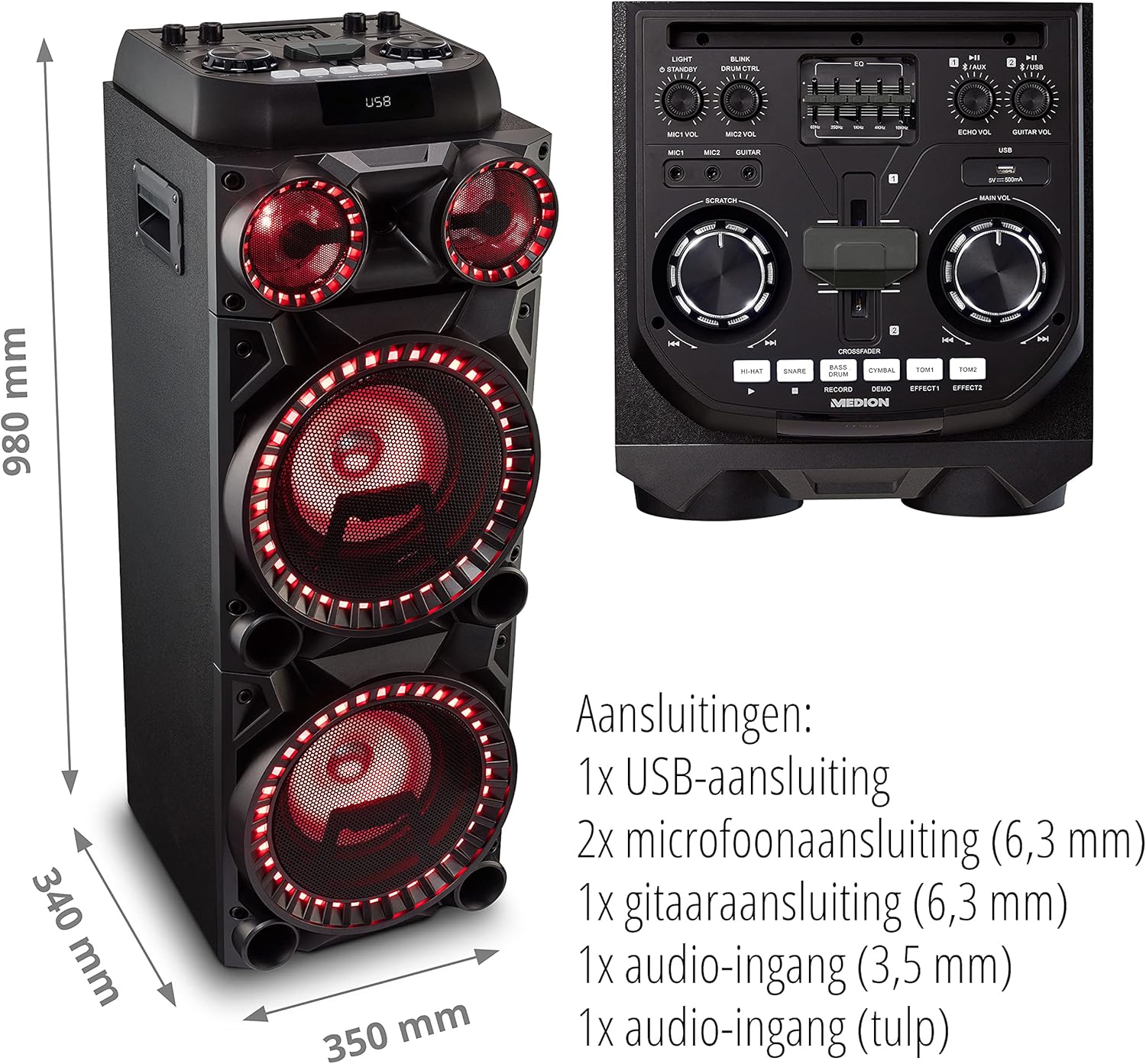
Image: Microphone and Guitar Connection for Karaoke
This image shows individuals enjoying karaoke, demonstrating the use of a microphone connected to the speaker for singing.
6. ఆపరేటింగ్ సూచనలు
6.1 బ్లూటూత్ కనెక్షన్
- నొక్కండి బ్లూటూత్ button on the control panel. The Bluetooth indicator will blink.
- మీ స్మార్ట్ఫోన్, టాబ్లెట్ లేదా ఇతర ఆడియో పరికరంలో బ్లూటూత్ను ప్రారంభించండి.
- కోసం వెతకండి "MEDION X64060" in your device's Bluetooth settings and select it to pair.
- Once connected, the Bluetooth indicator will stop blinking and remain solid. You can now play music wirelessly.

Image: Bluetooth Music Playback
This image shows a smartphone displaying a music application, indicating a wireless Bluetooth connection to the speaker for audio streaming.
6.2 USB ప్లేబ్యాక్
- ఆడియోను కలిగి ఉన్న USB ఫ్లాష్ డ్రైవ్ను చొప్పించండి files into the USB port on the top panel.
- నొక్కండి USB USB మోడ్ని ఎంచుకోవడానికి బటన్.
- The speaker will automatically detect and begin playing audio files from the USB drive. Use the playback controls (play/pause, skip track) on the control panel.
6.3 AUX ఇన్పుట్
- Connect an external audio device (e.g., MP3 player, laptop) to the 3.5 mm AUX input or the RCA audio input on the rear panel using an appropriate audio cable (not included).
- నొక్కండి AUX AUX మోడ్ని ఎంచుకోవడానికి బటన్.
- Play audio from your connected device. The speaker will output the sound.
6.4 DJ విధులు
The MEDION X64060 includes various DJ features for creative sound mixing.

Image: DJ Function Controls
ఈ చిత్రం వివరణాత్మకమైన view of the DJ control section, including the cross-fader, scratch wheel, and various drum pads.
- Cross-fader: Use the cross-fader to smoothly transition between different audio sources or effects.
- Scratch Wheel: Manipulate the scratch wheel for classic DJ scratch effects.
- డ్రమ్ ప్యాడ్స్: నొక్కండి HI-HAT, SNARE, బాస్ డ్రమ్, సింబల్, TOM1, మరియు TOM2 pads to add drum sound effects to your music.
- రికార్డ్ ఫంక్షన్: ఉపయోగించండి రికార్డ్ చేయండి button to record your drum pad sequences.
6.5 కరోకే ఫంక్షన్
Connect a microphone as described in section 5.3. Play your chosen karaoke track via Bluetooth, USB, or AUX. Adjust the microphone and echo volumes for the desired effect.
6.6 కాంతి ప్రభావాలు
The speaker features dynamic LED light effects that respond to the music. These lights automatically activate when the speaker is on. There may be a dedicated button (e.g., "LIGHT" or "BLINK") to control or cycle through different light modes, refer to the control panel for specific options.

Image: Dynamic Blue Light Effects
This image showcases the speaker with its blue LED lights illuminated, demonstrating the atmospheric light effects.

Image: Dynamic Red Light Effects
This image shows the speaker with its red LED lights illuminated, highlighting another color option for the atmospheric light effects.
7. నిర్వహణ
7.1 శుభ్రపరచడం
- శుభ్రపరిచే ముందు ఎల్లప్పుడూ స్పీకర్ను పవర్ అవుట్లెట్ నుండి అన్ప్లగ్ చేయండి.
- బయటి ఉపరితలాలను తుడవడానికి మృదువైన, పొడి వస్త్రాన్ని ఉపయోగించండి.
- Do not use liquid cleaners, aerosols, or abrasive materials, as these can damage the finish or internal components.
7.2 నిల్వ
When not in use for extended periods, store the speaker in a cool, dry place, away from direct sunlight and extreme temperatures. Cover the unit to protect it from dust.
8. ట్రబుల్షూటింగ్
| సమస్య | సాధ్యమైన కారణం | పరిష్కారం |
|---|---|---|
| శక్తి లేదు | Power cord not connected properly; Power outlet not working. | Ensure the power cord is securely plugged into both the speaker and a working wall outlet. Test the outlet with another device. |
| శబ్దం లేదు | Volume too low; Incorrect input selected; Device not paired (Bluetooth); Cable not connected (AUX/Guitar/Mic). | Increase the main volume and individual input volumes. Select the correct input source (Bluetooth, USB, AUX). Re-pair Bluetooth device. Check all cable connections. |
| బ్లూటూత్ కనెక్షన్ విఫలమైంది | స్పీకర్ జత చేసే మోడ్లో లేదు; పరికరం చాలా దూరంగా ఉంది; జోక్యం. | Ensure the speaker is in Bluetooth pairing mode (blinking indicator). Move your device closer to the speaker. Avoid obstacles and other wireless devices. |
| Microphone/Guitar not working | Volume too low; Cable faulty; Incorrect input. | Increase MIC/GUITAR VOL. Check microphone/guitar cable. Ensure the instrument is properly connected. |
9. స్పెసిఫికేషన్లు
| బ్రాండ్ | మధ్యస్థం |
| మోడల్ సంఖ్య | X64060 | MD44060 |
| అవుట్పుట్ పవర్ | 2 x 100 W RMS (2 x 1000 W గరిష్ట మ్యూజిక్ అవుట్పుట్ పవర్) |
| కనెక్టివిటీ టెక్నాలజీ | Bluetooth 5.0, USB, AUX (3.5mm, RCA) |
| ఆడియో ఇన్పుట్లు | 2 x Microphone (6.3 mm), 1 x Guitar (6.3 mm), 1 x AUX (3.5 mm), 1 x RCA |
| ఈక్వలైజర్ | 5-బ్యాండ్ |
| రంగు | నలుపు |
| మెటీరియల్ | ప్లాస్టిక్ |
| ఉత్పత్తి కొలతలు (L x W x H) | 38.8 x 35 x 101 సెం.మీ |
| వస్తువు బరువు | 15 కిలోలు |
| మౌంటు రకం | ఫ్లోర్ స్టాండింగ్ |
| శక్తి మూలం | కార్డెడ్ ఎలక్ట్రిక్ |
| అనుకూల పరికరాలు | ల్యాప్టాప్, స్మార్ట్ఫోన్ |
10. వారంటీ మరియు మద్దతు
For warranty information and technical support, please refer to the warranty card included with your product or visit the official MEDION webసైట్. ఏవైనా వారంటీ క్లెయిమ్ల కోసం మీ కొనుగోలు రుజువును ఉంచుకోండి.
MEDION కస్టమర్ సర్వీస్: For assistance, please contact MEDION customer support through their official channels. Contact details can typically be found on the MEDION webసైట్ లేదా ఉత్పత్తి ప్యాకేజింగ్లో.