
పరిచయం
The Cellularline Clip Pro is a mono Bluetooth® earbud designed for convenience and portability. It features a unique charging base with an integrated clip, allowing you to easily attach it to clothing. The earbud itself is wireless and its capsule can be rotated for comfortable use in either the right or left ear. This manual provides detailed instructions for setting up, operating, and maintaining your Clip Pro earbud.

Image: The Cellularline Clip Pro earbud detached from its charging base, showcasing its compact design and the charging contacts.
ప్యాకేజీ విషయాలు
దయచేసి ఈ క్రింది అంశాల కోసం ప్యాకేజీని తనిఖీ చేయండి:
- Cellularline Clip Pro Mono Headset
- ఛార్జింగ్ కేబుల్
- రీప్లేస్మెంట్ ఇయర్టిప్స్
- సూచనల మాన్యువల్ (ఈ పత్రం)
ఉత్పత్తి ముగిసిందిview
Familiarize yourself with the components of your Cellularline Clip Pro:

చిత్రం: పైన view of the Clip Pro charging base with the earbud securely docked. A blue indicator light is visible on the earbud.
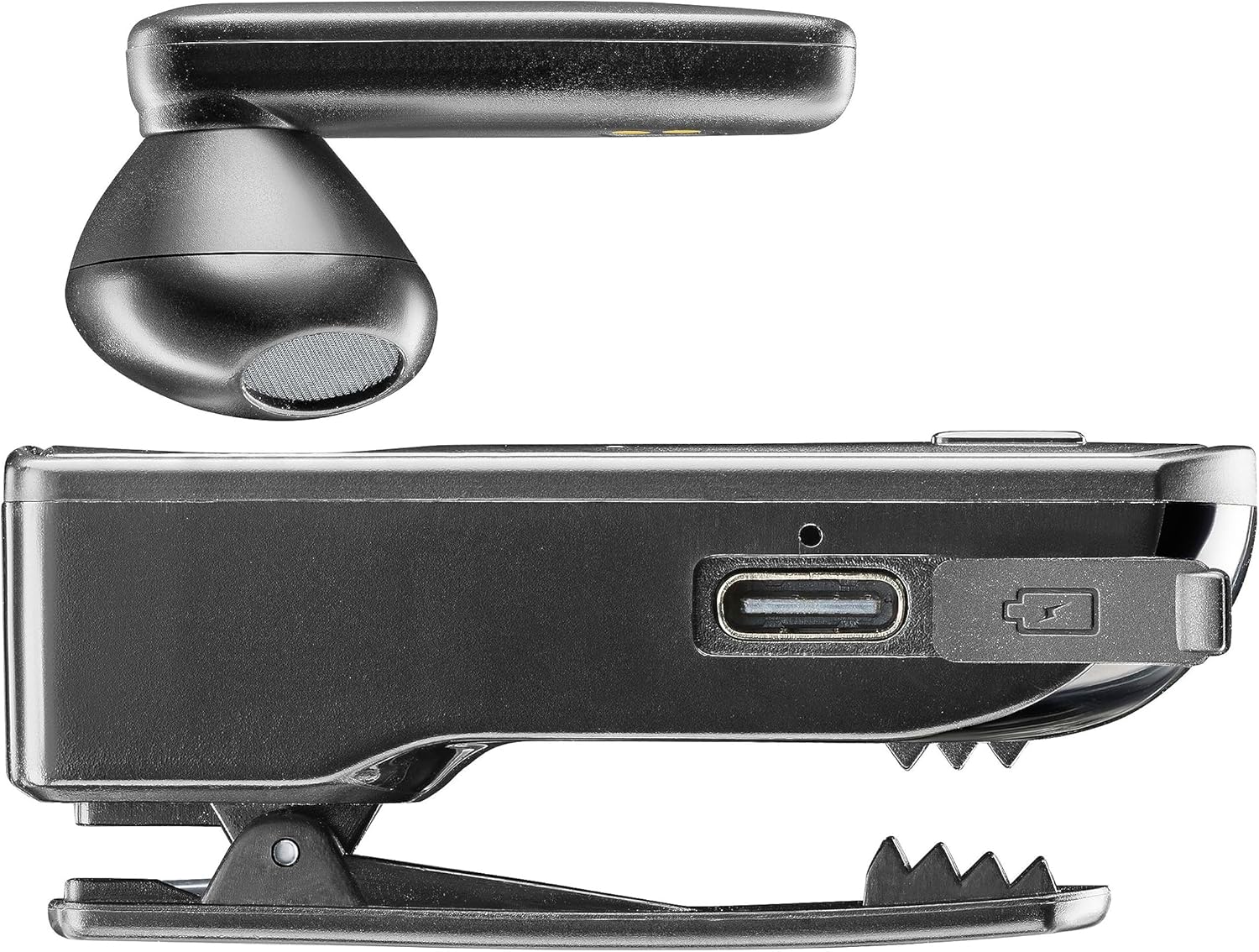
చిత్రం: వైపు view of the Clip Pro charging base, highlighting the USB-C charging port and the integrated clip mechanism.

చిత్రం: వివరణాత్మకం view of the earbud's inner surface, showing the two gold charging contacts and the speaker mesh.
సెటప్
1. పరికరాన్ని ఛార్జ్ చేస్తోంది
Before first use, fully charge your Cellularline Clip Pro. The charging base provides additional power for the earbud.
- Connect the provided charging cable to the USB-C port on the charging base.
- కేబుల్ యొక్క మరొక చివరను అనుకూలమైన USB పవర్ సోర్స్కి కనెక్ట్ చేయండి (ఉదా. వాల్ అడాప్టర్, కంప్యూటర్ USB పోర్ట్).
- Place the earbud into the charging base. Ensure the charging contacts align.
- The charging indicator light on the earbud will show charging status. A full charge takes approximately 1.5 hours.
2. బ్లూటూత్ పరికరంతో జత చేయడం
To use the earbud, you must first pair it with your smartphone or other Bluetooth-enabled device.
- Ensure the earbud is charged and powered off.
- Remove the earbud from the charging base. It will automatically enter pairing mode (indicator light will flash).
- On your device (e.g., smartphone), go to the Bluetooth settings and enable Bluetooth.
- కోసం వెతకండి available devices. Select "Cellularline Clip Pro" from the list.
- Once connected, the earbud's indicator light will stop flashing and remain solid or turn off, depending on the model.
- The earbud is now ready for use. It will automatically reconnect to the last paired device when powered on and within range.
ఆపరేటింగ్ సూచనలు
పవర్ ఆన్/ఆఫ్
- పవర్ ఆన్: Remove the earbud from the charging base. It will automatically power on. Alternatively, press and hold the multifunction button on the earbud for a few seconds.
- పవర్ ఆఫ్: Place the earbud back into the charging base. It will automatically power off. Alternatively, press and hold the multifunction button on the earbud for a few seconds until the indicator light turns off.
కాల్ నిర్వహణ
- సమాధానం/ముగింపు కాల్: మల్టీఫంక్షన్ బటన్ను ఒకసారి నొక్కండి.
- కాల్ని తిరస్కరించండి: Press and hold the multifunction button for approximately 2 seconds.
- చివరి నంబర్ని మళ్లీ డయల్ చేయండి: మల్టీఫంక్షన్ బటన్ను రెండుసార్లు నొక్కండి.
- Vibrator Feature: The charging base will vibrate when you receive an incoming call, even if the earbud is docked.
వాల్యూమ్ నియంత్రణ
The charging base features dedicated volume adjustment buttons.
- వాల్యూమ్ పెంచండి: Press the '+' button on the charging base.
- వాల్యూమ్ తగ్గించండి: Press the '-' button on the charging base.
Wearing the Earbud
The earbud capsule is rotatable, allowing for comfortable use in either the right or left ear.
- Gently rotate the earbud capsule to align with your preferred ear.
- Insert the earbud into your ear canal. Adjust for a secure and comfortable fit.

Image: A man wearing the Cellularline Clip Pro earbud, with the charging base clipped to his shirt collar, demonstrating its hands-free use.
నిర్వహణ
To ensure the longevity and optimal performance of your Cellularline Clip Pro, follow these maintenance guidelines:
- శుభ్రపరచడం: Use a soft, dry cloth to clean the earbud and charging base. Do not use abrasive cleaners or solvents.
- ఇర్టిప్స్: Regularly check and clean the eartips. Replace them if they become worn or damaged.
- నిల్వ: When not in use, store the earbud in its charging base to protect it and keep it charged. Store in a cool, dry place away from direct sunlight and extreme temperatures.
- నీటి నిరోధకత: This device is not waterproof. Avoid exposure to water, moisture, or excessive humidity.
ట్రబుల్షూటింగ్
If you encounter issues with your Cellularline Clip Pro, try the following solutions:
| సమస్య | సాధ్యమైన పరిష్కారం |
|---|---|
| ఇయర్బడ్ పవర్ ఆన్ అవ్వదు. | Ensure the earbud is charged. Place it in the charging base for at least 15 minutes. |
| పరికరంతో జత చేయడం సాధ్యం కాదు. | Make sure Bluetooth is enabled on your device. Ensure the earbud is in pairing mode (flashing indicator light). Try forgetting the device in your phone's Bluetooth settings and re-pairing. |
| శబ్దం లేదు లేదా తక్కువ వాల్యూమ్ ఉంది. | Check the volume levels on both the earbud (using the charging base buttons) and your connected device. Ensure the earbud is properly seated in your ear. |
| Charging base not vibrating for calls. | Ensure the earbud is correctly docked in the charging base and the base itself has sufficient power. |
| Earbud disconnects frequently. | Ensure your device is within the Bluetooth range (typically 10 meters/33 feet) and there are no significant obstructions. Fully charge both the earbud and the charging base. |
స్పెసిఫికేషన్లు
- మోడల్ పేరు: BTCLIPPROK
- బ్రాండ్: సెల్యులార్లైన్
- కనెక్టివిటీ టెక్నాలజీ: వైర్లెస్ బ్లూటూత్
- ఫారమ్ ఫ్యాక్టర్: Earbud (Capsule)
- చెవి ప్లేస్మెంట్: చెవిలో
- రంగు: నలుపు
- మెటీరియల్: PC + ABS ప్లాస్టిక్
- వస్తువు బరువు: 94 గ్రాములు
- ఛార్జింగ్ సమయం: 1.5 గంటలు
- బ్యాటరీ కూర్పు: లిథియం-అయాన్ (1 చేర్చబడింది)
- పునర్వినియోగపరచదగిన బ్యాటరీ: అవును
- ప్రత్యేక లక్షణాలు: Multifunction answer button, Volume adjustment buttons, Vibrating charging base
- అనుకూల పరికరాలు: iPhone, Samsung, Huawei, Xiaomi, and all Bluetooth-enabled devices
- నియంత్రణ రకం: Media control, Volume control, Touch
భద్రతా సమాచారం
Please read and follow these safety precautions to prevent damage to the device or injury to yourself:
- పరికరాన్ని తీవ్రమైన ఉష్ణోగ్రతలు, ప్రత్యక్ష సూర్యకాంతి లేదా అధిక తేమకు గురిచేయవద్దు.
- పరికరాన్ని వదలడం లేదా బలమైన ప్రభావాలకు గురి చేయడం మానుకోండి.
- Do not attempt to disassemble, repair, or modify the device yourself. Contact authorized service personnel for assistance.
- పరికరాన్ని పిల్లలు మరియు పెంపుడు జంతువుల నుండి దూరంగా ఉంచండి.
- స్థానిక నిబంధనల ప్రకారం పరికరాన్ని మరియు దాని బ్యాటరీని బాధ్యతాయుతంగా పారవేయండి.
- Do not use the earbud at excessively high volumes for prolonged periods, as this may cause hearing damage.
వారంటీ మరియు మద్దతు
For warranty information and customer support, please refer to the official Cellularline webమీ సైట్లో లేదా మీ రిటైలర్ను సంప్రదించండి. వారంటీ క్లెయిమ్ల కోసం మీ కొనుగోలు రుజువును ఉంచండి.