
1. ముఖ్యమైన భద్రతా మార్గదర్శకాలు
Before operating the Yasola M9 GPS Drone, please read and understand all safety instructions. Failure to follow these guidelines may result in injury, damage to the drone, or property damage.
- విమాన పర్యావరణం: డ్రోన్ను బహిరంగ ప్రదేశాలలో, ప్రజలు, జంతువులు, భవనాలు మరియు విద్యుత్ లైన్లకు దూరంగా ఆపరేట్ చేయండి. బలమైన గాలులు లేదా ప్రతికూల వాతావరణ పరిస్థితుల్లో ఎగరడం మానుకోండి.
- బ్యాటరీ భద్రత: Use only approved batteries and chargers. Do not overcharge or puncture batteries. Discontinue use if batteries show signs of swelling or damage.
- ప్రొపెల్లర్ భద్రత: Keep hands, face, and loose clothing away from rotating propellers. Ensure propellers are correctly installed and free from damage before each flight.
- ఆపరేటర్ బాధ్యత: The operator is responsible for safe operation and compliance with local regulations. Maintain visual line of sight with the drone at all times.
- అడ్డంకి నివారణ: While the drone features obstacle avoidance, it is not foolproof. Always exercise caution and maintain awareness of surroundings.
2. ప్యాకేజీ విషయాలు
క్రింద జాబితా చేయబడిన అన్ని అంశాలు మీ ప్యాకేజీలో చేర్చబడ్డాయని ధృవీకరించండి. ఏవైనా అంశాలు తప్పిపోయినా లేదా దెబ్బతిన్నా, దయచేసి కస్టమర్ మద్దతును సంప్రదించండి.

Image: Complete package contents of the Yasola M9 GPS Drone.
- Yasola M9 GPS Drone
- రిమోట్ కంట్రోలర్
- Intelligent Flight Batteries (2x 3000mAh)
- విడి ప్రొపెల్లర్లు
- USB ఛార్జింగ్ కేబుల్
- స్క్రూడ్రైవర్
- వినియోగదారు మాన్యువల్ (ఈ పత్రం)
- బాగ్ తీసుకెళ్లండి
- అడ్డంకి నివారణ మాడ్యూల్
3. కాంపోనెంట్ ఐడెంటిఫికేషన్
Familiarize yourself with the main components of your Yasola M9 GPS Drone.

Image: Key components of the Yasola M9 GPS Drone.
- 360° Laser Obstacle Avoider: Detects obstacles in all directions.
- GPS మాడ్యూల్: Provides precise positioning and navigation.
- EIS Anti-Shake Chip: Enhances image and video stability.
- 4K HD కెమెరా: Captures high-resolution photos and videos.
- 3-Axis Mechanical Gimbal: Stabilizes the camera for smooth footage and allows remote control of camera angle.
- బ్రష్లెస్ మోటార్లు: Provide efficient and quiet flight.

చిత్రం: ముందు భాగం view of the Yasola M9 GPS Drone.
4. సెటప్ గైడ్
4.1 బ్యాటరీ ఛార్జింగ్ మరియు ఇన్స్టాలేషన్
Charge the intelligent flight batteries using the provided USB charging cable. The battery indicator lights will show charging status. Once fully charged, slide the battery into the drone's battery compartment until it clicks securely into place.

Image: Modular battery design and capacity.
4.2 ప్రొపెల్లర్ ఇన్స్టాలేషన్
Attach the propellers to the corresponding motor shafts. Ensure that propellers marked 'A' are installed on 'A' motors and 'B' on 'B' motors. Use the provided screwdriver to secure them firmly. Incorrect installation can affect flight stability.
4.3 Obstacle Avoidance Module Attachment
The obstacle avoidance module can be attached to the top of the drone. Align the module with the designated slot and press down until it is securely fastened. This module enhances flight safety by detecting obstacles.

Image: 360-degree obstacle avoidance system.
4.4 రిమోట్ కంట్రోలర్ సెటప్
Insert batteries into the remote controller. Power on the remote controller, then power on the drone. The remote and drone should automatically pair. Refer to the remote controller's specific instructions for detailed button functions.
4.5 మొబైల్ యాప్ కనెక్షన్
Download the official Yasola drone application from your device's app store. Connect your smartphone to the drone's Wi-Fi network (usually named "Yasola-M9-XXXX"). Open the app to view the live camera feed and access advanced flight features.
5. ఆపరేటింగ్ సూచనలు
5.1 ప్రీ-ఫ్లైట్ చెక్లిస్ట్
- బ్యాటరీలు పూర్తిగా ఛార్జ్ అయ్యాయని నిర్ధారించుకోండి (డ్రోన్ మరియు రిమోట్).
- Check propellers for damage and secure attachment.
- Verify obstacle avoidance module is correctly installed.
- బహిరంగ విమాన ప్రయాణానికి ముందు GPS సిగ్నల్ సముపార్జనను నిర్ధారించండి.
- Check for clear flight path and safe operating environment.
5.2 టేకాఫ్ మరియు ల్యాండింగ్
After powering on and pairing, place the drone on a flat, open surface. Use the one-key take-off button on the remote or the mobile app to initiate flight. To land, use the one-key landing button or manually descend the drone slowly.
5.3 విమాన నియంత్రణలు
The remote controller uses standard drone control schemes. The left joystick typically controls altitude and yaw (rotation), while the right joystick controls forward/backward and left/right movement. Refer to the remote's diagram in the app for specific functions.
5.4 Camera Operation and Gimbal Control
The 4K HD camera captures high-quality aerial footage. The 3-axis mechanical gimbal provides stabilization and allows for remote adjustment of the camera's vertical angle (up to 90 degrees). Use the dedicated buttons on the remote or controls within the app to take photos or record videos.

Image: 4K HD Camera and 3-Axis Gimbal details.
5.5 GPS Positioning Features
The Yasola M9 drone utilizes GPS for stable flight and advanced features:
- Auto Return Home: The drone can automatically return to its take-off point in case of low battery, loss of signal, or manual activation.
- నన్ను అనుసరించు మోడ్: The drone can track and follow the remote controller or a designated subject.
- వే పాయింట్ ఫ్లైట్: Plan a flight path on the app, and the drone will follow it autonomously.

Image: Remote control and image transmission range.
5.6 Obstacle Avoidance System
The 360° laser obstacle avoidance system scans for obstacles within approximately 20 meters (60 feet). If an obstacle is detected, the remote control will alert you, and the drone will attempt to avoid it. For advanced users, the obstacle avoidance module can be removed.
5.7 సంజ్ఞ నియంత్రణ
The drone supports gesture recognition for taking photos or recording videos. Face the aircraft camera and perform the specified gestures (e.g., V-sign for photo, open palm for video) for approximately 3 seconds to activate the function.
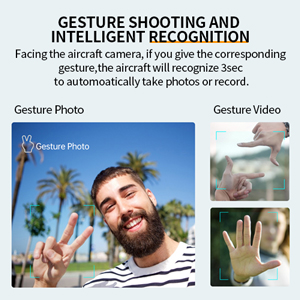
Image: Gesture shooting and intelligent recognition.
5.8 Optional Accessories (Thrower & Megaphone)
The Yasola M9 drone supports modular accessories such as a thrower and a megaphone. These can be attached to the top of the drone for specialized tasks. Refer to the accessory's individual manual for installation and operation details.
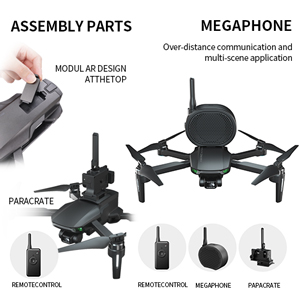
Image: Drone with optional thrower and megaphone attachments.
Video: Demonstration of Yasola GPS Drone features including 3-axis gimbal, obstacle avoidance, and optional accessories like the thrower and megaphone.
6. నిర్వహణ
- శుభ్రపరచడం: Regularly clean the drone body, camera lens, and sensors with a soft, dry cloth. Avoid using harsh chemicals.
- ప్రొపెల్లర్ తనిఖీ: Inspect propellers for cracks, bends, or chips before each flight. Replace damaged propellers immediately.
- బ్యాటరీ సంరక్షణ: Store batteries in a cool, dry place. Do not store fully charged or fully depleted for extended periods. Charge to about 50-60% for long-term storage.
- ఫర్మ్వేర్ నవీకరణలు: Check the official Yasola website or app for available firmware updates to ensure optimal performance and access to new features.
7. ట్రబుల్షూటింగ్
| సమస్య | సాధ్యమైన కారణం | పరిష్కారం |
|---|---|---|
| డ్రోన్ పవర్ ఆన్ చేయదు. | బ్యాటరీ అయిపోయింది లేదా తప్పుగా ఇన్స్టాల్ చేయబడింది. | Charge battery fully. Reinstall battery securely. |
| యాప్లో వీడియో ఫీడ్ లేదు. | Wi-Fi not connected or app not open. | Ensure phone is connected to drone's Wi-Fi. Restart app. |
| ఎగురుతున్నప్పుడు డ్రోన్ కదులుతుంది. | Improper calibration or strong winds. | Perform IMU and compass calibration. Fly in calm conditions. |
| అడ్డంకులను నివారించడం పనిచేయడం లేదు. | Module not installed or sensor obstructed. | Ensure module is correctly attached. Clean sensors. |
| Remote controller not pairing. | Remote or drone not powered on, or out of range. | Power cycle both devices. Ensure they are close during pairing. |
8. స్పెసిఫికేషన్లు
| ఫీచర్ | వివరాలు |
|---|---|
| బ్రాండ్ | Yasola |
| మోడల్ పేరు | M9 |
| తయారీదారు పార్ట్ నంబర్ | M9-MAX |
| వీడియో క్యాప్చర్ రిజల్యూషన్ | 4K (Video Capture Format) / 1080p (Live Feed) |
| కనెక్టివిటీ టెక్నాలజీ | Wi-Fi (5G FPV) |
| నైపుణ్యం స్థాయి | Novice, Intermediate |
| వస్తువు బరువు | 450 గ్రాములు (సుమారు 15.9 ఔన్సులు) |
| బ్యాటరీ కెపాసిటీ | 3000mAh (11.1 Watt Hours) |
| విమాన సమయం | Up to 23 minutes per battery (46 minutes with 2 batteries) |
| నియంత్రణ రకం | రిమోట్ కంట్రోల్ |
| గరిష్ట పరిధి | 1200 Meters (Control), 1000 Meters (Image Transmission) |
| మెటీరియల్ | ప్లాస్టిక్ |
| గింబాల్ | 3-Axis Mechanical Self-stabilizing Gimbal |
| అడ్డంకి నివారణ | 360° Laser Obstacle Avoider (detects within 20 meters) |
| మోటార్ రకం | బ్రష్ లేని మోటార్ |
| ఉత్పత్తి కొలతలు | 6.89 x 4.53 x 2.95 అంగుళాలు (మడతపెట్టబడింది) |
| UPC | 613706182347 |
9. వారంటీ మరియు మద్దతు
The Yasola M9 GPS Drone comes with a standard manufacturer's warranty. For detailed warranty information, technical support, or to purchase replacement parts, please visit the official Yasola webసైట్లో లేదా వారి కస్టమర్ సర్వీస్ విభాగాన్ని సంప్రదించండి. కొనుగోలు రుజువుగా మీ కొనుగోలు రసీదును ఉంచండి.
ఆన్లైన్ మద్దతు: Visit the Yasola Store on Amazon