
JCB 21-MS-210-C
JCB 210mm Mitre Saw User Instruction Manual
Model: 21-MS-210-C | Brand: JCB
ఉత్పత్తి ముగిసిందిview
The JCB 210mm Mitre Saw is a powerful and versatile tool designed for precise cutting of various materials including steel, aluminum, wood (with embedded nails), and plastic. It features an 1100W motor, a 210mm 24T carbide tipped (TCT) blade, and a laser guide for enhanced accuracy and safety. The saw is equipped with 4 mitre cut settings and a dust collection feature for a cleaner working environment.

చిత్రం 1: పైగాview of the JCB 210mm Mitre Saw, showing the main unit, blade guard, and dust collection bag.
ముఖ్యమైన భద్రతా సూచనలు
Always follow basic safety precautions when using this power tool to reduce the risk of fire, electric shock, and personal injury. Read all instructions before operating.
- పని ప్రాంత భద్రత: పని ప్రదేశాన్ని శుభ్రంగా మరియు బాగా వెలుతురు ఉండేలా చూసుకోండి. చిందరవందరగా లేదా చీకటిగా ఉండే ప్రాంతాలు ప్రమాదాలను ఆహ్వానిస్తాయి. మండే ద్రవాలు, వాయువులు లేదా ధూళి వంటి పేలుడు వాతావరణాలలో విద్యుత్ ఉపకరణాలను ఆపరేట్ చేయవద్దు.
- విద్యుత్ భద్రత: పవర్ టూల్ ప్లగ్లు అవుట్లెట్కు సరిపోలాలి. ప్లగ్ను ఎప్పుడూ ఎట్టి పరిస్థితుల్లోనూ సవరించవద్దు. వర్షం లేదా తడి పరిస్థితులకు పవర్ టూల్స్ను బహిర్గతం చేయవద్దు.
- వ్యక్తిగత భద్రత: Always wear eye protection (safety glasses or goggles) and hearing protection. Use a dust mask if operations create dust. Dress properly; avoid loose clothing or jewelry.
- సాధన వినియోగం మరియు సంరక్షణ: పవర్ టూల్ను బలవంతంగా వాడకండి. మీ అప్లికేషన్ కోసం సరైన పవర్ టూల్ను ఉపయోగించండి. ఏవైనా సర్దుబాట్లు చేయడానికి, ఉపకరణాలను మార్చడానికి లేదా పవర్ టూల్స్ నిల్వ చేయడానికి ముందు పవర్ సోర్స్ నుండి ప్లగ్ను డిస్కనెక్ట్ చేయండి.
- లేజర్ భద్రత: The laser wavelength is 650nm. Avoid direct eye exposure to the laser beam. Do not stare into the laser aperture.
సెటప్ మరియు అసెంబ్లీ
Before first use, ensure all components are present and properly assembled. Refer to the diagram below for component identification.

Figure 2: Key features of the JCB Mitre Saw, including laser guide, maximum cutting depth, aluminum guard, bevel range, and blade diameter.
- అన్ప్యాకింగ్: ప్యాకేజింగ్ నుండి మిటెర్ రంపాన్ని మరియు అన్ని ఉపకరణాలను జాగ్రత్తగా తొలగించండి. ఏదైనా షిప్పింగ్ నష్టం కోసం తనిఖీ చేయండి.
- మౌంటు: Secure the mitre saw to a stable workbench using appropriate clamps or bolts through the base mounting holes. Ensure the saw is level and stable.
- డస్ట్ బ్యాగ్ అటాచ్మెంట్: Attach the provided dust bag to the dust port located at the rear of the blade guard assembly. Ensure it is securely fastened to collect sawdust effectively.
- బ్లేడ్ ఇన్స్టాలేషన్ (ముందుగా ఇన్స్టాల్ చేయకపోతే): Ensure the saw is unplugged. Follow the instructions in the blade replacement section to safely install the 210mm TCT blade.
- పవర్ కనెక్షన్: Connect the saw to a suitable 240V AC power outlet. Ensure the power switch is in the OFF position before plugging in.
ఆపరేటింగ్ సూచనలు
ప్రాథమిక ఆపరేషన్
- మెటీరియల్ ప్లేస్మెంట్: Place the workpiece firmly against the fence and the saw base. Use clamps to secure smaller pieces.
- పవర్ ఆన్: Depress the trigger switch on the handle to start the motor. Allow the blade to reach full speed before beginning the cut.
- కట్ చేయడం: Slowly lower the blade through the workpiece with a steady, controlled motion. Do not force the saw.
- పవర్ ఆఫ్: Release the trigger switch to stop the motor. Wait for the blade to come to a complete stop before raising the blade or removing the workpiece.
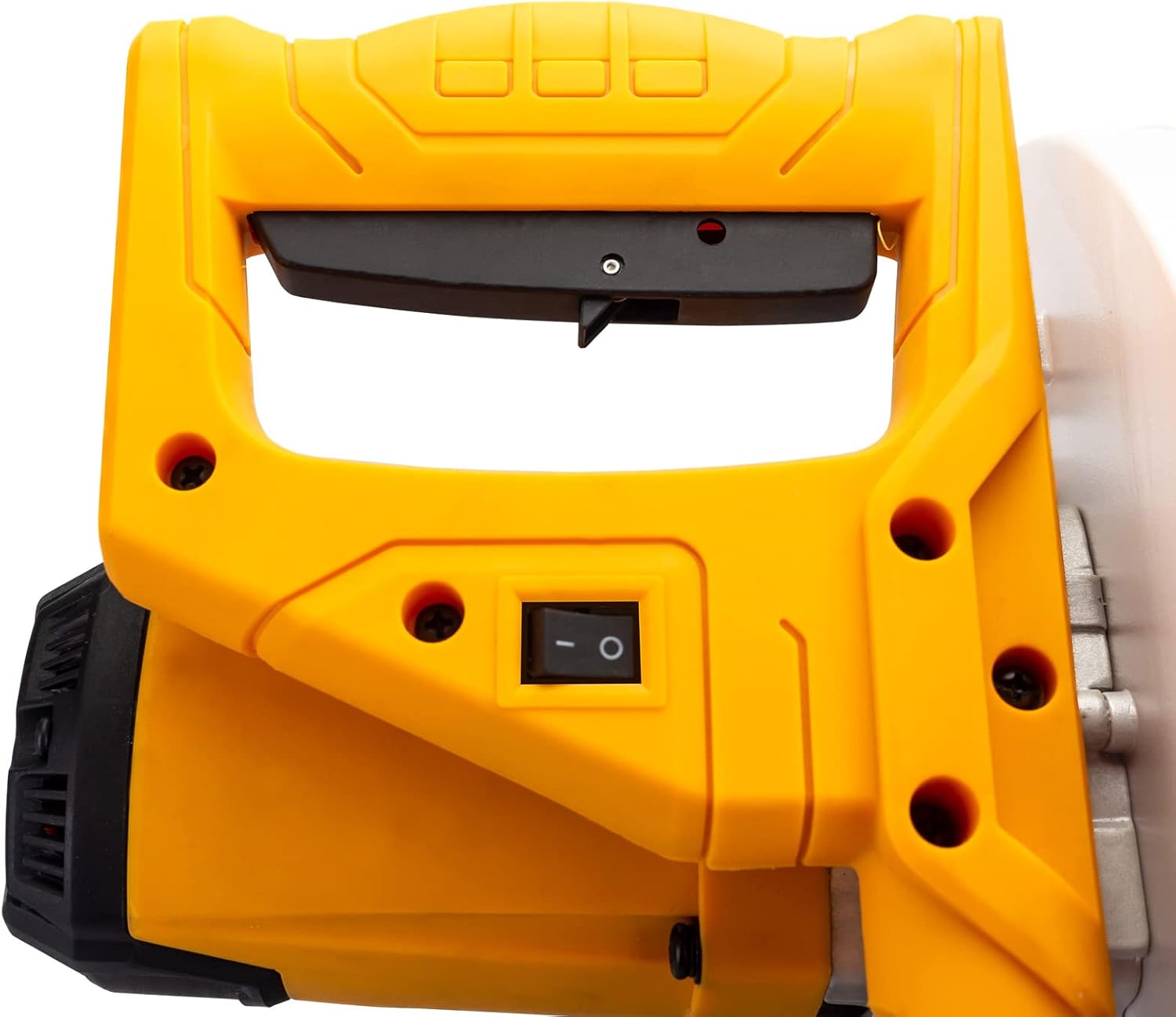
Figure 3: The ergonomic handle and power switch for operating the mitre saw.
Laser Guide Operation
The integrated laser guide projects a line onto the workpiece, indicating the exact cutting path of the blade. This enhances accuracy and allows for precise alignment before cutting.
- The laser guide is powered by the mains via a safety isolating transformer.
- To activate the laser, ensure the saw is plugged in and the laser switch (if separate) is turned on.
- Align the projected laser line with your desired cut mark on the workpiece.
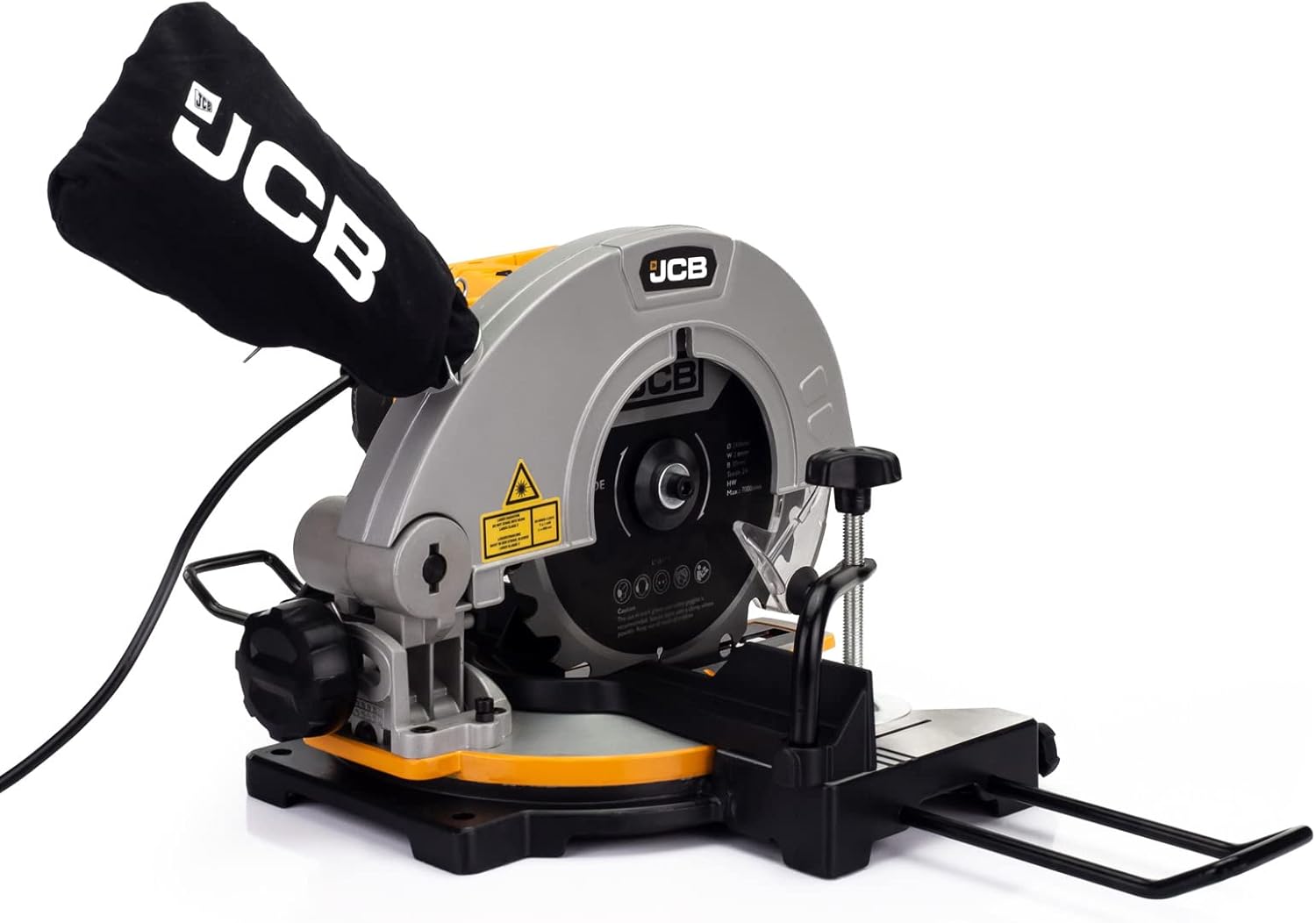
Figure 4: The laser guide mechanism, which projects a precise cutting line onto the workpiece.
మిటెర్ కోణాలను సర్దుబాటు చేయడం
The saw offers a cut range of -45° / 0° / +45° for various mitre cuts.
- Loosen the mitre lock knob located on the front of the saw base.
- Rotate the turntable to the desired angle indicated on the mitre scale.
- Tighten the mitre lock knob firmly to secure the turntable in position before making a cut.
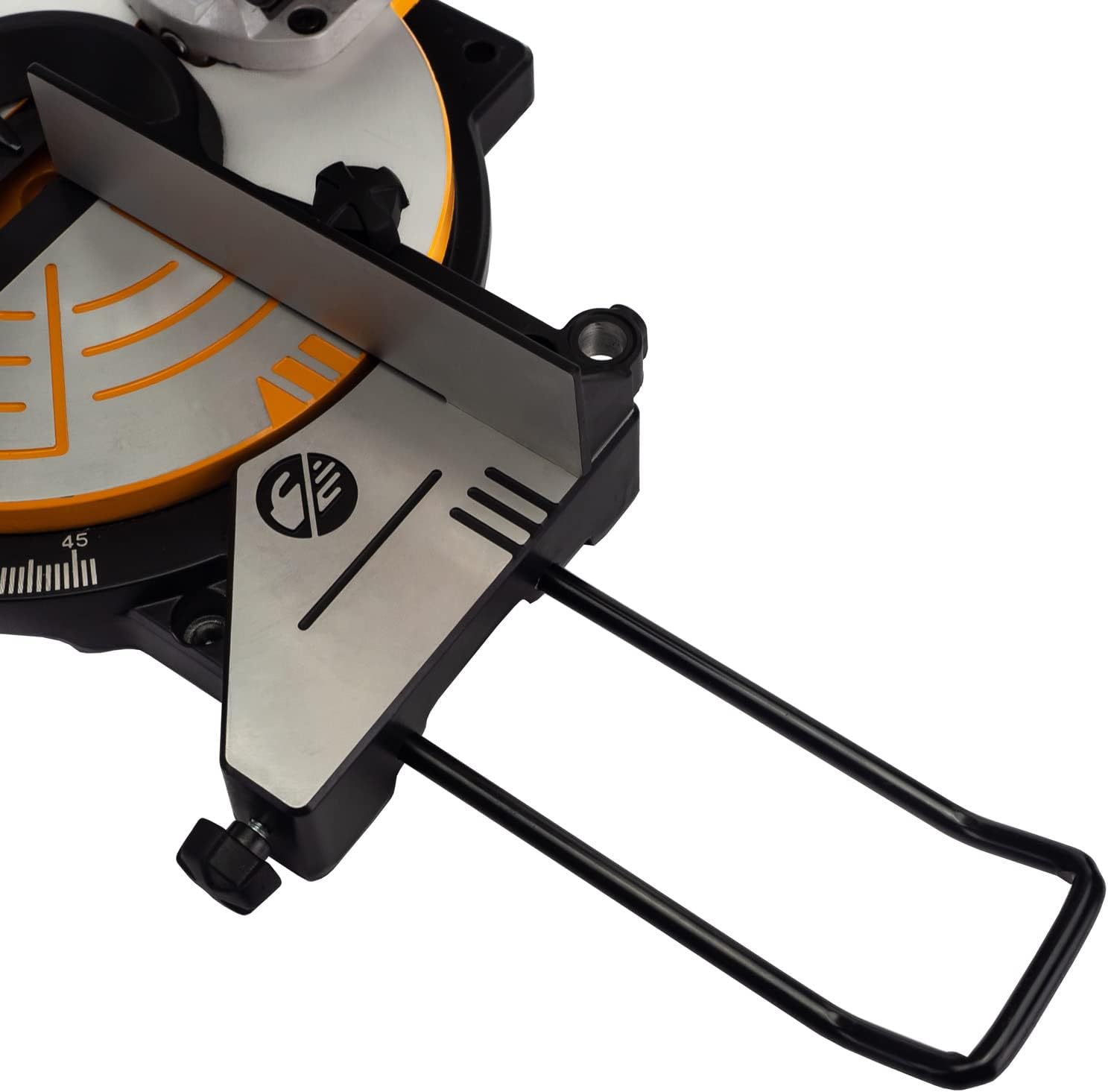
మూర్తి 5: వివరంగా view of the saw base, showing the mitre angle scale and locking mechanism for precise adjustments.
నిర్వహణ
Regular maintenance ensures the longevity and optimal performance of your JCB Mitre Saw. Always unplug the saw before performing any maintenance.
- శుభ్రపరచడం: After each use, clean the saw thoroughly. Remove sawdust and debris from the blade guard, motor vents, and base. Use a soft brush or compressed air.
- డస్ట్ బ్యాగ్: Empty the dust bag regularly to maintain effective dust collection. Clean the bag periodically to prevent clogging.
- బ్లేడ్ తనిఖీ: Inspect the blade for sharpness, damage, or missing teeth before each use. A dull or damaged blade can cause kickback and poor cuts.
- బ్లేడ్ ప్రత్యామ్నాయం: To replace the blade, ensure the saw is unplugged. Use the provided wrench to loosen the arbor nut while holding the blade lock button. Carefully remove the old blade and install the new 210mm blade, ensuring the teeth are oriented correctly. Tighten the arbor nut securely.
- సరళత: Periodically apply a light coat of machine oil to moving parts and pivot points to ensure smooth operation.
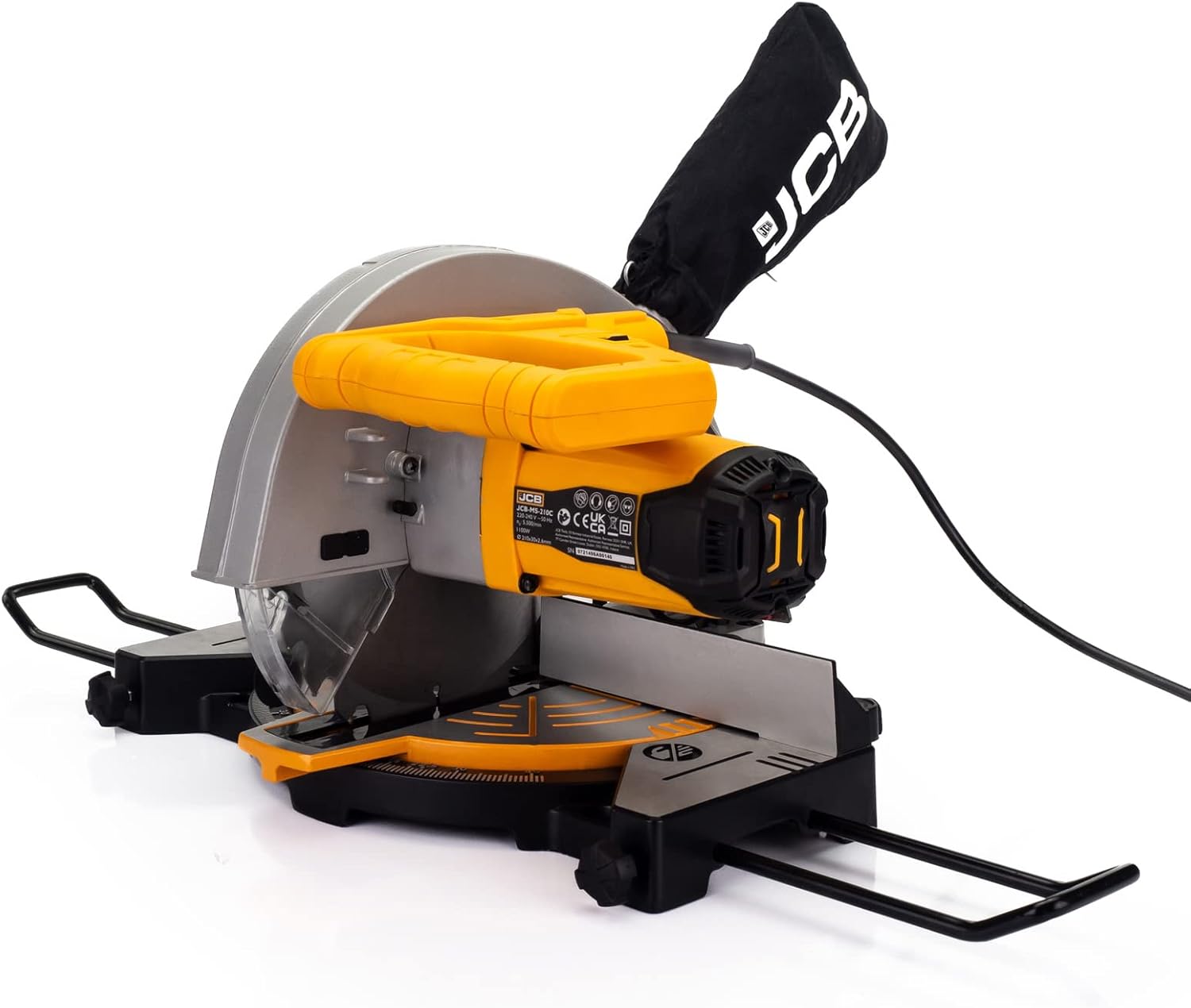
Figure 6: The dust collection bag attached to the mitre saw, essential for maintaining a clean work environment.
ట్రబుల్షూటింగ్
This section addresses common issues you might encounter with your JCB Mitre Saw.
| సమస్య | సాధ్యమైన కారణం | పరిష్కారం |
|---|---|---|
| సా ప్రారంభం కాదు | No power supply; Faulty switch; Motor overload. | Check power cord and outlet. Ensure switch is fully engaged. Allow motor to cool if overheated. |
| బ్లేడ్ శుభ్రంగా కత్తిరించడం లేదు | Dull or damaged blade; Incorrect blade for material; Blade installed backward. | Replace blade. Ensure correct blade type for material. Check blade orientation. |
| అధిక కంపనం లేదా శబ్దం | Loose blade; Damaged blade; Unstable mounting. | Tighten blade arbor nut. Replace damaged blade. Securely mount saw to workbench. |
| Laser guide not visible | Laser switch off; Dirty laser lens; Bright ambient light. | Turn on laser switch. Clean laser lens. Reduce ambient light if possible. |
| పేలవమైన దుమ్ము సేకరణ | Dust bag full; Dust port clogged; Dust bag not properly attached. | Empty dust bag. Clear any clogs from dust port. Re-attach dust bag securely. |
సాంకేతిక లక్షణాలు
| స్పెసిఫికేషన్ | వివరాలు |
|---|---|
| మోడల్ సంఖ్య | 21-MS-210-C |
| శక్తి మూలం | కార్డెడ్ ఎలక్ట్రిక్ |
| వాల్యూమ్tage | 240 వోల్ట్లు |
| వాట్tage | 1100 వాట్స్ |
| బ్లేడ్ వ్యాసం | 210 మి.మీ |
| బ్లేడ్ బోర్ | 30 మి.మీ |
| బ్లేడ్ మందం | 2.6 మి.మీ |
| Number of Teeth (Blade) | 24T (TCT) |
| నో-లోడ్ స్పీడ్ | 5500 RPM (max 7000/min) |
| Mitre Cut Range | -45° / 0° / +45° |
| లేజర్ తరంగదైర్ఘ్యం | 650 ఎన్ఎమ్ |
| వస్తువు బరువు | 9 గ్రా |
| ప్యాకేజీ కొలతలు | 48.4 x 32.2 x 29 సెం.మీ |
వారంటీ మరియు మద్దతు
This JCB Mitre Saw is backed by a JCB 3 Year Warranty. ఈ వారంటీ సాధారణ ఉపయోగంలో పదార్థాలు మరియు పనితనంలో లోపాలను కవర్ చేస్తుంది.
For warranty claims, technical assistance, or spare parts, please contact JCB customer support. UK support is available to assist with any queries or issues you may encounter.
వారంటీ ధ్రువీకరణ కోసం దయచేసి మీ కొనుగోలు రుజువును ఉంచుకోండి.
Ask a question about this manual
Ask about setup, troubleshooting, compatibility, parts, safety, or missing instructions. Manuals+ will review the question and use this page’s manual context to help answer it.