
1. పరిచయం
ధన్యవాదాలు, ధన్యవాదాలు.asing the Ledwood Drop 400 Wireless LED Speaker. This manual provides essential information for setting up, operating, and maintaining your speaker. Please read it carefully before use to ensure proper functionality and to maximize your listening experience.
2. భద్రతా సమాచారం
- స్పీకర్ను నీరు, తేమ లేదా తీవ్రమైన ఉష్ణోగ్రతలకు గురిచేయవద్దు.
- స్పీకర్ను వదలివేయడం లేదా బలమైన ప్రభావాలకు గురిచేయడం మానుకోండి.
- స్పీకర్ను మీరే విడదీయడానికి లేదా రిపేర్ చేయడానికి ప్రయత్నించవద్దు. అర్హత కలిగిన సేవా సిబ్బందిని సంప్రదించండి.
- స్పీకర్ను వేడి వనరుల నుండి మరియు ప్రత్యక్ష సూర్యకాంతి నుండి దూరంగా ఉంచండి.
- ఛార్జింగ్ కోసం అందించిన పవర్ అడాప్టర్ను మాత్రమే ఉపయోగించండి.
- స్పీకర్ను మృదువైన, పొడి గుడ్డతో శుభ్రం చేయండి. రాపిడి క్లీనర్లను ఉపయోగించవద్దు.
3. ప్యాకేజీ విషయాలు
దయచేసి ప్యాకేజీలో అన్ని అంశాలు ఉన్నాయో లేదో తనిఖీ చేయండి:
- 1 x Ledwood Drop 400 Wireless LED Speaker
- 1 x పవర్ అడాప్టర్
- 1 x 3.5mm AUX Input Cable
- 1 x రిమోట్ కంట్రోల్
- 1 x వైర్డు మైక్రోఫోన్
- 1 x యూజర్ మాన్యువల్ (ఈ పత్రం)
4. ఉత్పత్తి ముగిసిందిview
The Ledwood Drop 400 is a powerful wireless speaker featuring dynamic LED lighting and multiple connectivity options.
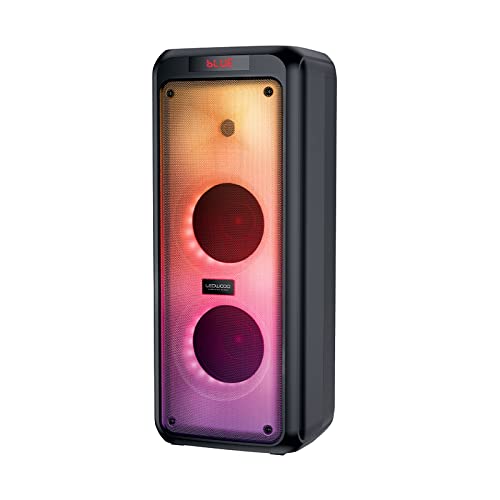
మూర్తి 4.1: ముందు view of the Ledwood Drop 400 speaker, showcasing its LED light panel.
నియంత్రణ ప్యానెల్ మరియు పోర్ట్లు

Figure 4.2: Top control panel with input ports and function buttons.
The top panel includes controls for power, volume, mode selection, playback, and inputs for USB, SD card, AUX, and two microphones. A digital display indicates the current mode or status.
5. సెటప్
5.1 స్పీకర్ను ఛార్జ్ చేయడం
- అందించిన పవర్ అడాప్టర్ను స్పీకర్లోని DC IN పోర్ట్కు కనెక్ట్ చేయండి.
- అడాప్టర్ను ప్రామాణిక గోడ అవుట్లెట్లోకి ప్లగ్ చేయండి.
- The charging indicator will illuminate. The speaker is fully charged when the indicator changes color or turns off (refer to the speaker's display for specific indications).
- పూర్తిగా ఛార్జ్ చేస్తే దాదాపు 6 గంటల ప్లేబ్యాక్ సమయం లభిస్తుంది.
5.2 పవర్ చేయడం ఆన్/ఆఫ్
- To power on, press and hold the Power button on the control panel or remote control.
- పవర్ ఆఫ్ చేయడానికి, పవర్ బటన్ను మళ్ళీ నొక్కి పట్టుకోండి.
6. ఆపరేటింగ్ సూచనలు
6.1 బ్లూటూత్ జత చేయడం
- Power on the Ledwood Drop 400 speaker. It will automatically enter Bluetooth pairing mode, indicated by a flashing 'BLUE' on the display and an audible prompt.
- మీ స్మార్ట్ఫోన్, టాబ్లెట్ లేదా ఇతర బ్లూటూత్-ప్రారంభించబడిన పరికరంలో బ్లూటూత్ను ప్రారంభించండి.
- కోసం వెతకండి available devices and select "Ledwood Drop 400" from the list.
- Once connected, the speaker will provide an audible confirmation, and 'BLUE' on the display will stop flashing.
- మీరు ఇప్పుడు మీ పరికరం నుండి స్పీకర్ ద్వారా ఆడియోను ప్లే చేయవచ్చు.
6.2 USB/SD కార్డ్ ప్లేబ్యాక్
- Insert a USB flash drive or an SD card (pre-loaded with MP3 audio files) స్పీకర్ కంట్రోల్ ప్యానెల్లోని సంబంధిత పోర్ట్లోకి.
- The speaker will automatically switch to USB or SD card mode and begin playing the audio files.
- ప్లేబ్యాక్ను నిర్వహించడానికి స్పీకర్ లేదా రిమోట్ కంట్రోల్లోని ప్లే/పాజ్, నెక్స్ట్ ట్రాక్ మరియు మునుపటి ట్రాక్ బటన్లను ఉపయోగించండి.
6.3 AUX ఇన్పుట్
- Connect one end of the supplied 3.5mm AUX cable to the AUX IN port on the speaker.
- మరొక చివరను మీ బాహ్య ఆడియో పరికరం యొక్క హెడ్ఫోన్ జాక్ లేదా ఆడియో అవుట్పుట్కు కనెక్ట్ చేయండి.
- Press the Mode button on the speaker or remote control until 'AUX' is displayed.
- మీ బాహ్య పరికరం నుండి ఆడియోను ప్లే చేయండి. స్పీకర్ మరియు బాహ్య పరికరం రెండింటి ద్వారా వాల్యూమ్ను నియంత్రించవచ్చు.
6.4 FM రేడియో
- Press the Mode button on the speaker or remote control until 'FM' is displayed.
- అందుబాటులో ఉన్న FM స్టేషన్లను ఆటో-స్కాన్ చేసి సేవ్ చేయడానికి, ప్లే/పాజ్ బటన్ను నొక్కి పట్టుకోండి. స్పీకర్ స్టేషన్లను ఆటోమేటిక్గా స్కాన్ చేసి నిల్వ చేస్తుంది.
- Use the Next Track and Previous Track buttons to navigate through the saved stations.
6.5 మైక్రోఫోన్ వాడకం
- Connect the wired microphone (or another compatible microphone) to one of the MIC IN ports on the speaker.
- Adjust the microphone volume using the dedicated MIC VOL knob on the control panel.
- The microphone can be used in any audio mode (Bluetooth, USB, SD, AUX, FM).
6.6 LED లైట్ మోడ్లు
The Ledwood Drop 400 features dynamic LED lighting with 4 different modes.
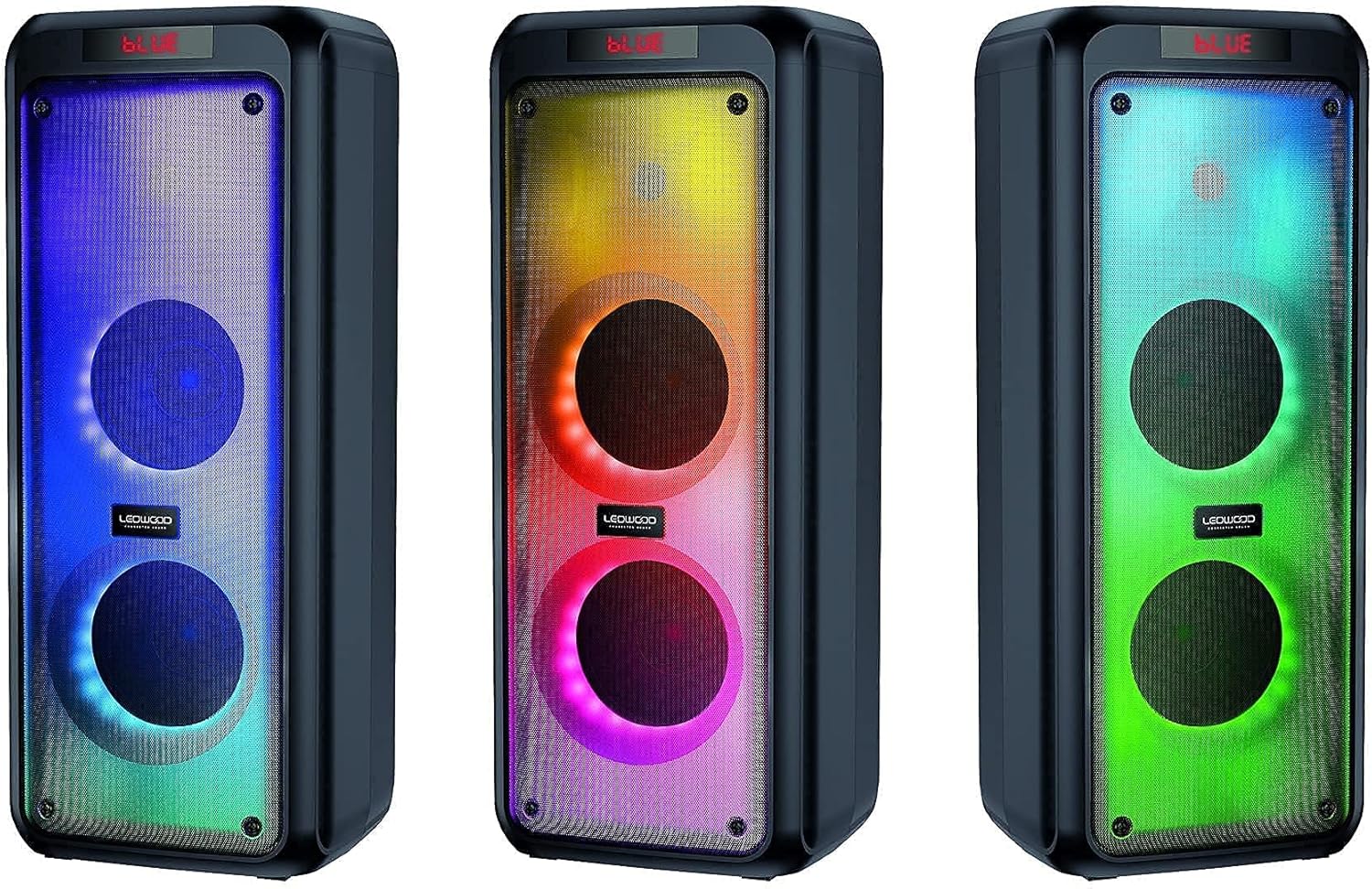
చిత్రం 6.1: ఉదాamples of the speaker's LED light modes.
- Press the LED button on the control panel or remote control to cycle through the available light modes.
- Press the LED button again to turn off the lights.
6.7 ట్రూ వైర్లెస్ స్టీరియో (TWS) ఫంక్షన్
The TWS function allows you to pair two Ledwood Drop 400 speakers together for a stereo sound experience.
- Ensure both Ledwood Drop 400 speakers are powered on and in Bluetooth mode, but not connected to any device.
- On one of the speakers (this will be the primary speaker), press and hold the TWS button (if available) or a designated pairing button (refer to specific button labels on your speaker).
- The primary speaker will search for the secondary speaker. Once connected, both speakers will emit an audible confirmation.
- ఇప్పుడు, విభాగం 6.1లో వివరించిన విధంగా మీ బ్లూటూత్ పరికరాన్ని ప్రాథమిక స్పీకర్కు కనెక్ట్ చేయండి. రెండు స్పీకర్ల ద్వారా ఆడియో స్టీరియోలో ప్లే అవుతుంది.
7. నిర్వహణ
7.1 శుభ్రపరచడం
- శుభ్రపరిచే ముందు ఎల్లప్పుడూ స్పీకర్ను పవర్ ఆఫ్ చేసి, అన్ప్లగ్ చేయండి.
- బయటి ఉపరితలాలను తుడవడానికి మృదువైన, పొడి, మెత్తటి బట్టను ఉపయోగించండి.
- లిక్విడ్ క్లీనర్లు, ఏరోసోల్స్ లేదా ద్రావకాలను ఉపయోగించవద్దు.
7.2 నిల్వ
- స్పీకర్ను ప్రత్యక్ష సూర్యకాంతి మరియు తీవ్రమైన ఉష్ణోగ్రతలకు దూరంగా చల్లని, పొడి ప్రదేశంలో నిల్వ చేయండి.
- ఎక్కువ కాలం నిల్వ చేస్తే, బ్యాటరీ ఆరోగ్యాన్ని కాపాడుకోవడానికి కాలానుగుణంగా (ఉదా. ప్రతి 3 నెలలకు) బ్యాటరీని ఛార్జ్ చేయండి.
8. ట్రబుల్షూటింగ్
| సమస్య | సాధ్యమైన కారణం | పరిష్కారం |
|---|---|---|
| స్పీకర్ పవర్ ఆన్ చేయదు. | Battery is depleted. Power adapter not connected. | Charge the speaker using the provided power adapter. Ensure the adapter is securely connected to both the speaker and a working power outlet. |
| స్పీకర్ నుండి శబ్దం లేదు. | Volume too low. Incorrect mode selected. Device not connected. | Increase speaker volume and source device volume. Ensure the correct input mode (Bluetooth, AUX, USB, SD, FM) is selected. Re-pair Bluetooth device or check cable connections. |
| బ్లూటూత్ పరికరం కనెక్ట్ కాలేదు. | స్పీకర్ జత చేసే మోడ్లో లేదు. పరికరం చాలా దూరంగా ఉంది. జోక్యం. | Ensure speaker is in Bluetooth pairing mode (flashing 'BLUE'). Move device closer to the speaker. Turn off other Bluetooth devices to reduce interference. Try restarting both devices. |
| FM రేడియో రిసెప్షన్ పేలవంగా ఉంది. | Weak signal. Speaker position. | Reposition the speaker to improve reception. Extend any external antenna if available. |
| మైక్రోఫోన్ పనిచేయడం లేదు. | Microphone not connected properly. MIC VOL too low. | Ensure microphone is fully inserted into the MIC IN port. Increase the MIC VOL knob. |
9. స్పెసిఫికేషన్లు
- బ్రాండ్: Ledwood
- మోడల్: డ్రాప్ 400
- కనెక్టివిటీ టెక్నాలజీ: బ్లూటూత్, USB
- ప్రత్యేక లక్షణాలు: FM Radio, LED Light Effects
- సిఫార్సు చేసిన ఉపయోగాలు: For computer, For smartphone or tablet
- అనుకూల పరికరాలు: ల్యాప్టాప్, స్మార్ట్ఫోన్
- రంగు: నలుపు
- నియంత్రణ పద్ధతి: రిమోట్ కంట్రోల్
- శక్తి మూలం: ఎలక్ట్రిక్ కేబుల్
- సగటు బ్యాటరీ జీవితం: 6 గంటలు
- పవర్ అవుట్పుట్: 400W (40W RMS)
- కొలతలు: 24 x 25 x 64 సెం.మీ (సుమారుగా)
- ASIN: B0972SSC4J
10. వారంటీ మరియు మద్దతు
For warranty information or technical support, please refer to the warranty card included with your product or contact Ledwood customer service directly. Contact details can typically be found on the official Ledwood webసైట్ లేదా ఉత్పత్తి ప్యాకేజింగ్లో.