
ఉత్పత్తి ముగిసిందిview
The Poly Sync 60 USB/Bluetooth smart speakerphone is designed to provide clear audio for small to medium conference rooms. It features powerful twin speakers and a six-microphone array that focuses on voices while reducing background noise. This allows for natural conversations, even when multiple participants speak simultaneously. The device offers versatile connectivity options, including USB-A, USB-C, and Bluetooth, enabling connection to PCs, Macs, and smartphones. It is powered by an AC adapter, eliminating the need for battery charging during use. For larger spaces, two units can be wirelessly paired to expand voice pickup coverage.
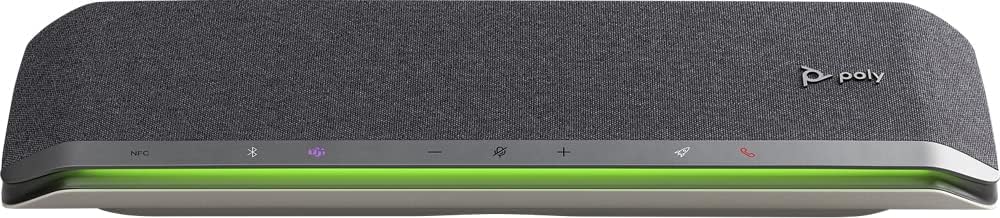
చిత్రం: ముందు భాగం view of the Poly Sync 60 Smart Speakerphone, showing the speaker grille, control buttons, and an illuminated LED light bar.
ప్యాకేజీ విషయాలు
- Poly Sync 60 Speakerphone
- Main power supply with global pin adapters
- USB cable with USB-A and USB-C connectors
కీ ఫీచర్లు
- అధునాతన ఆడియో: Six-microphone steerable array for echo and noise reduction, ensuring clear voice pickup.
- ద్వంద్వ స్పీకర్లు: High-performance speakers deliver rich, clear audio for all participants.
- AC ఆధారిత: Operates continuously via AC power, eliminating battery concerns.
- డైసీ చైన్ సామర్థ్యం: Wirelessly pair two units for extended coverage in larger meeting spaces.
- ఫ్లెక్సిబుల్ కనెక్టివిటీ: Connects to computers via combined USB-A/USB-C cable and to smartphones via Bluetooth.
- USB Video Camera Support: Connect a USB video camera to the speakerphone for combined audio and video with a single cable to the computer.
- Mobile Device Charging: Two USB ports allow charging of up to two mobile phones simultaneously.
- మైక్రోసాఫ్ట్ బృందాలు ధృవీకరించబడ్డాయి: Includes a dedicated Teams button for instant access to the Teams application.
సెటప్ గైడ్
1. పవర్ కనెక్షన్
Connect the provided main power supply to the Poly Sync 60 and plug it into a wall outlet. The device requires AC power for operation.
2. Connecting to a Computer (PC/Mac)
Use the integrated USB cable to connect the Poly Sync 60 to your computer. The cable supports both USB-A and USB-C ports. Once connected, the device should be recognized automatically by your operating system.
3. Connecting to a Smartphone (Bluetooth)
- నొక్కండి మరియు పట్టుకోండి బ్లూటూత్ బటన్ on the Poly Sync 60 until the LED indicator flashes blue.
- On your smartphone, navigate to the Bluetooth settings and select "Poly Sync 60" from the list of available devices.
- ఒకసారి జత చేసిన తర్వాత, LED సూచిక ఘన నీలం రంగులోకి మారుతుంది.
4. Daisy Chain Two Units (Optional)
For expanded audio coverage, two Poly Sync 60 units can be wirelessly paired. Refer to the official Poly support documentation for detailed instructions on how to enable this feature.
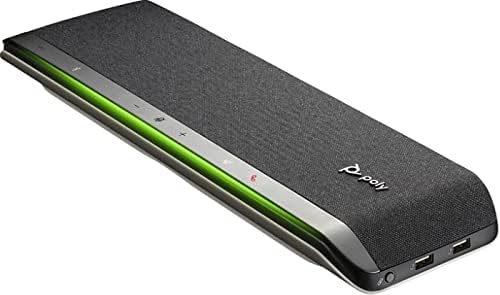
చిత్రం: వైపు view of the Poly Sync 60 Smart Speakerphone, highlighting the USB ports for charging mobile devices and connecting a video camera.
ఆపరేటింగ్ సూచనలు
ప్రాథమిక నియంత్రణలు
- వాల్యూమ్ అప్/డౌన్: ఉపయోగించండి + మరియు - స్పీకర్ వాల్యూమ్ను సర్దుబాటు చేయడానికి బటన్లు.
- మ్యూట్/అన్మ్యూట్: నొక్కండి microphone icon button to mute or unmute the microphone. The LED indicator will change color to show mute status.
- కాల్ సమాధానం/ముగింపు: నొక్కండి phone icon button కాల్కు సమాధానం ఇవ్వడానికి లేదా ముగించడానికి.
- మైక్రోసాఫ్ట్ జట్ల బటన్: నొక్కండి Teams icon button to launch or interact with the Microsoft Teams application (if certified version).
మొబైల్ పరికరాలను ఛార్జింగ్ చేస్తోంది
Connect your mobile phone or other USB-powered device to one of the two USB ports on the Poly Sync 60 to charge it during a meeting.
నిర్వహణ మరియు సంరక్షణ
- Clean the Poly Sync 60 with a soft, dry, lint-free cloth.
- Do not use abrasive cleaners, solvents, or strong chemicals, as these may damage the device.
- పరికరాన్ని తీవ్రమైన ఉష్ణోగ్రతలు, తేమ లేదా ప్రత్యక్ష సూర్యకాంతికి బహిర్గతం చేయకుండా ఉండండి.
- ఉపయోగంలో లేనప్పుడు స్పీకర్ఫోన్ను చల్లని, పొడి ప్రదేశంలో నిల్వ చేయండి.
ట్రబుల్షూటింగ్
- ఆడియో/మైక్రోఫోన్ పనిచేయడం లేదు:
- Ensure the device is powered on and the AC adapter is securely connected.
- Verify that the speakerphone is not muted (check the mute button LED).
- Check the volume levels on both the Poly Sync 60 and your connected computer/smartphone.
- Confirm that the Poly Sync 60 is selected as the audio input/output device in your computer's sound settings or conferencing application.
- కనెక్షన్ సమస్యలు (USB):
- USB కేబుల్ని మీ కంప్యూటర్లోని వేరే పోర్ట్కి కనెక్ట్ చేయడానికి ప్రయత్నించండి.
- మీ కంప్యూటర్ని పునఃప్రారంభించండి.
- కనెక్షన్ సమస్యలు (బ్లూటూత్):
- Ensure Bluetooth is enabled on your smartphone and the Poly Sync 60 is in pairing mode.
- Unpair and then re-pair the device from your smartphone's Bluetooth settings.
- ఇతర బ్లూటూత్ పరికరాలు ఏవీ జోక్యం చేసుకోవడం లేదని నిర్ధారించుకోండి.
- Echo or Background Noise:
- Place the speakerphone centrally in the room, away from walls or highly reflective surfaces.
- Ensure the room is quiet and free from excessive background noise.
సాంకేతిక లక్షణాలు
| ఫీచర్ | స్పెసిఫికేషన్ |
|---|---|
| మోడల్ పేరు | సమకాలీకరణ 60 |
| అంశం మోడల్ సంఖ్య | 216873-01 |
| స్పీకర్ రకం | మల్టీమీడియా |
| కనెక్టివిటీ టెక్నాలజీ | బ్లూటూత్, USB |
| వైర్లెస్ కమ్యూనికేషన్ టెక్నాలజీ | బ్లూటూత్ |
| బ్లూటూత్ రేంజ్ | 3 మీటర్లు |
| శక్తి మూలం | కార్డెడ్ ఎలక్ట్రిక్ |
| స్పీకర్ గరిష్ట అవుట్పుట్ పవర్ | 60 వాట్స్ |
| ఆడియో అవుట్పుట్ మోడ్ | స్టీరియో |
| సరౌండ్ సౌండ్ ఛానెల్ కాన్ఫిగరేషన్ | 2.0 |
| నియంత్రణ పద్ధతి | పుష్ బటన్ |
| ఉత్పత్తి కొలతలు | 1.5"డి x 15.5"వా x 4.8"హ |
| వస్తువు బరువు | 2.2 పౌండ్లు (1000 గ్రాములు) |
| సిఫార్సు చేసిన ఉపయోగాలు | Office work, remote work, conference calls, personal entertainment, charging mobile devices |
| మౌంటు రకం | టాబ్లెట్ మౌంట్ |
| తయారీదారు | పాలీ |
| UPC | 017229172517, 197029590572 |
వారంటీ సమాచారం
The Poly Sync 60 Smart Speakerphone comes with a full manufacturer's warranty. For detailed information regarding warranty terms, duration, and claim procedures, please refer to the official Poly webసైట్ లేదా మీ కొనుగోలుతో చేర్చబడిన వారంటీ డాక్యుమెంటేషన్.
మద్దతు
For further assistance, product updates, software downloads, or detailed guides, please visit the official Poly support website. You can also contact Poly customer service for technical support or service inquiries.
అధికారిక పాలీ Webసైట్: www.poly.com