
పరిచయం
This manual provides essential instructions for the proper use and maintenance of your Easytry123 replacement remote control. This remote is designed to be compatible with various Hisense Smart 4K UHD LED TV models. Please read this manual thoroughly before operating the remote control.
ఉత్పత్తి ముగిసిందిview
The Easytry123 replacement remote control is an ergonomic, button-controlled device utilizing infrared technology for seamless interaction with compatible Hisense televisions. It features dedicated buttons for power, volume, channel control, navigation, and quick access to popular streaming services.



సెటప్
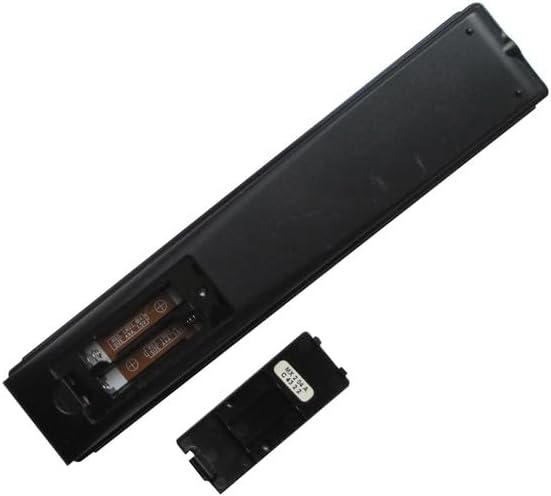
బ్యాటరీ సంస్థాపన
- రిమోట్ కంట్రోల్ వెనుక బ్యాటరీ కంపార్ట్మెంట్ను గుర్తించండి.
- Slide the battery cover downwards or press the latch and lift to open. (Refer to Figure 3 and Figure 4)
- రెండు (2) AAA బ్యాటరీలను చొప్పించండి, పాజిటివ్ (+) మరియు నెగటివ్ (-) టెర్మినల్స్ కంపార్ట్మెంట్ లోపల ఉన్న గుర్తులతో సరిగ్గా సమలేఖనం చేయబడ్డాయని నిర్ధారించుకోండి.
- Replace the battery cover by sliding it back into position until it clicks securely. (Refer to Figure 5)
No additional setup or coding is required for this replacement remote control. It is designed to work directly with compatible Hisense TV models once batteries are installed.
ఆపరేటింగ్ సూచనలు
This remote control operates using infrared (IR) signals. Ensure there is a clear line of sight between the remote's IR emitter (located at the top front) and your television's IR receiver.
- పవర్ బటన్: నొక్కండి శక్తి button (usually red, top right) to turn the TV on or off.
- వాల్యూమ్ నియంత్రణ: ఉపయోగించండి VOL+ మరియు వాల్యూమ్ - ఆడియో వాల్యూమ్ను సర్దుబాటు చేయడానికి బటన్లు.
- ఛానెల్ నియంత్రణ: ఉపయోగించండి CH ^ మరియు CH v buttons to change TV channels.
- నావిగేషన్ ప్యాడ్: The central circular pad with directional arrows (పైకి, క్రిందికి, ఎడమ, కుడి) and a central సరే/నమోదు చేయండి button is used to navigate menus and select options.
- వెనుక బటన్: నొక్కండి వెనుకకు button (left arrow) to return to the previous screen or menu.
- హోమ్ బటన్: నొక్కండి హోమ్ button (house icon or circle) to access the TV's main smart interface.
- యాప్ షార్ట్కట్ బటన్లు: Dedicated buttons for services like స్లింగ్, Google Play, ఫాండాంగో ఇప్పుడు, మరియు టికిలివ్ provide quick access to these applications.
- గూగుల్ అసిస్టెంట్ బటన్: The button with the Google Assistant logo (colored dots) activates voice commands if your TV supports this feature.
- Input/123 Button: This button (often labeled '123' or with an input icon) allows you to switch between different input sources (HDMI, AV, etc.).
- మ్యూట్ బటన్: The button with a crossed-out speaker icon mutes or unmutes the TV audio.
- ప్లేబ్యాక్ నియంత్రణలు: బటన్లు ఇలా ఉంటాయి ప్లే/పాజ్ చేయండి, రివైండ్ చేయండి, మరియు ఫాస్ట్ ఫార్వర్డ్ are used for media playback.
- CC (క్లోజ్డ్ క్యాప్షనింగ్): క్లోజ్డ్ క్యాప్షన్లను ఆన్ లేదా ఆఫ్ టోగుల్ చేస్తుంది.
- NRT (No Remote Timer): Functionality may vary by TV model.
- MTS (Multi-channel Television Sound): Allows selection of audio tracks (e.g., stereo, SAP).
నిర్వహణ
- శుభ్రపరచడం: రిమోట్ కంట్రోల్ను మృదువైన, పొడి గుడ్డతో తుడవండి. ద్రవ క్లీనర్లను లేదా రాపిడి పదార్థాలను ఉపయోగించవద్దు.
- బ్యాటరీ సంరక్షణ: రిమోట్ ప్రతిస్పందన మందగించినప్పుడు లేదా పనిచేయడం ఆగిపోయినప్పుడు బ్యాటరీలను మార్చండి. లీకేజీని నివారించడానికి రిమోట్ను ఎక్కువ కాలం ఉపయోగించకపోతే బ్యాటరీలను తీసివేయండి.
- నిల్వ: రిమోట్ను ప్రత్యక్ష సూర్యకాంతి మరియు తీవ్రమైన ఉష్ణోగ్రతలకు దూరంగా చల్లని, పొడి ప్రదేశంలో నిల్వ చేయండి.
ట్రబుల్షూటింగ్
- రిమోట్ స్పందించడం లేదు:
- కొత్త AAA బ్యాటరీలు సరైన ధ్రువణతతో సరిగ్గా ఇన్స్టాల్ చేయబడ్డాయని నిర్ధారించుకోండి.
- రిమోట్ మరియు టీవీ యొక్క IR రిసీవర్ మధ్య ఏవైనా అడ్డంకులు ఉన్నాయా అని తనిఖీ చేయండి.
- రిమోట్ను నేరుగా టీవీ వైపు చూపించండి.
- Try replacing the batteries with a fresh set.
- పనిచేయని కొన్ని విధులు:
- This is a replacement remote and may not support all advanced functions of your original TV remote.
- Verify that your TV model is listed as compatible with this remote.
- జోక్యం: Strong light sources or other infrared devices can sometimes interfere with the remote's signal.
స్పెసిఫికేషన్లు
| బ్రాండ్ | ఈజీట్రీ123 |
| అనుకూల పరికరాలు | Television (Various Hisense Smart 4K UHD LED TV Models) |
| కనెక్టివిటీ టెక్నాలజీ | ఇన్ఫ్రారెడ్ |
| కంట్రోలర్ రకం | బటన్ నియంత్రణ |
| ప్రత్యేక ఫీచర్ | ఎర్గోనామిక్ |
| బ్యాటరీలు అవసరం | 2 AAA బ్యాటరీలు |
ముఖ్యమైన గమనికలు
- This is a replacement remote control and is not a universal remote control.
- The replacement item may not work with all functions as the original remote. Some advanced or specific features of your original remote might not be supported.
- ఇది ఉపయోగించడానికి సులభం and does not require a manual or batteries to be included in the package.
- ఉంది no need for setup or code programming; it works directly with compatible models.
- ఎల్లప్పుడూ ensure our remote matches the model number of your unit సరైన అనుకూలత కోసం.
వారంటీ మరియు మద్దతు
Specific warranty information for this product is not provided in this manual. For any issues or support inquiries, please refer to the seller or retailer from whom the product was purchased. Ensure you retain your proof of purchase for any potential warranty claims.