1. పరిచయం
This manual provides comprehensive instructions for the setup, operation, maintenance, and troubleshooting of your Onn Roku TV Smart Remote Control. This remote is designed for seamless compatibility with specific Onn Roku TV models, ensuring a straightforward user experience.
2. ఉత్పత్తి ముగిసిందిview
The Onn Roku TV Smart Remote Control is an infrared (IR) remote designed for intuitive control of your compatible Onn Roku TV. It features dedicated buttons for power, navigation, playback, and popular streaming services.
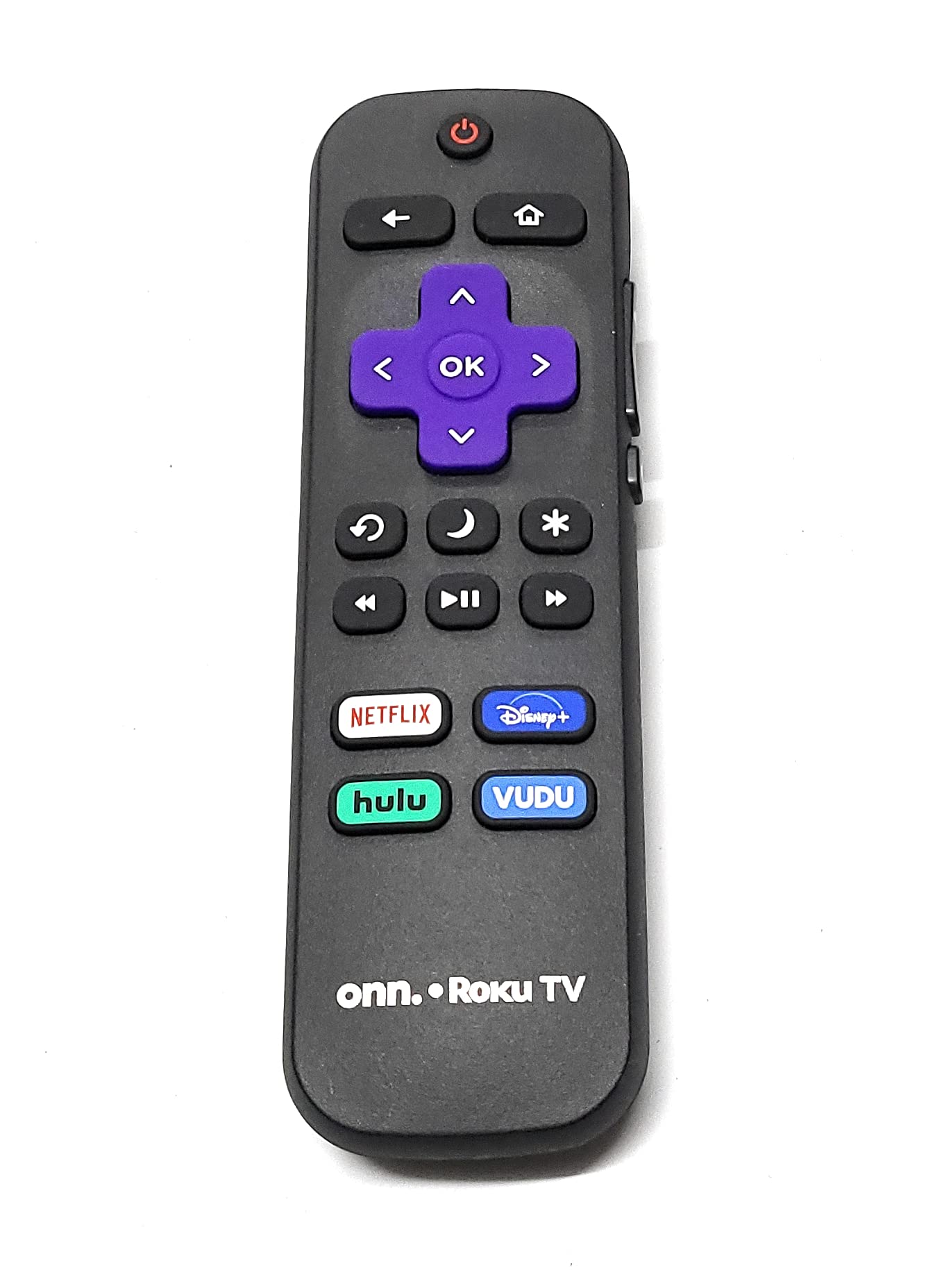
Figure 1: Onn Roku TV Smart Remote Control
This image displays the front face of the Onn Roku TV Smart Remote Control. It is black with various buttons. At the top is the Power button. Below it are the Back, Home, and directional navigation buttons (Up, Down, Left, Right) with an 'OK' button in the center. Further down are the Replay, Star (*), Rewind, Play/Pause, and Fast Forward buttons. At the bottom, there are dedicated quick-access buttons for Netflix, Disney+, Hulu, and Vudu. The remote also features "onn. Roku TV" branding at the bottom.
బటన్ విధులు:
- పవర్ బటన్ (⏻ ⏻ తెలుగు): టీవీని ఆన్ లేదా ఆఫ్ చేస్తుంది.
- వెనుక బటన్ (← ← లు): మునుపటి స్క్రీన్ లేదా మెనూకు తిరిగి వస్తుంది.
- హోమ్ బటన్ (⌂): Navigates to the Roku Home screen.
- డైరెక్షనల్ ప్యాడ్ (Up, Down, Left, Right): Used for navigating menus and selecting items.
- సరే బటన్: Confirms a selection or action.
- రీప్లే బటన్ (↻ లు): Replays the last few seconds of video.
- స్టార్ బటన్ (*): Accesses options or settings within an app or menu.
- రివైండ్ బటన్ (⏮): Rewinds video playback.
- ప్లే/పాజ్ బటన్ (⏯ ⏯ काला काला ⏯ काला काला के स): Plays or pauses video content.
- ఫాస్ట్ ఫార్వర్డ్ బటన్ (⏭): Fast forwards video playback.
- నెట్ఫ్లిక్స్ బటన్: Direct access to the Netflix streaming application.
- డిస్నీ+ బటన్: Direct access to the Disney+ streaming application.
- Hulu Button: Direct access to the Hulu streaming application.
- Vudu Button: Direct access to the Vudu streaming application.
3. సెటప్
3.1 బ్యాటరీ ఇన్స్టాలేషన్
- రిమోట్ కంట్రోల్ వెనుక బ్యాటరీ కంపార్ట్మెంట్ కవర్ను గుర్తించండి.
- కంపార్ట్మెంట్ తెరవడానికి కవర్ను క్రిందికి జారండి లేదా లాచ్ (ఉంటే) నొక్కండి.
- రెండు AAA బ్యాటరీలను (చేర్చబడలేదు) చొప్పించండి, పాజిటివ్ (+) మరియు నెగటివ్ (-) టెర్మినల్స్ కంపార్ట్మెంట్ లోపల ఉన్న రేఖాచిత్రాలకు సరిపోలుతున్నాయని నిర్ధారించుకోండి.
- బ్యాటరీ కంపార్ట్మెంట్ కవర్ను మార్చండి, అది సురక్షితంగా క్లిక్ అయ్యే వరకు దాన్ని తిరిగి స్థానంలోకి జారండి.
3.2 ప్రారంభ ఉపయోగం
This remote control operates using infrared (IR) technology and is designed to work immediately with compatible Onn Roku TV models without requiring any programming or pairing. Simply point the remote at your TV and press the Power button to begin use.
4. ఆపరేటింగ్ సూచనలు
To operate your Onn Roku TV using this remote control, ensure there is a clear line of sight between the remote's IR emitter and the TV's IR receiver.
- పవర్ ఆన్/ఆఫ్: నొక్కండి ⏻ ⏻ తెలుగు button once to turn the TV on or off.
- నావిగేషన్: Use the Up, Down, Left, and Right directional buttons to move through menus and select options. Press the OK మీ ఎంపికను నిర్ధారించడానికి బటన్.
- హోమ్ స్క్రీన్: నొక్కండి ⌂ button to return to the main Roku Home screen at any time.
- వెనుకకు: ఉపయోగించండి ← ← లు మునుపటి మెను లేదా స్క్రీన్కి తిరిగి వెళ్లడానికి బటన్.
- ప్లేబ్యాక్ నియంత్రణలు: During video playback, use the ⏮ (రివైండ్), ⏯ ⏯ काला काला ⏯ काला काला के स (Play/Pause), and ⏭ (Fast Forward) buttons to control media. The ↻ లు (Replay) button will jump back a few seconds.
- Options/Settings: నొక్కండి * button to access context-sensitive options or settings within an application or menu.
- Quick App Access: అంకితమైన వాటిని ఉపయోగించండి నెట్ఫ్లిక్స్, డిస్నీ+, హులు, మరియు వుడు buttons for instant access to these streaming services.
5. నిర్వహణ
5.1 శుభ్రపరచడం
మీ రిమోట్ కంట్రోల్ను శుభ్రం చేయడానికి, దానిని మృదువైన, పొడి గుడ్డతో సున్నితంగా తుడవండి. మొండి ధూళి కోసం, కొద్దిగా dampen గుడ్డను నీటితో శుభ్రం చేసుకోండి. కఠినమైన రసాయనాలు, రాపిడి క్లీనర్లు లేదా అధిక తేమను ఉపయోగించకుండా ఉండండి, ఎందుకంటే ఇవి రిమోట్ను దెబ్బతీస్తాయి.
5.2 బ్యాటరీ భర్తీ
Replace batteries when the remote's responsiveness decreases or it stops functioning. Always replace both batteries at the same time with new AAA alkaline batteries. Do not mix old and new batteries, or different types of batteries.
6. ట్రబుల్షూటింగ్
- రిమోట్ స్పందించడం లేదు:
- సరైన ధ్రువణతతో బ్యాటరీలు సరిగ్గా ఇన్స్టాల్ చేయబడ్డాయని నిర్ధారించుకోండి.
- పాత బ్యాటరీలను కొత్త వాటితో భర్తీ చేయండి.
- Check for any obstructions between the remote and the TV's IR sensor.
- మీరు ప్రభావవంతమైన పరిధిలో ఉన్నారని మరియు రిమోట్ను నేరుగా టీవీ వైపు గురిపెట్టారని నిర్ధారించుకోండి.
- పనిచేయని నిర్దిష్ట బటన్లు:
- This could indicate a stuck button or a localized issue. Try pressing the button firmly several times. If the issue persists after battery replacement, the remote may require replacement.
7. స్పెసిఫికేషన్లు
| ఫీచర్ | వివరాలు |
|---|---|
| బ్రాండ్ | సాధారణమైనది |
| అనుకూల పరికరాలు | Television (Onn Roku TV Models: 100005842, 100005396, 100005395, 100005397) |
| కనెక్టివిటీ టెక్నాలజీ | ఇన్ఫ్రారెడ్ (IR) |
| కంట్రోలర్ రకం | బటన్ నియంత్రణ |
| ప్రత్యేక ఫీచర్ | ఎర్గోనామిక్ డిజైన్ |
| వస్తువు బరువు | 1.13 ఔన్సులు (సుమారు 32 గ్రాములు) |
| ప్యాకేజీ కొలతలు | 5.83 x 1.69 x 0.91 అంగుళాలు |
8. వారంటీ మరియు మద్దతు
As this product is listed under a 'Generic' brand, specific warranty information may vary. Please refer to the retailer or point of purchase for details regarding warranty coverage and customer support options. For general troubleshooting, please consult the 'Troubleshooting' section of this manual.


