
పరిచయం
This manual provides detailed instructions for the installation, operation, maintenance, and troubleshooting of your GIGABYTE GeForce RTX 3080 Vision OC 10G graphics card. This high-performance graphics card is designed for demanding visual tasks, powered by NVIDIA's Ampere architecture, featuring 2nd Generation RT Cores, 3rd Generation Tensor Cores, and 10GB GDDR6X memory. It incorporates the WINDFORCE 3X Cooling System for efficient thermal management and RGB Fusion 2.0 for customizable lighting.
సెటప్ మరియు ఇన్స్టాలేషన్
1. సిస్టమ్ అవసరాలు
- ఒక ద్వంద్వ-వెడల్పు x16 గ్రాఫిక్స్ స్లాట్తో పిసిఐ ఎక్స్ప్రెస్-కంప్లైంట్ మదర్బోర్డ్.
- రెండు 8-పిన్ PCIe పవర్ కనెక్టర్లతో కనీసం 750W విద్యుత్ సరఫరా.
- Microsoft Windows 10 64-bit or Linux 64-bit operating system.
- 32GB system memory recommended for optimal performance.
- డ్రైవర్ డౌన్లోడ్ కోసం ఇంటర్నెట్ కనెక్షన్.
2. ప్యాకేజీ విషయాలు
- GIGABYTE GeForce RTX 3080 Vision OC 10G Graphics Card
- వినియోగదారు మాన్యువల్ (ఈ పత్రం)
3. భౌతిక సంస్థాపన
- మీ వ్యవస్థను సిద్ధం చేయండి: మీ కంప్యూటర్ను పవర్ ఆఫ్ చేసి, అన్ని కేబుల్లను డిస్కనెక్ట్ చేయండి. కంప్యూటర్ కేస్ను తెరవండి.
- PCIe స్లాట్ను గుర్తించండి: మీ మదర్బోర్డులో అందుబాటులో ఉన్న PCI ఎక్స్ప్రెస్ x16 స్లాట్ను గుర్తించండి.
- Remove slot covers: Remove the necessary expansion slot covers from the back of your computer case to accommodate the graphics card.
- గ్రాఫిక్స్ కార్డ్ని చొప్పించండి: Carefully align the graphics card with the PCIe slot and press it firmly until it is securely seated. Ensure the retention clip on the PCIe slot locks into place.

చిత్రం: ముందు భాగం view of the GIGABYTE GeForce RTX 3080 Vision OC 10G Graphics Card, showcasing the triple WINDFORCE fans and the white/silver shroud design.
- కార్డును భద్రపరచండి: Fasten the graphics card to the computer case using screws.
- పవర్ కేబుల్స్ కనెక్ట్ చేయండి: Connect the two 8-pin PCIe power connectors from your power supply to the corresponding ports on the graphics card. Ensure a firm connection.
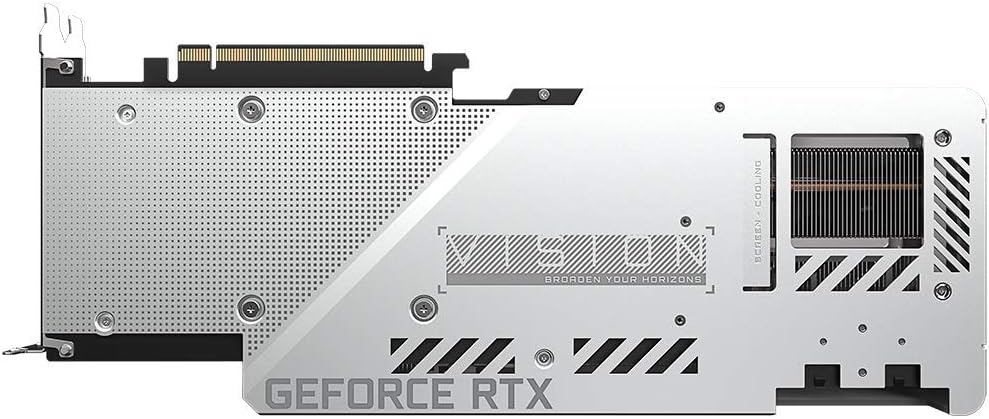
చిత్రం: వెనుక view of the GIGABYTE GeForce RTX 3080 Vision OC 10G Graphics Card, highlighting the protective metal backplate with ventilation cutouts and the GeForce RTX branding.
- కేసును మూసివేయండి: కంప్యూటర్ కేస్ కవర్ను మార్చి, అన్ని కేబుల్లను తిరిగి కనెక్ట్ చేయండి.
- డిస్ప్లేను కనెక్ట్ చేయండి: Connect your monitor to one of the display outputs (HDMI or DisplayPort) on the graphics card.
ఆపరేటింగ్ సూచనలు
1 డ్రైవర్ ఇన్స్టాలేషన్
- పవర్ ఆన్: Turn on your computer. The system may boot into a lower resolution or use a generic display driver.
- డ్రైవర్లను డౌన్లోడ్ చేయండి: అధికారిక GIGABYTE ని సందర్శించండి webసైట్ (www.gigabyte.com) లేదా NVIDIA అధికారి webసైట్ (www.nvidia.com/drivers).
- Select product: Navigate to the support section and locate the drivers for the GeForce RTX 3080 series.
- డ్రైవర్లను ఇన్స్టాల్ చేయండి: Download the latest recommended drivers and follow the on-screen instructions to complete the installation. A system restart may be required.
2. సాఫ్ట్వేర్ కాన్ఫిగరేషన్
- GIGABYTE Control Center / AORUS Engine: For advanced control over your graphics card, including fan speed adjustment, overclocking profiles, and RGB Fusion 2.0 lighting customization, download and install the GIGABYTE Control Center or AORUS Engine software from the GIGABYTE webసైట్.
- NVIDIA GeForce Experience: Install NVIDIA GeForce Experience for optimal game settings, driver updates, and access to features like ShadowPlay.
నిర్వహణ
- దుమ్ము తొలగింపు: Regularly clean dust from the graphics card fans and heatsink using compressed air. Ensure the system is powered off and unplugged before cleaning.
- ఫ్యాన్ తనిఖీ: Periodically check the fans for any obstructions or unusual noises.
- డ్రైవర్ నవీకరణలు: Keep your graphics drivers updated to ensure optimal performance and stability.
ట్రబుల్షూటింగ్
డిస్ప్లే అవుట్పుట్ లేదు
- మానిటర్ కేబుల్ గ్రాఫిక్స్ కార్డ్ మరియు మానిటర్కి సురక్షితంగా కనెక్ట్ చేయబడిందని నిర్ధారించుకోండి.
- PCIe స్లాట్లో గ్రాఫిక్స్ కార్డ్ పూర్తిగా అమర్చబడిందో లేదో ధృవీకరించండి.
- Check that all required PCIe power connectors are securely attached to the graphics card.
- వీలైతే వేరే డిస్ప్లే కేబుల్ లేదా మానిటర్తో పరీక్షించండి.
సిస్టమ్ అస్థిరత లేదా క్రాష్లు
- మీ విద్యుత్ సరఫరా కనీస వాట్ కు అనుగుణంగా ఉందని నిర్ధారించుకోండిtagఇ అవసరం (750W).
- మీ గ్రాఫిక్స్ డ్రైవర్లను తాజా వెర్షన్కు నవీకరించండి.
- Monitor GPU temperatures using software like GIGABYTE Control Center to check for overheating.
- Check for conflicts with other installed drivers or software.
పేలవమైన పనితీరు
- Ensure drivers are correctly installed and up to date.
- Verify that the graphics card is running at its intended clock speeds (can be checked with monitoring software).
- సిస్టమ్ వనరులను వినియోగించే అవకాశం ఉన్న నేపథ్య అనువర్తనాలను తనిఖీ చేయండి.
- Ensure your system's BIOS/UEFI is updated.
స్పెసిఫికేషన్లు
| గ్రాఫిక్స్ ప్రాసెసింగ్ యూనిట్ | NVIDIA GeForce RTX 3080 |
| వీడియో మెమరీ | 10GB GDDR6X |
| మెమరీ ఇంటర్ఫేస్ | 320-బిట్ |
| బూస్ట్ క్లాక్ | 1800 MHz |
| మెమరీ వేగం | 19000 MHz |
| అవుట్పుట్ పోర్ట్లు | డిస్ప్లేపోర్ట్, HDMI |
| Max Digital Resolution | 7680x4320 (via DisplayPort 1.4a) |
| బహుళ-view | 4 |
| కార్డ్ కొలతలు (పొడవxఅడుగు xఅడుగు) | 12.6 x 4.96 x 2.17 అంగుళాలు (320 x 126 x 55 మిమీ) |
| సిఫార్సు చేయబడిన PSU | 750W |
| పవర్ కనెక్టర్లు | 2x 8-పిన్ |
| PCI ఎక్స్ప్రెస్ | 4.0 x16 |
| మోడల్ సంఖ్య | GV-N3080VISION OC-10GD 2.0 |
వారంటీ సమాచారం
GIGABYTE products are covered by a limited warranty. The specific terms and duration of the warranty may vary by region and product. Please refer to the official GIGABYTE website or your product's packaging for detailed warranty information and registration procedures. Keep your proof of purchase for warranty claims.
సాంకేతిక మద్దతు
For technical assistance, driver downloads, FAQs, and further support, please visit the official GIGABYTE support webసైట్:
You may also contact GIGABYTE customer service through the contact information provided on their webమీ నిర్దిష్ట ప్రాంతం కోసం సైట్.