
పరిచయం
Thank you for choosing the SONICAKE Rude Mouse Distortion Pedal. This manual provides essential information for the proper setup, operation, and maintenance of your new guitar effects pedal. Please read this manual thoroughly to ensure optimal performance and longevity of your device.
ఉత్పత్తి ముగిసిందిview
The SONICAKE Rude Mouse is a compact, all-analog distortion pedal designed to deliver a wide range of classic and modern distortion tones. It features two distinct modes, "Classic" and "Hot," offering versatility from creamy overdrive to aggressive fuzz. Its true bypass design ensures your guitar's signal remains uncolored when the effect is disengaged.
- 100% Analog Circuit: Provides authentic and rich distortion, overdrive, and fuzz tones.
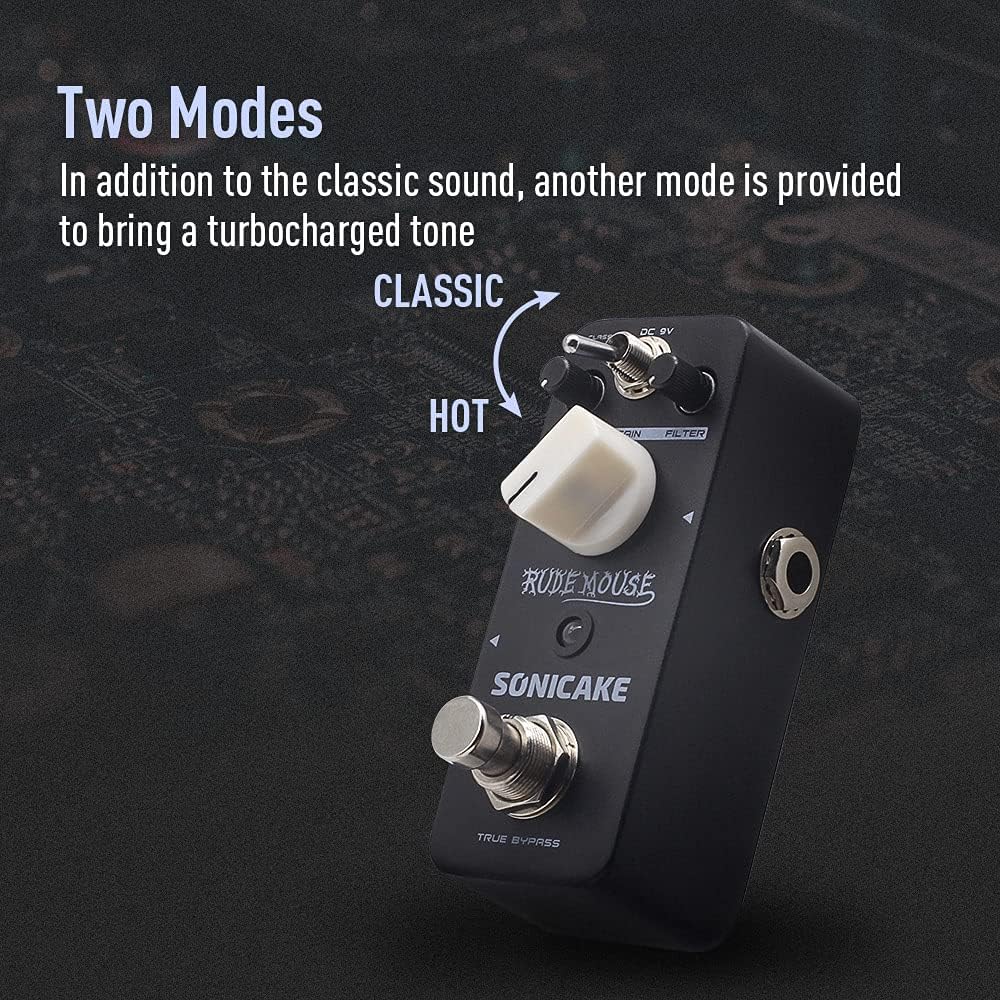
- రెండు మోడ్లు: Switch between "Classic" for vintage distortion and "Hot" for a more aggressive, turbo-charged sound.
- ఫిల్టర్ నియంత్రణ: Offers a broad tonal range, from dark to bright, allowing precise sound sculpting.
- నిజమైన బైపాస్: Maintains the integrity of your guitar's signal when the pedal is off.
- మన్నికైన నిర్మాణం: Housed in a robust zinc-alloy die-cast casing for reliability.
- కాంపాక్ట్ సైజు: Designed for portability and efficient pedalboard space utilization.


నియంత్రణలు మరియు విధులు
Familiarize yourself with the controls of the Rude Mouse pedal:

- DC 9V ఇన్పుట్: Connect a standard 9V DC power adapter (center negative) here. The pedal requires a stable power supply for operation.
- స్థాయి నాబ్: Controls the overall output volume of the effect. Adjust to balance the effect volume with your clean signal.
- గెయిన్ నాబ్: Adjusts the amount of distortion. Turning clockwise increases the intensity of the distortion.
- FILTER Knob: Shapes the tone of the distorted sound. This control allows you to dial in a wide range of frequencies, from dark and bass-heavy to bright and cutting.
- MODE Switch (Classic/Hot): Toggles between two distinct distortion voicings.
- క్లాసిక్: Provides a vintage, smooth distortion tone.
- హాట్: Delivers a more aggressive, higher-gain distortion with increased saturation.
- అవుట్పుట్ జాక్: దీన్ని మీ ampమీ సిగ్నల్ చైన్లోని లైఫైయర్ లేదా తదుపరి పెడల్.
- ఇన్పుట్ జాక్: Connect your guitar or the preceding pedal in your signal chain here.
- నిజమైన బైపాస్ ఫుట్స్విచ్: Engages or disengages the effect. When engaged, the LED indicator will illuminate. When disengaged, the pedal is bypassed, and your signal passes through unaffected.
సెటప్
Follow these steps to set up your SONICAKE Rude Mouse pedal:
- పవర్ కనెక్షన్: Connect a standard 9V DC power adapter (center negative) to the DC 9V input jack (1). Ensure the power supply meets the specified voltage మరియు ధ్రువణత అవసరాలు. (Note: Power adapter is not included.)
- ఇన్పుట్ కనెక్షన్: Connect your guitar to the Input Jack (7) using a standard 1/4-inch instrument cable.
- అవుట్పుట్ కనెక్షన్: Connect the Output Jack (6) to your amplifier's input or to the input of the next pedal in your effects chain using a standard 1/4-inch instrument cable.
- ప్రారంభ సెట్టింగ్లు: Before powering on, set the LEVEL knob to a low position, and the GAIN and FILTER knobs to their middle positions (12 o'clock).
- పవర్ ఆన్: Once all connections are secure, power on your amplifier and then the pedal.


ఆపరేటింగ్ సూచనలు
To achieve various distortion sounds:
- Engage the Effect: Press the TRUE BYPASS Footswitch (8) to activate the distortion effect. The red LED indicator will light up.
- Adjust Level: Use the LEVEL knob (2) to set the desired output volume. Start low and increase gradually to avoid sudden loud sounds.
- లాభం సెట్ చేయండి: Rotate the GAIN knob (3) to control the amount of distortion. Lower settings provide a mild crunch, while higher settings deliver heavy, saturated distortion.
- Shape Tone with Filter: Adjust the FILTER knob (4) to fine-tune the tonal characteristics. Turning it clockwise generally brightens the sound, while counter-clockwise makes it darker. Experiment to find the sweet spot for your guitar and ampజీవితకాలం.
- మోడ్ని ఎంచుకోండి: Use the MODE Switch (5) to toggle between "Classic" and "Hot" voicings.
- For a more traditional, smooth distortion, select క్లాసిక్.
- For a more aggressive, modern, and higher-gain sound, select వేడి.
- Disengage Effect: Press the TRUE BYPASS Footswitch (8) again to bypass the effect. The LED indicator will turn off, and your signal will pass through the pedal without modification.
నిర్వహణ
- శుభ్రపరచడం: Use a soft, dry cloth to clean the pedal's exterior. Avoid using abrasive cleaners or solvents, as they may damage the finish.
- నిల్వ: పెడల్ను పొడి వాతావరణంలో, తీవ్రమైన ఉష్ణోగ్రతలు మరియు ప్రత్యక్ష సూర్యకాంతి నుండి దూరంగా నిల్వ చేయండి.
- విద్యుత్ సరఫరా: Always use a regulated 9V DC power supply with a center-negative plug. Incorrect power supplies can damage the unit and void the warranty.
- కనెక్షన్లు: Ensure all cables are securely connected but do not overtighten. Periodically check cables for wear and tear.
ట్రబుల్షూటింగ్
| సమస్య | సాధ్యమైన కారణం | పరిష్కారం |
|---|---|---|
| పెడల్ నొక్కినప్పుడు శబ్దం రాదు. | Incorrect power supply, faulty cables, incorrect connections, LEVEL knob set too low. | Verify 9V DC center-negative power supply. Check all instrument cables. Ensure guitar is connected to INPUT and amplifier to OUTPUT. Increase LEVEL knob. |
| Weak or distorted sound (unintended). | Low battery (if applicable, though this pedal is not battery-powered), incorrect impedance, faulty cables. | Ensure proper power supply. Check cable integrity. Ensure correct input/output impedance matching with other gear. |
| అవాంఛిత శబ్దం లేదా హమ్. | Ground loop, faulty power supply, interference from other electronics. | Use a high-quality, isolated power supply. Try a different power outlet. Move pedal away from other electronic devices. Check for faulty cables. |
| LED not lighting up. | No power, pedal not engaged. | Ensure power supply is connected and functional. Press the footswitch to engage the effect. |
స్పెసిఫికేషన్లు
| ఫీచర్ | వివరాలు |
|---|---|
| మోడల్ సంఖ్య | QSS-18 |
| బ్రాండ్ | సోనికేక్ |
| వస్తువు బరువు | 7.3 ఔన్సులు (208 గ్రాములు) |
| ఉత్పత్తి కొలతలు | 2.05"L x 1.65"W x 3.68"H (52mm L x 42mm W x 93.5mm H) |
| బాడీ మెటీరియల్ | Zinc-alloy die-cast casing |
| శక్తి మూలం | Corded Electric (9V DC, center negative) |
| వాల్యూమ్tage | 9 వోల్ట్లు |
| సిగ్నల్ ఫార్మాట్ | అనలాగ్ |
| కనెక్టర్ రకం | 1/4 అంగుళాల (6.35mm) ఆడియో జాక్ |


వారంటీ మరియు మద్దతు
For warranty information, please refer to the documentation included with your purchase or visit the official SONICAKE website. If you encounter any issues or require technical assistance, please contact SONICAKE customer support through their official channels.
మీరు మరిన్ని వివరాలు మరియు సంప్రదింపు వివరాలను ఇక్కడ కనుగొనవచ్చు SONICAKE Amazon Store.
ముఖ్యమైన సమాచారం
- క్రమ సంఖ్య: For product identification and warranty purposes, please note your pedal's serial number: 60190008971.
- UPC: 0843037101667
- EAN: 6971002021666
వీడియో వనరులు
While this manual provides comprehensive instructions, visual demonstrations can be helpful. Please note that specific product videos were not available in the provided data for embedding. For official product videos and demonstrations, please visit the SONICAKE official website or their official YouTube channel.