
1. పరిచయం
Thank you for choosing the LOQRON L22 Smart Lock. This manual provides essential information for the proper installation, operation, and maintenance of your new smart lock. Please read these instructions carefully before installation and keep them for future reference.
2. భద్రతా సమాచారం
- తాళాన్ని మీరే విడదీయడానికి లేదా మరమ్మతు చేయడానికి ప్రయత్నించవద్దు. ఇది వారంటీని రద్దు చేసి నష్టాన్ని కలిగించవచ్చు.
- Use only the specified battery type (4 x AA alkaline batteries). Do not mix old and new batteries or different types of batteries.
- Keep mechanical keys in a safe place outside your home.
- పనిచేయకపోవడాన్ని నివారించడానికి సంస్థాపన సమయంలో అన్ని భాగాలు సురక్షితంగా బిగించబడ్డాయని నిర్ధారించుకోండి.
- Protect your passcodes and eKeys. Do not share them with unauthorized individuals.
3. ప్యాకేజీ విషయాలు
Please verify that all parts are included in your package:
- బాహ్య కీప్యాడ్ అసెంబ్లీ
- అంతర్గత అసెంబ్లీ
- డెడ్బోల్ట్ గొళ్ళెం
- మౌంటు ప్లేట్
- స్ట్రైక్ ప్లేట్
- స్క్రూలు మరియు ఫాస్టెనర్లు
- మెకానికల్ కీలు (2)
- IC కార్డులు (2)
- ఇన్స్టాలేషన్ గైడ్ (ఈ మాన్యువల్)
4. సెటప్ మరియు ఇన్స్టాలేషన్
Follow these steps for proper installation of your LOQRON L22 Smart Lock.
4.1 Prepare the Door
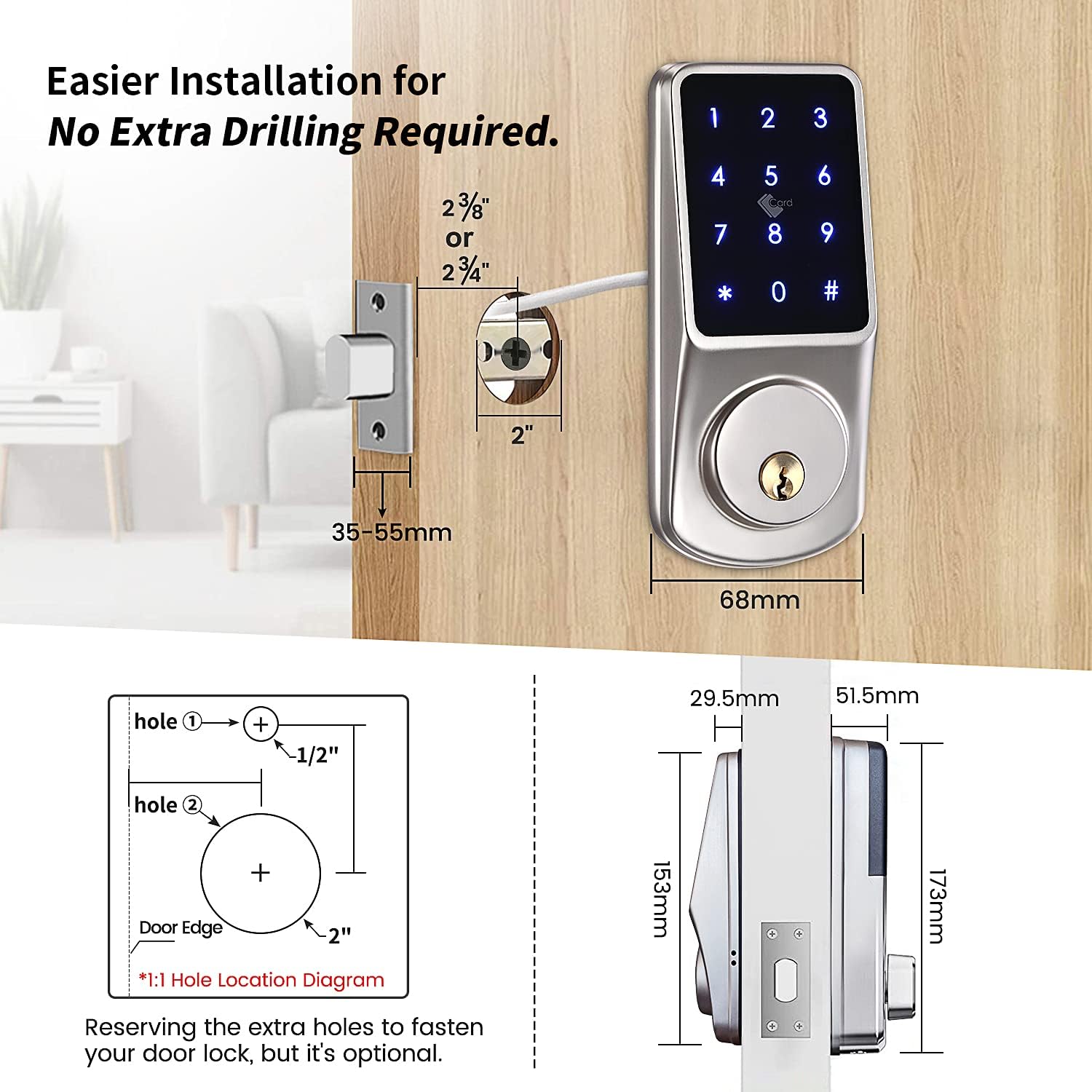
Ensure your door is prepared for installation. The deadbolt should always be in the PULL IN position before installation.

Image: Installation dimensions and hole location diagram for the LOQRON L22 Smart Lock.
4.2 Install the Deadbolt Latch
Insert the deadbolt latch into the door edge. Secure it with the provided screws. Ensure the deadbolt is in the retracted (pulled in) position.
4.3 Determine Door Handing
Identify if your door is left-handed or right-handed. This is crucial for the correct orientation of the internal mechanism.

Image: Diagram illustrating how to determine if a door is left-handed or right-handed by observing hinge placement.
4.4 Adjust the Spindle Direction
Based on your door's handing, adjust the spindle on the interior assembly. For a right-handed door, the arrow on the PCB board should point to 'R'. For a left-handed door, it should point to 'L'. The spindle must always be horizontal.

Image: Diagram showing the correct spindle orientation for left-handed and right-handed doors.
4.5 Install Exterior Keypad and Mounting Plate
Feed the cable from the exterior keypad through the door hole. Align the keypad with the deadbolt and secure the mounting plate on the interior side with screws.
4.6 Connect Cables and Install Interior Assembly
Connect the cable from the exterior keypad to the interior assembly. Carefully tuck the wires into the door. Mount the interior assembly onto the mounting plate and secure it with screws.
4.7 బ్యాటరీలను వ్యవస్థాపించండి
Insert four (4) AA alkaline batteries into the battery compartment of the interior assembly. Ensure correct polarity.
4.8 తాళాన్ని పరీక్షించండి
After installation, test the lock using the mechanical key and the thumb turn to ensure smooth operation.
Video: Detailed installation guide for the LOQRON L22 Smart Lock.
5. ఆపరేటింగ్ సూచనలు
The LOQRON L22 Smart Lock offers multiple ways to unlock and secure your door.
చిత్రం: పైగాview of the multiple unlocking methods available for the LOQRON L22 Smart Lock.
5.1 అన్లాకింగ్ పద్ధతులు
- Keypad Passcode: Enter your 6-9 digit passcode on the keypad, then press '#'.
- యాంటీ-పీప్ ఫంక్షన్: To prevent others from seeing your passcode, you can enter random digits before or after your actual passcode. For example, if your passcode is 123456, you can enter 987+123456+321 then '#'. The lock will still recognize the correct sequence within the longer entry.

Image: Illustration of the Anti-Peep Password feature for enhanced security.
- IC కార్డ్: Tap a registered IC card on the keypad to unlock.
- TTLock App: Use the TTLock mobile application to unlock the door via Bluetooth.
- మెకానికల్ కీ: In case of emergency or battery depletion, use the provided mechanical key to unlock the door.
5.2 లాకింగ్ పద్ధతులు
- తనంతట తానే తాళంవేసుకొను: The lock will automatically re-lock after a set period (configurable via the TTLock app).
- మాన్యువల్ లాక్: Press and hold the '#' key on the keypad for 2 seconds to manually lock the door from the outside.

Image: Manual locking instruction by pressing the '#' button.
5.3 TTLock App Features
The TTLock app provides advanced control and management of your smart lock.
- పాస్కోడ్లను రూపొందించండి: Create various types of passcodes:
- శాశ్వత: ఎప్పుడూ చురుకుగా ఉంటారు.
- సమయం ముగిసింది: Active only during specified dates and times.
- ఒక్కసారి: Valid for a single use within a short period.
- పునరావృతం: Active on specific days of the week or intervals.
- Send eKeys: Grant access to others by sending eKeys to their TTLock app accounts.
- View రికార్డులు: Monitor unlock history and access logs.
- వాడుకరి నిర్వహణ: Add, modify, or delete users and their access permissions.
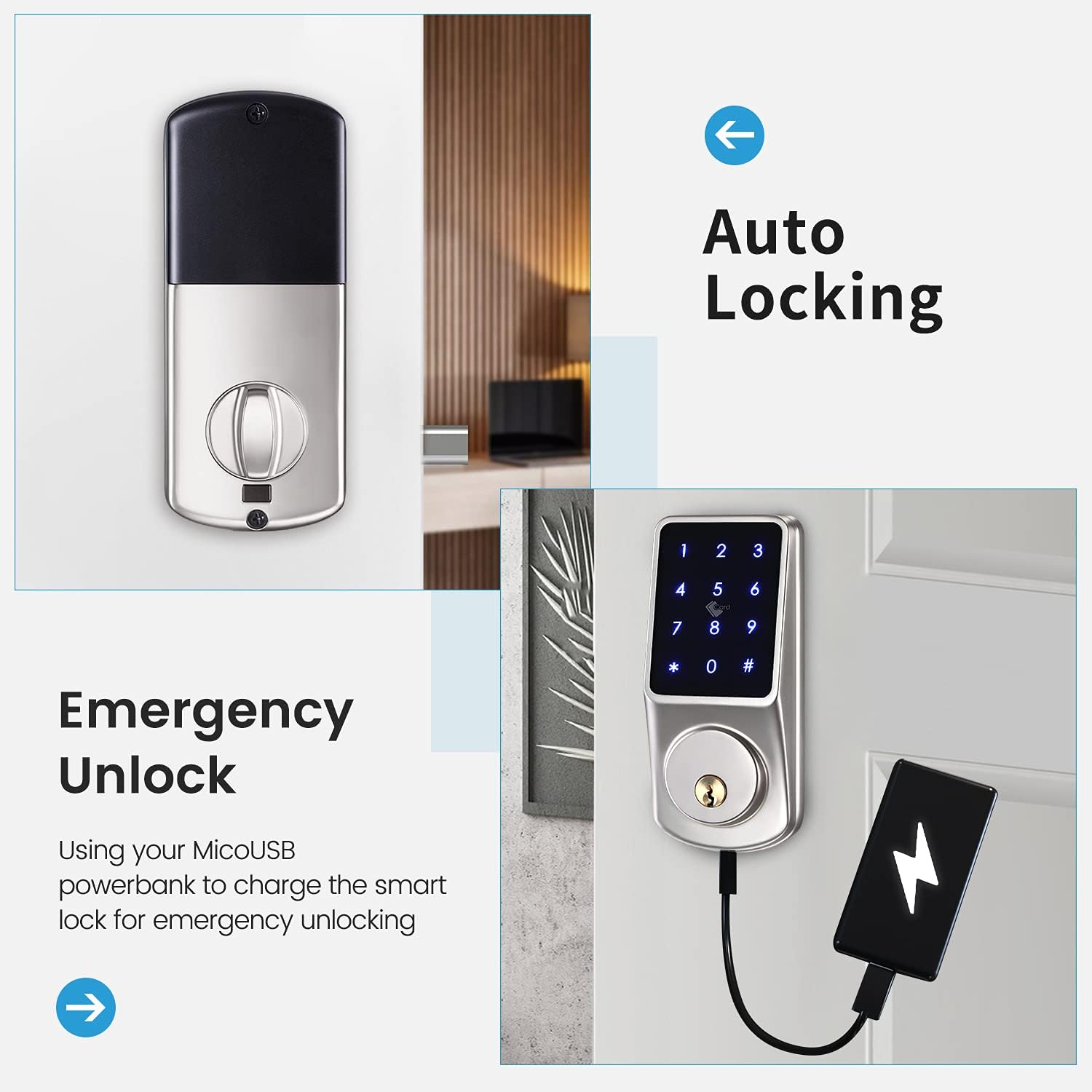
Image: TTLock app interface for managing timed passcodes and viewరికార్డులను అన్లాక్ చేయడం.
Video: Instructions on how to program passcodes using the TTLock App.
Video: Guide on how to unlock the door using an eKey and send eKeys via the TTLock App.
5.4 Deadlock Function
The lock features a deadlock function for enhanced security from the inside. To activate, press the deadlock button for 2 seconds. To cancel, press the deadlock button for 2 seconds and rotate the thumb knob of the back panel once.
Video: Demonstration of the deadlock function for inside security.
6. నిర్వహణ
6.1 బ్యాటరీ భర్తీ
When the battery level is low, the lock will provide an audible warning. Replace all four AA batteries promptly. Do not use rechargeable batteries.
6.2 శుభ్రపరచడం
తాళం బయటి భాగాన్ని మృదువైన, d తో శుభ్రం చేయండి.amp వస్త్రం. ముగింపు లేదా ఎలక్ట్రానిక్ భాగాలను దెబ్బతీసే రాపిడి క్లీనర్లు లేదా ద్రావకాలను ఉపయోగించకుండా ఉండండి.
6.3 వాతావరణ నిరోధకత
The LOQRON L22 is designed to be weatherproof (IP55 rated) and can withstand temperatures from -4°F/-20°C to 122°F/50°C.

Image: LOQRON L22 Smart Lock highlighting its weatherproof and temperature resistance features.
7. ట్రబుల్షూటింగ్
- లాక్ స్పందించడం లేదు: Check battery levels. If batteries are dead, use the mechanical key or connect a power bank to the emergency Micro USB port for temporary power.
- పాస్కోడ్ పనిచేయడం లేదు: Ensure you are entering the correct passcode. Try using the anti-peep function. If still unsuccessful, reset the passcode via the TTLock app.
- యాప్ కనెక్షన్ సమస్యలు: Ensure Bluetooth is enabled on your phone and you are within range of the lock. Restart the app or your phone if necessary.
- అత్యవసర అన్లాక్: If the batteries are completely drained, connect a Micro USB power bank to the emergency power port located at the bottom of the exterior keypad to temporarily power the lock and gain entry.

Image: Emergency unlock method using a Micro USB power bank.
8. స్పెసిఫికేషన్లు
| ఫీచర్ | వివరాలు |
|---|---|
| బ్రాండ్ | LOQRON |
| మోడల్ సంఖ్య | L22 |
| లాక్ రకం | Keypad, Electronic Deadbolt |
| మెటీరియల్ | అల్యూమినియం |
| కనెక్టివిటీ ప్రోటోకాల్ | బ్లూటూత్ |
| నియంత్రణ పద్ధతి | App (TTLock), Hand Control, Mechanical Knob |
| ప్రత్యేక లక్షణాలు | Smart Lock, Waterproof (IP55), Wi-Fi (with optional gateway), Anti-Peep, Auto Lock |
| సిఫార్సు చేసిన ఉపయోగాలు | Security for Home, Bedroom, Office, Apartment |
| వస్తువు బరువు | 2.47 పౌండ్లు |
| ప్యాకేజీ కొలతలు | 8.78 x 8.19 x 3.31 అంగుళాలు |
9. వారంటీ మరియు మద్దతు
LOQRON products are designed for durability and reliability. For warranty information, please refer to the product packaging or contact LOQRON customer support directly.
If you encounter any issues or have questions regarding your LOQRON L22 Smart Lock, please contact our customer support team:
- ఆన్లైన్ మద్దతు: Visit the official LOQRON webతరచుగా అడిగే ప్రశ్నలు మరియు మద్దతు వనరుల కోసం సైట్.
- ఇమెయిల్ మద్దతు: [Insert Customer Support Email Address Here]
- ఫోన్ మద్దతు: [కస్టమర్ సపోర్ట్ ఫోన్ నంబర్ను ఇక్కడ చొప్పించండి]
Please have your product model (L22) and purchase information ready when contacting support.