
1. పరిచయం
This user manual provides detailed instructions for the SHREYANS 1D Wired Barcode Scanner, Model KP_306 NEW. It covers essential information regarding product setup, operation, maintenance, and troubleshooting to ensure optimal performance and longevity of your device. Please read this manual thoroughly before using the scanner.
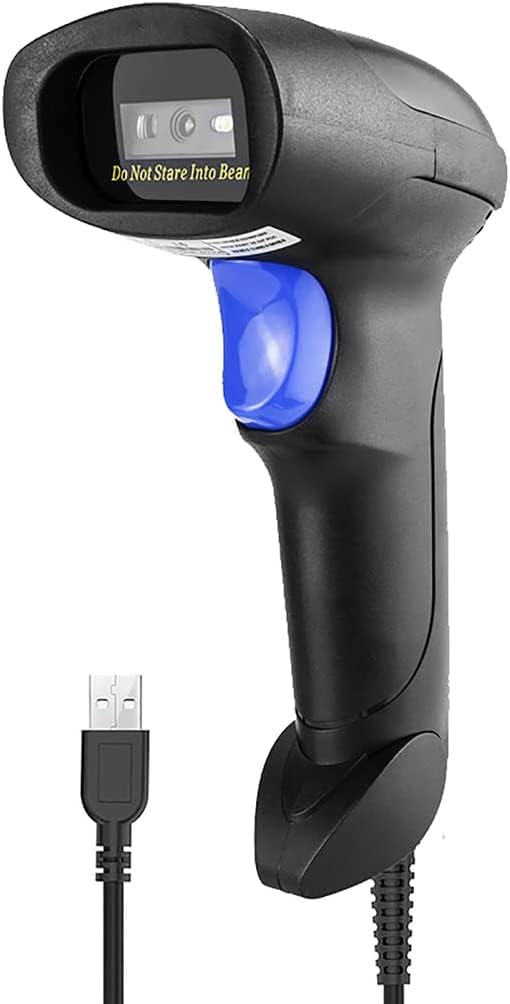
Figure 1: SHREYANS 1D Wired Barcode Scanner, Model KP_306 NEW.
2 కీ ఫీచర్లు
- Advanced CCD Image Scanning Technology: Equipped with a CCD sensor for quick and accurate capture of 1D barcodes from both paper and digital screens.
- Durable and Anti-Shock Design: Constructed with high-quality ABS material, designed to withstand drops from up to 2 meters onto concrete surfaces, ensuring long-term reliability.
- బహుళ స్కానింగ్ మోడ్లు: Features Key Trigger Mode, Auto-Induction Mode, and Continuous Mode for versatile operation.
- Broad 1D Barcode Compatibility: Supports a wide range of 1D barcode types including UPC-A, UPC-E, EAN-8, EAN-13, ISSN, ISBN, Code 128, GS1-128, Code39, Code93, Code32, Code11, UCC/EAN128, Interleaved 2 of 5, Industrial 2 of 5, Codabar(NW-7), MSI, Plessey, RSS, and China Post.
- ప్లగ్ అండ్ ప్లే కనెక్టివిటీ: Simple USB 2.0 wired connection for immediate use with PCs and laptops, requiring no additional driver installation.

Figure 2: The scanner's robust anti-shock design, capable of withstanding drops.

Figure 3: The scanner's ability to decode damaged, reflective, colorful, and distorted barcodes.
3. సెటప్
3.1 ప్యాకేజీ విషయాలు
ప్యాకేజీలో అన్ని అంశాలు ఉన్నాయని నిర్ధారించుకోండి:
- 1 x SHREYANS 1D Wired Barcode Scanner
- 1 x USB కేబుల్
- 1 x యూజర్ మాన్యువల్ (ఈ పత్రం)
3.2 స్కానర్ను కనెక్ట్ చేయడం
The SHREYANS 1D Wired Barcode Scanner is designed for plug-and-play functionality. Follow these steps to connect it to your computer:
- మీ PC లేదా ల్యాప్టాప్లో అందుబాటులో ఉన్న USB పోర్ట్ను గుర్తించండి.
- USB కేబుల్ను స్కానర్ పోర్ట్కు కనెక్ట్ చేయండి.
- Plug the other end of the USB cable into the USB port on your computer.
- The scanner will automatically install necessary drivers (if required) and be ready for use. No additional software installation is typically needed.

Figure 4: Illustrates the simple USB 2.0 wired connection process for the scanner.
4. ఆపరేటింగ్ సూచనలు
4.1 స్కానింగ్ మోడ్లు
The scanner supports three operational modes:
- కీ ట్రిగ్గర్ మోడ్: Press the trigger button to activate the scan beam and read a barcode. Release the button to stop scanning.
- ఆటో-ఇండక్షన్ మోడ్: The scanner automatically detects a barcode placed within its scanning range and activates the beam to read it without requiring a trigger press.
- నిరంతర మోడ్: The scan beam remains continuously active, allowing for rapid, successive scanning of multiple barcodes without repeatedly pressing the trigger.
4.2 బార్కోడ్లను స్కాన్ చేయడం
బార్కోడ్ని స్కాన్ చేయడానికి:
- స్కానర్ మీ కంప్యూటర్కు సరిగ్గా కనెక్ట్ అయ్యిందని నిర్ధారించుకోండి.
- Open a text editor, spreadsheet, or POS application where you want the scanned data to appear.
- మీరు స్కాన్ చేయాలనుకుంటున్న బార్కోడ్ వైపు స్కానర్ విండోను సూచించండి.
- Activate the scan beam according to your selected scanning mode (press trigger, or allow auto-induction/continuous mode to activate).
- A successful scan will typically be indicated by an audible beep and/or a visual confirmation (e.g., LED indicator). The barcode data will then appear in your active application.

Figure 5: Demonstrating the scanner's ability to read various 1D barcodes, including those that are damaged or distorted.
4.3 Supported 1D Barcode Types
The SHREYANS 1D Wired Barcode Scanner is compatible with the following 1D barcode symbologies:
- UPC-A, UPC-E, EAN-8, EAN-13
- ISSN, ISBN
- Code 128, GS1-128, Code39, Code93, Code32, Code11
- UCC/EAN128
- Interleaved 2 of 5, Industrial 2 of 5
- కోడబార్ (NW-7)
- MSI, Plessey, RSS
- చైనా పోస్ట్
5. సంరక్షణ మరియు నిర్వహణ
Proper care ensures the longevity and optimal performance of your barcode scanner:
- శుభ్రపరచడం: Use a soft, dry cloth to clean the scanner's exterior. For the scanning window, use a soft, lint-free cloth lightly dampతేలికపాటి, రాపిడి లేని క్లీనర్తో తయారు చేయబడింది. కఠినమైన రసాయనాలు లేదా రాపిడి పదార్థాలను నివారించండి.
- నిల్వ: స్కానర్ను ప్రత్యక్ష సూర్యకాంతి మరియు తీవ్రమైన ఉష్ణోగ్రతలకు దూరంగా చల్లని, పొడి ప్రదేశంలో నిల్వ చేయండి.
- నిర్వహణ: While the scanner has an anti-shock design, avoid unnecessary drops or impacts to prevent potential damage.
- కేబుల్ కేర్: Do not bend or twist the USB cable excessively. Ensure it is not pinched or placed under heavy objects.
6. ట్రబుల్షూటింగ్
If you encounter issues with your SHREYANS barcode scanner, refer to the following table for common problems and solutions:
| సమస్య | సాధ్యమైన కారణం | పరిష్కారం |
|---|---|---|
| స్కానర్ పవర్ ఆన్ అవ్వదు. | USB కేబుల్ సరిగ్గా కనెక్ట్ కాలేదు లేదా USB పోర్ట్ తప్పుగా ఉంది. | Ensure the USB cable is securely connected to both the scanner and the computer. Try a different USB port. |
| స్కానర్ బార్కోడ్లను చదవదు. | Barcode is damaged, poorly printed, or not a supported 1D type. Incorrect scanning mode. | Ensure the barcode is clear and undamaged. Verify it is a supported 1D barcode type. Check the selected scanning mode and adjust if necessary. Ensure the scanner is aimed correctly. |
| స్కాన్ చేసిన డేటా తప్పుగా కనిపిస్తుంది. | Keyboard language settings mismatch or scanner configuration issue. | Check your computer's keyboard language settings. Refer to the scanner's programming guide (if available) for advanced configuration options. |
| Scanner is slow or unresponsive. | Interference from other devices or system resource issues. | Disconnect and reconnect the scanner. Restart your computer. Ensure no other applications are heavily utilizing system resources. |
సమస్య కొనసాగితే, దయచేసి మరింత సహాయం కోసం కస్టమర్ మద్దతును సంప్రదించండి.
7. సాంకేతిక లక్షణాలు
| ఫీచర్ | స్పెసిఫికేషన్ |
|---|---|
| బ్రాండ్ | శ్రేయాన్స్ |
| మోడల్ సంఖ్య | KP_306 NEW |
| కనెక్టివిటీ టెక్నాలజీ | USB కేబుల్ |
| శక్తి మూలం | కార్డెడ్ ఎలక్ట్రిక్ |
| అనుకూల పరికరాలు | ల్యాప్టాప్, PC |
| వస్తువు బరువు | 200 గ్రా |
| అంశం కొలతలు (LxWxH) | 8 x 5 x 9 సెంటీమీటర్లు |
| తయారీదారు | Shreyans Retail Solutions |
| మూలం దేశం | భారతదేశం |
8. వారంటీ మరియు కస్టమర్ మద్దతు
8.1 వారంటీ సమాచారం
This product comes with a standard manufacturer's warranty. For specific details regarding warranty coverage, duration, and terms, please refer to the warranty card included in your product packaging or contact SHREYANS customer support.
8.2 కస్టమర్ మద్దతు
For technical support, installation assistance, or any other inquiries, please contact our customer support team:
- ఫోన్: +91 22-40041231
- Mobile/WhatsApp: +91 9324776246
- ఇమెయిల్: shreyanspos@gmail.com
Our support team is available 24/7 to assist you with any technical faults or problems.

Figure 6: SHREYANS 24/7 Customer Support Service details.