
1. పరిచయం
Thank you for choosing the Greadio MD-T26 Portable AM/FM/SW Radio. This manual provides detailed instructions for the proper setup, operation, and maintenance of your radio. Please read this manual thoroughly before use to ensure optimal performance and longevity of your device.
The Greadio MD-T26 is a versatile portable radio featuring AM, FM, and Shortwave (SW) bands, an LCD display for clear frequency and time viewing, and dual power options for both indoor and outdoor use. It is designed for ease of use with large, accessible controls and a built-in speaker for clear audio.

మూర్తి 1: ముందు view of the Greadio MD-T26 Portable AM/FM/SW Radio.
2. ఉత్పత్తి లక్షణాలు
- మల్టీ-బ్యాండ్ రిసెప్షన్: Receives AM, FM, and Shortwave (SW) frequencies.
- LCD డిస్ప్లే: Clear digital display for frequency and time settings.
- ద్వంద్వ శక్తి ఎంపికలు: Operates via AC power or 4 x D cell batteries (not included).
- హై-క్వాలిటీ స్పీకర్: Integrated 2W speaker for clear sound output.
- టోన్ కంట్రోల్: Adjustable tone settings (Low/High) for personalized audio.
- ఇయర్ ఫోన్ జాక్: 3.5mm stereo earphone jack for private listening.
- పోర్టబుల్ డిజైన్: Equipped with a sturdy handle for easy transport.
3. సెటప్
3.1 రేడియోకు శక్తినివ్వడం
The Greadio MD-T26 radio offers two methods for power supply:
- AC విద్యుత్ సరఫరా: For indoor use, connect the included AC power cable to the radio's AC input jack and then plug it into a standard wall outlet.
- బ్యాటరీ పవర్ సప్లై: For portable use, insert four (4) D cell batteries (not included) into the battery compartment located on the back of the radio. Ensure correct polarity (+/-) as indicated inside the compartment.
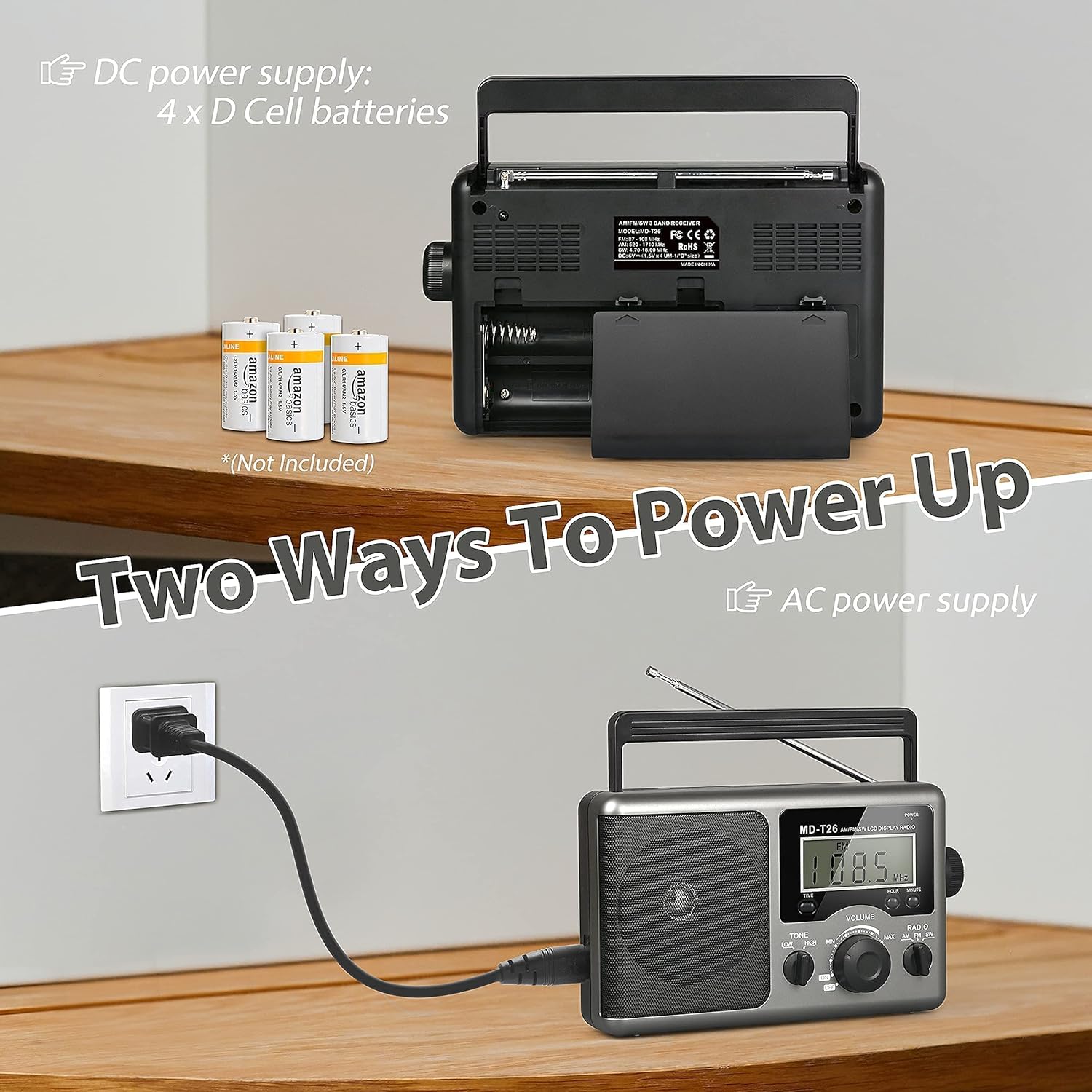
Figure 2: Illustration of AC power connection and battery compartment for D cell batteries.
3.2 యాంటెన్నా సర్దుబాటు
For optimal reception, adjust the antenna as follows:
- FM/SW Reception: Extend the telescopic antenna fully and adjust its angle for the clearest signal.
- ఉదయం రిసెప్షన్: The radio uses a built-in ferrite rod antenna for AM. Rotate the entire radio unit to find the strongest signal.
4. ఆపరేటింగ్ సూచనలు
4.1 నియంత్రణలు ఓవర్view

మూర్తి 3: వివరంగా view of the radio's control panel.
- పవర్ బటన్: Located on the top right, press to turn the radio ON/OFF.
- ట్యూనింగ్ నాబ్: Located on the right side, rotate to select radio stations.
- వాల్యూమ్ నాబ్: Located on the front panel, rotate to adjust the sound level.
- RADIO Band Selector: Switch between AM, FM, and SW bands.
- TONE Switch: Select between LOW and HIGH tone settings.
- TIME/HOUR/MINUTE Buttons: Used for setting the time on the LCD display.
4.2 Turning On and Selecting a Band
- నొక్కండి శక్తి button to turn on the radio. The LCD display will illuminate.
- ఉపయోగించండి రేడియో band selector switch to choose your desired band: AM, FM, or SW.
4.3 స్టేషన్కు ట్యూనింగ్ చేయడం
బ్యాండ్ ఎంచుకున్న తర్వాత, నెమ్మదిగా తిప్పండి ట్యూనింగ్ knob on the right side of the radio. Observe the frequency displayed on the LCD screen. Stop rotating when you hear your desired station clearly.
4.4 వాల్యూమ్ మరియు టోన్ సర్దుబాటు
- వాల్యూమ్: తిప్పండి వాల్యూమ్ వాల్యూమ్ పెంచడానికి ముందు ప్యానెల్పై సవ్యదిశలో మరియు తగ్గించడానికి అపసవ్య దిశలో నాబ్ను నొక్కండి.
- టోన్: ఉపయోగించండి టోన్ switch to select between 'LOW' for a warmer sound or 'HIGH' for a brighter sound, according to your preference.
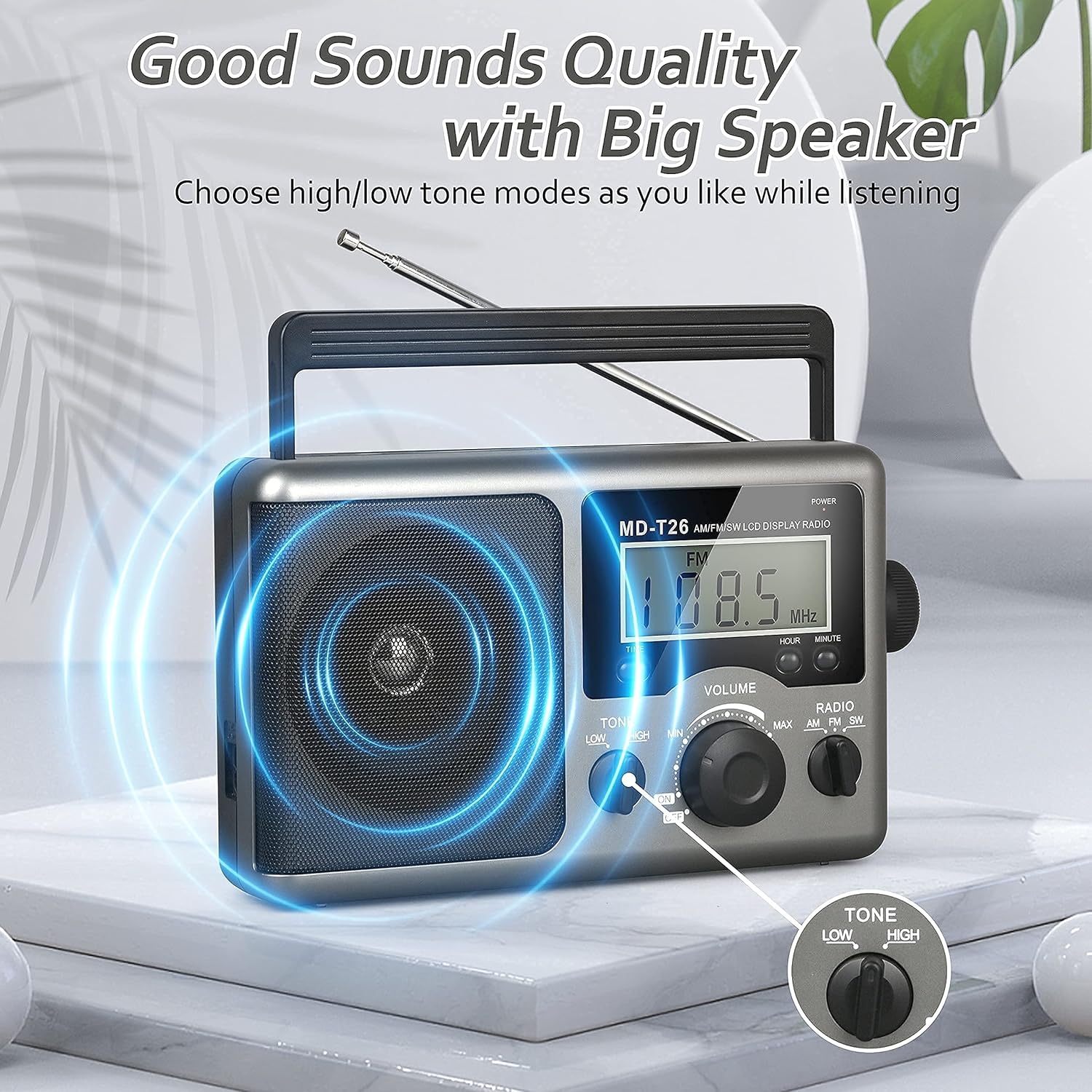
Figure 4: Speaker and Tone control detail.
4.5 సమయాన్ని సెట్ చేయడం
The LCD display can also show the current time. To set the time:
- నొక్కండి TIME button once to enter time setting mode.
- ఉపయోగించండి గంట గంట సర్దుబాటు చేయడానికి బటన్.
- ఉపయోగించండి నిమిషం నిమిషం సర్దుబాటు చేయడానికి బటన్.
- The time system is 24-hour format.
4.6 Using the Earphone Jack
For private listening, plug any standard 3.5mm stereo earphones (not included) into the ఎర్ఫోన్ జాక్ located on the side of the radio. The internal speaker will automatically mute when earphones are connected.
5. నిర్వహణ
- శుభ్రపరచడం: రేడియో బాహ్య భాగాన్ని మృదువైన, పొడి వస్త్రంతో తుడవండి. రాపిడి క్లీనర్లు లేదా ద్రావకాలను ఉపయోగించవద్దు.
- బ్యాటరీ సంరక్షణ: If the radio will not be used for an extended period, remove the D cell batteries to prevent leakage and damage.
- నిల్వ: ప్రత్యక్ష సూర్యకాంతి మరియు తీవ్రమైన ఉష్ణోగ్రతలకు దూరంగా చల్లని, పొడి ప్రదేశంలో రేడియోను నిల్వ చేయండి.
- నీటి నిరోధకత: ఈ రేడియో నీటి నిరోధకత కాదు. Avoid exposure to rain, moisture, or splashing water.
6. ట్రబుల్షూటింగ్
| సమస్య | సాధ్యమైన కారణం | పరిష్కారం |
|---|---|---|
| శక్తి లేదు | AC cable not connected, batteries depleted or incorrectly inserted. | Check AC cable connection. Replace batteries or ensure correct polarity. |
| పేలవమైన స్వీకరణ / స్టాటిక్ | Antenna not extended/adjusted, weak signal area, interference. | Extend and adjust telescopic antenna (FM/SW). Rotate radio for AM. Move to an area with better signal. Avoid sources of electronic interference. |
| స్పీకర్ నుండి శబ్దం లేదు | వాల్యూమ్ చాలా తక్కువగా ఉంది, ఇయర్ఫోన్లు కనెక్ట్ చేయబడ్డాయి. | Increase volume. Disconnect earphones if not intended for private listening. |
| LCD డిస్ప్లే పని చేయడం లేదు | విద్యుత్ సమస్య, అంతర్గత లోపం. | విద్యుత్ సరఫరాను తనిఖీ చేయండి. సమస్య కొనసాగితే, కస్టమర్ మద్దతును సంప్రదించండి. |
7. స్పెసిఫికేషన్లు
| ఫీచర్ | వివరాలు |
|---|---|
| బ్రాండ్ | గ్రేడియో |
| మోడల్ సంఖ్య | MD-T26 |
| కనెక్టివిటీ టెక్నాలజీ | Auxiliary (for earphone) |
| ట్యూనర్ టెక్నాలజీ | AM, FM, SW |
| శక్తి మూలం | AC Power, 4 x D Cell Batteries |
| అనుకూల పరికరాలు | ఇయర్ఫోన్ |
| ప్రదర్శన రకం | LCD |
| హార్డ్వేర్ ఇంటర్ఫేస్ | 3.5mm ఆడియో జాక్ |
| నీటి నిరోధక స్థాయి | వాటర్ రెసిస్టెంట్ కాదు |
8. వారంటీ మరియు మద్దతు
8.1 వారంటీ సమాచారం
Greadio provides a 12 నెలల వారంటీ for this product, covering manufacturing defects from the date of purchase. Additionally, a 30-రోజుల మనీ-బ్యాక్ గ్యారెంటీ అందించబడుతుంది.
This warranty does not cover damage caused by misuse, accident, unauthorized modification, or normal wear and tear.
8.2 కస్టమర్ మద్దతు
For any questions, technical assistance, or warranty claims, please contact Greadio customer service. We offer 24/7 కస్టమర్ సేవ మీకు సహాయం చేయడానికి.
దయచేసి ఉత్పత్తి ప్యాకేజింగ్ లేదా రిటైలర్ యొక్క webఅత్యంత తాజా సంప్రదింపు సమాచారం కోసం సైట్.


