
Xiaomi MZB09YFEU
Xiaomi Redmi 9C స్మార్ట్ఫోన్ యూజర్ మాన్యువల్
Model: MZB09YFEU
1. పరిచయం
This manual provides essential information for the safe and efficient use of your Xiaomi Redmi 9C smartphone. Please read this manual carefully before using the device and keep it for future reference.
The Xiaomi Redmi 9C features a 6.53-inch HD+ DotDrop display, a MediaTek Helio G35 processor, a 13MP AI triple rear camera, and a large 5000 mAh battery with 10W fast charging support. It comes with 4GB RAM and 128GB internal storage.
2. సెటప్
2.1 ప్యాకేజీ విషయాలు
మీ ప్యాకేజీ కింది అంశాలను కలిగి ఉందని ధృవీకరించండి:
- Xiaomi Redmi 9C స్మార్ట్ఫోన్
- పవర్ అడాప్టర్ (10W)
- USB కేబుల్
- SIM ఎజెక్ట్ సాధనం
- వినియోగదారు మాన్యువల్ (ఈ పత్రం)
2.2 సిమ్ కార్డ్ మరియు మైక్రో SD కార్డ్ చొప్పించడం
Locate the SIM card tray on the side of the device. Use the provided SIM eject tool to open the tray. Insert your Nano-SIM card(s) and an optional microSD card into the designated slots. Ensure the cards are correctly oriented as shown in the diagram.

మూర్తి 2.2.1: వైపు view of the Xiaomi Redmi 9C, showing the location of the SIM card tray. The tray is designed to hold two Nano-SIM cards and one microSD card simultaneously.
2.3 ప్రారంభ పవర్ ఆన్ మరియు సెటప్ విజార్డ్
Press and hold the Power button until the Xiaomi logo appears. Follow the on-screen instructions to complete the initial setup, including language selection, Wi-Fi connection, Google account login, and security settings.
3. మీ పరికరాన్ని ఆపరేట్ చేయడం
3.1 పరికర లేఅవుట్

మూర్తి 3.1.1: ముందు view of the Xiaomi Redmi 9C, highlighting the 6.53-inch DotDrop display and the front camera notch.
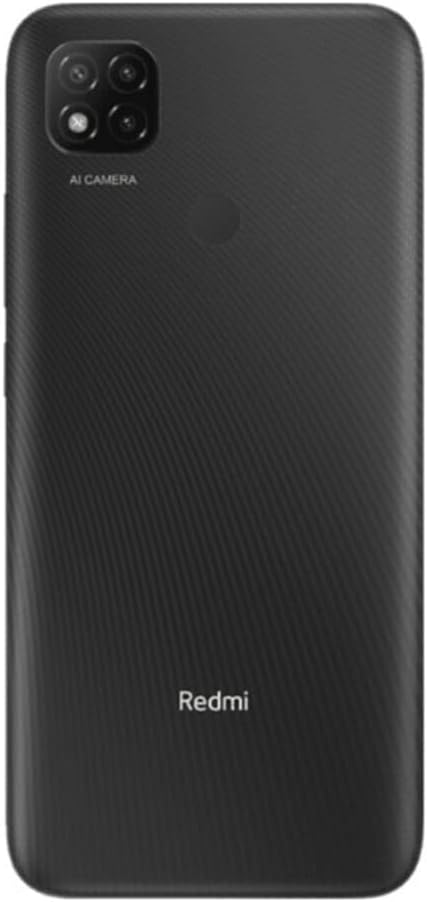
చిత్రం 3.1.2: వెనుక view of the Xiaomi Redmi 9C, showing the triple camera module with AI capabilities and the rear-mounted fingerprint sensor.
The Redmi 9C features a large display on the front, with a small notch for the front camera. On the rear, it has a square camera module housing three lenses and a flash, along with a circular fingerprint sensor. The power and volume buttons are located on the right side of the device.
3.2 ప్రాథమిక విధులు
- పవర్ ఆన్/ఆఫ్: పవర్ బటన్ను నొక్కి పట్టుకోండి.
- స్క్రీన్ లాక్/అన్లాక్: పవర్ బటన్ని క్లుప్తంగా నొక్కండి.
- వాల్యూమ్ సర్దుబాటు: వాల్యూమ్ అప్/డౌన్ బటన్లను ఉపయోగించండి.
- స్క్రీన్షాట్లు తీయడం: Press Volume Down and Power button simultaneously.
3.3 కెమెరా వినియోగం
The Xiaomi Redmi 9C is equipped with a 13MP AI triple rear camera system. To open the camera application, tap the camera icon on your home screen or app drawer.

చిత్రం 3.3.1: క్లోజప్ view of the Redmi 9C's rear camera module, showing the three lenses and the "AI CAMERA" branding, indicating its artificial intelligence features for photography.
The AI features assist in scene recognition and optimization for better photo quality. Explore different modes like Portrait, Macro, and Pro mode for various photographic effects.

Figure 3.3.2: An image depicting a person interacting with the Redmi 9C in a dimly lit environment, showcasing the phone's display and user interface during use.

చిత్రం 3.3.3: A sample selfie photo, demonstrating the clarity and color reproduction capabilities of the Redmi 9C's front-facing camera.

Figure 3.3.4: A user holding the Redmi 9C to take a selfie, illustrating the ergonomic design and ease of use for self-portraits.
3.4 బ్యాటరీ నిర్వహణ
The Redmi 9C is equipped with a 5000 mAh high-capacity battery, providing extended usage time. To maximize battery life:
- స్క్రీన్ ప్రకాశాన్ని తగ్గించండి.
- ఉపయోగంలో లేనప్పుడు Wi-Fi, బ్లూటూత్ మరియు GPS లను నిలిపివేయండి.
- నేపథ్య అనువర్తనాలను మూసివేయండి.
- Use power-saving modes.

Figure 3.4.1: A graphical representation indicating the 5000 mAh battery capacity of the Redmi 9C, emphasizing its long-lasting power.
The device supports 10W fast charging. Always use the original charger and cable for optimal charging performance and safety.
3.5 Gaming and Multimedia
The MediaTek Helio G35 processor provides a smooth experience for everyday tasks and casual gaming. The large 6.53-inch display enhances the viewing experience for videos and games.

Figure 3.5.1: The Redmi 9C displaying a high-action racing game, illustrating its capability for multimedia consumption and gaming on its large screen.
For an optimal gaming experience, ensure your device is sufficiently charged and close unnecessary background applications.
3.6 కనెక్టివిటీ
The Redmi 9C supports various connectivity options:
- Wi-Fi: ఇంటర్నెట్ యాక్సెస్ కోసం వైర్లెస్ నెట్వర్క్లకు కనెక్ట్ అవ్వండి.
- బ్లూటూత్: వైర్లెస్ హెడ్ఫోన్లు, స్పీకర్లు మరియు ఇతర పరికరాలతో జత చేయండి.
- GPS: Utilize location services for navigation and mapping applications.
- 3.5mm ఆడియో జాక్: Connect wired headphones.
4. నిర్వహణ
4.1 మీ పరికరాన్ని శుభ్రపరచడం
Use a soft, lint-free cloth to clean the screen and body of your phone. Avoid using harsh chemicals or abrasive materials that could damage the device.
4.2 సాఫ్ట్వేర్ నవీకరణలు
సరైన పనితీరు, భద్రత మరియు కొత్త ఫీచర్లకు ప్రాప్యతను నిర్ధారించుకోవడానికి సాఫ్ట్వేర్ నవీకరణలను క్రమం తప్పకుండా తనిఖీ చేసి, ఇన్స్టాల్ చేయండి. నావిగేట్ చేయండి సెట్టింగ్లు > ఫోన్ గురించి > MIUI వెర్షన్ నవీకరణల కోసం తనిఖీ చేయడానికి.
4.3 నిల్వ నిర్వహణ
128GB అంతర్గత నిల్వతో, మీకు ampయాప్లు మరియు మీడియా కోసం le స్పేస్. నిల్వను నిర్వహించడానికి, వెళ్ళండి సెట్టింగ్లు > నిల్వ. Consider regularly clearing cache and uninstalling unused applications to free up space.
5. ట్రబుల్షూటింగ్
| సమస్య | సాధ్యమైన పరిష్కారం |
|---|---|
| పరికరం పవర్ ఆన్ చేయదు | బ్యాటరీ ఛార్జ్ అయ్యిందని నిర్ధారించుకోండి. ఛార్జర్ను కనెక్ట్ చేసి, మళ్లీ పవర్ ఆన్ చేయడానికి ప్రయత్నించే ముందు కొన్ని నిమిషాలు వేచి ఉండండి. స్పందించకపోతే, పవర్ బటన్ను 10-15 సెకన్ల పాటు నొక్కి ఉంచడం ద్వారా బలవంతంగా రీస్టార్ట్ చేయండి. |
| యాప్లు క్రాష్ అవుతున్నాయి లేదా స్తంభించిపోతున్నాయి | యాప్ కాష్ను క్లియర్ చేయండి (సెట్టింగ్లు > యాప్లు > [యాప్ పేరు] > నిల్వ > కాష్ను క్లియర్ చేయండి). Restart the device. If the issue persists, consider reinstalling the app or performing a factory reset (backup data first). |
| పేలవమైన బ్యాటరీ జీవితం | Review బ్యాటరీ వినియోగం సెట్టింగ్లు > బ్యాటరీ to identify power-hungry apps. Reduce screen brightness, disable unnecessary connectivity features (Wi-Fi, Bluetooth, GPS), and close background apps. |
| Wi-Fiకి కనెక్ట్ చేయడం సాధ్యపడదు | Ensure Wi-Fi is enabled. Restart your router and the phone. Forget the network and reconnect. Check if other devices can connect to the same Wi-Fi network. |
6. స్పెసిఫికేషన్లు
| ఫీచర్ | వివరాలు |
|---|---|
| మోడల్ పేరు | రెడ్మి 9 సి |
| మోడల్ సంఖ్య | MZB09YFEU |
| ప్రదర్శించు | 6.53-inch HD+ DotDrop Display |
| ప్రాసెసర్ | మీడియాటెక్ హీలియో G35 (1.8 GHz CPU వేగం) |
| RAM | 4 GB |
| అంతర్గత నిల్వ | 128 GB |
| వెనుక కెమెరా | 13MP AI Triple Camera |
| బ్యాటరీ కెపాసిటీ | 5000 mAh (Nominal Power: 3600) |
| ఛార్జింగ్ | 10W ఫాస్ట్ ఛార్జింగ్ |
| కొలతలు | 0.9 x 7.71 x 16.49 సెం.మీ |
| బరువు | 196 గ్రా |
| కనెక్టివిటీ | Wi-Fi, Bluetooth, GPS, Cellular (GSM), 3.5mm Audio Jack |
| ప్రత్యేక లక్షణాలు | Camera, Flash |
7. వారంటీ మరియు మద్దతు
వారంటీ సమాచారం మరియు సాంకేతిక మద్దతు కోసం, దయచేసి అధికారిక Xiaomi వెబ్సైట్ను చూడండి. webసైట్ లేదా వారి కస్టమర్ సర్వీస్ను సంప్రదించండి. వారంటీ క్లెయిమ్ల కోసం మీ కొనుగోలు రుజువును ఉంచండి.
మీరు అధికారిక Xiaomi వెబ్సైట్లో మరిన్ని వివరాలు మరియు మద్దతు వనరులను కనుగొనవచ్చు. webసైట్: Xiaomi మద్దతు
Ask a question about this manual
Ask about setup, troubleshooting, compatibility, parts, safety, or missing instructions. Manuals+ will review the question and use this page’s manual context to help answer it.