
1. పరిచయం
This manual provides detailed instructions for the setup, operation, maintenance, and troubleshooting of your uRage Exodus 700 Semi-Mechanical Gaming Keyboard. Please read this manual thoroughly before using the product to ensure optimal performance and longevity.
2. ప్యాకేజీ విషయాలు
ప్యాకేజీలో అన్ని అంశాలు ఉన్నాయని నిర్ధారించుకోండి:
- uRage Exodus 700 Semi-Mechanical Gaming Keyboard
- User's Guide (this document)
- వారంటీ కార్డ్
3. సెటప్
3.1 కీబోర్డ్ను కనెక్ట్ చేయడం
The uRage Exodus 700 keyboard connects via a wired USB-A connection. Follow these steps to connect your keyboard:
- మీ కంప్యూటర్లో అందుబాటులో ఉన్న USB-A పోర్ట్ను గుర్తించండి.
- కీబోర్డ్ కేబుల్ యొక్క USB-A కనెక్టర్ను మీ కంప్యూటర్లోని USB-A పోర్ట్లోకి ప్లగ్ చేయండి.
- The operating system (Windows 11/10/8/7) will automatically detect and install the necessary drivers.
3.2 సాఫ్ట్వేర్ ఇన్స్టాలేషన్ (ఐచ్ఛికం)
For advanced customization, including macro programming and lighting effects, dedicated gaming software is available. Refer to the official uRage website for the latest software download and installation instructions.

Image 1: uRage Exodus 700 Semi-Mechanical Gaming Keyboard connected and ready for use.
4. కీబోర్డ్ను ఆపరేట్ చేయడం
4.1 ముఖ్య లక్షణాలు
- Semi-Mechanical Keys: Provides a tactile typing experience with fast response times (1 ms) and a key travel of 2.5 mm.
- యాంటీ-గోస్టింగ్: Ensures that multiple key presses are registered simultaneously, crucial for gaming. Up to 24 keys can be registered at once.
- RGB లైటింగ్: Customizable backlighting with various effects and colors.
- WIN Lock-Function: Disables the Windows key to prevent accidental interruptions during gameplay.
- ఇంటిగ్రేటెడ్ రిస్ట్ రెస్ట్: Designed for enhanced comfort during extended use.
4.2 RGB లైటింగ్ నియంత్రణ
The keyboard features integrated RGB lighting. Specific key combinations (often involving the 'Fn' key) or the dedicated gaming software can be used to:
- Turn the lighting on or off.
- Cycle through different lighting modes and effects.
- ప్రకాశం స్థాయిలను సర్దుబాటు చేయండి.
Refer to the keyboard's function key legends for specific lighting control shortcuts.

Image 2: Keyboard in use, demonstrating RGB lighting.
4.3 Macro and Multimedia Functions
The keyboard includes 4 dedicated macro buttons (G1-G4) and additional multimedia functions. These can be programmed and controlled:
- మాక్రో ప్రోగ్రామింగ్: Use the dedicated gaming software to record and assign complex key sequences to the macro buttons.
- మల్టీమీడియా నియంత్రణలు: Access functions like volume control, play/pause, and track skipping via function key combinations.
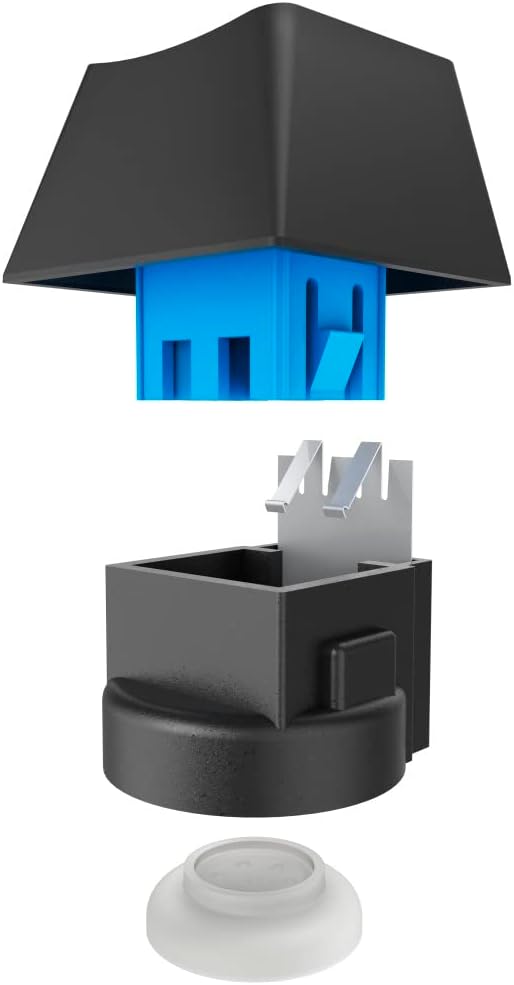
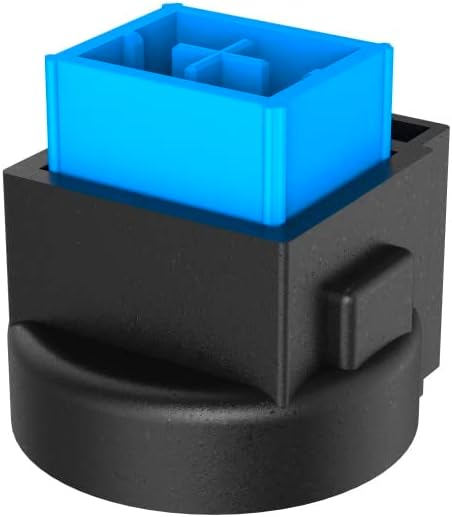
Image 3: Exploded and assembled views of the semi-mechanical key structure.
5. నిర్వహణ
సరైన నిర్వహణ మీ కీబోర్డ్ యొక్క దీర్ఘాయువు మరియు పనితీరును నిర్ధారిస్తుంది.
5.1 శుభ్రపరచడం
- శుభ్రం చేయడానికి ముందు మీ కంప్యూటర్ నుండి కీబోర్డ్ను డిస్కనెక్ట్ చేయండి.
- కీబోర్డ్ ఉపరితలాన్ని తుడవడానికి మృదువైన, పొడి వస్త్రాన్ని ఉపయోగించండి.
- కీల మధ్య దుమ్ము మరియు శిధిలాల కోసం, సంపీడన గాలిని ఉపయోగించండి.
- కఠినమైన రసాయనాలు, రాపిడి క్లీనర్లు లేదా అధిక తేమను ఉపయోగించడం మానుకోండి.
5.2 నిల్వ
ఉపయోగంలో లేనప్పుడు, కీబోర్డ్ను ప్రత్యక్ష సూర్యకాంతి మరియు తీవ్రమైన ఉష్ణోగ్రతలకు దూరంగా శుభ్రమైన, పొడి వాతావరణంలో నిల్వ చేయండి.
6. ట్రబుల్షూటింగ్
If you encounter issues with your uRage Exodus 700 keyboard, refer to the following common solutions:
- కీబోర్డ్ స్పందించడం లేదు:
- USB కేబుల్ కీబోర్డ్ మరియు కంప్యూటర్ రెండింటికీ సురక్షితంగా ప్లగ్ చేయబడిందని నిర్ధారించుకోండి.
- కీబోర్డ్ను వేరే USB పోర్ట్లోకి ప్లగ్ చేసి ప్రయత్నించండి.
- మీ కంప్యూటర్ని పునఃప్రారంభించండి.
- నమోదు కాని కీలు:
- కీక్యాప్స్ కింద ఏవైనా భౌతిక అడ్డంకులు ఉన్నాయా అని తనిఖీ చేయండి.
- Ensure the keyboard drivers are correctly installed (check Device Manager on Windows).
- RGB లైటింగ్ పనిచేయడం లేదు:
- Verify that the lighting is not turned off via keyboard shortcuts.
- Check the gaming software settings if installed.
- Macro functions not working:
- Ensure the gaming software is running and macros are correctly configured.
- Update the gaming software to the latest version.
If problems persist, contact uRage customer support for further assistance.
7. స్పెసిఫికేషన్లు
| ఫీచర్ | స్పెసిఫికేషన్ |
|---|---|
| మోడల్ పేరు | నిర్గమకాండము 700 |
| మోడల్ సంఖ్య | ham_n8_U8186011 |
| కీబోర్డ్ లేఅవుట్ | QWERTY (ఇంగ్లీష్) |
| కీలక సాంకేతికత | Semi-Mechanical |
| కీల సంఖ్య | 114 |
| Rollover Buttons | 24 వరకు |
| ప్రతిస్పందన సమయం | 1 ms |
| కీ జీవితకాలం | 10 Million Attacks |
| Work Travel | 2.5 మి.మీ |
| కనెక్టివిటీ | వైర్డు USB-A |
| లైటింగ్ | RGB రంగులు |
| అనుకూల OS | Windows 11/10/8/7 |
| Number of Macro Buttons | 4 |
| రంగు | నలుపు |
| మెటీరియల్ | ప్లాస్టిక్ |
| కేబుల్ పొడవు | 180 సెం.మీ |
| కొలతలు (W x H x D) | 47 cm x 3.5 cm x 19 cm |
| బరువు | 885 గ్రా |
8. వారంటీ & సపోర్ట్
8.1 తయారీదారు వారంటీ
The uRage Exodus 700 Semi-Mechanical Gaming Keyboard comes with a 5 సంవత్సరాల తయారీదారు వారంటీ. వారంటీ క్లెయిమ్ల కోసం దయచేసి మీ కొనుగోలు రుజువును ఉంచుకోండి. సాధారణ ఉపయోగంలో మెటీరియల్స్ మరియు పనితనంలో లోపాలను వారంటీ కవర్ చేస్తుంది.
8.2 కస్టమర్ మద్దతు
For technical support, warranty claims, or further inquiries, please visit the official uRage website or contact their customer service department. Contact information can typically be found on the warranty card included in your package or on the brand's official webసైట్.