
1. పరిచయం
This manual provides essential instructions for the safe and efficient use of your Xiaomi Mi Portable Bluetooth Speaker. Please read this manual thoroughly before using the product and retain it for future reference. The speaker features high-quality sound, True Wireless Stereo (TWS) capability, Bluetooth 5.0 connectivity, and IPX7 waterproofing, making it suitable for various environments.

చిత్రం: కోణీయ view of the Xiaomi Mi Portable Bluetooth Speaker, highlighting its compact design and control panel.
2. ప్యాకేజీ విషయాలు
ప్యాకేజీలో అన్ని వస్తువులు ఉన్నాయని నిర్ధారించుకోండి:
- Xiaomi Mi Portable Bluetooth Speaker x1
- Charging Cable x1 (USB-C)
- వినియోగదారు మాన్యువల్ x1
3. ఉత్పత్తి లక్షణాలు
- అధిక-నాణ్యత ధ్వని: Delivers clear and balanced audio.
- నిజమైన వైర్లెస్ స్టీరియో (TWS): Connect two speakers for an immersive stereo experience.
- బ్లూటూత్ 5.0: స్థిరమైన మరియు సమర్థవంతమైన వైర్లెస్ కనెక్టివిటీ.
- IPX7 జలనిరోధిత: Protected against immersion in water up to 1 meter for 30 minutes.
- లాంగ్ ప్లే టైమ్: Approximately 13 hours of playback at 50% volume.
- అంతర్నిర్మిత మైక్రోఫోన్: హ్యాండ్స్-ఫ్రీ కాలింగ్ కోసం.
- AUX ఇన్పుట్: వైర్డు ఆడియో కనెక్షన్ కోసం.
4. నియంత్రణలు మరియు సూచికలు
Familiarize yourself with the speaker's control buttons and indicators:
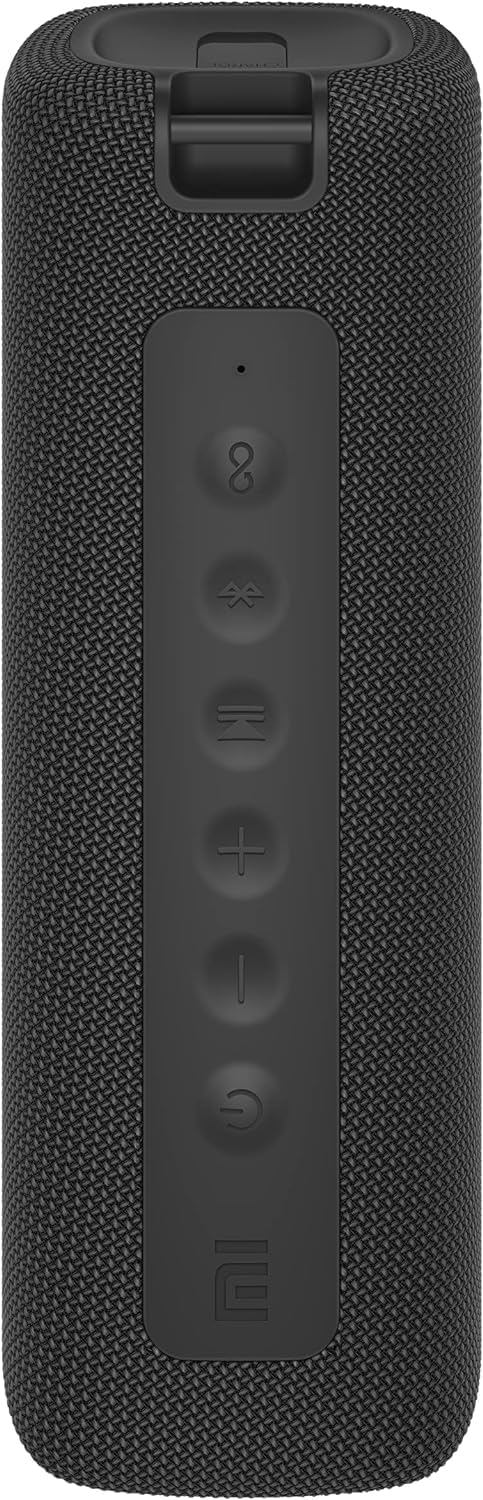
చిత్రం: ముందు భాగం view of the speaker with clearly visible control buttons.
| బటన్/సూచిక | ఫంక్షన్ |
|---|---|
| పవర్ బటన్ (⏻ ⏻ తెలుగు) | Press and hold for 2 seconds to power on/off. Short press to play/pause music or answer/end calls. |
| వాల్యూమ్ డౌన్ (−) | వాల్యూమ్ తగ్గించడానికి షార్ట్ ప్రెస్ చేయండి. మునుపటి ట్రాక్ కోసం నొక్కి పట్టుకోండి. |
| వాల్యూమ్ అప్ (+) | వాల్యూమ్ పెంచడానికి షార్ట్ ప్రెస్ చేయండి. తదుపరి ట్రాక్ కోసం నొక్కి పట్టుకోండి. |
| బ్లూటూత్ బటన్ (Ⓑ Ⓑ లు) | బ్లూటూత్ జత మోడ్లోకి ప్రవేశించడానికి చిన్న ప్రెస్ చేయండి. |
| TWS బటన్ (∞) | Press to initiate True Wireless Stereo pairing with another Mi Portable Bluetooth Speaker. |
| LED సూచిక | పవర్ స్థితి, ఛార్జింగ్ స్థితి మరియు బ్లూటూత్ జత చేసే స్థితిని సూచిస్తుంది. |
5. సెటప్
5.1 స్పీకర్ను ఛార్జ్ చేయడం
- అందించిన USB-C ఛార్జింగ్ కేబుల్ను స్పీకర్ ఛార్జింగ్ పోర్ట్కు కనెక్ట్ చేయండి.
- Connect the other end of the cable to a 5V 1A USB power adapter (not included) or a computer's USB port.
- LED సూచిక ఛార్జింగ్ స్థితిని చూపుతుంది (ఉదాహరణకు, ఛార్జింగ్ చేస్తున్నప్పుడు ఎరుపు, పూర్తిగా ఛార్జ్ అయినప్పుడు ఆఫ్).
- పూర్తిగా ఛార్జ్ చేయడానికి సుమారు 4 గంటలు పడుతుంది.
5.2 పవర్ ఆన్/ఆఫ్
- పవర్ ఆన్ చేయడానికి: Press and hold the Power button for 2 seconds. You will hear an audible prompt, and the LED indicator will light up.
- పవర్ ఆఫ్ చేయడానికి: Press and hold the Power button for 2 seconds. You will hear an audible prompt, and the LED indicator will turn off.
5.3 బ్లూటూత్ జత చేయడం
- Ensure the speaker is powered on. The LED indicator will flash blue, indicating it's in pairing mode.
- మీ పరికరంలో (స్మార్ట్ఫోన్, టాబ్లెట్, కంప్యూటర్), బ్లూటూత్ను ప్రారంభించి, అందుబాటులో ఉన్న పరికరాల కోసం శోధించండి.
- Select "Mi Portable Bluetooth Speaker" from the list of devices.
- జత చేసిన తర్వాత, LED సూచిక ఘన నీలం రంగులోకి మారుతుంది మరియు మీరు నిర్ధారణ ధ్వనిని వింటారు.
- The speaker will automatically connect to the last paired device when powered on, if within range.
5.4 ట్రూ వైర్లెస్ స్టీరియో (TWS) జత చేయడం
To pair two Xiaomi Mi Portable Bluetooth Speakers for stereo sound:
- రెండు స్పీకర్లు ఆన్లో ఉన్నాయని మరియు మరే ఇతర బ్లూటూత్ పరికరానికి కనెక్ట్ కాలేదని నిర్ధారించుకోండి.
- On one speaker (this will be the primary speaker), short press the TWS button (∞). The LED indicator will flash.
- రెండవ స్పీకర్లో, TWS బటన్ను షార్ట్ ప్రెస్ చేయండి (∞).
- The two speakers will automatically connect to each other. You will hear a confirmation sound, and the LED indicators on both speakers will turn solid blue.
- Now, connect your device to the primary speaker via Bluetooth as described in section 5.3. The sound will play in stereo through both speakers.
5.5 AUX కనెక్షన్
For wired audio playback:
- Connect a 3.5mm audio cable (not included) from your audio source to the AUX IN port on the speaker.
- స్పీకర్ స్వయంచాలకంగా AUX మోడ్కి మారుతుంది.
- Control playback and volume from your audio source device.
6. ఆపరేటింగ్ సూచనలు
6.1 మ్యూజిక్ ప్లేబ్యాక్
- ప్లే/పాజ్: పవర్ బటన్ను షార్ట్ ప్రెస్ చేయండి.
- ధ్వని పెంచు: Short press the Volume Up (+) బటన్.
- వాల్యూమ్ డౌన్: Short press the Volume Down (−) బటన్.
- తదుపరి ట్రాక్: Press and hold the Volume Up (+) బటన్.
- మునుపటి ట్రాక్: Press and hold the Volume Down (−) బటన్.
6.2 కాల్ నిర్వహణ
- సమాధానం/ముగింపు కాల్: Short press the Power button when a call comes in or during a call.
- కాల్ని తిరస్కరించండి: కాల్ వచ్చినప్పుడు పవర్ బటన్ను 2 సెకన్ల పాటు నొక్కి ఉంచండి.
7. నిర్వహణ
- శుభ్రపరచడం: స్పీకర్ను మెత్తగా తుడవండి, డిamp గుడ్డ. రాపిడి క్లీనర్లు లేదా ద్రావకాలు ఉపయోగించవద్దు.
- నిల్వ: స్పీకర్ను ప్రత్యక్ష సూర్యకాంతి మరియు తీవ్రమైన ఉష్ణోగ్రతలకు దూరంగా చల్లని, పొడి ప్రదేశంలో నిల్వ చేయండి.
- నీటి నిరోధకత: The speaker is IPX7 waterproof. Ensure the charging port cover is securely closed before exposure to water. Do not submerge the speaker for extended periods or beyond specified depths.
- బ్యాటరీ సంరక్షణ: To prolong battery life, avoid fully discharging the speaker frequently. Charge it regularly, even if not in use for long periods.
8. ట్రబుల్షూటింగ్
| సమస్య | సాధ్యమైన పరిష్కారం |
|---|---|
| స్పీకర్ పవర్ ఆన్ చేయదు. | బ్యాటరీ ఛార్జ్ అయ్యిందని నిర్ధారించుకోండి. పవర్ సోర్స్కి కనెక్ట్ చేసి, మళ్లీ ప్రయత్నించండి. |
| బ్లూటూత్ ద్వారా జత చేయడం సాధ్యం కాదు. |
|
| శబ్దం లేదు లేదా తక్కువ వాల్యూమ్ ఉంది. |
|
| TWS జత చేయడం విఫలమైంది. |
|
| తక్కువ ధ్వని నాణ్యత. |
|
9. స్పెసిఫికేషన్లు

చిత్రం: దిగువన view of the speaker, displaying model number and certifications.
| పరామితి | విలువ |
|---|---|
| మోడల్ | MDZ-36-DB |
| ఉత్పత్తి కొలతలు | W 213 x D 74 x H 74 mm (approx. 8 x 3 x 3 inches) |
| కనెక్టివిటీ | Bluetooth 5.0, 3.5mm AUX IN |
| రేట్ చేయబడిన అవుట్పుట్ | 2 x 8W (మొత్తం 16W) |
| సిగ్నల్-టు-శబ్ద నిష్పత్తి | ≥ 70dB |
| TWS Connection Range | ≤ 5మీ |
| జలనిరోధిత రేటింగ్ | IPX7 |
| బ్యాటరీ రకం | లిథియం-అయాన్, 3.7V |
| బ్యాటరీ కెపాసిటీ | 2600mAh |
| బ్యాటరీ ఛార్జింగ్ సమయం | సుమారు 4 గంటలు |
| ప్లేబ్యాక్ సమయం | సుమారు 13 గంటలు (50% వాల్యూమ్ వద్ద) |
| ఫ్రీక్వెన్సీ రేంజ్ | 80Hz నుండి 20KHz |
| రేట్ చేయబడిన ఇంపెడెన్స్ | 4 Ω |
| ప్రసార దూరం | 15మీ |
| రేట్ చేయబడిన ఇన్పుట్ | 5V 1A |
| వస్తువు బరువు | 500 గ్రాములు (1.1 పౌండ్లు) |
10. వారంటీ మరియు మద్దతు
వివరణాత్మక వారంటీ సమాచారం కోసం, దయచేసి మీ ఉత్పత్తితో చేర్చబడిన వారంటీ కార్డ్ని చూడండి లేదా అధికారిక Xiaomi వెబ్సైట్ను సందర్శించండి. webసైట్.
If you encounter any issues not covered in this manual, please contact Xiaomi customer support or visit their official support channels for assistance.