
1. ఉత్పత్తి ముగిసిందిview
The MAKINGTEC B-40 Laser Measure is a compact and versatile digital device designed for accurate distance, area, and volume measurements. It features an LCD backlit display, multiple measurement modes, and a durable, waterproof design. This manual will guide you through its functions and proper usage.
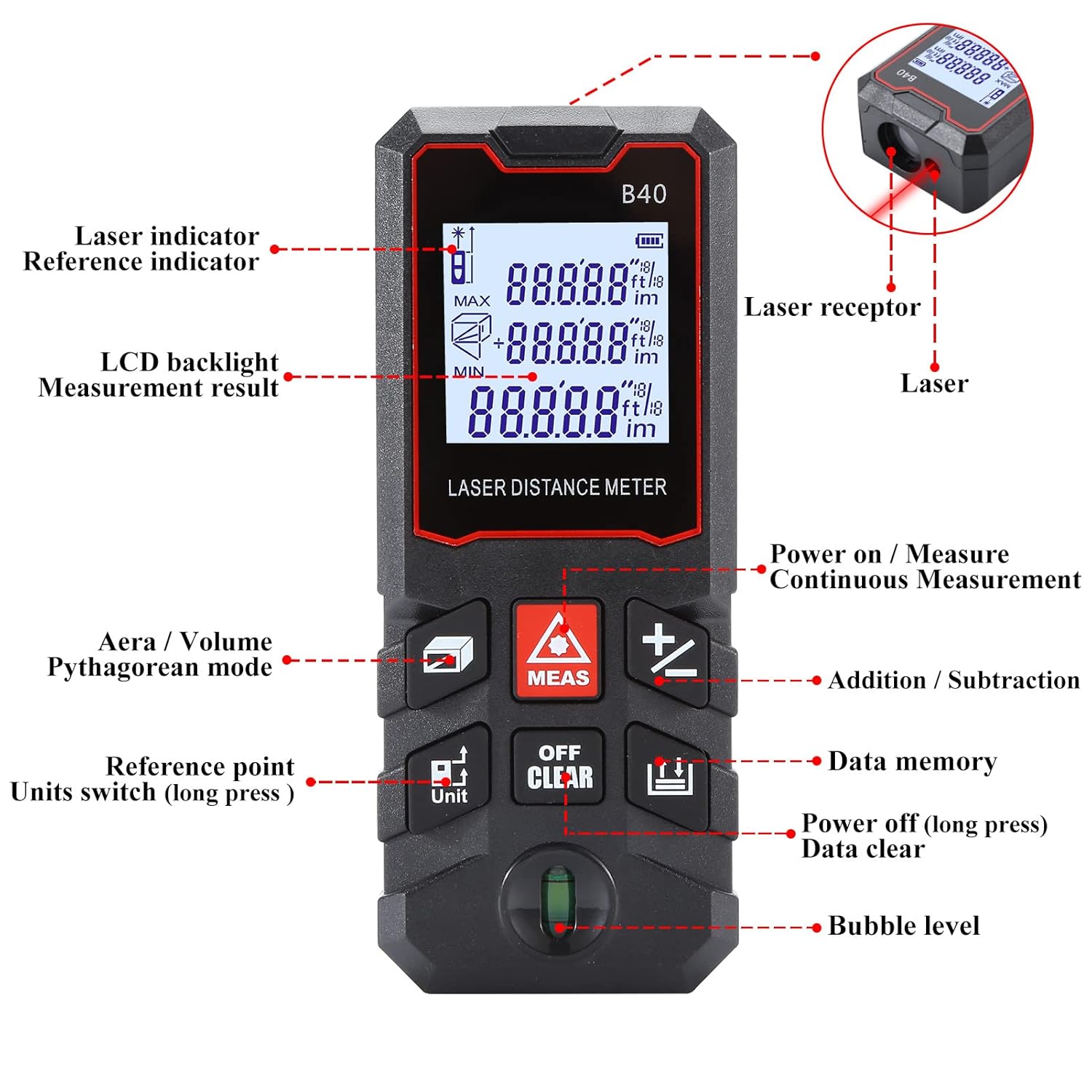
మూర్తి 1.1: ముందు view of the MAKINGTEC B-40 Laser Measure with key components labeled. This includes the laser indicator, LCD backlight, measurement result display, area/volume/Pythagorean mode button, reference point/units switch, power on/measure button, continuous measurement, addition/subtraction, data memory, power off/data clear, and bubble level.
2. సెటప్ మరియు ప్రారంభ ఉపయోగం
2.1 బ్యాటరీ ఇన్స్టాలేషన్
The MAKINGTEC B-40 Laser Measure operates on alkaline batteries, which are typically included. To install or replace batteries:
- పరికరం వెనుక భాగంలో బ్యాటరీ కంపార్ట్మెంట్ కవర్ను గుర్తించండి.
- కవర్ను స్లైడ్ చేయడం లేదా లాక్ చేయడం ద్వారా తెరవండి.
- సరైన ధ్రువణతను (+/-) నిర్ధారించడానికి బ్యాటరీలను చొప్పించండి.
- బ్యాటరీ కంపార్ట్మెంట్ కవర్ను సురక్షితంగా మూసివేయండి.
2.2 పవర్ చేయడం ఆన్/ఆఫ్
- పవర్ ఆన్ చేయడానికి: నొక్కండి MEAS button. The device will turn on and be ready for measurement.
- పవర్ ఆఫ్ చేయడానికి: లాంగ్ ప్రెస్ ది ఆఫ్/క్లియర్ 2 సెకన్ల కంటే ఎక్కువ బటన్.
3. ప్రాథమిక ఆపరేషన్
This section covers the fundamental steps for using your laser measure.
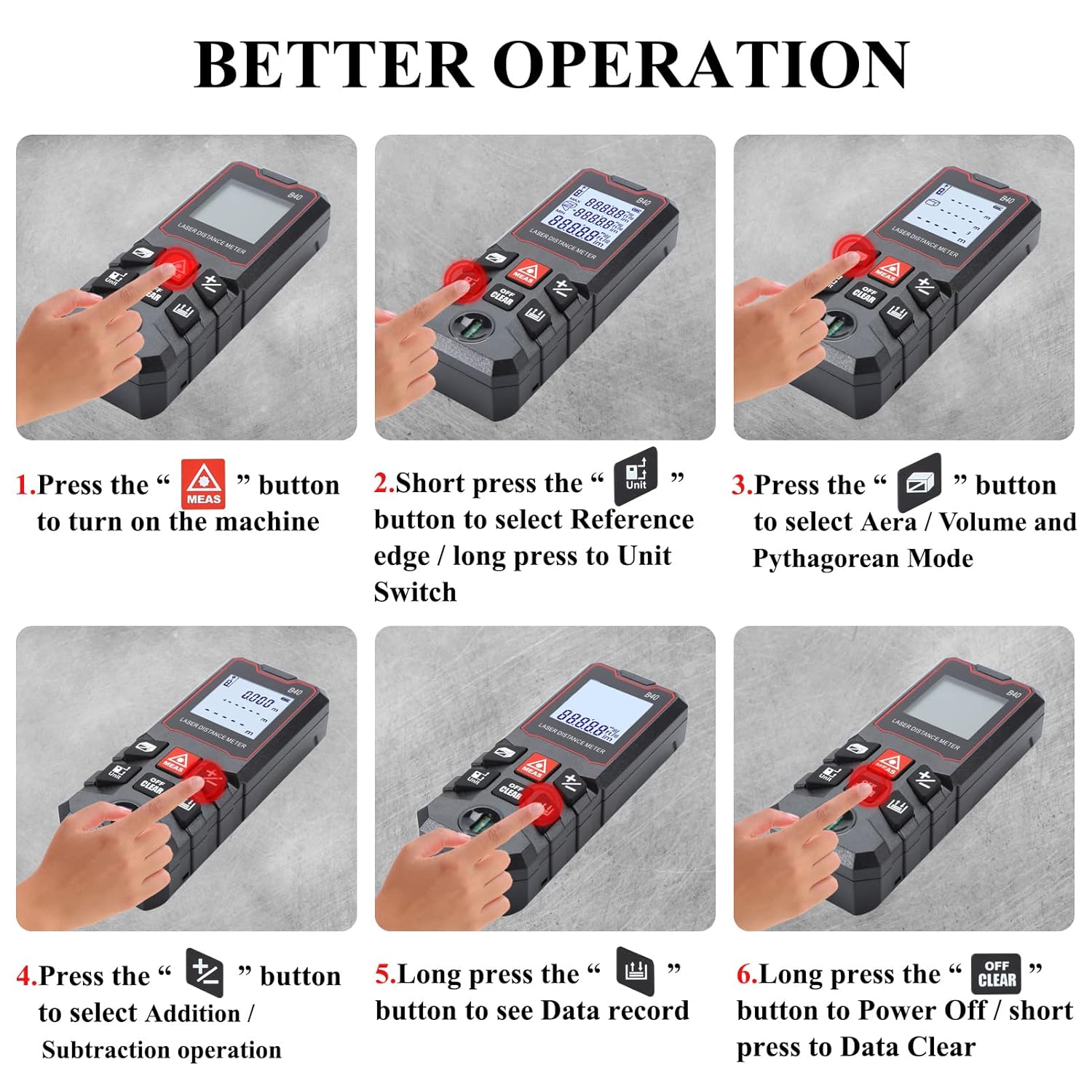
మూర్తి 3.1: Visual guide for basic operations including powering on, selecting reference point, choosing measurement modes, performing addition/subtraction, viewing data records, and powering off.
3.1 ఒకే దూర కొలత
- పరికరం పవర్ ఆన్ చేయబడిందని నిర్ధారించుకోండి.
- లక్ష్య ఉపరితలం వైపు లేజర్ను సూచించండి.
- నొక్కండి MEAS button once. The measurement will be displayed on the screen.
3.2 యూనిట్ స్విచింగ్
The device supports multiple units of measurement. To switch between units (meter, feet, inch, feet+inch, inch with fraction mode):
- లాంగ్ ప్రెస్ ది యూనిట్ button. The unit will cycle through the available options.

మూర్తి 3.2: Illustration of unit switching sequence and reference point adjustment using the 'Unit' button.
3.3 Reference Point Adjustment
The measurement reference point can be set from the front or the back of the device. This is crucial for accurate measurements depending on where the device is placed.
- షార్ట్ ప్రెస్ ది యూనిట్ button to toggle between front and back reference points. An icon on the display will indicate the current reference point.
3.4 కూడిక మరియు తీసివేత
The B-40 allows for adding or subtracting measurements.
- కొలత నిర్వహించండి.
- నొక్కండి + button for addition or the - button for subtraction.
- Perform the next measurement. The result will be added or subtracted from the previous one.
3.5 డేటా నిల్వ
ఈ పరికరం 50 సమూహాల కొలత డేటాను నిల్వ చేయగలదు.
- కు view stored data, long press the డేటా మెమరీ బటన్.
- To clear data, short press the ఆఫ్/క్లియర్ అయితే బటన్ viewing డేటా.
4. కొలత మోడ్లు
The MAKINGTEC B-40 offers several advanced measurement functions.

మూర్తి 4.1: విజువల్ ఎక్స్amples of the different measurement modes available on the device.
4.1 నిరంతర కొలత
This mode allows for dynamic measurement, continuously updating the distance as the device is moved. It is useful for finding minimum and maximum distances.
- నొక్కండి MEAS button to enter continuous measurement mode.
- Move the device, and the display will show real-time measurements, along with minimum and maximum values.
- నొక్కండి MEAS మళ్ళీ నిష్క్రమించడానికి.
4.2 ఏరియా కొలత
దీర్ఘచతురస్రాకార స్థలం యొక్క వైశాల్యాన్ని లెక్కించడానికి:
- నొక్కండి ప్రాంతం/వాల్యూమ్/పైథాగరియన్ button until the area icon appears on the display.
- Measure the first side (length) by pressing MEAS.
- Measure the second side (width) by pressing MEAS.
- పరికరం స్వయంచాలకంగా ప్రాంతాన్ని లెక్కించి ప్రదర్శిస్తుంది.
4.3 వాల్యూమ్ కొలత
To calculate the volume of a cubic space:
- నొక్కండి ప్రాంతం/వాల్యూమ్/పైథాగరియన్ button until the volume icon appears.
- Measure the length, width, and height sequentially by pressing MEAS ప్రతి కొలత తర్వాత.
- పరికరం స్వయంచాలకంగా వాల్యూమ్ను లెక్కించి ప్రదర్శిస్తుంది.
4.4 Pythagorean Mode
This mode uses the Pythagorean theorem to calculate indirect measurements, such as height or distance, when direct measurement is not possible.
- నొక్కండి ప్రాంతం/వాల్యూమ్/పైథాగరియన్ button until the desired Pythagorean mode icon appears (e.g., for single or double Pythagorean calculations).
- Follow the on-screen prompts to measure the required sides (hypotenuse, base) by pressing MEAS ప్రతి కోసం.
- పరికరం తెలియని వైపును లెక్కించి ప్రదర్శిస్తుంది.
5. నిర్వహణ మరియు సంరక్షణ
Proper maintenance ensures the longevity and accuracy of your MAKINGTEC B-40 Laser Measure.
5.1 శుభ్రపరచడం
- పరికరాన్ని మృదువైన, డితో తుడవండిamp గుడ్డ. రాపిడి క్లీనర్లు లేదా ద్రావకాలు ఉపయోగించవద్దు.
- Clean the laser lens carefully with a soft cloth, similar to cleaning camera lenses, to avoid scratching.
5.2 నిల్వ
- పరికరాన్ని చల్లని, పొడి ప్రదేశంలో, ప్రత్యక్ష సూర్యకాంతి మరియు తీవ్రమైన ఉష్ణోగ్రతలకు దూరంగా నిల్వ చేయండి.
- ఎక్కువసేపు నిల్వ చేస్తే, లీకేజీని నివారించడానికి బ్యాటరీలను తీసివేయండి.
5.3 మన్నిక
The MAKINGTEC B-40 has an IP54 protection rating, meaning it is protected against dust ingress and splashing water from any direction. While durable, avoid submerging the device in water or exposing it to heavy rain.

మూర్తి 5.1: The device is designed with IP54 protection, offering resistance to dust and water splashes.
6. ట్రబుల్షూటింగ్
మీ పరికరంలో మీకు సమస్యలు ఎదురైతే, ఈ క్రింది సాధారణ సమస్యలు మరియు పరిష్కారాలను చూడండి:
| సమస్య | సాధ్యమైన కారణం | పరిష్కారం |
|---|---|---|
| పరికరం పవర్ ఆన్ చేయదు. | తక్కువ లేదా డెడ్ బ్యాటరీలు; తప్పు బ్యాటరీ ఇన్స్టాలేషన్. | బ్యాటరీలను మార్చండి; సరైన ధ్రువణతను నిర్ధారించుకోండి. |
| సరికాని కొలతలు. | Dirty laser lens; incorrect reference point; unstable surface. | Clean the laser lens; verify reference point setting; ensure stable measurement conditions. |
| డిస్ప్లే మసకగా లేదా చదవలేని విధంగా ఉంది. | తక్కువ బ్యాటరీ; విపరీతమైన ఉష్ణోగ్రత. | Replace batteries; operate within specified temperature range. |
7. స్పెసిఫికేషన్లు
Key technical specifications for the MAKINGTEC B-40 Laser Measure.
| ఫీచర్ | వివరాలు |
|---|---|
| బ్రాండ్ | మేకింగ్టెక్ |
| మోడల్ సంఖ్య | B-40 laser measure |
| కొలిచే పరిధి | 0.03-40మీ (0.1-131 అడుగులు) |
| ఖచ్చితత్వం | ± 1/16 అంగుళం |
| అంతర్జాతీయ రక్షణ రేటింగ్ | IP54 (జలనిరోధిత, దుమ్ము నిరోధక) |
| మెటీరియల్ | మెటల్, ప్లాస్టిక్ |
| వస్తువు బరువు | 85 గ్రాములు |
| ఉత్పత్తి కొలతలు | 10.9L x 4.9W x 2.5H సెంటీమీటర్లు |
| బ్యాటరీ రకం | Alkaline (Batteries Included: Yes) |
| ప్రదర్శించు | LCD బ్యాక్లిట్ |
| డేటా నిల్వ | 50 సమూహాలు |

మూర్తి 7.1: The B-40 Laser Measure offers fast and precise measurements with an accuracy of ±1/16 inch.
8. ఉత్పత్తి ప్రదర్శన వీడియో
Watch this official product video for a visual demonstration of the MAKINGTEC B-40 Laser Measure's features and operation.
వీడియో 8.1: An official demonstration of the MAKINGTEC B-40 Laser Measure, showcasing its design, button functions, and various measurement capabilities including length, area, and unit switching. This video provides a comprehensive visual guide to the device's operation.
9. వారంటీ మరియు మద్దతు
The MAKINGTEC B-40 Laser Measure comes with a 12-month return policy. Additionally, a 1-year extended warranty by Onsitego is available for purchase, providing further protection for your device.
For further assistance or inquiries, please refer to the contact information provided with your purchase or visit the official MAKINGTEC support channels.