
1. భద్రతా సమాచారం
ఈ ఉత్పత్తిని ఉపయోగించే ముందు దయచేసి అన్ని భద్రతా సూచనలను చదివి అర్థం చేసుకోండి. ఈ సూచనలను పాటించడంలో విఫలమైతే విద్యుత్ షాక్, అగ్ని ప్రమాదం లేదా ఇతర ప్రమాదాలు సంభవించవచ్చు.
- Do not expose the receiver to water or extreme humidity.
- Keep the push button away from direct sunlight for prolonged periods to ensure optimal battery life.
- పరికరాన్ని విడదీయడానికి లేదా మరమ్మతు చేయడానికి ప్రయత్నించవద్దు. సహాయం కోసం కస్టమర్ సపోర్ట్ని సంప్రదించండి.
- రిసీవర్ ప్రామాణిక 110V AC అవుట్లెట్కి ప్లగ్ చేయబడిందని నిర్ధారించుకోండి.
2. ప్యాకేజీ విషయాలు
మీ ప్యాకేజీలో అన్ని అంశాలు ఉన్నాయని ధృవీకరించండి:
- 2 x ప్లగ్-ఇన్ రిసీవర్లు
- 1 x Push Button Transmitter
- 1 x Door Sign
- 1 x 12V23A Battery (pre-installed in transmitter)
- 1 x స్క్రూడ్రైవర్
- 4 x డోవెల్స్
- 2 x ద్విపార్శ్వ అంటుకునే టేప్
- 1 x ఇన్స్ట్రక్షన్ మాన్యువల్
3. ఉత్పత్తి ముగిసిందిview
The SURFOU Wireless Doorbell Kit N128 provides a reliable and customizable solution for your home or office. Featuring a 1300ft wireless range, 55 chimes, and adjustable volume, it ensures you never miss a visitor.


4. సెటప్ & ఇన్స్టాలేషన్
4.1. ట్రాన్స్మిటర్ సంస్థాపన
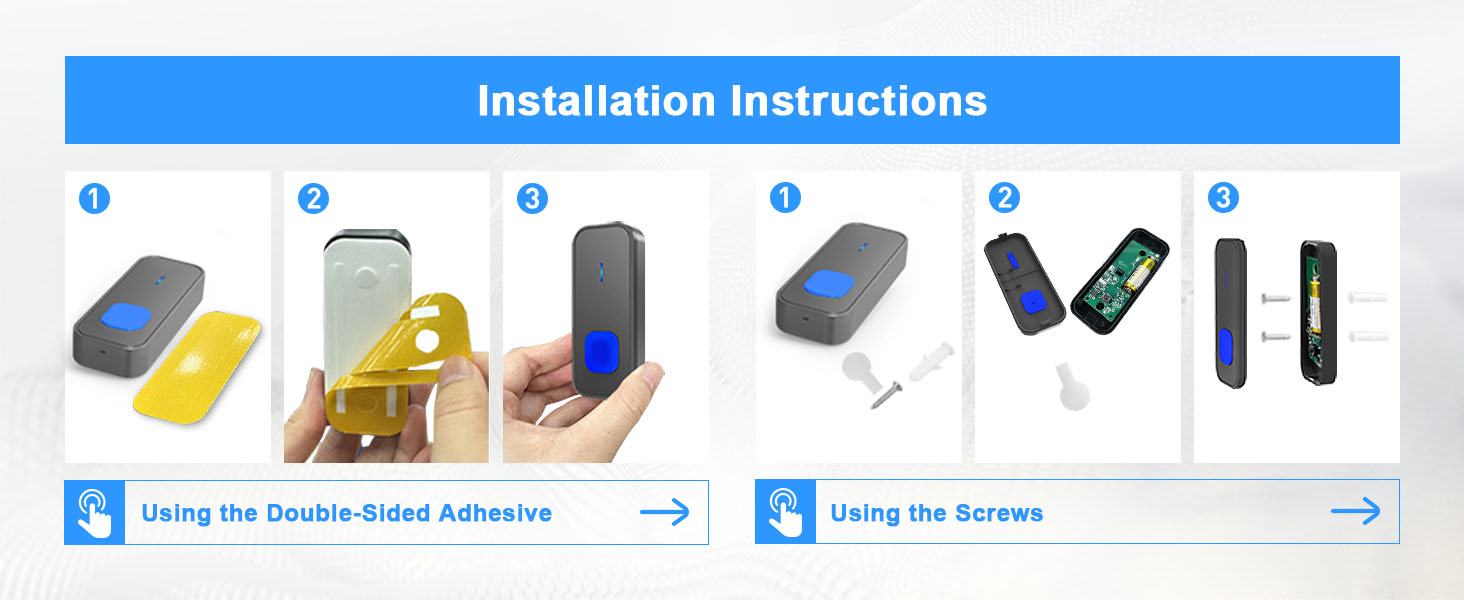
The push button transmitter can be installed using either the provided adhesive tape or screws.
- Clean the desired mounting surface thoroughly to ensure proper adhesion.
- అంటుకునే టేప్ ఉపయోగించడం: Peel off one side of the double-sided adhesive tape and attach it to the back of the transmitter. Peel off the other side and firmly press the transmitter onto the desired location on your wall or door frame for at least 30 seconds.
- స్క్రూలను ఉపయోగించడం: Open the back cover of the transmitter (refer to Section 6.1 for battery replacement instructions, as this involves opening the cover). Mark the screw holes on the wall. Drill pilot holes, insert the dowels, and then secure the transmitter with the provided screws. Close the back cover.
4.2. రిసీవర్ ప్లేస్మెంట్
Simply plug the receiver into any standard electrical outlet within the wireless range of the transmitter. For optimal performance, avoid placing receivers near large metal objects or thick walls that may interfere with the signal.

5. ఆపరేటింగ్ సూచనలు
5.1. రింగ్టోన్లను మార్చడం
To select your preferred ringtone:
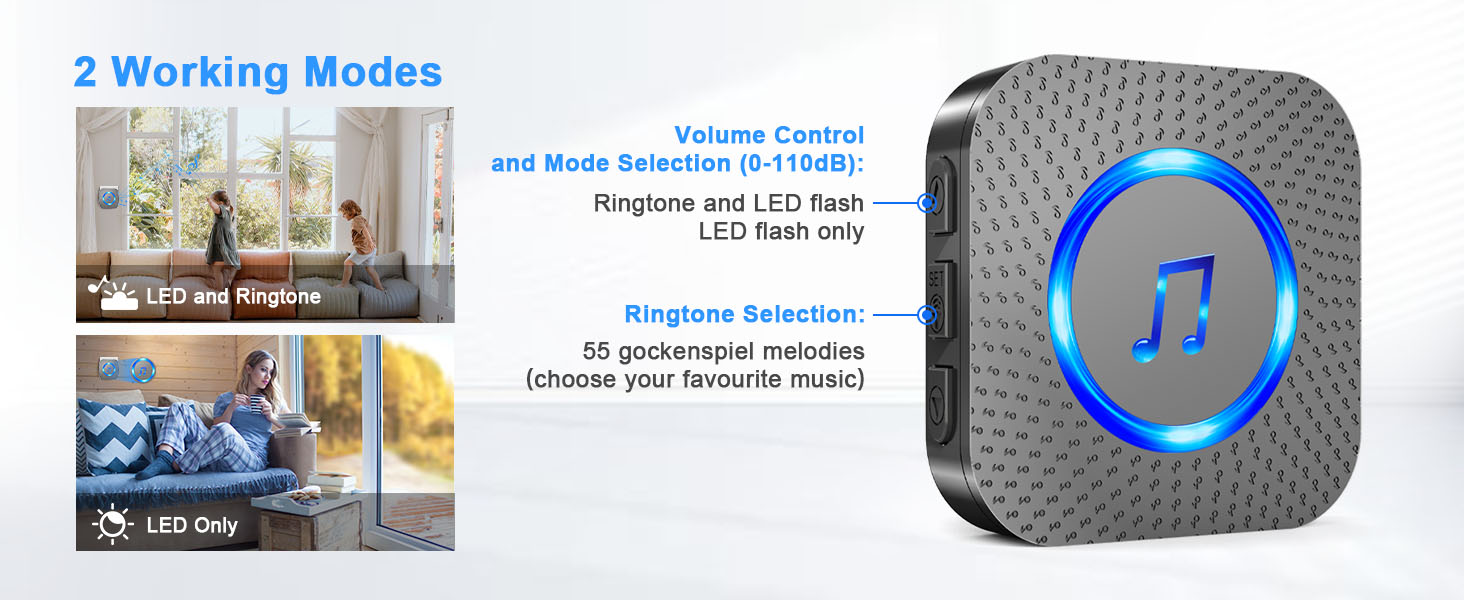
- Press the 'Up' or 'Down' button on the side of the receiver to cycle through the 55 available melodies.
- Once you hear a melody you like, stop pressing the buttons. The receiver will automatically save this selection.
This video demonstrates how to change the ringtone and re-pair the SURFOU wireless doorbell receiver with the transmitter.
5.2. వాల్యూమ్ సర్దుబాటు
Press the 'Volume' button on the side of the receiver to cycle through the 5 adjustable volume levels (0dB to 110dB).
5.3. Pairing Additional Devices (or Re-pairing)
If you need to pair an additional transmitter or re-pair an existing one:
- Long press the 'Volume' button on the receiver for approximately 8 seconds until it emits a 'ding' sound and the LED flashes. This indicates it's in learning mode.
- Quickly press the push button transmitter within 8 seconds. The receiver will emit two 'ding' sounds and the LED will flash, confirming successful pairing.
- The learning mode will automatically exit after 8 seconds if no transmitter is pressed.
5.4. వర్కింగ్ మోడ్లు
The receiver supports two working modes:
- LED and Ringtone: The receiver will play the selected melody and flash its LED light when the push button is pressed.
- LED Only (Silent Mode): The receiver will only flash its LED light without an audible chime. This is useful for quiet environments or for individuals with hearing impairments.
6. నిర్వహణ
6.1. బ్యాటరీ భర్తీ (ట్రాన్స్మిటర్)
The push button transmitter uses a 12V23A battery. When the LED indicator on the transmitter no longer lights up or the range decreases significantly, it's time to replace the battery.
- Use the provided mini screwdriver to gently pry open the back cover of the transmitter. Insert the screwdriver at a 45-degree angle into the bottom slot and carefully lift the cover.
- పాత బ్యాటరీని తీసివేయండి.
- Insert a new 12V23A battery, ensuring correct polarity (negative contact spring).
- Snap the back cover firmly into place.
Watch this video for a step-by-step guide on how to safely replace the battery in your SURFOU wireless doorbell transmitter.
6.2. శుభ్రపరచడం
Wipe the doorbell units with a soft, dry cloth. Do not use abrasive cleaners or solvents, as these may damage the finish or internal components.
7. ట్రబుల్షూటింగ్
| సమస్య | సాధ్యమైన కారణం | పరిష్కారం |
|---|---|---|
| Receiver does not ring. | Receiver unplugged or power outage. Transmitter battery low or dead. Units out of range or signal interference. Receiver in silent mode. | Ensure receiver is plugged in and powered. Replace transmitter battery (see Section 6.1). Move receiver closer to transmitter; avoid metal objects. Adjust volume (see Section 5.2) or change working mode. |
| Short range or intermittent ringing. | Obstructions (thick walls, metal). తక్కువ ట్రాన్స్మిటర్ బ్యాటరీ. ఇతర వైర్లెస్ పరికరాల నుండి జోక్యం. | Relocate receiver or transmitter. ట్రాన్స్మిటర్ బ్యాటరీని భర్తీ చేయండి. Move other wireless devices away from the doorbell. |
| Receiver rings unexpectedly. | Interference from another doorbell system. | Re-pair the transmitter and receiver (see Section 5.3). |
8. స్పెసిఫికేషన్లు
| ఫీచర్ | వివరాలు |
|---|---|
| మోడల్ సంఖ్య | N128 |
| వైర్లెస్ రేంజ్ | బహిరంగ ప్రదేశాలలో 1300 అడుగుల (400 మీ) వరకు |
| చైమ్స్ | 55 ఎంచుకోదగిన మెలోడీలు |
| వాల్యూమ్ స్థాయిలు | 5 levels (0dB to 110dB) |
| జలనిరోధక రేటింగ్ (ట్రాన్స్మిటర్) | IP55 |
| ఆపరేటింగ్ ఉష్ణోగ్రత | -22°F నుండి 158°F (-30°C నుండి 70°C) |
| పవర్ సోర్స్ (రిసీవర్) | AC 110V |
| పవర్ సోర్స్ (ట్రాన్స్మిటర్) | 1 x 12V23A Alkaline Battery |
| Average Battery Life (Transmitter) | 3 సంవత్సరాలు |
| మెటీరియల్ | ABS |
| కొలతలు (ట్రాన్స్మిటర్) | 3.39 x 1.38 x 0.79 అంగుళాలు |
| కొలతలు (రిసీవర్) | 2.75 x 2.75 x 0.79 అంగుళాలు |
| వస్తువు బరువు | 7.8 ఔన్సులు |
9. వారంటీ సమాచారం
SURFOU products are designed and manufactured to the highest quality standards. This product is covered by a standard manufacturer's warranty against defects in materials and workmanship. Please retain your proof of purchase for warranty claims. For specific warranty terms and conditions, refer to the product packaging or contact customer support.
10. కస్టమర్ మద్దతు
If you have any questions, require technical assistance, or need to report an issue with your SURFOU Wireless Doorbell Kit, please contact our customer support team. You can typically find contact information on the product packaging or through the retailer where you purchased the item.