
1. పరిచయం
Thank you for choosing the Xiaomi AX3000 Mesh System. This device is designed to provide a stable and high-speed Wi-Fi 6 (802.11ax) network throughout your home or office. This manual provides detailed instructions for setting up, operating, maintaining, and troubleshooting your mesh system to ensure optimal performance.
2. ప్యాకేజీ విషయాలు
దయచేసి మీ ప్యాకేజీలో అన్ని అంశాలు ఉన్నాయని ధృవీకరించండి:
- Xiaomi AX3000 Mesh Router Unit
- పవర్ అడాప్టర్
- ఈథర్నెట్ కేబుల్
- వినియోగదారు మాన్యువల్ (ఈ పత్రం)
3. ఉత్పత్తి ముగిసిందిview
Familiarize yourself with the components of your Xiaomi AX3000 Mesh System.

మూర్తి 3.1: ముందు view of the Xiaomi AX3000 Mesh System, showing its sleek black design and indicator lights.
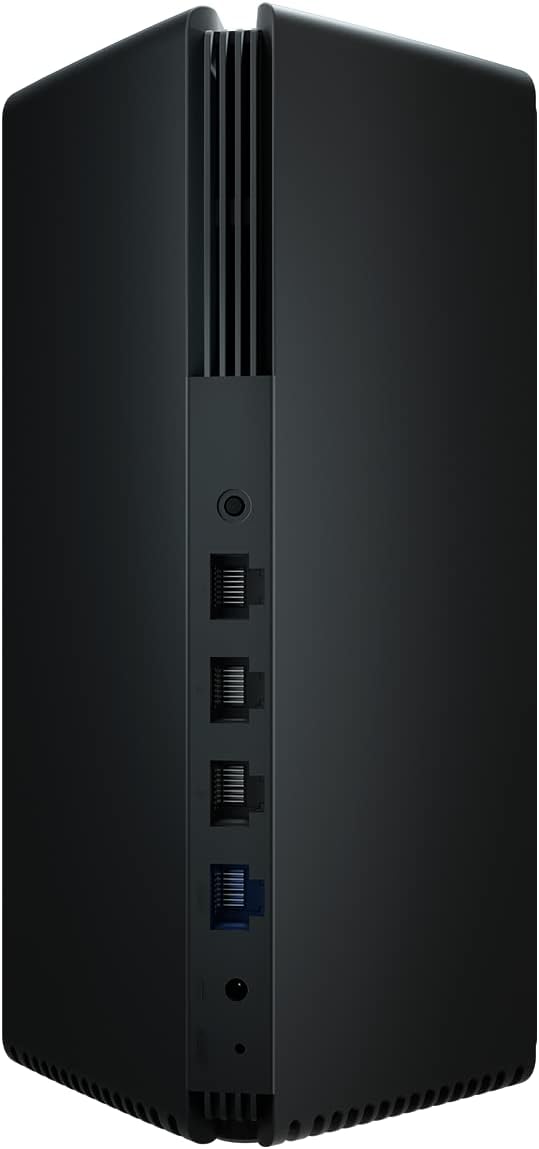
మూర్తి 3.2: వెనుక view of the Xiaomi AX3000 Mesh System, highlighting the power input, WAN port (blue), and multiple LAN ports (black).
3.1. పోర్ట్లు మరియు సూచికలు
- WAN పోర్ట్ (నీలం): Connects to your modem or main internet source.
- LAN Ports (Black): కంప్యూటర్లు, గేమింగ్ కన్సోల్లు లేదా స్మార్ట్ టీవీలు వంటి వైర్డు పరికరాలను కనెక్ట్ చేయండి.
- పవర్ ఇన్పుట్: అందించిన పవర్ అడాప్టర్కు కనెక్ట్ అవుతుంది.
- రీసెట్ బటన్: Used to restore factory settings (usually a small pinhole button).
- System Indicator LED: Indicates the device's status (e.g., solid white for normal operation, blinking for setup/error).
4. సెటప్
4.1. ప్రారంభ నియామకం
Place the Xiaomi AX3000 unit in a central location in your home, away from obstructions like thick walls, metal objects, and other electronic devices that may cause interference.
4.2 పవర్కి కనెక్ట్ అవుతోంది
- Connect the power adapter to the power input port on the back of the router.
- Plug the power adapter into a power outlet. The system indicator LED will light up.
4.3. నెట్వర్క్కి కనెక్ట్ అవుతోంది
- Connect one end of the Ethernet cable to the WAN port (blue) of the Xiaomi AX3000 router.
- Connect the other end of the Ethernet cable to your modem's LAN port or your existing router's LAN port.
4.4. App Installation and Initial Configuration
For the best setup experience, download the Xiaomi Home app on your smartphone or tablet. The app will guide you through the initial setup process, including setting up your Wi-Fi name (SSID) and password.
- డౌన్లోడ్ చేయండి షియోమి హోమ్ మీ పరికరం యొక్క యాప్ స్టోర్ నుండి యాప్ (Android కోసం Google Play స్టోర్, iOS కోసం Apple యాప్ స్టోర్).
- యాప్ తెరిచి, మీ Xiaomi ఖాతాను సృష్టించండి లేదా లాగిన్ అవ్వండి.
- Follow the on-screen instructions to add your new Xiaomi AX3000 Mesh System. The app will automatically detect the device.
- Set up your Wi-Fi network name (SSID) and password when prompted.
5. ఆపరేటింగ్
5.1. Mesh Network Configuration (Adding More Units)
If you have multiple Xiaomi AX3000 units, you can easily expand your mesh network:
- Place the additional mesh unit in an area where you need extended Wi-Fi coverage, ensuring it's within range of the main router or another mesh unit.
- Power on the new unit.
- Open the Xiaomi Home app. The app should detect the new unit and prompt you to add it to your existing mesh network. Follow the on-screen instructions.
- Alternatively, some units support a mesh button pairing. Press the mesh button on the main router and then on the new unit simultaneously to initiate pairing. Refer to the specific unit's quick start guide for exact button locations.
5.2. Wi-Fi కాన్ఫిగరేషన్
The Xiaomi AX3000 supports Dual-Band (2.4 GHz and 5 GHz) Wi-Fi 6 (802.11ax) for optimal performance. You can manage your Wi-Fi settings through the Xiaomi Home app:
- నెట్వర్క్ పేరు (SSID): Change your Wi-Fi network name.
- పాస్వర్డ్: భద్రత కోసం మీ Wi-Fi పాస్వర్డ్ను క్రమం తప్పకుండా నవీకరించండి.
- అతిథి నెట్వర్క్: Create a separate network for guests to enhance security.
- బ్యాండ్ స్టీరింగ్: The system intelligently directs devices to the optimal Wi-Fi band (2.4 GHz or 5 GHz) for better performance.
5.3. LED Indicator Meanings
- ఘన తెలుపు: The mesh system is operating normally and connected to the internet.
- తెల్లగా మెరిసిపోవడం: The system is starting up, updating firmware, or in pairing mode.
- Solid Orange/Red: No internet connection or a system error.
- Blinking Orange/Red: Network cable not connected or other connection issues.
6. నిర్వహణ
6.1. ఫర్మ్వేర్ నవీకరణలు
Regularly check for and install firmware updates via the Xiaomi Home app. Firmware updates provide new features, performance improvements, and security patches. Ensure your device is powered on and connected to the internet during updates.
6.2. శుభ్రపరచడం
To clean the device, use a soft, dry cloth. Do not use liquid cleaners or aerosol sprays directly on the unit. Ensure the device is unplugged before cleaning.
6.3. పరికరాన్ని రీసెట్ చేస్తోంది
If you encounter persistent issues, you may need to reset the device to its factory settings. This will erase all custom configurations.
- పరికరం ఆన్లో ఉన్నప్పుడు, పేపర్క్లిప్ లేదా ఇలాంటి కోణాల వస్తువును ఉపయోగించి నొక్కి పట్టుకోండి రీసెట్ చేయండి button (usually a small pinhole) for approximately 5-10 seconds.
- Release the button when the system indicator LED starts blinking rapidly.
- The device will restart with factory default settings. You will need to reconfigure it using the Xiaomi Home app.
7. ట్రబుల్షూటింగ్
ఈ విభాగం మీరు ఎదుర్కొనే సాధారణ సమస్యలను పరిష్కరిస్తుంది.
7.1. ఇంటర్నెట్ కనెక్షన్ లేదు
- Check if the WAN port cable is securely connected to your modem/router.
- Verify that your modem/main router is working correctly and has an active internet connection.
- Restart your modem, then your Xiaomi AX3000 unit.
- Check the system indicator LED for error states (Solid Orange/Red).
7.2. Poor Wi-Fi Signal or Slow Speeds
- Ensure the mesh unit is placed centrally and away from interference sources.
- If using multiple units, ensure they are within optimal range of each other.
- ఫర్మ్వేర్ నవీకరణల కోసం తనిఖీ చేయండి.
- Reduce the number of connected devices or consider adding more mesh units for larger areas.
7.3. Wi-Fi నెట్వర్క్కు కనెక్ట్ కాలేదు
- మీరు సరైన Wi-Fi పాస్వర్డ్ను నమోదు చేస్తున్నారని ధృవీకరించండి.
- Restart your device (smartphone, laptop) and try connecting again.
- If the issue persists, try resetting the Xiaomi AX3000 to factory settings and reconfiguring it.
8. స్పెసిఫికేషన్లు
| ఫీచర్ | వివరాలు |
|---|---|
| మోడల్ సంఖ్య | AX3000 |
| వైర్లెస్ స్టాండర్డ్ | Wi-Fi 6 (802.11ax) |
| ఫ్రీక్వెన్సీ బ్యాండ్లు | డ్యూయల్-బ్యాండ్ (2.4 GHz / 5 GHz) |
| కనెక్టివిటీ టెక్నాలజీ | ఈథర్నెట్, WLAN |
| కొలతలు (L x W x H) | 9.7 x 9.7 x 22.2 సెం.మీ |
| బరువు | 760 గ్రాములు |
| మెటీరియల్ రకం | ప్లాస్టిక్ |
| రంగు | నలుపు |
| చేర్చబడిన భాగాలు | రూటర్ |
9. వారంటీ మరియు మద్దతు
9.1. వారంటీ సమాచారం
Warranty terms and conditions may vary by region and point of purchase. Please refer to the warranty card included with your product or contact your retailer for specific warranty details. Keep your purchase receipt as proof of purchase.
9.2. కస్టమర్ మద్దతు
మరిన్ని సహాయం, సాంకేతిక మద్దతు లేదా సేవా విచారణల కోసం, దయచేసి అధికారిక Xiaomi మద్దతును సందర్శించండి. website or contact Xiaomi customer service in your region. You can often find FAQs, troubleshooting guides, and contact information on their webసైట్.
10 చట్టపరమైన సమాచారం
This product is new from a specialist dealer. An invoice including VAT is available. Shipping to a packing station is possible.