
Dalton 10kVA
Dalton 10 kVA Uninterruptible Power Supply (UPS) Unit
వినియోగదారు సూచనల మాన్యువల్
1. పరిచయం
Thank you for choosing the Dalton 10 kVA Uninterruptible Power Supply (UPS) unit. This manual provides essential information for the safe and efficient operation of your UPS. Please read this manual thoroughly before installation and operation, and keep it for future reference.
This UPS is designed to provide reliable power protection for critical equipment, safeguarding against power outages, surges, and fluctuations. Its advanced technology ensures stable and clean power delivery, extending the lifespan of your connected devices.
2. భద్రతా సమాచారం
Always observe the following safety precautions to prevent injury or damage to the UPS and connected equipment:
- UPS తెరవవద్దు casing. లోపల వినియోగదారు-సేవ చేయగల భాగాలు లేవు. అన్ని సర్వీసింగ్లను అర్హత కలిగిన సేవా సిబ్బందికి సూచించండి.
- UPS గ్రౌండెడ్ పవర్ అవుట్లెట్కి కనెక్ట్ చేయబడిందని నిర్ధారించుకోండి.
- Do not block ventilation openings. Adequate airflow is crucial for proper cooling.
- అధిక దుమ్ము, తేమ లేదా విపరీతమైన ఉష్ణోగ్రతలు ఉన్న ప్రాంతాల్లో UPSని ఇన్స్టాల్ చేయవద్దు.
- Disconnect the UPS from the AC power source before performing any maintenance or moving the unit.
- బ్యాటరీలు విద్యుత్ షాక్ మరియు అధిక షార్ట్-సర్క్యూట్ కరెంట్ ప్రమాదాన్ని కలిగిస్తాయి. బ్యాటరీలతో పనిచేసేటప్పుడు సరైన జాగ్రత్తలు పాటించండి.
3. ప్యాకేజీ విషయాలు
Carefully unpack the UPS and check if all items are present and undamaged. If any items are missing or damaged, contact your dealer immediately.
- Dalton 10 kVA UPS Unit
- వినియోగదారు మాన్యువల్ (ఈ పత్రం)
- ఇన్పుట్ పవర్ కేబుల్
- Output Power Cables (quantity may vary)
- USB Communication Cable (for monitoring software)
- సాఫ్ట్వేర్ CD (వర్తిస్తే)
4. ఉత్పత్తి ముగిసిందిview
The Dalton 10 kVA UPS is a robust power protection solution. Below is an overview of its typical components and features.
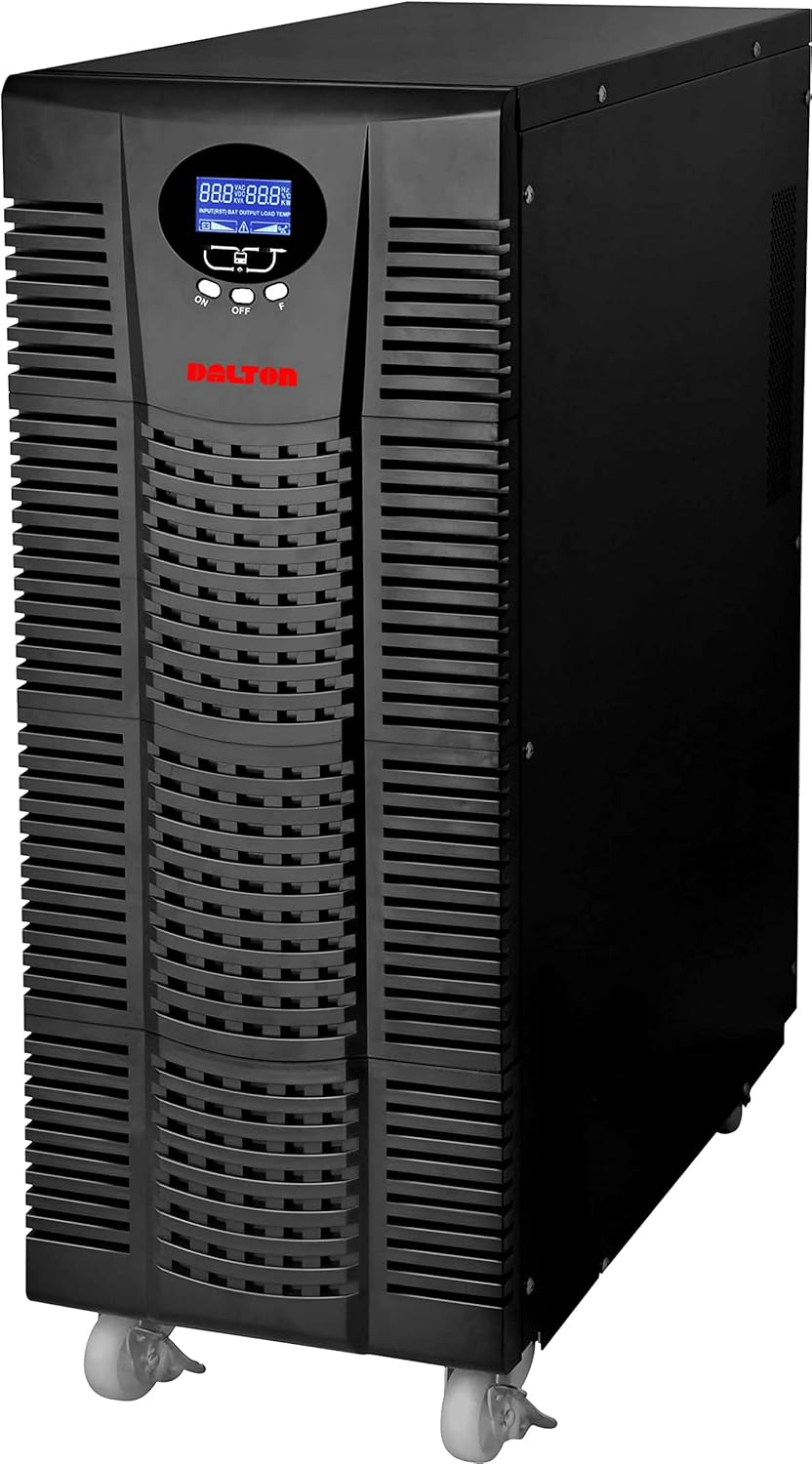
మూర్తి 4.1: ముందు view of the Dalton 10 kVA UPS unit. This image displays the tall, black tower design of the UPS, featuring a prominent vented front panel for airflow and integrated wheels at the base for easy mobility. The control panel and display are visible towards the top of the unit.
4.1 ఫ్రంట్ ప్యానెల్
- LCD డిస్ప్లే: నిజ-సమయ స్థితి, ఇన్పుట్/అవుట్పుట్ వాల్యూమ్ను చూపుతుందిtage, battery level, load percentage, మరియు ఎర్రర్ కోడ్లు.
- నియంత్రణ బటన్లు: Used to navigate menus, acknowledge alarms, and perform system tests.
- పవర్ బటన్: UPSని ఆన్ లేదా ఆఫ్ చేస్తుంది.
4.2 వెనుక ప్యానెల్
- ఇన్పుట్ పవర్ కనెక్టర్: For connecting the UPS to the main AC power source.
- అవుట్పుట్ రెసెప్టాకిల్స్: For connecting protected equipment.
- కమ్యూనికేషన్ పోర్ట్లు (USB/RS232): పర్యవేక్షణ మరియు నిర్వహణ కోసం కంప్యూటర్కు కనెక్ట్ చేయడానికి.
- External Battery Connector (if applicable): For connecting optional external battery packs.
- సర్క్యూట్ బ్రేకర్: ఓవర్లోడ్ రక్షణను అందిస్తుంది.
5. సెటప్ మరియు ఇన్స్టాలేషన్
Follow these steps for proper installation of your UPS unit:
- ప్లేస్మెంట్:
- Place the UPS in a clean, dry, and well-ventilated area.
- Ensure sufficient clearance around the unit for proper airflow.
- ప్రత్యక్ష సూర్యకాంతి, వేడి వనరులు మరియు అధిక తేమను నివారించండి.
- ప్రారంభ బ్యాటరీ ఛార్జ్:
- UPSని గ్రౌండెడ్ AC పవర్ అవుట్లెట్కి కనెక్ట్ చేయండి.
- Allow the UPS to charge for at least 8 hours before connecting any equipment to ensure full battery capacity. The display will indicate charging status.
- కనెక్ట్ చేసే పరికరాలు:
- With the UPS turned off and fully charged, connect your critical equipment (computers, servers, networking devices) to the UPS output receptacles.
- Do not connect laser printers or other high-surge current devices to the battery-backed outlets, as this may overload the UPS.
- పవర్ ఆన్:
- Press and hold the power button on the front panel until you hear a beep and the display illuminates.
- The UPS will perform a self-test and then enter normal operating mode.
6. ఆపరేటింగ్ సూచనలు
6.1 సాధారణ ఆపరేషన్
Once powered on, the UPS continuously monitors the incoming AC power. In normal mode, it provides clean and stable power to connected devices.
6.2 బ్యాటరీ మోడ్
If the utility power fails or fluctuates outside acceptable limits, the UPS will automatically switch to battery mode, providing power from its internal batteries. An audible alarm will sound, and the LCD display will indicate "Battery Mode".
- During battery mode, save your work and shut down connected equipment gracefully to prevent data loss.
- The duration of battery backup depends on the load connected and the battery charge level.
6.3 Powering Off the UPS
To turn off the UPS and disconnect power to connected devices:
- Shut down all connected equipment.
- Press and hold the power button on the UPS until it powers off.
- Disconnect the UPS from the AC power outlet.
7. నిర్వహణ
7.1 బ్యాటరీ సంరక్షణ
- Regularly charge the batteries by keeping the UPS connected to AC power.
- Perform a battery self-test periodically (refer to your UPS display menu for this option) to check battery health.
- Batteries have a limited lifespan (typically 3-5 years). Contact service for battery replacement when performance degrades.
7.2 శుభ్రపరచడం
- Clean the exterior of the UPS with a soft, dry cloth.
- ద్రవ లేదా ఏరోసోల్ క్లీనర్లను ఉపయోగించవద్దు.
- వెంటిలేషన్ ఓపెనింగ్స్ దుమ్ము మరియు శిధిలాలు లేకుండా చూసుకోండి.
8. ట్రబుల్షూటింగ్
ఈ విభాగం మీ UPS తో మీరు ఎదుర్కొనే సాధారణ సమస్యలకు పరిష్కారాలను అందిస్తుంది.
| సమస్య | సాధ్యమైన కారణం | పరిష్కారం |
|---|---|---|
| UPS ఆన్ అవ్వడం లేదు. | No AC input power; Low battery; UPS fault. | Check power cord connection and wall outlet. Allow UPS to charge for several hours. Contact service if problem persists. |
| సాధారణ మోడ్లో UPS నిరంతరం బీప్ అవుతూ ఉంటుంది. | Overload; Battery fault. | Reduce connected load. Perform battery self-test. |
| తక్కువ బ్యాకప్ సమయం. | Overload; Old battery; Insufficient charging. | Reduce load. Replace battery. Ensure UPS is fully charged. |
For issues not listed here, or if solutions do not resolve the problem, please contact Dalton customer support.
9. స్పెసిఫికేషన్లు
| ఫీచర్ | వివరాలు |
|---|---|
| బ్రాండ్ | డాల్టన్ |
| మోడల్ | 10 kVA UPS |
| గరిష్ట శక్తి | 10,000 వాట్స్ |
| అవుట్పుట్ పవర్ | 10,000 వాట్స్ |
| ఫ్రీక్వెన్సీ రేంజ్ | 50/60 Hz (± 3 Hz) |
| కనెక్టర్ రకం | IEC 320, Battery |
| రంగు | నలుపు |
| మెటీరియల్ | మెటల్ |
| ASIN | B09NC2FXNC |
| మొదట అందుబాటులో ఉన్న తేదీ | డిసెంబర్ 9, 2021 |
10. వారంటీ మరియు మద్దతు
Dalton provides comprehensive support for its products. As authorized distributors in the Arab Republic of Egypt, we maintain an authorized service center for all Dalton UPS units.
- For technical assistance, troubleshooting, or warranty claims, please contact our authorized service center.
- Ensure you have your product model and ASIN (B09NC2FXNC) ready when contacting support.
- అనధికార మరమ్మతులు లేదా మార్పులు ఉత్పత్తి వారంటీని రద్దు చేస్తాయి.
For more information, please visit the official Dalton webసైట్ లేదా మీ స్థానిక పంపిణీదారుని సంప్రదించండి.
Ask a question about this manual
Ask about setup, troubleshooting, compatibility, parts, safety, or missing instructions. Manuals+ will review the question and use this page’s manual context to help answer it.