
1. ఉత్పత్తి ముగిసిందిview
The FEASYCOM FSC-BT1026D is a high-performance Bluetooth 5.1 dual-mode audio module designed for integration into various audio applications such as Bluetooth speakers, headsets, and automotive systems. Featuring the Qualcomm QCC3024 chipset, this module offers robust wireless connectivity, advanced audio processing capabilities, and a compact design. It supports both iOS and Android compatibility and comes with multiple international certifications.
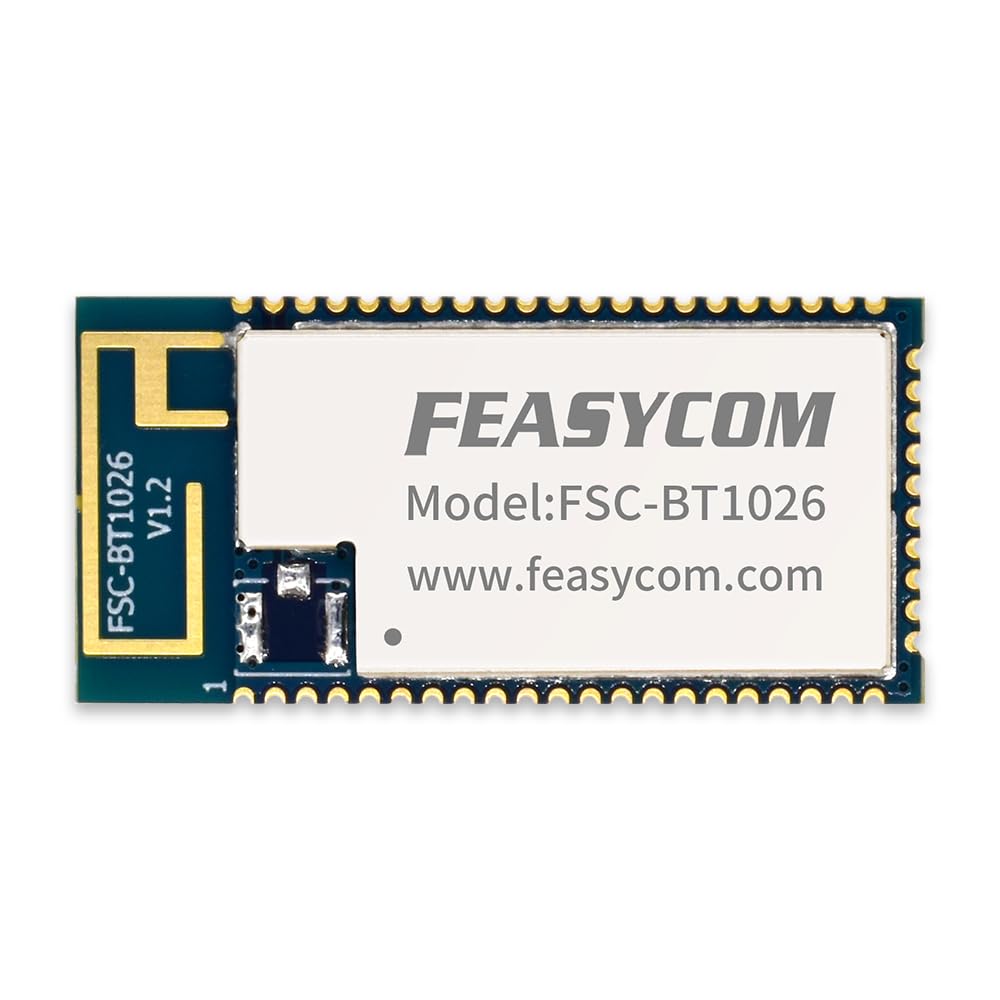
చిత్రం 1.1: పైభాగం view of the FEASYCOM FSC-BT1026D Bluetooth 5.1 Audio Module.
2 కీ ఫీచర్లు
- Bluetooth 5.1 Dual Mode: Qualified Bluetooth v5.1 specification for reliable and efficient wireless communication.
- క్వాల్కమ్ QCC3024 చిప్సెట్: Integrates a 120MHz Qualcomm Kalimba audio DSP and a 32MHz developer processor for applications.
- కాంపాక్ట్ సైజు: Ultra-small dimensions of 13 x 26.9 x 1.7 mm, ideal for space-constrained designs.
- విస్తరించిన పరిధి: Offers a coverage range of up to 50 meters (165 feet) with a transmit power of 9 dBm.
- ఆడియో కోడెక్ మద్దతు: Supports SBC and AAC audio codecs for high-quality audio streaming.
- ఆడియో ఇంటర్ఫేస్లు: High-performance 24-bit stereo audio interface, digital and analog microphone interfaces.
- మద్దతు ఉన్న ప్రోfiles: A2DP, AVRCP, HFP, HSP, PBAP, SPP, GATT for broad compatibility.
- సీరియల్ ఇంటర్ఫేస్లు: Supports UART, Bit Serializer (I²C/SPI), and USB 2.0 serial interfaces.
- విద్యుత్పరివ్యేక్షణ: Integrated PMU with dual SMPS for system/digital circuits and an integrated Li-ion battery charger.
- ధృవపత్రాలు: BQB, FCC, IC, CE, TELEC, KC, NCC certified for global market compliance.
- Advanced Audio Algorithms: Includes 1 or 2-mic Qualcomm cVc headset noise reduction and echo cancellation technology.

Image 2.1: Visual representation of Bluetooth 5.1, QCC3024 chipset, and various certifications for the module.
3. సెటప్ మరియు ఇన్స్టాలేషన్
This section provides general guidelines for integrating and setting up the FSC-BT1026D module. Specific implementation details may vary based on your host device and application.
3.1 పిన్ నిర్వచనాలు మరియు కనెక్షన్లు
Refer to the official datasheet for detailed pin definitions and electrical characteristics. Proper connection of power, ground, audio input/output, and control signals (UART, I²C/SPI) is crucial for correct operation.

చిత్రం 3.1: దిగువన view of the FSC-BT1026D module, showing the pin array for integration.
3.2 విద్యుత్ సరఫరా
- విద్యుత్ సరఫరా వాల్యూమ్ నిర్ధారించుకోండిtage is within the specified operating range for the module.
- Implement proper power filtering and decoupling to prevent noise interference.
3.3 Audio Input/Output
- Connect analog or digital audio sources (e.g., IIS) to the module's input pins as per your design.
- Route the module's audio output to your speaker amplifier or headphone driver.
3.4 Antenna Placement
The module features an integrated antenna. For optimal performance, ensure the antenna area is clear of metal obstructions and placed in an open environment.

చిత్రం 3.2: పైభాగం view of the module, highlighting the integrated antenna area for proper placement considerations.
4. ఆపరేటింగ్ సూచనలు
Once the FSC-BT1026D module is correctly integrated and powered, it can be operated via its host controller or through direct commands, depending on the firmware configuration.
4.1 బ్లూటూత్ జత చేయడం
- పవర్ ఆన్: Ensure the module and its host device are powered on.
- డిస్కవరీ మోడ్: The module typically enters discovery mode automatically or can be commanded to do so by the host.
- Scan on Host Device: On your smartphone, tablet, or other Bluetooth-enabled device, scan for available Bluetooth devices.
- Select Module: Select the FSC-BT1026D (or its configured name) from the list of discovered devices.
- జత: Confirm pairing if prompted. A successful connection will be indicated by the module's status LED or host feedback.
4.2 ఆడియో స్ట్రీమింగ్
After successful pairing, audio can be streamed from your connected device to the module. The module will process the audio and output it through its configured audio interface.

Image 4.1: The module supports various profiles like HSP, HFP, A2DP, and AVRCP for audio streaming and control.
4.3 డేటా కమ్యూనికేషన్
For applications requiring data communication (e.g., SPP, GATT profiles), the module can exchange data with the connected device via its serial interfaces (UART, I²C/SPI). Refer to the programming guide for specific commands and protocols.
5. నిర్వహణ
The FSC-BT1026D module is designed for long-term reliability. Minimal maintenance is required.
- శుభ్రపరచడం: If necessary, gently clean the module with a dry, soft cloth. Avoid using liquids or harsh chemicals.
- నిల్వ: Store the module in a dry, anti-static environment, away from extreme temperatures and direct sunlight.
- నిర్వహణ: Always handle the module by its edges to avoid damaging components or introducing electrostatic discharge.
6. ట్రబుల్షూటింగ్
If you encounter issues with the FSC-BT1026D module, refer to the following common troubleshooting steps.
6.1 శక్తి లేదు
- విద్యుత్ సరఫరా సరిగ్గా కనెక్ట్ చేయబడిందని మరియు పేర్కొన్న వాల్యూమ్ను అందిస్తుందని ధృవీకరించండి.tage.
- ఏవైనా షార్ట్ సర్క్యూట్లు లేదా తప్పు వైరింగ్ కోసం తనిఖీ చేయండి.
6.2 పరికరంతో జత చేయడం సాధ్యం కాదు
- Ensure the module is in discovery/pairing mode.
- Check that Bluetooth is enabled on your host device.
- Move the host device closer to the module to rule out range issues.
- Try restarting both the module (or its host system) and the pairing device.
- Clear previously paired devices from your host device's Bluetooth settings.
6.3 ఆడియో అవుట్పుట్ లేదు
- Confirm that the module is successfully paired and connected to an audio source.
- Check the audio connections from the module to your ampలిఫైయర్/స్పీకర్లు.
- Ensure the volume on both the source device and the output system is not muted or set too low.
- Verify that the correct audio profile (e.g., A2DP) is active.
6.4 Poor Connection Quality
- Reduce the distance between the module and the connected device.
- Remove any obstacles (especially metal) between the devices.
- Minimize interference from other 2.4 GHz wireless devices (Wi-Fi, other Bluetooth devices).
- Ensure the module's antenna area is unobstructed.
7. స్పెసిఫికేషన్లు
| ఫీచర్ | వివరాలు |
|---|---|
| మోడల్ సంఖ్య | FSC-BT1026D |
| బ్లూటూత్ వెర్షన్ | 5.1 (Dual Mode) |
| చిప్సెట్ | క్వాల్కమ్ QCC3024 |
| కొలతలు (L x W x H) | 13 x 26.9 x 1.7 మిమీ (0.51 x 1.06 x 0.06 అంగుళాలు) |
| బరువు | 1 గ్రాములు (0.035 ఔన్సులు) |
| శక్తిని ప్రసారం చేయండి | 9 dBm |
| కవరేజ్ పరిధి | 50మీ (165అడుగులు) వరకు |
| మద్దతు ఉన్న ప్రోfiles | A2DP, AVRCP, HFP, HSP, PBAP, SPP, GATT |
| ఆడియో కోడెక్స్ | SBC, AAC |
| ఇంటర్ఫేస్లు | UART, I²C/SPI, USB 2.0, IIS (Input/Output) |
| ఆపరేటింగ్ ఉష్ణోగ్రత | -40°C నుండి +85°C |
| ధృవపత్రాలు | BQB, FCC, IC, CE, TELEC, KC, NCC, SRRC |
| Compatible OS Family | ఆండ్రాయిడ్, iOS |

Image 7.1: Diagram showing the dimensions (13mm x 26.9mm) and supported Bluetooth profileమాడ్యూల్ యొక్క s.

Image 7.2: Size comparison of the FSC-BT1026D module next to a US dollar coin, illustrating its compact form factor.
8. వారంటీ సమాచారం
FEASYCOM products are typically covered by a limited warranty against defects in materials and workmanship. For specific warranty terms, duration, and conditions applicable to the FSC-BT1026D module, please refer to the official warranty documentation provided by FEASYCOM or contact their customer support directly. Keep your purchase receipt as proof of purchase.
9. మద్దతు మరియు సంప్రదింపులు
For technical assistance, detailed datasheets, firmware updates, or further inquiries regarding the FEASYCOM FSC-BT1026D module, please contact FEASYCOM customer support.
- అధికారిక Webసైట్: సందర్శించండి FEASYCOM webసైట్ ఉత్పత్తి సమాచారం మరియు వనరుల కోసం.
- సాంకేతిక మద్దతు: అధికారిక పేజీలోని కాంటాక్ట్ విభాగాన్ని చూడండి. website for technical support channels.
- డాక్యుమెంటేషన్: Access the latest datasheets and application notes from the product page on the FEASYCOM webసైట్.