
One For All URC 3661
One For All URC 3661 Universal Remote Control
వినియోగదారు మాన్యువల్
ఉత్పత్తి ముగిసిందిview
The One For All URC 3661 is a universal remote control designed to consolidate multiple remote controls into a single, easy-to-use device. It is compatible with a wide range of electronic devices, including televisions, set-top boxes, audio systems, DVD players, and Blu-ray players. This remote features backlit keys for improved visibility in low-light conditions and includes a learning function to copy commands from original remotes.

చిత్రం 1: కోణీయ view of the URC 3661 Universal Remote Control.
సెటప్
1. బ్యాటరీ ఇన్స్టాలేషన్
The URC 3661 remote control requires two (2) AA batteries for operation. Follow these steps to install them:
- రిమోట్ కంట్రోల్ వెనుక బ్యాటరీ కంపార్ట్మెంట్ను గుర్తించండి.
- Slide the battery cover downwards and lift it off.
- రెండు AA బ్యాటరీలను చొప్పించండి, పాజిటివ్ (+) మరియు నెగటివ్ (-) టెర్మినల్స్ కంపార్ట్మెంట్ లోపల ఉన్న మార్కింగ్లతో సమలేఖనం చేయబడ్డాయని నిర్ధారించుకోండి.
- బ్యాటరీ కవర్ సురక్షితంగా క్లిక్ అయ్యే వరకు దాన్ని తిరిగి స్థానంలోకి జారడం ద్వారా దాన్ని భర్తీ చేయండి.
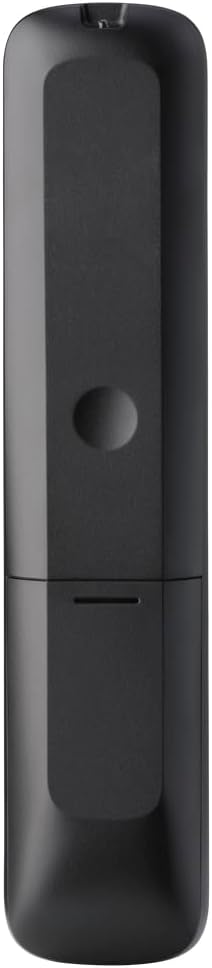
మూర్తి 2: వెనుకకు view of the remote, highlighting the battery compartment.
2. రిమోట్ కంట్రోల్ ప్రోగ్రామింగ్
The URC 3661 can be programmed using direct code entry, auto code search, or the learning function. It is recommended to try direct code entry first.
డైరెక్ట్ కోడ్ ఎంట్రీ:
- మీరు నియంత్రించాలనుకుంటున్న పరికరాన్ని ఆన్ చేయండి (ఉదా. టీవీ, DVD ప్లేయర్).
- నొక్కండి మరియు పట్టుకోండి సెటప్ button until the LED light under the device key (e.g., TV, DVD) blinks twice and stays lit.
- Press the device key you want to program (e.g., TV). The LED will remain lit.
- Enter the 4-digit or 5-digit setup code for your brand and device. Refer to the code list provided with your remote or visit the One For All website for the most up-to-date codes.
- After entering the code, the LED will blink twice and turn off if the code is valid. If it blinks once and stays lit, the code is invalid; re-enter the code.
- నొక్కడం ద్వారా రిమోట్ను పరీక్షించండి శక్తి button. If the device turns off, try other functions like volume or channel. If it works, programming is complete. If not, try the next code for your brand or use the Auto Code Search.
ఆటో కోడ్ శోధన:
- మీరు నియంత్రించదలిచిన పరికరాన్ని ఆన్ చేయండి.
- నొక్కండి మరియు పట్టుకోండి సెటప్ button until the LED blinks twice and stays lit.
- Press the device key you want to program.
- రిమోట్ను పరికరం వైపు గురిపెట్టి, నొక్కండి శక్తి పరికరం ఆపివేయబడే వరకు పదే పదే (సుమారుగా ప్రతి 3 సెకన్లకు) బటన్ను నొక్కండి.
- పరికరం ఆపివేయబడిన తర్వాత, వెంటనే నొక్కండి సెటప్ button to save the code. The LED will blink twice and turn off.
- Test the remote. If it doesn't work correctly, repeat the process.
అభ్యాస ఫంక్షన్:
The learning function allows the URC 3661 to copy functions directly from your original remote control, which is useful for commands not available via direct code entry or auto search.
- Place the URC 3661 and your original remote on a flat surface, facing each other, about 1-2 inches apart.
- నొక్కండి మరియు పట్టుకోండి సెటప్ button until the LED blinks twice and stays lit.
- Press the button on the URC 3661 that you want to teach a function to (e.g., a specific input button). The LED will blink rapidly.
- Press and hold the corresponding button on your original remote control until the LED on the URC 3661 blinks twice, indicating successful learning.
- కావలసిన అన్ని బటన్ల కోసం పునరావృతం చేయండి.
- లెర్నింగ్ మోడ్ నుండి నిష్క్రమించడానికి, సెటప్ button. The LED will blink twice and turn off.
రిమోట్ కంట్రోల్ని ఆపరేట్ చేస్తోంది
The URC 3661 is designed for intuitive operation. Familiarize yourself with the button layout and their primary functions.

మూర్తి 3: ముందు view of the URC 3661 with button layout.
ముఖ్య విధులు:
- Device Keys (TV, STB, AUDIO, BLURAY, DVD, STREAM): Select the device you wish to control. The LED under the selected device key will illuminate.
- శక్తి: ఎంచుకున్న పరికరాన్ని ఆన్ లేదా ఆఫ్ చేస్తుంది.
- VOL +/-: వాల్యూమ్ను సర్దుబాటు చేస్తుంది.
- CH +/-: ఛానెల్లను మారుస్తుంది.
- Navigation Pad (UP, DOWN, LEFT, RIGHT, OK): మెనూ నావిగేషన్ మరియు ఎంపిక కోసం ఉపయోగించబడుతుంది.
- మెను: పరికరం యొక్క ప్రధాన మెనూను తెరుస్తుంది.
- గైడ్: Displays the electronic program guide (if supported by the device).
- సమాచారం: ప్రస్తుత ప్రోగ్రామ్ లేదా ఇన్పుట్ గురించి సమాచారాన్ని ప్రదర్శిస్తుంది.
- హోమ్: Returns to the device's home screen.
- బయటకి దారి: Exits menus or applications.
- Playback Controls (PLAY, PAUSE, STOP, REWIND, FAST FORWARD, SKIP): మీడియా ప్లేబ్యాక్ని నియంత్రించండి.
- సంఖ్య కీలు (0-9): For direct channel entry or numerical input.
- App Shortcut Keys (Netflix, Prime Video, YouTube): ప్రసిద్ధ స్ట్రీమింగ్ సేవలకు ప్రత్యక్ష ప్రాప్యత.
- బ్యాక్లైట్: The keys are backlit for easy use in dark environments. The backlight activates automatically when a button is pressed.
నిర్వహణ
రిమోట్ శుభ్రం చేయడం:
To maintain the remote's appearance and functionality, clean it regularly:
- రిమోట్ ఉపరితలాన్ని తుడవడానికి మృదువైన, పొడి వస్త్రాన్ని ఉపయోగించండి.
- మొండి ధూళికి, కొద్దిగా dampనీరు లేదా తేలికపాటి, రాపిడి లేని క్లీనర్తో గుడ్డను తుడవండి. అధిక తేమను నివారించండి.
- Do not use harsh chemicals, solvents, or abrasive cleaning agents, as these can damage the remote's finish or internal components.
బ్యాటరీ భర్తీ:
Replace batteries when the remote's performance degrades or the LED indicator blinks unusually. Refer to the "Battery Installation" section under Setup for detailed instructions.
ట్రబుల్షూటింగ్
If you encounter issues with your URC 3661 remote control, try the following troubleshooting steps:
| సమస్య | సాధ్యమైన కారణం | పరిష్కారం |
|---|---|---|
| Remote does not operate the device. | Incorrect device selected. బ్యాటరీలు తక్కువగా ఉన్నాయి లేదా తప్పుగా చొప్పించబడ్డాయి. తప్పు కోడ్ ప్రోగ్రామ్ చేయబడింది. | Ensure the correct device key (TV, DVD, etc.) is pressed. బ్యాటరీ ఓరియంటేషన్ తనిఖీ చేయండి మరియు అవసరమైతే భర్తీ చేయండి. Re-program the remote using a different code or the Auto Code Search/Learning function. |
| కొన్ని బటన్లు పనిచేయవు. | Incomplete programming. Device does not support the function. | Use the Learning function to copy specific commands from your original remote. Verify if the original remote has that function. |
| LED blinks once and stays lit during code entry. | Invalid code entered. | Ensure you are entering the correct 4 or 5-digit code. Try another code from the list or use Auto Code Search. |
| రిమోట్ LED వెలగదు. | డెడ్ బ్యాటరీలు. | Replace the batteries with new AA batteries. |
For further assistance, visit the official One For All support website or consult the comprehensive online manual.
స్పెసిఫికేషన్లు
| ఫీచర్ | వివరాలు |
|---|---|
| మోడల్ సంఖ్య | యుఆర్సి 3661 |
| బ్రాండ్ | అందరికీ ఒకటి |
| ఉత్పత్తి కొలతలు | 0.39 x 0.39 x 0.39 అంగుళాలు |
| వస్తువు బరువు | 6.7 ఔన్సులు |
| బ్యాటరీలు అవసరం | 2 AA బ్యాటరీలు |
| మద్దతు ఉన్న పరికరాల గరిష్ట సంఖ్య | 6 పరికరాల వరకు |
| అనుకూల పరికరాలు | Television, Set-top Box, Audio, Blu-ray, DVD, Streaming devices |
| ప్రత్యేక ఫీచర్ | Universal, Learning Function, Backlit Keys |

Figure 4: Product packaging indicating compatibility with up to 6 devices.
వారంటీ మరియు మద్దతు
Warranty information for the One For All URC 3661 Universal Remote Control is typically provided with your purchase documentation. Please refer to the warranty card or leaflet included in the product packaging for details regarding coverage, terms, and conditions.
For technical support, frequently asked questions, or to find the latest programming codes, please visit the official One For All website. Contact information for customer service may also be found on the manufacturer's webసైట్ లేదా మీ ఉత్పత్తి డాక్యుమెంటేషన్లో.
One For All Official Webసైట్: www.oneforall.com
Ask a question about this manual
Ask about setup, troubleshooting, compatibility, parts, safety, or missing instructions. Manuals+ will review the question and use this page’s manual context to help answer it.